Rasa: Rasa X Server install help- 'please fill all the fields'
Rasa version:
1.0.1
0.19.0
Python version:
3.4
Operating system (windows, osx, ...):
Linux - Ubuntu 16.04 also tried 18.04 (DigitalOcean)
Issue:
I followed the server installations, running on DigitalOcean, met min requirements, installed & my IP address shows Rasa, but…
when I get to step 4 admin password -
sudo python rasa_x_commands.py set_password PASSWORD
I get an error, invalid choice: ‘set_password’ (choose from u’create’ u’delete) So I was able to create an admin username password with -
sudo python rasa_x_commands.py create admin USERNAME PASSWORD
It worked, it creates a user, but since this is the free and not enterprise I don’t think I have a username
& my ip address shows an error 'please fill all the fields' can't enter a password, can't clink on enterprise
tl;dr But the big issue, my IP address shows the login screen with Welcome, password sign in or I have enterprise ID, and no matter what I do I get Please full all the fields in red above, can’t click buttons or do anything, I tried Chrome and Firefox, same issue
Content of configuration file (config.yml):
Content of domain file (domain.yml) (if used & relevant):
 WR1171
All 18 comments
Thanks for raising this issue, @wochinge will get back to you about it soon.
 akelad
on 24 May 2019
akelad
on 24 May 2019
@WR1171 It's currently a bug that the user password is not shown in the logs when you start the community edition as docker containers.
Can you please try to update the password of the me user as a workaround?
Should be sudo python rasa_x_commands.py create --update admin me <your password>
 wochinge
on 24 May 2019
wochinge
on 24 May 2019
Facing the same issue. It seems that the CE docker image does not create a me user at all.
# python rasa_x_commands.py create --update admin me password
User me does not exist. To create a new user please run `sudo python rasa_x_commands.py create me <pw> admin`
Although it is possible to create the me user with:
python rasa_x_commands.py create admin me password
(and not rasa_x_commands.py create me <pw> admin as the output message states)
this apparently triggers the enterprise edition functionality and Rasa X starts hitting URLs that do not exist (in the CE), such as /api/conversations/me which respond with HTTP 404
 ftsamis
on 24 May 2019
ftsamis
on 24 May 2019
Got the same answer as ftsamis
It wants me to create the 'me' user, and I am still running into my landing page tell me 'please fill in all the fields'
ftsamis, are you able to get beyond the login page at all?
That is my current digital ocean docker install
WR1171
on 24 May 2019
@WR1171 You can get beyond the login page by passing the username and the password as GET parameters (which is generally a bad practice). I discovered that when attempting to install Rasa X through pip (which worked btw). In the docker version, even if you manually create a me user and successfully login, the actual Rasa X functionality does not work - you'll get a ton of HTTP 404 and 500 status codes.
http://<url>/login?username=me&password=pass
ftsamis
on 25 May 2019
Gotcha, well hopefully they can fix the docker setup soon. I'm pretty
stoked to get this thing up and running. I haven't played with it rasa
before and I should just get it installed locally, but using digital ocean
has become a habit, I like my local computer free of other things running
while I'm multitasking and the ability to refresh a server after I
completely destroy it is great. I'll keep checking on the updates, thanks
for following up
On Sat, May 25, 2019, 7:22 AM Fotis Tsamis notifications@github.com wrote:
@WR1171 https://github.com/WR1171 You can get beyond the login page by
passing the username and the password as GET parameters (which is generally
a bad practice). I discovered that when attempting to install Rasa X
through pip (which worked btw). In the docker version, even if you manually
create a me user and successfully login, the actual Rasa X functionality
does not work - you'll get a ton of HTTP 404 and 500 status codes.http://
/login?username=me&password=pass —
You are receiving this because you were mentioned.
Reply to this email directly, view it on GitHub
https://github.com/RasaHQ/rasa/issues/3577?email_source=notifications&email_token=AKHJA4FB3AJDLSOYW4B57B3PXFDTTA5CNFSM4HPJWSE2YY3PNVWWK3TUL52HS4DFVREXG43VMVBW63LNMVXHJKTDN5WW2ZLOORPWSZGODWHSX4Y#issuecomment-495922163,
or mute the thread
https://github.com/notifications/unsubscribe-auth/AKHJA4EZ5M7MXKMTWIKZKJDPXFDTTANCNFSM4HPJWSEQ
.
WR1171
on 25 May 2019
@WR1171 You can get beyond the login page by passing the username and the password as GET parameters (which is generally a bad practice). I discovered that when attempting to install Rasa X through pip (which worked btw). In the docker version, even if you manually create a
meuser and successfully login, the actual Rasa X functionality does not work - you'll get a ton of HTTP404and500status codes.
http://<url>/login?username=me&password=pass
When you installed through PIP were you still running into errors?
WR1171
on 27 May 2019
@WR1171 @ftsamis I'm looking into this as part of the sprint, so we can hopefully ship a fix with the new release. I'm very sorry about this!
wochinge
on 27 May 2019
@WR1171 Installing through pip3 worked fine. Rasa X creates a user and a random password on startup and provides you with the login URL.
ftsamis
on 27 May 2019
will be fixed by https://github.com/RasaHQ/rasa-x/issues/746
 tmbo
on 3 Jun 2019
tmbo
on 3 Jun 2019
@WR1171 @ftsamis This was fixed in the latest version of Rasa X: Release 0.19.1. You should upgrade to this new version!
 TyDunn
on 14 Jun 2019
TyDunn
on 14 Jun 2019
will close this then, let us know if you do encounter it again though
akelad
on 17 Jun 2019
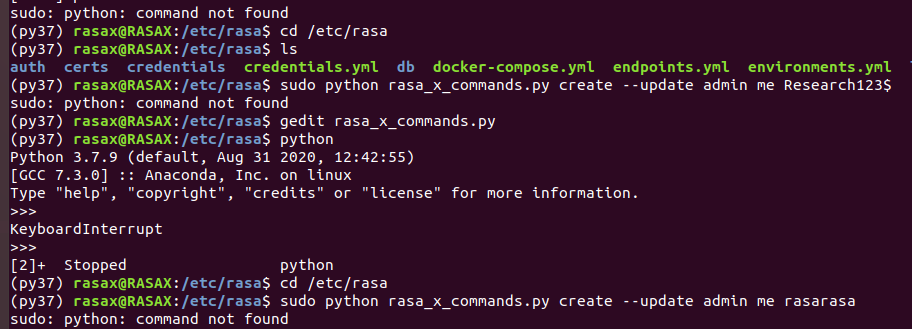
I am getting the error. python not found
 zmalq
on 9 Sep 2020
zmalq
on 9 Sep 2020
can you try python3 instead?
akelad
on 9 Sep 2020
can you try
python3instead?
Yes it worked. Thanks!
zmalq
on 10 Sep 2020
It worked for me but when i click on the external link and enter the code it says wrong credentials
 konandavy
on 29 Nov 2020
konandavy
on 29 Nov 2020
@konandavy Can you please create a new issue and provide some information about your deployment like OS and Rasa X version?
wochinge
on 30 Nov 2020
ok no problem
konandavy
on 30 Nov 2020
Related issues
 nahidalam
·
3Comments
nahidalam
·
3Comments
 rayush7
·
3Comments
rayush7
·
3Comments
 yondu22
·
3Comments
yondu22
·
3Comments
 karnigili
·
3Comments
karnigili
·
3Comments
 alonsopg
·
3Comments
alonsopg
·
3Comments
Most helpful comment
@WR1171 @ftsamis I'm looking into this as part of the sprint, so we can hopefully ship a fix with the new release. I'm very sorry about this!