Rasa: ERROR:rasa_core.training.interactive:An exception occurred while recording messages.
Rasa Core version:
rasa-nlu ==0.14.1
rasa-coe == 0.13.0
rasa-core-sdk==0.12.1
Python version: 3.6.8(64bit)
Operating system (windows, osx, ...):windows
Issue:
I try to train the model online but everytime i get the following error
Chat History

 #    Bot                                                                       You
───────────────────────────────────────────────────────────────────────────────────────────
 1    action_listen
───────────────────────────────────────────────────────────────────────────────────────────
 2                                                                                     hey
                                                                        intent: greet 0.72
───────────────────────────────────────────────────────────────────────────────────────────
 3    utter_greet 1.00
      Hello! How can I help?
      utter_ask_category
      can you choose the category you are interested in?
      Buttons:
      1: Tag
      (/inform{"category":"Tag"})
      2: Market (inform{"category":"Market"})
      action_listen
───────────────────────────────────────────────────────────────────────────────────────────
 4                                                            /inform{"category":"Market"}
                                                                       intent: inform 1.00
───────────────────────────────────────────────────────────────────────────────────────────
 5    slot{"category": "Market"}


Current slots:
        category: Market, name: None

------
? What is the next action of the bot?  0.08 action_listen
Thanks! The bot will now run action_listen.

ERROR:rasa_core.training.interactive:An exception occurred while recording messages.
Traceback (most recent call last):
  File "C:\Users\swarnalathaa\AppData\Local\Programs\Python\Python36\lib\site-packages\rasa_core\training\interactive.py", line 1216, in record_messages
    finetune, sender_ids, plot_file)
  File "C:\Users\swarnalathaa\AppData\Local\Programs\Python\Python36\lib\site-packages\rasa_core\training\interactive.py", line 824, in _predict_till_next_listen
    _plot_trackers(sender_ids, plot_file, endpoint)
  File "C:\Users\swarnalathaa\AppData\Local\Programs\Python\Python36\lib\site-packages\rasa_core\training\interactive.py", line 1151, in _plot_trackers
    max_history=2)
  File "C:\Users\swarnalathaa\AppData\Local\Programs\Python\Python36\lib\site-packages\rasa_core\training\visualization.py", line 448, in visualize_neighborhood
    _merge_equivalent_nodes(graph, max_history)
  File "C:\Users\swarnalathaa\AppData\Local\Programs\Python\Python36\lib\site-packages\rasa_core\training\visualization.py", line 200, in _merge_equivalent_nodes
    _nodes_are_equivalent(graph, i, j, max_history)):
  File "C:\Users\swarnalathaa\AppData\Local\Programs\Python\Python36\lib\site-packages\rasa_core\training\visualization.py", line 145, in _nodes_are_equivalent
    _fingerprint_node(graph, node_b, max_history)))
  File "C:\Users\swarnalathaa\AppData\Local\Programs\Python\Python36\lib\site-packages\rasa_core\training\visualization.py", line 111, in _fingerprint_node
    for continuation in continuations}
  File "C:\Users\swarnalathaa\AppData\Local\Programs\Python\Python36\lib\site-packages\rasa_core\training\visualization.py", line 111, in <setcomp>
    for continuation in continuations}
TypeError: sequence item 1: expected str instance, dict found
Content of domain file (if used & relevant):
slots:
  category:
    type: text
  name:
    type: text

intents:
 - greet
 - goodbye
 - inform


entities:
  - category
  - name

templates:
  utter_ask_category:
    -
      buttons:
        -
          payload: "/inform{\"category\":\"Tag\"}"
          title: Tag
        -
          payload: "inform{\"category\":\"Market\"}"
          title: Market
      text: "can you choose the category you are interested in?"

  utter_dont_understand:
    - "Sorry, I dont understand what you are asking for :("
  utter_goodbye:
    - "Talk to you later."
    - "Bye bye :("
  utter_greet:
    - "Hello! How can I help?"


actions:
 - utter_greet
 - utter_goodbye
 - utter_ask_category
 - utter_dont_understand
 - action_news
 Swarnalathaa
All 22 comments
Thanks for raising this issue, @MetcalfeTom will get back to you about it soon.
 akelad
on 20 Feb 2019
akelad
on 20 Feb 2019
Hi @Swarnalathaa,
I believe this is because the intent in your second button is not formatted properly - please ensure the payload is mapped to /inform{"category":"Market"}. At the moment it seems you are missing the / character and returning the intent in the button text.
If this fixes the issue, please come back here and leave a comment because we can also prevent this error in future
 MetcalfeTom
on 20 Feb 2019
MetcalfeTom
on 20 Feb 2019
Hi @MetcalfeTom ,
Thanks for your reply.
No, it didn't work.
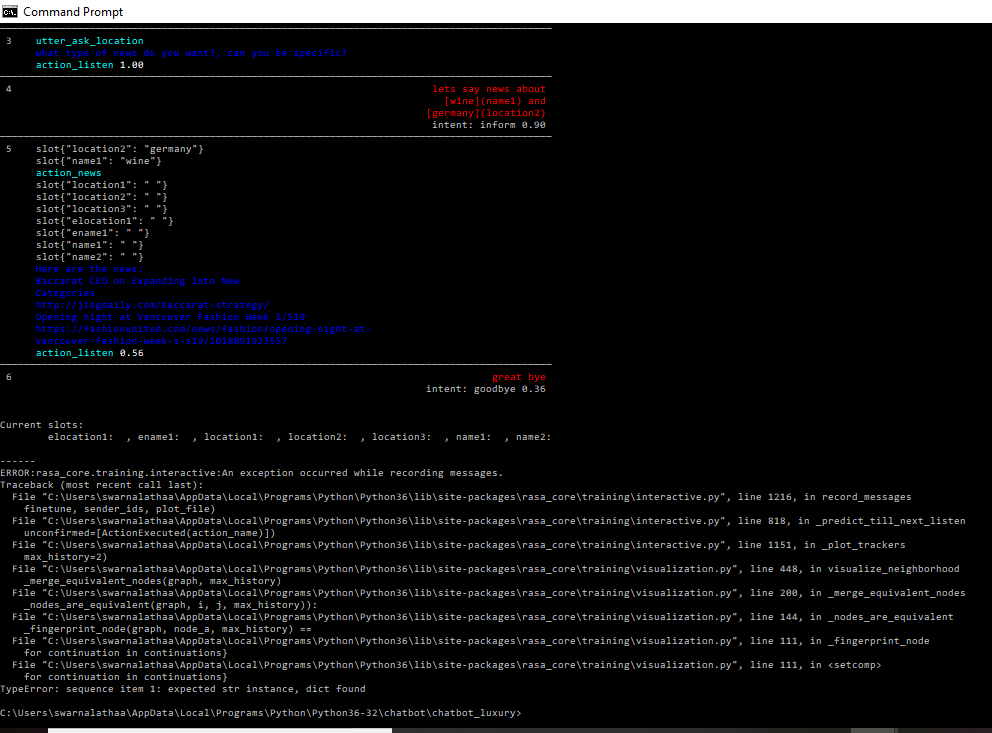
I still get this error even if i remove the button option completely from the bot.
Following screenshot is from running bot after removing button option, but still i get the same kind of error
Swarnalathaa
on 20 Feb 2019
Ahh OK, it is my understanding that is a bug with our visualisation script that arises when setting the same slot twice in one turn. We can work a fix for this, however in the meantime I would recommend trying:
- Running the script with the flag
--skip_visualization - Creating a separate action 'reset_slots' which is predicted in your story data after
-action_news. For this you just need the action to return theAllSlotsReset()event fromrasa_core_sdk.events
Thanks for bringing this to our attention!
MetcalfeTom
on 27 Feb 2019
Hi @MetcalfeTom ,
I followed the above suggestion and I am not getting the error. Thanks :)
Swarnalathaa
on 28 Feb 2019
I was getting this same error. Before I could look into it it disappeared again and I can't seem to reproduce it, having not changed the code or any settings.
 paulaWesselmann
on 4 Mar 2019
paulaWesselmann
on 4 Mar 2019
hi @MetcalfeTom,
can you please explain the steps
Ahh OK, it is my understanding that is a bug with our visualisation script that arises when setting the same slot twice in one turn. We can work a fix for this, however in the meantime I would recommend trying:
Running the script with the flag --skip_visualization
Creating a separate action 'reset_slots' which is predicted in your story data after -action_news. For this you just need the action to return the AllSlotsReset() event from rasa_core_sdk.events
Thanks for bringing this to our attention!
 shanushawan
on 5 Mar 2019
shanushawan
on 5 Mar 2019
Hi @shanushawan ,
1) If you are getting error something like the one mentioned above during interactive training then try to run your interactive training by disabling visualization. check this link https://rasa.com/docs/core/interactive_learning/
2) Since I wanted to reset all slots after the action_news has been performed, I made a separate action in actions.py which will reset all the slots.
class Actionreset(Action):
def name(self):
    return 'action_reset'

def run(self, dispatcher, tracker, domain):
    return [AllSlotsReset()]
and in my stories I need to call this action after action_news to reset all slots.
Hope this helps :)
Swarnalathaa
on 5 Mar 2019
@Swarnalathaa i followed same steps, but visualization seems to be still running for me.can you tell what command exactly you used ?
 Griffin98
on 5 Mar 2019
Griffin98
on 5 Mar 2019
@Swarnalathaa i got it working. And the error is gone for now @MetcalfeTom hope to see fix soon.
Griffin98
on 5 Mar 2019
@Swarnalathaa thank you! it's working for me
shanushawan
on 6 Mar 2019
hello @Swarnalathaa
How can I simulate this error and test solution for my tcc?
 luizhsc
on 8 Mar 2019
luizhsc
on 8 Mar 2019
I tried to run python train_interactive.py --skip_visualization but it still doesn't stop the visualization.
 Nexemics
on 13 Mar 2019
Nexemics
on 13 Mar 2019
@Nexemics you are doing it wrongly.If you are using script then while calling run_interactive_learning pass skip_visualization=True
like this : interactive.run_interactive_learning(agent,training_data_file,skip_visualization=True)
or through terminal you can do like this:
python -m rasa_core.train interactive -o models/dialogue -d domain.yml -c policy_config.yml -s data/stories.md --skip_visualization --nlu models/current/nlu --endpoints endpoints.yml
Griffin98
on 13 Mar 2019
Yeah I followed the first method and got it working. Thanks mate!
Nexemics
on 13 Mar 2019
@MetcalfeTom does this require any fixes from our side or can this be closed?
akelad
on 14 Mar 2019
@Griffin98's solution worked for me
interactive.run_interactive_learning(agent, dialog_training_data_file, skip_visualization=True)
 sandeepsuvit
on 15 Mar 2019
sandeepsuvit
on 15 Mar 2019
I got the same error also after selecting action_listen as next action:
What is the next action of the bot?  0.00 action_listen
Thanks! The bot will now run action_listen.

2019-03-25 15:00:28 ERROR    rasa_core.training.interactive  - An exception occurred while recording messages.
Traceback (most recent call last):
  File "C:\Users\spe\AppData\Local\Programs\Python\Python36\lib\site-packages\rasa_core\training\interactive.py", line 1219, in record_messages
    finetune, sender_ids, plot_file)
  File "C:\Users\spe\AppData\Local\Programs\Python\Python36\lib\site-packages\rasa_core\training\interactive.py", line 827, in _predict_till_next_listen
    _plot_trackers(sender_ids, plot_file, endpoint)
  File "C:\Users\spe\AppData\Local\Programs\Python\Python36\lib\site-packages\rasa_core\training\interactive.py", line 1154, in _plot_trackers
    max_history=2)
  File "C:\Users\spe\AppData\Local\Programs\Python\Python36\lib\site-packages\rasa_core\training\visualization.py", line 448, in visualize_neighborhood
    _merge_equivalent_nodes(graph, max_history)
  File "C:\Users\spe\AppData\Local\Programs\Python\Python36\lib\site-packages\rasa_core\training\visualization.py", line 200, in _merge_equivalent_nodes
    _nodes_are_equivalent(graph, i, j, max_history)):
  File "C:\Users\spe\AppData\Local\Programs\Python\Python36\lib\site-packages\rasa_core\training\visualization.py", line 144, in _nodes_are_equivalent
    _fingerprint_node(graph, node_a, max_history) ==
  File "C:\Users\spe\AppData\Local\Programs\Python\Python36\lib\site-packages\rasa_core\training\visualization.py", line 111, in _fingerprint_node
    for continuation in continuations}
  File "C:\Users\spe\AppData\Local\Programs\Python\Python36\lib\site-packages\rasa_core\training\visualization.py", line 111, in <setcomp>
    for continuation in continuations}
TypeError: sequence item 1: expected str instance, dict found
Deactivating the visualization also helped in this case.
 Spenhouet
on 25 Mar 2019
Spenhouet
on 25 Mar 2019
@akelad Yes we can fix this in visualization.py, we just need to overwrite the node fingerprint with the latest slot value when a slot is set more than once in a single conversation turn.
MetcalfeTom
on 1 Apr 2019
Hi @shanushawan ,
1. If you are getting error something like the one mentioned above during interactive training then try to run your interactive training by disabling visualization. check this link https://rasa.com/docs/core/interactive_learning/

2. Since I wanted to reset all slots after the action_news has been performed, I made a separate action in actions.py which will reset all the slots.
class Actionreset(Action):
def name(self):
    return 'action_reset'

def run(self, dispatcher, tracker, domain):
    return [AllSlotsReset()]
and in my stories I need to call this action after action_news to reset all slots.
Hope this helps :)
i have one doubt, do i need to create one actions.py file and in that can i define different classes for different actions or i need to write separate actions file?
 garchaaman19
on 9 Apr 2019
garchaaman19
on 9 Apr 2019
@MetcalfeTom since you're PR has been merged i'm gonna close
akelad
on 10 Apr 2019
Ahh OK, it is my understanding that is a bug with our visualisation script that arises when setting the same slot twice in one turn. We can work a fix for this, however in the meantime I would recommend trying:
- Running the script with the flag
--skip_visualization- Creating a separate action 'reset_slots' which is predicted in your story data after
-action_news. For this you just need the action to return theAllSlotsReset()event fromrasa_core_sdk.eventsThanks for bringing this to our attention!
Thanks I had the same issue and it helped me.
 PRAkamble
on 26 Apr 2019
PRAkamble
on 26 Apr 2019
Related issues
 Arghya999
·
3Comments
Arghya999
·
3Comments
 connorbrinton
·
3Comments
connorbrinton
·
3Comments
 igormiranda001
·
3Comments
igormiranda001
·
3Comments
 johnson7788
·
3Comments
johnson7788
·
3Comments
 mit4dev
·
4Comments
mit4dev
·
4Comments
Most helpful comment
@Nexemics you are doing it wrongly.If you are using script then while calling run_interactive_learning pass skip_visualization=True
like this : interactive.run_interactive_learning(agent,training_data_file,skip_visualization=True)
or through terminal you can do like this:
python -m rasa_core.train interactive -o models/dialogue -d domain.yml -c policy_config.yml -s data/stories.md --skip_visualization --nlu models/current/nlu --endpoints endpoints.yml