Rasa Core version: 0.9.0a5
Issue:
Example: " I want to book a movie ticket."
Then Bot should ask to user that please provide the time & locations. Until the slots :- locations & time is not fill the Bot will repeat the question.
 DhruvMevada
All 16 comments
You can use Rasa's FormAction class to achieve this. Forms make it easier to define required fields and it handles most of the stuff for you. Relevant documentation with examples can be found here.
 auzair92
on 22 May 2018
auzair92
on 22 May 2018
Rasa Core version: 0.9.0a5
Ya, I have tried that, but still not getting that. Please help me if I'm doing any mistake here.
Yaml file
intents:
  - greetings
  - booking
  - confirm
  - goodbye

entities:
- city
- destination_location
- source_location

slots:
  city:
    type: text
  source_location:
    type: text
  destination_location:
    type: text
  requested_slot:
    type: unfeaturized


templates:
  act_greet:
    - "Hi there!!"
    - "Greetings for the day"
    - "Hello, Have a good day"
    - "How can I help you"

  act_booking:
    - "booking a ride"
  act_confirm:
    - "Your travelling from {source_location}, {city} to {destination_location}, {city} on {travel_date} {travel_time}
    Are you want to Book this ?"
  act_goodbye:
    - "Good Bye"
  act_cancel:
    - "you have cancel your booking!!"
  utter_ask_source_location:
    - "Please provide me source location"
  utter_ask_destination_location:
    - "please provide me destination location"
  utter_ask_city:
    - "in which city you currently living"

actions:
- act_greet
- act_confirm
- act_booking
- act_goodbye
- act_cancel
- actions.ActionBooking
#- bot.ActionSuggest
Stories.md file
## story_1
* greet
 - act_greet
* booking
 - action_booking
 - slot{"requested_slot": "source_location"}
 - slot{"requested_slot": "destination_location"}
 - slot{"requested_slot": "city"}

* bye
 - act_goodbye
custom action class of actions.py file
class RestaurantAPI(object):
   def search(self, info):
       return "papi’s pizza place"

class ActionBooking(FormAction):

   RANDOMIZE = False

   @staticmethod
   def required_fields():
       return [
           FreeTextFormField("destination_location", "destination_location"),
           FreeTextFormField("source_location", "source_location"),
           FreeTextFormField("city", "city")
       ]

   def name(self):
       return "action_booking"

   def run(self, dispatcher, tracker, domain):
       dispatcher.utter_message("looking for restaurants")
       restaurant_api = RestaurantAPI()
       restaurants = restaurant_api.search(tracker.get_slot("city"))
       return
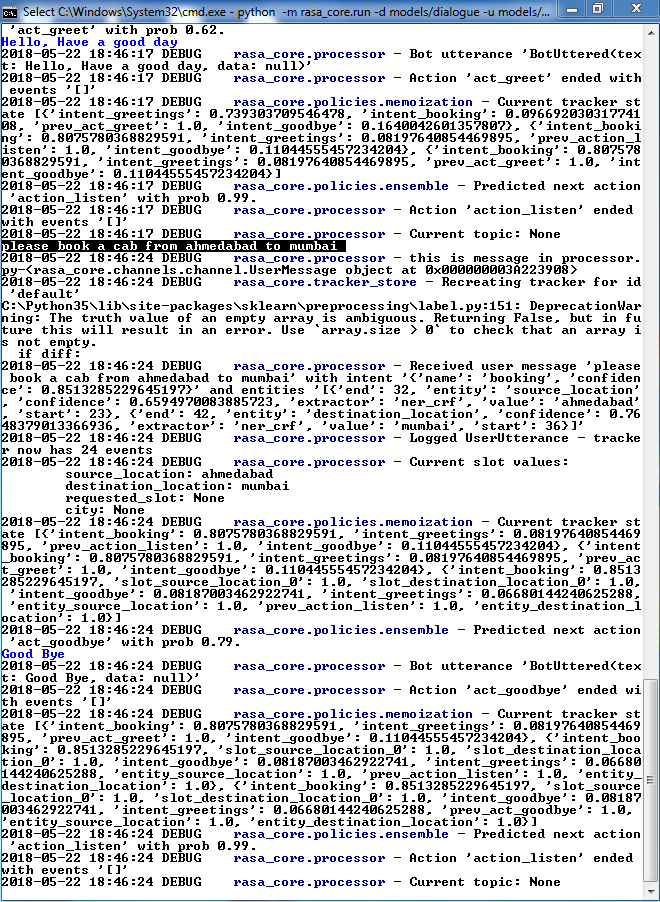
output with debug command, Here the slots source & destination locations are filled, but the bot not asked regarding missing slot city.
DhruvMevada
on 22 May 2018
@tmbo @auzair92
I think in our actions.py file we declared method which name is required_fields() as per the documents.
but it seems to that method is not executing while calling our action. So for checking purpose I have put logs in that required_fields() method but, that logs were not generating in our output, while we are run our bot.so, I think problem is in required_fields method.
if i am right can anyone please assist why it is not calling. or if i am wrong, assist me how to apply required slots in bot.
below are the custom action file that I put in our action.py file
class RestaurantAPI(object):
   def search(self, info):
       return "papi’s pizza place"

class ActionBooking(FormAction):

   RANDOMIZE = False

   @staticmethod
   def required_fields():
       logger.debug("---------------------------calling required field in action.py  file------------- ")
       return [
           EntityFormField("destination_location", "destination_location")
       ]

   def name(self):
       return "action_booking"

   def run(self, dispatcher, tracker, domain):
       dispatcher.utter_message("looking for restaurants")
       restaurant_api = RestaurantAPI()
       restaurants = restaurant_api.search(tracker.get_slot("city"))
       return
Here I'm attaching source file.Taxi bot.zip
Thanks in advance.
DhruvMevada
on 23 May 2018
@DhruvMevada Two things:
- you have to change name of 'run' method to 'submit'; this should solve the issue of slot filling not being implemented
- your story is wrong; you can't set pass three values to requested_slot in one go. it will simply take the last passed value. it has to be done in three steps
- booking
- action_booking
- slot{"requested_slot": "source_location"}
- booking{"source_location":"mumbai"}
- action_booking
- slot{"source_location":"mumbai"}
- slot{"requested_slot": "destination_location"}
- booking{"destination_location":"delhi"}
- action_booking
- slot{"destination_location":"delhi"}
- slot{"requested_slot": "city"}
- booking{"city":"delhi"}
- action_booking
- slot{"city":"delhi"}
 santhosh-ceg
on 23 May 2018
santhosh-ceg
on 23 May 2018
The suggested solution is a part of version 0.9 . It has not been released yet. How do I get it through 'pip' ?
 memahesh
on 24 May 2018
memahesh
on 24 May 2018
You can download the latest version from Github.
Unzip the folder..
Go to command line..
Change the current directory to the folder to which you unzipped
After that, Type this in the command line: python setup.py install
Thanks,
Santhosh.
Sent from my iPhone
On 24-May-2018, at 2:24 PM, Medam Mahesh notifications@github.com wrote:
The suggested solution is a part of version 0.9 . It has not been released yet. How do I get it through 'pip' ?
—
You are receiving this because you commented.
Reply to this email directly, view it on GitHub, or mute the thread.
santhosh-ceg
on 24 May 2018
or pip install rasa_core==0.9.0a3
 akelad
on 24 May 2018
akelad
on 24 May 2018
Great !!
It worked. Thanks guys.
memahesh
on 24 May 2018
Hi @memahesh, I have a question. How come it worked for you.
@staticmethod
   def required_fields():
       return [
           FreeTextFormField("destination_location", "destination_location"),
           FreeTextFormField("source_location", "source_location"),
           FreeTextFormField("city", "city")
       ]
FreeTextFormField does not take 2 named entities, while you are passing 2 args.
In https://github.com/RasaHQ/rasa_core/blob/master/rasa_core/actions/forms.py
class FreeTextFormField(FormField):
    def __init__(self, slot_name):
        self.slot_name = slot_name
Do let me know how you were able to work with FreeTextFormField. Thanks.
 RAJAT--PALIWAL
on 30 May 2018
RAJAT--PALIWAL
on 30 May 2018
I haven't worked with _FreeTextFormField_ . I was using _EntityFormField_ and _BooleanFormField_ for my use case. Now that I look at the code in the question, it is written wrongly.
If you want to use the _FreeTextFormField_ , just give it the slot name you want to be filled. Whenever the value in _requested_slot_ is set to the slot name given in FreeTextFormField, the slot will be filled with the next user message.
memahesh
on 31 May 2018
My issue is still unresolved , any hint or suggestion is appreciated. Thanks
DhruvMevada
on 4 Jun 2018
While ActionBooking is taking object FormAction and there is no submit().
RAJAT--PALIWAL
on 5 Jun 2018
@DhruvMevada you need to give more details as to what's not working now. Have you tried all the suggestions given in the thread here?
akelad
on 6 Jun 2018
This issue has been automatically marked as stale because it has not had recent activity. It will be closed if no further activity occurs. Thank you for your contributions.
![stale[bot] picture](https://avatars3.githubusercontent.com/in/1724?v=4&s=40) stale[bot]
on 4 Sep 2018
stale[bot]
on 4 Sep 2018
This issue has been automatically closed due to inactivity. Please create a new issue if you need more help.
stale[bot]
on 11 Sep 2018
Related issues
 connorbrinton
·
3Comments
connorbrinton
·
3Comments
 mit4dev
·
4Comments
mit4dev
·
4Comments
 N-Olbert
·
3Comments
N-Olbert
·
3Comments
 rayush7
·
3Comments
rayush7
·
3Comments
 irfan-zoefit
·
3Comments
irfan-zoefit
·
3Comments