Rasa: Simple Rasa Core + NLU Rest API delivering responses
My goal is to wrap the rasa core + nlu bot into an API so that I can call it in some JavaScript-based UI, such as a simple angularjs-chat ( http://angularjs.chat/tutorials/angularjs-basic-chat-module/).
However, I can only use CustomInput to send a message to "localhost:5005" by POST but I cannot get the response from my bot. Is there any way that I could build/modify on top of the rasa_core? I know that it is already using Flask, so I don’t want to build another Flask app on top of that.
In summary, I guess it would be great if we can set up an API such as "localhost:5005" to receive the questions from users and send responses back to the same channel, like what we have using the consoleInput.
 jenniferzhu
All 55 comments
You can create a custom input channel like this:
from __future__ import absolute_import
from __future__ import division
from __future__ import print_function
from __future__ import unicode_literals
import logging
from flask import Blueprint, request, jsonify
from rasa_core.channels.channel import UserMessage
from rasa_core.channels.direct import CollectingOutputChannel
from rasa_core.channels.rest import HttpInputComponent
logger = logging.getLogger(__name__)
class SimpleWebBot(HttpInputComponent):
"""A simple web bot that listens on a url and responds."""
def blueprint(self, on_new_message):
custom_webhook = Blueprint('custom_webhook', __name__)
@custom_webhook.route("/", methods=['GET'])
def health():
return jsonify({"status": "ok"})
@custom_webhook.route("/webhook", methods=['POST'])
def receive():
payload = request.json
sender_id = payload.get("sender", None)
text = payload.get("message", None)
out = CollectingOutputChannel()
on_new_message(UserMessage(text, out, sender_id))
responses = [m for _, m in out.messages]
return jsonify(responses)
return custom_webhook
A request to /webhook will give a json response like ["How are you?"] with the messages of the bot.
 tmbo
on 30 Nov 2017
tmbo
on 30 Nov 2017
Hey, @tmbo, i tried this approach, and it just returns an empty list as response. The bot works just fine from the command line. I see the response gets stored in the tracker object, but there is no messages in out.messages.
 schafferer
on 20 Dec 2017
schafferer
on 20 Dec 2017
hey @tmbo same here, there is no proper documentation how to use that custom channel.
 sachin-srijan
on 27 Dec 2017
sachin-srijan
on 27 Dec 2017
There is a validation error when I execute this custom channel
python -m rasa_core.run -d models/dialogue -u models/nlu/current --port 5002 --connector SimpleWebBot
usage: run.py [-h] -d CORE [-u NLU] [-p PORT] [-o LOG_FILE]
[--credentials CREDENTIALS]
[-c {facebook,slack,telegram,cmdline}] [--debug] [-v]
run.py: error: argument -c/--connector: invalid choice: 'rasa-ui-channel.SimpleWebBot' (choose from 'facebook', 'slack', 'telegram', 'cmdline')
This could be cleared by commenting out parser argument choices in run.py
choices=["facebook", "slack", "telegram", "cmdline"],
@tmbo can this be updated to accept custom channels?
 pradeepmvn
on 29 Jan 2018
pradeepmvn
on 29 Jan 2018
Also to get this working, domain.yml should not have Remote action factory declaration.
action_factory: remote
pradeepmvn
on 29 Jan 2018
choices=["facebook", "slack", "telegram", "cmdline"],
Hi @pradeepmvn after commenting above line as you said, i am still getting the following error
Traceback (most recent call last):
File "/usr/lib/python2.7/runpy.py", line 162, in _run_module_as_main
"__main__", fname, loader, pkg_name)
File "/usr/lib/python2.7/runpy.py", line 72, in _run_code
exec code in run_globals
File "/home/user/Desktop/rasa_chatbot/rasa-core-fr/rasa_core/rasa_core/run.py", line 151, in <module>
cmdline_args.credentials)
File "/home/user/Desktop/rasa_chatbot/rasa-core-fr/rasa_core/rasa_core/run.py", line 134, in main
input_channel = create_input_channel(channel, port, credentials_file)
File "/home/user/Desktop/rasa_chatbot/rasa-core-fr/rasa_core/rasa_core/run.py", line 119, in create_input_channel
raise Exception("Unknown input channel for running main.")
Exception: Unknown input channel for running main.
please help.
 TabrejTeli
on 20 Feb 2018
TabrejTeli
on 20 Feb 2018
After you've trainined rasa-NLU and rasa-core, create a file called 'serve.py' in your projects root directory with the following code. then run python serve.py run
from __future__ import absolute_import
from __future__ import division
from __future__ import print_function
from __future__ import unicode_literals

import logging

from rasa_core.channels import HttpInputChannel
from rasa_core import utils
from rasa_core.agent import Agent
from rasa_core.interpreter import RasaNLUInterpreter
from rasa_core.channels.channel import UserMessage
from rasa_core.channels.direct import CollectingOutputChannel
from rasa_core.channels.rest import HttpInputComponent
from flask import Blueprint, request, jsonify

logger = logging.getLogger(__name__)
class SimpleWebBot(HttpInputComponent):
    """A simple web bot that listens on a url and responds."""

    def blueprint(self, on_new_message):
        custom_webhook = Blueprint('custom_webhook', __name__)

        @custom_webhook.route("/status", methods=['GET'])
        def health():
            return jsonify({"status": "ok"})

        @custom_webhook.route("/", methods=['POST'])
        def receive():
            payload = request.json
            sender_id = payload.get("sender", None)
            text = payload.get("message", None)
            out = CollectingOutputChannel()
            on_new_message(UserMessage(text, out, sender_id))
            responses = [m for _, m in out.messages]
            return jsonify(responses)

        return custom_webhook

def run(serve_forever=True):
    #path to your NLU model
    interpreter = RasaNLUInterpreter("models/nlu/default/current")
    # path to your dialogues models
    agent = Agent.load("models/dialogue", interpreter=interpreter)
    #http api endpoint for responses
    input_channel = SimpleWebBot()
    if serve_forever:
        agent.handle_channel(HttpInputChannel(5004, "/chat", input_channel))
    return agent
then you should be able to POST a request to the following endpoint:
localhost:5004/chat/
using a body like:
{ "sender": "default", "message": "hello"}
 dtfiedler
on 20 Feb 2018
dtfiedler
on 20 Feb 2018
hey @dtfiedler it worked thank you so much for your help :+1:
TabrejTeli
on 21 Feb 2018
I think adding an endpoint like this to the server.py could actually work quite well for this use case, what do you think @dtfiedler ?
tmbo
on 22 Feb 2018
@dtfiedler the code just executes and exists!
 alokraj68
on 24 Feb 2018
alokraj68
on 24 Feb 2018
@alokraj68 call the run() at the end
if __name__ == '__main__':
    utils.configure_colored_logging(loglevel="INFO")
    run()
how to add cross origin the above mentioned serve.py?
 Selvaganapathi06
on 17 Mar 2018
Selvaganapathi06
on 17 Mar 2018
i have used above code and customize UI but faced below error in UI
Response to preflight request doesn't pass access control check: No 'Access-Control-Allow-Origin' header is present on the requested resource. Origin
Selvaganapathi06
on 17 Mar 2018
flask cors is what you want
 amn41
on 18 Mar 2018
amn41
on 18 Mar 2018
i have already installed flask cors and added the below line of code
from flask import Flask
from flask_cors import CORS
app = Flask(__name__)
CORS(app)
i tried some different way also. It's working fine postman, only issue in my ui integration.
can you please tell me which place need to add cross origin code, I have used above mentioned serve.py. Please help on this ASAP. Any other way available using customize channel ? please suggest me.
Selvaganapathi06
on 18 Mar 2018
Thanks, Above mentioned cross origin issue was fixed.
Selvaganapathi06
on 20 Mar 2018
@Selvaganapathi06
can you please tell me how your issue was solved?
 arunimaChaurasia
on 28 Mar 2018
arunimaChaurasia
on 28 Mar 2018
Please check the below example
! /usr/bin/env python
from flask import Flask
from flask_cors import CORS, cross_origin
from SimpleHTTPServer import SimpleHTTPRequestHandler, test
app = Flask(__name__)
class CORSHTTPRequestHandler(SimpleHTTPRequestHandler):
def end_headers(self):
self.send_header('Access-Control-Allow-Origin', '*')
super(CORSHTTPRequestHandler, self).end_headers(self)
@app.route("/")
@cross_origin()
def hello():
return "Hello World!"
if __name__ == '__main__':
app.run(host='0.0.0.0', debug=True)
Selvaganapathi06
on 28 Mar 2018
@Selvaganapathi06
Same error again!
could not solve with this example
arunimaChaurasia
on 28 Mar 2018
Can you please tell me what is your issue exactly
Selvaganapathi06
on 28 Mar 2018
The thing is I am trying to create a channel that handles request for bot
as well as handle other queries also like user login etc
Is it possible ?
Coz this code gives custom app and I am new to this , so cannot understand
how it will actually work !?
On Wed, Mar 28, 2018, 2:43 PM Selvaganapathi06 notifications@github.com
wrote:
Can you please tell me what is your issue exactly
—
You are receiving this because you commented.
Reply to this email directly, view it on GitHub
https://github.com/RasaHQ/rasa_core/issues/119#issuecomment-376817687,
or mute the thread
https://github.com/notifications/unsubscribe-auth/AUBCab9v44aIqeRSABk4_irsG4Gdk2CDks5ti1RUgaJpZM4QsV9D
.
arunimaChaurasia
on 28 Mar 2018
yes , it is working with request and response
Selvaganapathi06
on 28 Mar 2018
I am so sorry but can you please elaborate ?
On Wed, Mar 28, 2018, 2:57 PM Selvaganapathi06 notifications@github.com
wrote:
yes , it is working with request and response
—
You are receiving this because you commented.
Reply to this email directly, view it on GitHub
https://github.com/RasaHQ/rasa_core/issues/119#issuecomment-376821583,
or mute the thread
https://github.com/notifications/unsubscribe-auth/AUBCaZSKLyNm6a9oEqEdZ9iEosIlYJnsks5ti1d0gaJpZM4QsV9D
.
arunimaChaurasia
on 28 Mar 2018
For me it works replacing
responses = [m for _, m in out.messages]
with
responses = [m["text"] for m in out.messages]
 diegoami
on 7 Apr 2018
diegoami
on 7 Apr 2018
@dtfiedler hi i am trying doing the mentioned steps but commands does not works it loads and nothing happens
 NikhilBansal21
on 11 Apr 2018
NikhilBansal21
on 11 Apr 2018
Well, if use @dtfiedler's code and you need CORS it seems that you need to directly modify rasa_core/channels/rest.py code in a cloned repository to make it work - change the method HttpInputChanell._record_message in the following way, and add import to CORS :
 def _record_messages(self, on_message):
        # type: (Callable[[UserMessage], None]) -> None
        from flask import Flask

        app = Flask(__name__)
        CORS(app)
        app.config['CORS_HEADERS'] = 'Content-Type'
As nobody is pointing out here, this is actually a better way you are supposed to do it now (I think you still need the latest version cloned from master). :
Start the server with CORS support, eg :
python -m rasa_core.server -d models/dialogue -u models/nlu/default/current --debug -o out.log --cors *
and then call the new API "respond"
curl -XPOST localhost:5005/conversations/default/respond -d '{"query":"Hello"}'
You should get the answer from your engine:
[{"recipient_id": "default", "text": "Hello there. I am fine, and my family is also fine."}]%
It is also now documented at https://github.com/RasaHQ/rasa_core/blob/master/docs/http.rst
It is also important to make sure that you do not send any headers from your cross-site request, otherwise it will not work.
diegoami
on 15 Apr 2018
@diegoami https://github.com/RasaHQ/rasa_core/pull/383 should fix the issue with CORS
amn41
on 16 Apr 2018
Wow that was a quick fix !
diegoami
on 16 Apr 2018
closing this for now, let us know if there's more issues
 akelad
on 17 Apr 2018
akelad
on 17 Apr 2018
I follow the above steps and logs are not generating...
 nileshgarg
on 25 Apr 2018
nileshgarg
on 25 Apr 2018
Hi I used the same serve.py(attached) as suggested by @dtfiedler
serve.zip
I use the below to craft my message from the client terminal when the above serve.py is running on the server terminal port 5004
curl -XPOST localhost:5004/chat/ -d '{"sender":"default", "message": "hello"}'
However, I get the below error;
[2018-05-11 17:02:10,286] ERROR in app: Exception on /chat/ [POST]
Traceback (most recent call last):
  File "/usr/local/lib/python2.7/dist-packages/flask/app.py", line 1982, in wsgi_app
    response = self.full_dispatch_request()
  File "/usr/local/lib/python2.7/dist-packages/flask/app.py", line 1614, in full_dispatch_request
    rv = self.handle_user_exception(e)
  File "/usr/local/lib/python2.7/dist-packages/flask/app.py", line 1517, in handle_user_exception
    reraise(exc_type, exc_value, tb)
  File "/usr/local/lib/python2.7/dist-packages/flask/app.py", line 1612, in full_dispatch_request
    rv = self.dispatch_request()
  File "/usr/local/lib/python2.7/dist-packages/flask/app.py", line 1598, in dispatch_request
    return self.view_functions[rule.endpoint](**req.view_args)
  File "serve.py", line 31, in receive
    sender_id = payload.get("sender", None)
AttributeError: 'NoneType' object has no attribute 'get'
127.0.0.1 - - [2018-05-11 17:02:10] "POST /chat/ HTTP/1.1" 500 412 0.068356
Can someone please help me ?
Thanks in advance
I am also not able get a response as stated by @diegoami above:
I run the server as mentioned, it starts listening, then I run the client with the above command and I get the below message:
the server:
2018-05-11 17:52:43+0530 [-] "127.0.0.1" - - [11/May/2018:12:22:42 +0000] "POST /conversations/default/respond HTTP/1.1" 404 233 "-" "curl/7.47.0"
the client:
# curl -XPOST localhost:5005/conversations/default/respond -d '{"query":"Hello"}'

<!DOCTYPE HTML PUBLIC "-//W3C//DTD HTML 3.2 Final//EN">
<title>404 Not Found</title>
<h1>Not Found</h1>
<p>The requested URL was not found on the server.  If you entered the URL manually please check your spelling and try again.</p>
 NewtoAI
on 11 May 2018
NewtoAI
on 11 May 2018
Worked using @diegoami method from command line
Following @dtfiedler approach (w/o any modification to the Rasa core) doesn't work. Using Rasa core version 0.9.0a6 and Rasa NLU version 0.12.3 I am getting below error
On the server side -
ERROR    flask.app - Exception on /chat/ [POST]
 File "serve.py", line 31, in receive
    sender_id = payload.get("sender", None)
AttributeError: 'NoneType' object has no attribute 'get'
On the client side
<!DOCTYPE HTML PUBLIC "-//W3C//DTD HTML 3.2 Final//EN">
<title>500 Internal Server Error</title>
<h1>Internal Server Error</h1>
<p>The server encountered an internal error and was unable to complete your request.  Either the server is overloaded or there is an error in the application.</p>
 nahidalam
on 22 May 2018
nahidalam
on 22 May 2018
Make sure to set the curl json header (-H "Content-Type: application/json")
tmbo
on 22 May 2018
@tmbo not sure what you meant. I run serve.py and then used below command in a different terminal
curl -H "Content-Type: application/json" -XPOST localhost:5004/chat/ -d '{"sender":"default", "message": "hello"}'
I am getting reply ["text"] which is wrong. I am supposed to get something like 'hi, How can I help?'
nahidalam
on 22 May 2018
try replacing the line
responses = [m for _, m in out.messages]
with
responses = [m.get("text") for _, m in out.messages]
tmbo
on 22 May 2018
@tmbo just did it. Now I am getting error again running serve.py
On the client
<!DOCTYPE HTML PUBLIC "-//W3C//DTD HTML 3.2 Final//EN">
<title>500 Internal Server Error</title>
<h1>Internal Server Error</h1>
<p>The server encountered an internal error and was unable to complete your request.  Either the server is overloaded or there is an error in the application.</p>
On the server
File "serve.py", line 35, in receive
    responses = [m.get("text") for _, m in out.messages]
  File "serve.py", line 35, in <listcomp>
    responses = [m.get("text") for _, m in out.messages]
AttributeError: 'str' object has no attribute 'get'
127.0.0.1 - - [2018-05-22 12:46:35] "POST /chat/ HTTP/1.1" 500 412 0.016356
@nahidalam Did you figure out this problem? Because we are also stuck with this..
 nitinkumartech
on 8 Jun 2018
nitinkumartech
on 8 Jun 2018
@nitincypher I solved it in a different way.
1st run below command in a terminal
$python -m rasa_core.server -d <DIALOGUE_MODEL_PATH> -u <NLU_MODEL_PATH> --debug -o out.log --cors *
Then run below code
import requests
import json

data = '{"query":"hello"}'
response = requests.post('http://localhost:5005/conversations/default/respond', data=data)
json_response = response.json()
print (json_response[0]['text'])
This should output the reply of hello in your terminal.
nahidalam
on 8 Jun 2018
@nahidalam Thank you. We finally figured it out :)
nitinkumartech
on 8 Jun 2018
Using the above code, i am getting the responses but how can i host this in server.
$python -m rasa_core.server -d
import requests
import json
data = '{"query":"hello"}'
response = requests.post('http://localhost:5005/conversations/default/respond', data=data)
json_response = response.json()
print (json_response[0]['text'])
 gprabhuv4me
on 14 Jul 2018
gprabhuv4me
on 14 Jul 2018
i'm not sure what your question is - could you elaborate please?
akelad
on 17 Jul 2018
How can i display buttons that are defined in my yaml file using rest api. or is there any way to return the response through rest api in this format:
{
type : "text",
message : "how can i help you"
}
{
type : "buttons",
message : "we are providing options for : ",
options : ["option1", "option2" ]
}
 chinnusujitha
on 9 Aug 2018
chinnusujitha
on 9 Aug 2018
please create a new issue for this
akelad
on 10 Aug 2018
@dtfiedler i ran the script python serve.py run from command line and then switched to chrome and entered http://localhost:5000/chat in the search bar but it shows "Method Not Allowed.The method is not allowed for the requested URL." . what am i doing wrong?
 krati5
on 29 Aug 2018
krati5
on 29 Aug 2018
@diegoami,
When we are using this below code, where are we specifying that port number is 5005 for this. Also could you plese explain what is the need of having server up and running through this command and also through code given by @tfiedler
As nobody is pointing out here, this is actually a better way you are supposed to do it now (I think you still need the latest version cloned from master). :
Start the server with CORS support, eg :
python -m rasa_core.server -d models/dialogue -u models/nlu/default/current --debug -o out.log --cors *
and then call the new API "respond"
curl -XPOST localhost:5005/conversations/default/respond -d '{"query":"Hello"}'
You should get the answer from your engine:
[{"recipient_id": "default", "text": "Hello there. I am fine, and my family is also fine."}]%
It is also now documented at https://github.com/RasaHQ/rasa_core/blob/master/docs/http.rst
It is also important to make sure that you do not send any headers from your cross-site request, otherwise it will not work.
 kappaganthusivaram
on 1 Sep 2018
kappaganthusivaram
on 1 Sep 2018
After you've trainined rasa-NLU and rasa-core, create a file called 'serve.py' in your projects root directory with the following code. then run
python serve.py runfrom __future__ import absolute_import from __future__ import division from __future__ import print_function from __future__ import unicode_literals import logging from rasa_core.channels import HttpInputChannel from rasa_core import utils from rasa_core.agent import Agent from rasa_core.interpreter import RasaNLUInterpreter from rasa_core.channels.channel import UserMessage from rasa_core.channels.direct import CollectingOutputChannel from rasa_core.channels.rest import HttpInputComponent from flask import Blueprint, request, jsonify logger = logging.getLogger(__name__) class SimpleWebBot(HttpInputComponent): """A simple web bot that listens on a url and responds.""" def blueprint(self, on_new_message): custom_webhook = Blueprint('custom_webhook', __name__) @custom_webhook.route("/status", methods=['GET']) def health(): return jsonify({"status": "ok"}) @custom_webhook.route("/", methods=['POST']) def receive(): payload = request.json sender_id = payload.get("sender", None) text = payload.get("message", None) out = CollectingOutputChannel() on_new_message(UserMessage(text, out, sender_id)) responses = [m for _, m in out.messages] return jsonify(responses) return custom_webhook def run(serve_forever=True): #path to your NLU model interpreter = RasaNLUInterpreter("models/nlu/default/current") # path to your dialogues models agent = Agent.load("models/dialogue", interpreter=interpreter) #http api endpoint for responses input_channel = SimpleWebBot() if serve_forever: agent.handle_channel(HttpInputChannel(5004, "/chat", input_channel)) return agentthen you should be able to POST a request to the following endpoint:
localhost:5004/chat/using a body like:
{ "sender": "default", "message": "hello"}
When I try this code, I get import errors I fixed most of them by following the migration guide here I just can't fix HttpInputChannel error
from rasa_core.channels import HttpInputChannel (In serve.py)
ImportError: cannot import name 'HttpInputChannel'
I am using starter-pack-rasa-stack
Before, trying this I wrote my own flask wrapper to chat with the bot, I am aware it's not needed I can directly use this serve.py. Please, help how to sort this out and get the GUI working. Please, follow this detailed query I posted on the community
here
If I do a POST request in the below format I get 500 Error:
response = requests.post('http://localhost:5002/webhooks/rest/webhook', data=payload)
I run the rasa_core server as:
python -m rasa_core.server -d models/rasbot/dialogue -u models/rasbot/nlu --port 5002 --debug --cors *
If I do a POST request in the below format I get 404 Error:
response = requests.post('http://localhost:5002/conversations/default/respond', data=payload)
I run the rasa_core as:
python -m rasa_core.run --enable_api --endpoints endpoints.yml -d models/rasbot/dialogue -u models/rasbot/nlu --port 5002 --debug
Any help is appreciated.
Thanks
 Bhaarat-Pachori
on 30 Sep 2018
Bhaarat-Pachori
on 30 Sep 2018
@diegoami,
When we are using this below code, where are we specifying that port number is 5005 for this. Also could you plese explain what is the need of having server up and running through this command and also through code given by @tfiedler
As nobody is pointing out here, this is actually a better way you are supposed to do it now (I think you still need the latest version cloned from master). :Start the server with CORS support, eg :
python -m rasa_core.server -d models/dialogue -u models/nlu/default/current --debug -o out.log --cors *and then call the new API "respond"
curl -XPOST localhost:5005/conversations/default/respond -d '{"query":"Hello"}'
You should get the answer from your engine:
[{"recipient_id": "default", "text": "Hello there. I am fine, and my family is also fine."}]%
It is also now documented at https://github.com/RasaHQ/rasa_core/blob/master/docs/http.rst
It is also important to make sure that you do not send any headers from your cross-site request, otherwise it will not work.
There is no file named http.rst as mentioned in the URL. I checked the repository and there is no such file
Bhaarat-Pachori
on 30 Sep 2018
Please create a new issue
akelad
on 1 Oct 2018
Solution provided by @dtfiedler was nice but what was the version of rasa nlu and rasa core
when im using with Rasa nlu -- 0.13.4 Rasa_core -- 0.11.1 this version facing problem with importings even i tried this migrating guide too https://rasa.com/docs/core/migrations/ but still facing problem with importings
 savi429
on 12 Oct 2018
savi429
on 12 Oct 2018
Hi im facing the similar issue...
Here is my server.py file..
`import logging
from rasa_core.agent import Agent
from rasa_core.interpreter import RasaNLUInterpreter
from rasa_core.channels.channel import CollectingOutputChannel
from flask import json
from klein import Klein
from pymongo import MongoClient
from pymongo import DESCENDING
import datetime
import urllib3
http=urllib3.PoolManager()
import json
import requests
import time
import calendar
from ast import literal_eval
logger = logging.getLogger(__name__)
db = client.convai
def request_parameters(request):
if request.method.decode('utf-8', 'strict') == 'GET':
return {
key.decode('utf-8', 'strict'): value[0].decode('utf-8','strict')
for key, value in request.args.items()}
else:
content = request.content.read()
try:
return json.loads(content.decode('utf-8', 'strict'))
except ValueError as e:
logger.error("Failed to decode json during respond request. Error: {}. Request content: '{}' ".format(e, content))
raise
class Server:
app = Klein()
def __init__(self, model_directory, interpreter):
    self.model_directory = model_directory
    self.interpreter = interpreter
    self.agent = self._create_agent(model_directory, interpreter)

@staticmethod
def _create_agent(model_directory, interpreter):
    """Creates a Rasa Agent which runs when the server is started"""
    try:
        return Agent.load(model_directory, interpreter)
    except Exception as e:
        logger.warn("Failed to load any agent model. Running Rasa Core server with out loaded model now. {}".format(e))
        return None

@app.route("/api/v1/status", methods=['GET'])
def status(self, request):
    """Check if the server is running and responds with the status."""
    request.setHeader('Access-Control-Allow-Origin', '*')
    return json.dumps({'status': 'OK'})


@app.route('/api/v1/<sender_id>/parse', methods=['GET', 'POST'])
def parse(self, request, sender_id):
    request.setHeader('Content-Type', 'application/json')
    request_params = request_parameters(request)

    if 'query' in request_params:
        message = request_params.pop('query')
    elif 'q' in request_params:
        message = request_params.pop('q')
    else:
        request.setResponseCode(400)
        return json.dumps({"error": "Invalid parse parameter specified"})
    try:
        response = self.agent.start_message_handling(message, sender_id)
        request.setResponseCode(200)
        return json.dumps(response)
    except Exception as e:
        request.setResponseCode(500)
        logger.error("Caught an exception during parse: {}".format(e), exc_info=1)
        return json.dumps({"error": "{}".format(e)})

@app.route('/api/v1/<sender_id>/respond', methods=['GET', 'POST'])
def respond(self, request, sender_id):
    request.setHeader('Content-Type', 'application/json')
    request.setHeader('Access-Control-Allow-Origin', '*')

    request_params = request_parameters(request)
    print("=========Request PARam================: ",request_params)
    if 'query' in request_params:
        message = request_params.pop('query')
    elif 'q' in request_params:
        message = request_params.pop('q')
    else:
        request.setResponseCode(400)
        return json.dumps({"error": "Invalid parse parameter specified"})
    try:
        out = CollectingOutputChannel()
        response = self.agent.handle_message(message, output_channel=out, sender_id=sender_id)
        request.setResponseCode(200)
        return json.dumps(response)
    except Exception as e:
        request.setResponseCode(500)
        logger.error("Caught an exception during parse: {}".format(e), exc_info=1)
        return json.dumps({"error": "{}".format(e)})
if __name__ == "__main__":
server = Server("models/dialogue", RasaNLUInterpreter("./models/nlu/default/weathernlu"))
server.app.run("0.0.0.0", 8087)`
Im currently using Klein as an API wrapper and able to run RASA Core in my terminal.Im not able to get a response from the bot
Im not able to get the response for the API which worked perfectly fine with version 7 of RASA. After the upgrade of RASA from 7 to 12 it was not working. Im not able to understand why the code for 2nd API is not working.I have made necessary changes for migrating from version 7 to version 12 ..Requesting your help…
 Pras-commits
on 8 Feb 2019
Pras-commits
on 8 Feb 2019
@dtfiedler, @tmbo , @schafferer , @TabrejTeli
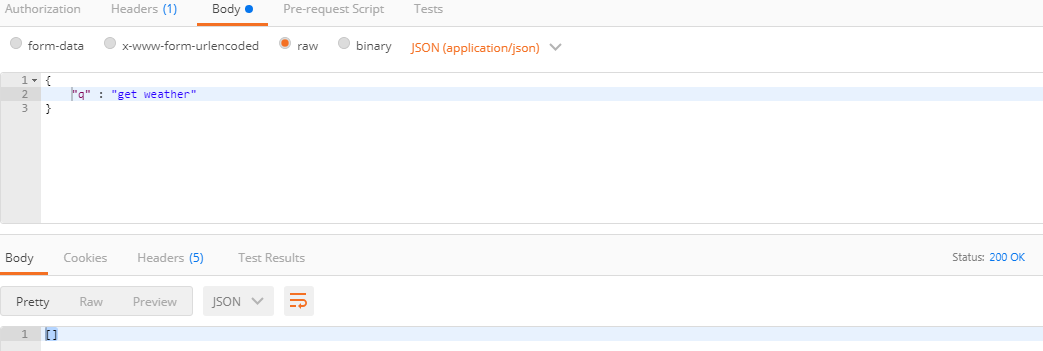
Ive tried this approach, and it just returns an empty list as response. The bot works just fine from the command line. I see the response gets stored in the tracker object..But im getting empty response when im trying to hit it through postman..
Can someone help me out with this..
Here is my error_screenshot in postman:
Pras-commits
on 18 Feb 2019
@PrasannaGaneshu , try the Body with query property,
{
    "query":"12-12-2019"
}
 liangjun-jiang
on 25 Feb 2019
liangjun-jiang
on 25 Feb 2019
Hi All ,
Could you please help me any one I am facing issue on chatbot conversation . My UI in angular and Now i want to access rasa core + nlu as rest from my angular services.
my python complete code as follows:
I am new in python and rasa:
from __future__ import absolute_import
from __future__ import division
from __future__ import print_function
from __future__ import unicode_literals
import logging
import requests
from rasa_core.utils import EndpointConfig
from rasa_core.channels import HttpInputChannel
from rasa_core import utils
from rasa_core.agent import Agent
from rasa_core.interpreter import RasaNLUInterpreter
from rasa_core.channels.channel import UserMessage
from rasa_core.channels.direct import CollectingOutputChannel
from rasa_core.channels.rest import HttpInputComponent
from flask import Blueprint, request, Flask # jsonify,
from flask_cors import CORS, cross_origin
from flask_restful import Resource, Api
from json import dumps
from flask_jsonpify import jsonify
app = Flask(__name__)
api = Api(app)
CORS(app)
logger = logging.getLogger(__name__)
class SimpleWebBot(HttpInputChannel):
"""A simple web bot that listens on a url and responds. """
def blueprint(self, on_new_message):
custom_webhook = Blueprint('custom_webhook', __name__)
    @custom_webhook.route("/status", methods=['GET'])
    def health():
        print(f"1***********{request}**********************")
        return jsonify({"status":"ok pradeep find out status by localhost:5004/chat/status Service"})

    @custom_webhook.route("/", methods=['POST'])
    def receive():
        print(f"2***********{request}**********************")
        payload = request.json
        print(f"3***********************{payload}************************")
        sender_id = payload.get("sender", None)
        text = payload.get("message", None)
        out = CollectingOutputChannel()
        print("11***********************************{out}*********************************")
        on_new_message(UserMessage(text, out, sender_id))
        responses = [m for _, m in out.messages]
        return jsonify(responses)

    return custom_webhook
def run(serve_forever=True):
interpreter = RasaNLUInterpreter("./models/nlu/default/weathernlu")
agent = Agent.load("./models/dialogue", interpreter=interpreter)
input_channel = SimpleWebBot(5004, "/chat")
if serve_forever:
print("6run******SERVER STARTED**************")
agent.handle_channel(HttpInputChannel(5004, "/chat",input_channel))
return agent
if __name__ == '__main__':
utils.configure_colored_logging(loglevel="INFO")
run()
Please be response I stucked.
Thanks Adv.
 pradeepd80
on 25 Jul 2019
pradeepd80
on 25 Jul 2019
I am facing mainly two issue
- In postman is ok. but when I am calling "http://127.0.0.1:5004/chat/status" from angular then showing error:
Access to XMLHttpRequest at 'http://127.0.0.1:5004/chat/status' from origin 'http://localhost:4200' has been blocked by CORS policy: Response to preflight request doesn't pass access control check: No 'Access-Control-Allow-Origin' header is present on the requested resource.
- When i am calling http://127.0.0.1:5004/chat from postman there is showing server error.
Please help.
Thanks in Adv.
pradeepd80
on 25 Jul 2019
Related issues
 nikhilcss97
·
3Comments
nikhilcss97
·
3Comments
 karnigili
·
3Comments
karnigili
·
3Comments
 johnson7788
·
3Comments
johnson7788
·
3Comments
 connorbrinton
·
3Comments
connorbrinton
·
3Comments
 Jasperty
·
3Comments
Jasperty
·
3Comments
Most helpful comment
After you've trainined rasa-NLU and rasa-core, create a file called 'serve.py' in your projects root directory with the following code. then run
python serve.py runthen you should be able to POST a request to the following endpoint:
localhost:5004/chat/using a body like:
{ "sender": "default", "message": "hello"}