Rancher: Integrate Rancher 2.0 with gitlab kubernetes function
Rancher versions:
rancher/server or rancher/rancher: rancher/rancher
Setup details: (single node rancher vs. HA rancher, internal DB vs. external DB)
HA Rancher
Environment Template: (Cattle/Kubernetes/Swarm/Mesos)
Kubernetes
Steps to Reproduce:
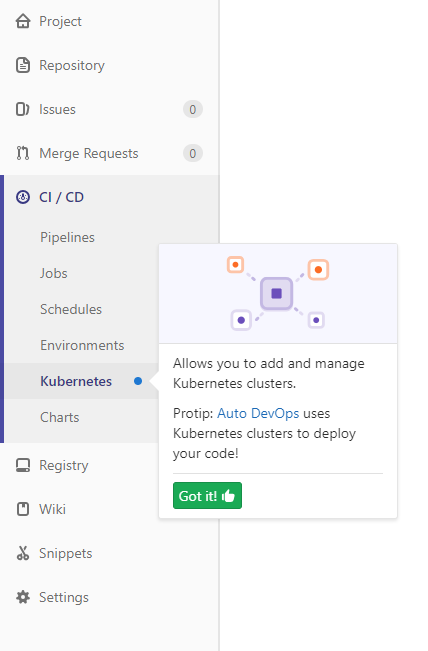
In Gitlab choose CI / CD and then Kubernetes
After choosing to add an existing Kubernetes cluster there are certain fields that Gitlab is asking us to fill in:
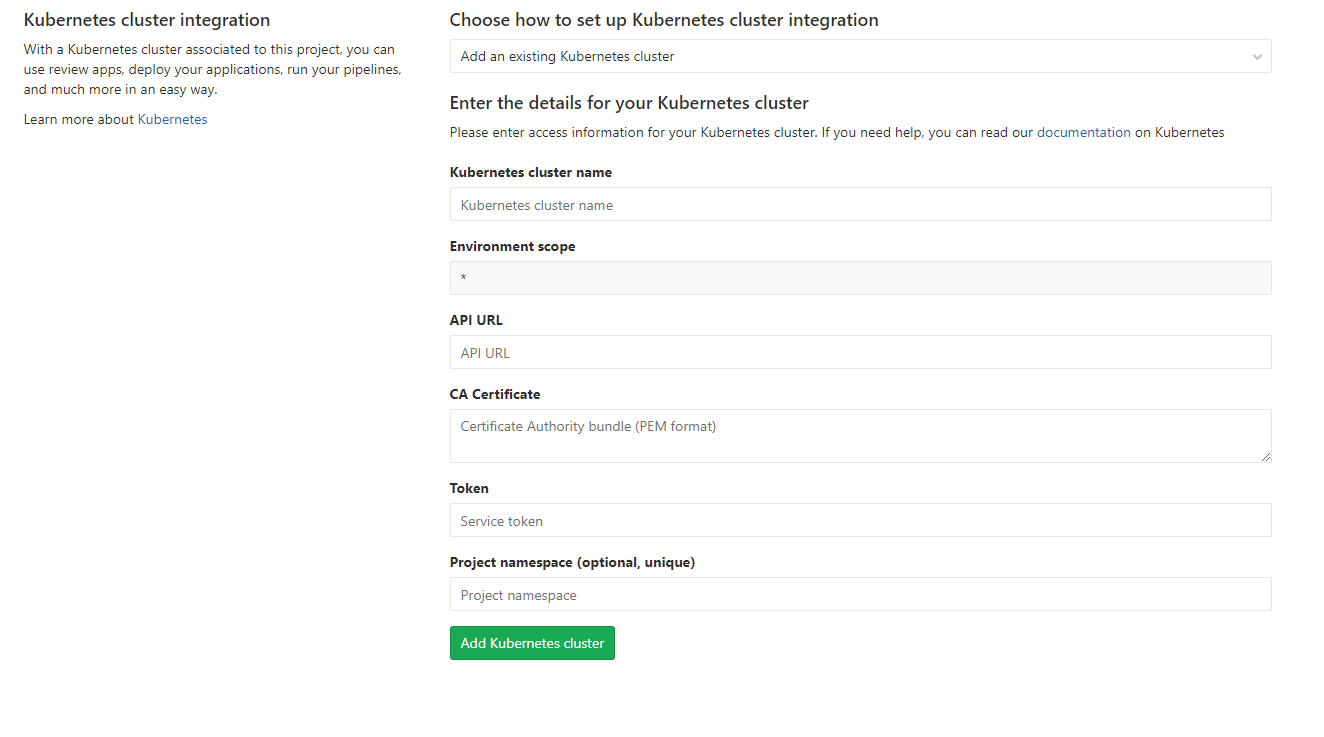
I tried to fill the data from the Kubeconfig File, especially:
CA Certificate with "certificate-authority-data" of the cluster
API URL with server address
Token with user token
Results:
After filling them out that way and I tried certain other combinations the result is still that there is no connection:

Could there be a Guide how to connect Rancher 2.0 with Gitlab Kubernetes?
 dmastag
All 66 comments
Also very interested in this guide/feature! +1
 stefanvangastel
on 28 May 2018
stefanvangastel
on 28 May 2018
The CA certificate needs to be in PEM format. So you need to take the certificate-authority-data from kubeconfig and base64 decode it, like
echo "LS0tLS1CRUdJTiBDRV ..." | base64 -d
wich results in
-----BEGIN CERTIFICATE-----
MIIC7jCCAdag....
-----END CERTIFICATE-----
 tkuther
on 28 May 2018
tkuther
on 28 May 2018
Tried with the CA certificate in PEM format and I get another error :
Kubernetes error: Namespace in version "v1" cannot be handled as a Namespace: no kind "Namespace" is registered for version "clusters/v1"
Any idea ?
 drskullster
on 30 May 2018
drskullster
on 30 May 2018
For some reasons github wasn't sending a notification that this issue has been replied.
Anyway, thanks for @tkuther though I am also getting a new Error now

FYI I am using an external Load Balancer (nginx) using Certificate Signed By A Recognized Certificate Authority (3-node-externalssl-recognizedca.yml)
Is there an additional step I need to do ?
dmastag
on 30 May 2018
I checked the Documentation on Installing RKE again and noticed there is something i haven't done.
https://rancher.com/docs/rancher/v2.x/en/installation/ha-server-install-external-lb/#part-12-remove-default-certificates
But everytime I try to delete and save the cacert, it comes back for some reason.
Is this a separate bug that I need to submit as an issue?
dmastag
on 30 May 2018
I get this error:

Kubernetes error: Namespace in version "v1" cannot be handled as a Namespace: no kind "Namespace" is registered for version "clusters/v1"
I installed rancher with Let's encrypt from the beginning, so I don't have the problem with the valid certificates. Did anybody of you get it running yet?
 JannikZed
on 31 May 2018
JannikZed
on 31 May 2018
See https://github.com/rancher/rancher/issues/13058 & https://github.com/abonas/kubeclient/issues/318
 superseb
on 31 May 2018
superseb
on 31 May 2018
thank you @superseb. So we have to wait I assume.
JannikZed
on 31 May 2018
Hi, I'm stuck in the same problem and being new to Kubernetes, I'm not much sure how to make it work. Could someone please guide me how to add an reverse-proxy server in the existing Kubernetes cluster?
 KartikeyaRokde
on 13 Jun 2018
KartikeyaRokde
on 13 Jun 2018
@KartikeyaRokde I tried using multiple reverse proxy setups on my nginx external load balancer but none are working
My last attempt was https://github.com/rancher/rancher/issues/13058#issuecomment-399004765
dmastag
on 21 Jun 2018
So I finally got it working by combining a couple of Articles
I used the internal IP address at :6443, but since its https I had to extract the PEM certificate.
So I based on this Answer on the gitlab forum got the PEM
https://forum.gitlab.com/t/kubernetes-integration-something-went-wrong-while-installing-helm-tiller/15627/6
I had a problem with the Token and also got the following problem
"Kubernetes error: namespaces "gitlab-managed-apps" is forbidden: User "system:serviceaccount:gitlab-managed-apps:gitlab-sa" cannot get namespaces in the namespace "gitlab-managed-apps"
Luckily I was able to find the following article.
dmastag
on 26 Jun 2018
@dmastag would you mind writing up all the steps you took to get it working in some sort of tutorial?
 mKeRix
on 26 Jun 2018
mKeRix
on 26 Jun 2018
Also, doesn't connecting to the master api server directly bypass the rancher rbac header handling, thus the access rights? With the service account it moves to cluster security, but that's a big selling point of rancher?
 krishofmans
on 26 Jun 2018
krishofmans
on 26 Jun 2018
Actually really nice, that you got it running with a lot of hacking, but I wouldn’t close this issue. This really can’t be the right way of connecting these two services. Bypassing rancher is in my eyes a bad idea and there might be many downsides of it in a later step ..
From: Kris notifications@github.com
Sent: Tuesday, June 26, 2018 4:53:52 PM
To: rancher/rancher
Cc: JZinkl; Comment
Subject: Re: [rancher/rancher] Integrate Rancher 2.0 with gitlab kubernetes function (#13736)
Also, doesn't connecting to the master api server directly bypass the rancher rbac header handling, thus the access rights? With the service account it moves to cluster security, but that's a big selling point of rancher?
—
You are receiving this because you commented.
Reply to this email directly, view it on GitHubhttps://github.com/rancher/rancher/issues/13736#issuecomment-400339032, or mute the threadhttps://github.com/notifications/unsubscribe-auth/AHLXHsO_OUoYSDPgv7a-w3mgiBJmBKesks5uAksAgaJpZM4UOxhn.
JannikZed
on 26 Jun 2018
I am having the same issues with my Rancher setup, I am not able to register the cluster... I only find outdated documentation. :(
 tamasgal
on 27 Jun 2018
tamasgal
on 27 Jun 2018
I got it to the point where I receive the Kubernetes error: Namespace in version "v1" cannot be handled as a Namespace: no kind "Namespace" is registered for version "clusters/v1" and now I probably have to give up, unless I bypass Rancher with a handful of hacks...
tamasgal
on 27 Jun 2018
@JannikZed True
So I am Reopening this
dmastag
on 27 Jun 2018
Managed to get it working following the same hacks as @dmastag
Had to shot RBAC down...
If anyone try, there's currently a bug with v11 of Gitlab, with SSL and the current version of Alpine (3.6).
If you have an error like can't fetch helm charts from one of google website, here's the trick:
On your gitlab host
perl -i -pe s/alpine:3.6/alpine:3.7/ /opt/gitlab/embedded/service/gitlab-rails/lib/gitlab/kubernetes/helm/pod.rb
perl -i -pe "s/ca-certificates openssl/ca-certificates openssl wget/" /opt/gitlab/embedded/service/gitlab-rails/lib/gitlab/kubernetes/helm/base_command.rb
Then gitlab-ctl restart may have you go good until they merge this into 11.1
More infos here : https://gitlab.com/gitlab-org/gitlab-ce/merge_requests/20471#note_86687238
 r-mach
on 10 Jul 2018
r-mach
on 10 Jul 2018
I get the following error when trying to install Helm Tiller (gitlab.com):
Something went wrong while installing Helm Tiller

ERROR: http://dl-cdn.alpinelinux.org/alpine/v3.6/main: DNS lookup error WARNING: Ignoring APKINDEX.84815163.tar.gz: No such file or directory ERROR: http://dl-cdn.alpinelinux.org/alpine/v3.6/community: DNS lookup error WARNING: Ignoring APKINDEX.24d64ab1.tar.gz: No such file or directory ERROR: http://mirror.clarkson.edu/alpine/v3.6/main: DNS lookup error WARNING: Ignoring APKINDEX.490b721e.tar.gz: No such file or directory ERROR: http://mirror1.hs-esslingen.de/pub/Mirrors/alpine/v3.6/main: DNS lookup error WARNING: Ignoring APKINDEX.44c98ace.tar.gz: No such file or directory ERROR: unsatisfiable constraints:
EDIT: Resolved this. Was a bad domain in the search list of my /etc/resolv.conf file on my cluster host. Caused dns lookups to fail from the alpine container Helm uses when installing.
 colinwilson
on 21 Jul 2018
colinwilson
on 21 Jul 2018
Any updates on this?
 WoLfulus
on 18 Aug 2018
WoLfulus
on 18 Aug 2018
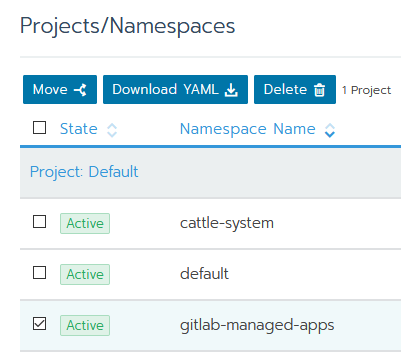
If you have DNS issue or some thing like rancher ERROR: http://dl-cdn.alpinelinux.org/alpine/v3.6/main: temporary error
In Rancher go to Projects/Namespaces and just move namespace gitlab-managed-apps to Default Project.
 ru-it-specialist
on 25 Aug 2018
ru-it-specialist
on 25 Aug 2018
Take a look at this guide: https://rancher.com/blog/2018/2018-08-07-cicd-pipeline-k8s-autodevops-rancher-and-gitlab/
 PhilippHeuer
on 10 Sep 2018
PhilippHeuer
on 10 Sep 2018
Thanks for the report.
Please check https://github.com/rancher/rancher/issues/13736#issuecomment-419906942 and https://github.com/rancher/rancher/issues/13736#issuecomment-393515935
You can find the guild via https://rancher.com/blog/2018/2018-08-07-cicd-pipeline-k8s-autodevops-rancher-and-gitlab/
Please let us know in a comment if you can still reproduce the issue, and we'll reopen it
 loganhz
on 21 Oct 2018
loganhz
on 21 Oct 2018
Hey, I'd like to thanks Chris Urwin for writing this guide on rancher.com blog. This solution is quite ok. I was able to deploy my application to environments like review, staging and production. But it has few "places for improvement".
Author suggest to put deployments inside gitlab-managed-apps namespace. I think it should be reserved only for real GItlab Managed Apps like Tiller, Prometheus and Gitlab Runner.
Also this solution doesn't work with those real Gitlab Managed Apps. When I added configuration from http://x.co/rm082018 I wasn't able to install them from Gitlab Cluster settings page. I contacted gitlab support, and they send me this link - https://docs.gitlab.com/ee/user/project/clusters/#role-based-access-control-rbac . I found out that when GKE is created there are created three things - ServiceAccount, ClusterRoleBinding and Secret. I created my own configuration with three of those as it's in table from Gitlab Docs.
apiVersion: v1
kind: ServiceAccount
metadata:
  name: gitlab
  namespace: default
---
kind: ClusterRoleBinding
apiVersion: rbac.authorization.k8s.io/v1beta1
metadata:
  name: gitlab-admin
  namespace: default
subjects:
  - kind: ServiceAccount
    name: gitlab
    namespace: default
roleRef:
  kind: ClusterRole
  name: cluster-admin
  apiGroup: rbac.authorization.k8s.io
---
apiVersion: v1
kind: Secret
metadata:
  name: gitlab-token
  namespace: default
  annotations:
    kubernetes.io/service-account.name: gitlab
type: kubernetes.io/service-account-token
Thanks to this configuration I was able to install Gitlab Managed Apps. Unfortunately I wasn't able to deploy application to environments. I'm not a Kubernetes genius so I applied configuration from Rancher blog guide, but changed namespace to my-project-name. Thanks to that (without changing already created token used for Gitlab Managed Apps ) I was able to deploy applications.
Conclusion - I think that someone with better knowledge of Kubernetes should merge those two configurations and it should work like a charm :sunglasses:
There is also some Ingress issue, but I think it's not related to Rancher. By default clusters can have L7 Nginx Ingress and Gitlab is trying to install L4 and it's not supported by Rancher.
You can also check my comment here - https://gitlab.com/gitlab-org/gitlab-ce/issues/45939#note_110193977 It's also connected with Gitlab <-> Rancher issues. There is even a link to configuration from Rancher Blog guide.
 marcinmaruszewski
on 22 Oct 2018
marcinmaruszewski
on 22 Oct 2018
I am trying to get this running with our self hosted GitLab installation but I get a general error and no idea where to get better logs. I followed the instructions from https://rancher.com/blog/2018/2018-08-07-cicd-pipeline-k8s-autodevops-rancher-and-gitlab/ but I am not sure about the API key. I got one from the Kubernets cluster config and tried a new API key which I generated over the Rancher 2.0 web interface but I always get this:

Any ideas?
tamasgal
on 2 Nov 2018
@tamasgal , instructions you mentioned are working only for application deployment using Auto DevOps.
Gitlab Managed Apps like Helm Tiller, Ingress, Gitlab Runner work differently. When you are trying to install Helm Tiller Gitlab is trying to create two resources - tiller ServiceAccount and tiller-admin ClusterRoleBinding. ServiceAccount created from configuration that is mentioned on blog post doesn't have enough permission to do it so there is an error.
Since my last comment I was trying to check different approach. and I created this configuration:
apiVersion: v1
kind: ServiceAccount
metadata:
  name: gitlab
  namespace: default
---
kind: ClusterRoleBinding
apiVersion: rbac.authorization.k8s.io/v1beta1
metadata:
  name: gitlab-admin
  namespace: default
subjects:
  - kind: Group
    name: system:serviceaccounts
    apiGroup: rbac.authorization.k8s.io
roleRef:
  kind: ClusterRole
  name: cluster-admin
  apiGroup: rbac.authorization.k8s.io
---
apiVersion: v1
kind: Secret
metadata:
  name: gitlab-token
  namespace: default
  annotations:
    kubernetes.io/service-account.name: gitlab
type: kubernetes.io/service-account-token
When I used it I was able to install Gitlab Managed Apps and deploy application. You can also check this issue on Gitlab - https://gitlab.com/gitlab-org/gitlab-ce/issues/45939
I also think that API keys from Rancher UI won't work in this case. They are intended to use when you are trying to manage your cluster through Rancher API, not created by Rancher Kubernetes Cluster.
marcinmaruszewski
on 2 Nov 2018
Thanks @marcinmaruszewski, I also tried that config but no success.
Well, AutoDevOps... to be honest, I thought it’s the same. The final goal is using GitLab and Rancher to do continuous integration.
Currently we use Jenkins but the community edition of GitLab (self hosted) is very limited wrt to Jenkins.
tamasgal
on 2 Nov 2018
@tamasgal, that's a pity. I tried this configuration many times and it worked for me. Please try to reproduce my steps:
- Create Kubernetes Cluster inside Rancher.
- Use bash script from blog post to get kubeconfig (get_kubeconfig_custom_cluster_rancher2.sh).
- Don't apply configuration from http://x.co/rm082018 but that I mentioned above. You can find online version here https://gitlab.com/snippets/1767299/raw
- Get PEM certificate and gitlab-token.
- Create Cluster configuration inside Gitlab.
5.1 Provide url to Cluster, not Rancher API.
5.2 Be sure that you are using Gitlab 11.4.x because you need to enable RBAC.
5.3 Leave blank namespace field. Gitlab will create namespace only for your app like my-github-project-123 (where my-github-project is name, and 123 is project ID). - Try to install Helm Tiller, Runner, Prometheus (you will need to create persistent volume) and skip Ingress (Gitlab L4 Ingress doesn't work on Clusters created with Rancher).
Good luck!
marcinmaruszewski
on 2 Nov 2018
Many thanks @marcinmaruszewski I am now trying.
In step 3, do I need to get rid of the old configurations? I am a bit confused... does this only apply for a single cluster? (Sry for the dumb question, it’s a bit voodoo for me, still)
tamasgal
on 2 Nov 2018
No problem @tamasgal . I hope that someone smarter than us will gather it together and make it work with one click ;)
My configuration create different resources, tokens, service account etc. so I think It's gonna be ok. But I'd rather create a new cluster and do it from scratch.
marcinmaruszewski
on 2 Nov 2018
Ok i did, many thanks so far ;)
Well, it was the first time the “Install” Button turned into “installing...” (before it just turned grey for like 10 sec and then error), however, it still shows “Kubernetes error” 😔
tamasgal
on 2 Nov 2018
Maybe I am doing something wrong during the configuration application. Just to be sure: I am running that command (with your config @marcinmaruszewski ) on the rancher/rancher docker instance... that’s nothing cluster specific 🤨 I think there is my mistake? But how to apply that to the specific cluster?
tamasgal
on 2 Nov 2018
@tamasgal , this configuration should be applied to specific cluster. In API URL there is link to bash script.
Download the content of get_kubeconfig_custom_cluster_rancher2.sh from https://gist.github.com/superseb/f6cd637a7ad556124132ca39961789a4
You have to run it on machine where rancher/rancher is running. When you run it there will be created kubeconfig file. In order to apply my configuration you need to run kubectl --kubeconfig kubeconfig -f https://gitlab.com/snippets/1767299/raw.
There is also shorter way. If you don't have kubectl, then you can go to your Rancher, select your cluster, click Lunch kubectl and run this command kubectl apply -f https://gitlab.com/snippets/1767299/raw.
marcinmaruszewski
on 2 Nov 2018
OK, still fighting...
For the sake of completeness:
- I created a new cluster called
testcluster2 - Executed the bash script to create the
kubeconfigfile. - On the Rancher UI, I entered the
kubectloftestcluster2and launchedkubectl apply -f https://gitlab.com/snippets/1767299/raw(this showed...secret gitlab-token created) - Copied the token value from
kubectl describe secrets/gitlab-token - Create the PEM string (converted with
base64) - Got the URL (not the API URL, but the one with the 6443 port)
Pasted everything into GitLab and then Kubernetes error. again. :(
I added a persistent storage, but not sure if it's working. Is this needed for this?
tamasgal
on 3 Nov 2018
@tamasgal , in order to get token created from my configuration you have to run
kubectl describe secret gitlab-token
marcinmaruszewski
on 3 Nov 2018
Yep, I did kubectl describe secrets/gitlab-token, which also showed a token (sorry, I edited afterwards). I am now trying again from scratch... Btw. it's a bit weird that when I create a new cluster, the old one does not work anymore (This cluster is currently Unavailable; areas that interact directly with it will not be available until the API is ready.)
Anyways, still no success yet, so I guess I am yet not replicating your workflow somehow, but I don't know where :-/
tamasgal
on 3 Nov 2018
I am wondering if this is a firewall issue... However, I can access telnet 131.x.x.x 6443 from outside :-?
tamasgal
on 3 Nov 2018
I am really puzzled. I went through the process several times, checked the firewall configuration but I could not find any suspicious setting. It’s really annoying that the error message is so generic...
One last question @marcinmaruszewski is there maybe something special about the cluster creation? I just create a new cluster in Rancher (default member nodes and cluster options), enable all three node roles and execute the docker command on the server. After that I just wait until the cluster is active (it displays one node). Is there maybe something I forgot to set up?
tamasgal
on 3 Nov 2018
@tamasgal I did nothing special when I created my cluster. I followed instructions from Rancher blog except applying their configuration as I mentioned earlier.
Maybe try to add Kubernetes integration in Gitlab and then try to deploy simple application to Cluster using Gitlab Pipelines (you need to have some Gitlab Runner to do it). If deploy job will fail there will be more information about issues.
marcinmaruszewski
on 3 Nov 2018
Thanks @marcinmaruszewski I will try to set that up. Have to search for a good tutorial though ;)
tamasgal
on 5 Nov 2018
Same issue here too, following the guide results in Helm error.
Tried to use @marcinmaruszewski comments, but maybe the env is already tainted.
@loghanz can we have it reopened?
Thanks for your efforts!
 mihai-satmarean
on 23 Nov 2018
mihai-satmarean
on 23 Nov 2018
Same issue here too, following the guide results in Helm error.
Tried to use @marcinmaruszewski comments, but maybe the env is already tainted.
@loghanz can we have it reopened?
Thanks for your efforts!
mihai-satmarean
on 23 Nov 2018
Same issue here too, following the guide results in Helm error.
Tried to use @marcinmaruszewski comments, but maybe the env is already tainted.
@loghanz can we have it reopened?
Thanks for your efforts!
mihai-satmarean
on 23 Nov 2018
Same issue here too, following the guide results in Helm error.
Tried to use @marcinmaruszewski comments, but maybe the env is already tainted.
@loghanz can we have it reopened?
Thanks for your efforts!
mihai-satmarean
on 23 Nov 2018
Same issue here too, following the guide results in Helm error.
Tried to use @marcinmaruszewski comments, but maybe the env is already tainted.
@loghanz can we have it reopened?
Thanks for your efforts!
mihai-satmarean
on 23 Nov 2018
Same issue here too, following the guide results in Helm error.
Tried to use @marcinmaruszewski comments, but maybe the env is already tainted.
@loghanz can we have it reopened?
Thanks for your efforts!
mihai-satmarean
on 23 Nov 2018
Same issue here too, following the guide results in Helm error.
Tried to use @marcinmaruszewski comments, but maybe the env is already tainted.
@loghanz can we have it reopened?
Thanks for your efforts!
mihai-satmarean
on 23 Nov 2018
Edit: I was wrong. There was something wrong with my cluster. It's working the same way on 11.5 like it was working on 11.4.
There is a new Gitlab release - 11.5. In this release, there are some changes related to RBAC feature.
My Kubernetes configuration doesn't work anymore, because I get "Kubernetes error" while I'm trying to install Helm TIller on new Cluster. I'll need to investigate it.
https://about.gitlab.com/2018/11/22/gitlab-11-5-released/#rbac-creates-service-account-restricted-to-projects-namespace
https://docs.gitlab.com/ee/user/project/clusters/#role-based-access-control-rbac
marcinmaruszewski
on 23 Nov 2018
Good to know that i'm not the only one having problems here. Tried integrating a fresh Rancher k8s Cluster within a Gitlab.com Project without success. All i get is the same simple
Something went wrong while installing Helm Tiller

 - Kubernetes error.
error as mentioned above.
 nevotheless
on 26 Nov 2018
nevotheless
on 26 Nov 2018
Hello,
I also have the same problem when importing an existing Rancher cluster.
I used the command on the Rancher tutorial to create the different services:
kubectl apply -f http://x.co/rm082018
But I get the same error when installing Helm.
 aborderon
on 26 Nov 2018
aborderon
on 26 Nov 2018
I'm also failing to integrate with an existing Rancher cluster - external load balanced by nginx as per the instructions.
I've tried following Chris Urwin's Rancher blog post, as well as @marcinmaruszewski's instructions above... The error I get is:
Something went wrong while installing Helm Tiller
  * Can't start installation process.
I've tried using 2 different kubeconfig files unsuccessfully:
- the kubeconfig generated by @superseb's gist to connect to the cluster
- the Rancher dashboard default kubconfig file
I haven't tried using a self-generated Rancher API key, but even if this worked, is this the best solution?
Looking at the GitLab production.log shows the error:
Can't start installation process: Errno::EHOSTUNREACH Failed to open TCP connection to xxx.xxx.xxx.xxx:6443 (No route to host - connect(2) for "xxx.xxx.xxx.xxx" port 6443)
It sounds like Rancher custom clusters are the common theme (connecting to a GKE cluster, whether via creating one in GitLab or one in Rancher sounds like it works), but maybe it's not a Rancher issue at all.. see @dirkd's commentary about GitLab's use of kubeclient. I hope I don't have to do some fancy proxy header wrangling to get this to work!
For the record, some other pages and issues I've consulted:
- GitLab #46969, or just take a look at the issues in the GitLab k8s integration epic
- https://forum.gitlab.com/t/kubernetes-integration-something-went-wrong-while-installing-helm-tiller/15627/6
- GitLab "connecting to k8s" help docs
The kicker: https://gitlab.com/gitlab-org/gitlab-ce/issues/45796
 kphunter
on 27 Nov 2018
kphunter
on 27 Nov 2018
So after scanning the cluster with nmap -p 6443 <host> it turns out it was a firewall issue. Opening that port on the API server allowed the Helm installation to proceed.
kphunter
on 27 Nov 2018
After some tests, I add a new cluster role in addition to kubectl apply -f http://x.co/rm082018 :
kubectl create clusterrolebinding permissive-binding --clusterrole=cluster-admin --user=admin --user=kubelet --group=system:serviceaccounts
And the Kubernetes cluster is imported with RBAC. I was then able to install Helm and Gitlab runner.
But I'm not sure that's the right solution ...
aborderon
on 27 Nov 2018
Hello, I have this problem too. Is this a GitLab or RKE Rancher problem? Solutions above dosn't work for me
 GreyXor
on 4 Feb 2019
GreyXor
on 4 Feb 2019
@GreyXor if you follow the steps from https://rancher.com/blog/2018/2018-08-07-cicd-pipeline-k8s-autodevops-rancher-and-gitlab/ and you get direct access credentials you should be able to talk to the cluster from gitlab and install all the gitlab managed apps.
krishofmans
on 4 Feb 2019
@krishofmans Thanks for link but i have already follow this tutorial. I just get an error in gitlab.com. An error without so much description about kind of error
I have this error too : https://github.com/rancher/rancher/issues/13736#issuecomment-435484139
GreyXor
on 4 Feb 2019
As of the new releases of GitLab (introducing the RBAC feature), a part of this tutorial is outdated.
You do not need the "Token" part anymore, but instead check the "enable RBAC" feature directly on GitLab.
It is way more safe, and easier (I've seen many tricks, like shutting down the whole access control system...).
Here's a more recent one from a working cluster I've set up 10 minutes ago:
Follow the outdated tutorial https://rancher.com/blog/2018/2018-08-07-cicd-pipeline-k8s-autodevops-rancher-and-gitlab/
Then stop after the "CA Certificate" step, and instead of creating the service account yourself by following the "Token" part, follow the GitLab doc here : https://docs.gitlab.com/ce/user/project/clusters/
(Simply execute the "Adding an existing Kubernetes cluster" part).Retrieve the token as told on the GitLab doc, and use it. (Let GitLab chose the namespaces, it's a more convenient option... So leave empty.) Don't forget to enable the RBAC feature.
Deploy Tiller, Ingress, etc, ... It works.
But this issue still deserves to be there, because:
- We need a way to bypass the Rancher v2 API proxy, and directly access the real K8S APIs.
- Ingress with Rancher and GitLab are in a conflictual state, as GitLab tries to deploy a L4 LB which remains in pending state (because most of the time, no one have that L4 LB, and Rancher uses a L7 one).
Basically, when an app is deployed from GitLab to Rancher, GitLab deploy a reverse proxy using... Rancher's ingress controller (instead of the one he previously deployed!). So, everything works fine, but that is not normal. GitLab or Rancher should allow us to hook to whatever ingress controller we wants to (And in my opinion, this is GitLab's fault, not Rancher's).
The only thing that won't work for now is Prometheus NGINX metrics, as the Rancher's Ingress controller is used instead of the GitLab deployed one, and Prometheus is fetching metrics from the unused GitLab deployed ingress controller...
(Hello @chrisurwin could you take a look at this and maybe update your tutorial accordingly ?)
r-mach
on 4 Feb 2019
- We need a way to bypass the Rancher v2 API proxy, and directly access the real K8S APIs.
- Ingress with Rancher and GitLab are in a conflictual state, as GitLab tries to deploy a L4 LB which remains in pending state (because most of the time, no one have that L4 LB, and Rancher uses a L7 one).
To add to your great response, if you are like me and using rancher on a bare metal server you can use MetalLB to get the L4 working.
 morsok
on 5 Feb 2019
morsok
on 5 Feb 2019
@morsok what is this MetalDB? Can you send some link with more information? I can't find anything on the web.
marcinmaruszewski
on 5 Feb 2019
Oups sorry MetalLB : https://metallb.universe.tf/
morsok
on 5 Feb 2019
@r-mach Thanks for reply. I have followed your tutorial but i get again Something went wrong while installing Helm Tiller
Kubernetes error:
GreyXor
on 5 Feb 2019
@r-mach Almost got it on my side with your instructions. I've got the Helm Tiller (tiller-deploy) pod deployed with success. However, I'm stuck at trying to get the Gitlab Runner installed. When I click on install, I see the pod "install-runner" starting. I've got 29 errors saying:
Retrying (28)...
Client: &version.Version{SemVer:"v2.11.0", GitCommit:"2e55dbe1fdb5fdb96b75ff144a339489417b146b", GitTreeState:"clean"}
Error: cannot connect to Tiller
Followed by a 30th one that seems to says that it worked, but still end with another error:
+ echo 'Retrying (30)...'
+ helm repo add runner https://charts.gitlab.io
Retrying (30)...
"runner" has been added to your repositories
+ helm repo update
Hang tight while we grab the latest from your chart repositories...
...Skip local chart repository
...Successfully got an update from the "runner" chart repository
...Successfully got an update from the "stable" chart repository
Update Complete. ⎈ Happy Helming!⎈
+ helm install runner/gitlab-runner --name runner --tls --tls-ca-cert /data/helm/runner/config/ca.pem --tls-cert /data/helm/runner/config/cert.pem --tls-key /data/helm/runner/config/key.pem --version 0.1.43 --set 'rbac.create=true,rbac.enabled=true' --namespace gitlab-managed-apps -f /data/helm/runner/config/values.yaml
Error: remote error: tls: bad certificate
I'm now totally lost in making Gitlab connect with a local Rancher.
 sharky98
on 8 Feb 2019
sharky98
on 8 Feb 2019
Here's an updated tutorial: https://rancher.com/blog/2019/connecting-gitlab-autodevops-authorized-cluster-endpoints/
Unfortunately, I still get stuck because of the L4/L7 issue... @twk3... maybe you can help??
kphunter
on 25 Oct 2019
I'm using https://metallb.universe.tf/ to work around l4 issues. It might not suit all cases but definitely made things more convenient for me.
krishofmans
on 25 Oct 2019
@krishofmans, could you please provide an example of how to configure Metal LB to work with GitLab Auto Deploy? I'm stuck in this part.
 bruno-lopes
on 7 Nov 2019
bruno-lopes
on 7 Nov 2019
More about CI integration:
For bare-metalal installation use MetalLB: https://metallb.universe.tf/installation/ https://metallb.universe.tf/configuration/ to get External IP for ingress-nginx-controller.
You can use helm: https://github.com/bitnami/charts/tree/master/bitnami/metallb then you have to change namespace and name:
apiVersion: v1
kind: ConfigMap
metadata:
  namespace: default
  name: metallb
data:
  config: |
      address-pools:
      - addresses:
        - 192.168.1.100-192.168.88.110
        name: default
        protocol: layer2
MetalLB Helm chart, installed from Rancher Apps - not working.
More about Load Balancing support: https://rancher.com/docs/rancher/v2.x/en/k8s-in-rancher/load-balancers-and-ingress/load-balancers/
https://kubernetes.github.io/ingress-nginx/deploy/baremetal/
For GitLab Prometheus you need install Persistent Volume, for example NFS Provisioner from Apps: rancher.domain/g/apps/catalog/cattle-global-data:library-nfs-provisioner
More: https://rancher.com/docs/rancher/v2.x/en/cluster-admin/volumes-and-storage/examples/nfs/ & https://github.com/kubernetes-retired/external-storage/tree/master/nfs
Rancher + Self-hosted GitLab CI integration: https://blog.kubernauts.io/ci-cd-with-rancher-pipelines-and-self-hosted-gitlab-b17248294fda
 CSRedRat
on 2 Oct 2020
CSRedRat
on 2 Oct 2020
Related issues
 deadbeef84
·
55Comments
deadbeef84
·
55Comments
 gary-skwirrel
·
47Comments
gary-skwirrel
·
47Comments
 ecliptik
·
71Comments
ecliptik
·
71Comments
 dmzaytsev
·
63Comments
dmzaytsev
·
63Comments
 ciokan
·
102Comments
ciokan
·
102Comments
Most helpful comment
Any updates on this?