Rainloop-webmail: [BUG(?)] Content-security-policy header breaks Google Viewer integration
RainLoop version, browser, OS:
Rainloop version 1.15.0 running in docker
Browser: Chrome
OS: Windows 10
Expected behavior and actual behavior:
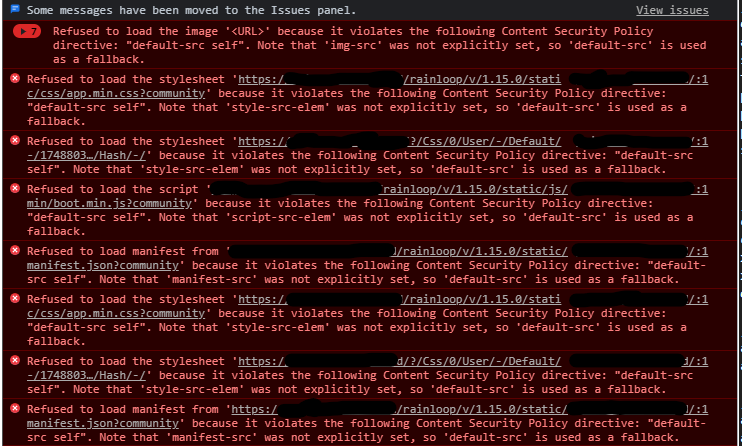
After I enabled the google file viewer through admin panel, the viewer shows error related to "Content-Security-Policy"
Some research showed, that the root of the problem is in the ServiceActions.php at line 509
https://github.com/RainLoop/rainloop-webmail/blob/20e0c1417d4ac94a6452af499296d5f4cd5ff50e/rainloop/v/0.0.0/app/libraries/RainLoop/ServiceActions.php
    public function ServiceRaw()
    {
        .
                .  #truncated
                .
                $sMethodName = 'Raw'.$sAction;
                if (\method_exists($this->oActions, $sMethodName))
                {
                    @\header('X-Raw-Action: '.$sMethodName, true);
                    @\header('Content-Security-Policy: script-src \'none\'; child-src \'none\'', true); #this line

                    $sRawError = '';
                    $this->oActions->SetActionParams(array(
                        'RawKey' => empty($this->aPaths[3]) ? '' : $this->aPaths[3],
                        'Params' => $this->aPaths
                    ), $sMethodName);

                    if (!\call_user_func(array($this->oActions, $sMethodName)))
                    {
                        $sRawError = 'False result';
                    }
                    else
                    {
                        $sRawError = '';
                    }
                }
        .
                . #truncated
                .
    }
I am not an expert at php or webserver policies, thats why I am asking wheter it is the correct behavior, or am I missed something when I configured the integration with Google.
Steps to reproduce the problem:
- Enable Google Viewer integration on the admin panel
- try to open a word/excel/ppt attachment
- browser will not load it's content because of Content-security-policy (cant reach docs.google.com)
Logs or screenshots:
Chrome developer tools shows error while Rainloop try to open the docx attachment:

Rainloop logs:
[19-Mar-2021 22:34:10] WARNING: [pool default] child 61 said into stderr: "[19-Mar-2021 22:34:10 UTC] PHP Warning:  RainLoop\Actions::RainLoop\{closure}(): Argument #1 ($sUid) must be passed by reference, value given in /rainloop/rainloop/v/1.15.0/app/libraries/RainLoop/Actions.php on line 5725"


[19-Mar-2021 22:34:10] WARNING: [pool default] child 61 said into stderr: "[19-Mar-2021 22:34:10 UTC] PHP Warning:  RainLoop\Actions::RainLoop\{closure}(): Argument #1 ($sUid) must be passed by reference, value given in /rainloop/rainloop/v/1.15.0/app/libraries/RainLoop/Actions.php on line 5725"


[19-Mar-2021 22:34:10] WARNING: [pool default] child 61 said into stderr: "[19-Mar-2021 22:34:10 UTC] PHP Warning:  RainLoop\Actions::RainLoop\{closure}(): Argument #1 ($sUid) must be passed by reference, value given in /rainloop/rainloop/v/1.15.0/app/libraries/RainLoop/Actions.php on line 5725"
I am kinda confused about this behavior, because I dont think these headers are there without a function nor to break File viewer functionality...
Can anyone confirm this problem?
 fdisamuel
All 8 comments
What happens when you set content_security_policy in the /_data_/_default_/configs/application.ini?
Example:
default-src 'self'; script-src 'self' 'unsafe-inline' 'unsafe-eval'; img-src 'self' data: https: http:; style-src 'self' 'unsafe-inline'
img-src 'self' = disallow remote images (you must enable proxy in admin settings)
style-src 'self' = disallow emails with <link rel="stylesheet"
For frames read: https://developer.mozilla.org/en-US/docs/Web/HTTP/Headers/Content-Security-Policy/frame-src
 the-djmaze
on 22 Mar 2021
the-djmaze
on 22 Mar 2021
@the-djmaze I inserted your line :
; Access settings
allow_admin_panel = Off
allow_two_factor_auth = On
force_two_factor_auth = Off
hide_x_mailer_header = Off
admin_panel_host = ""
admin_panel_key = "admin"
content_security_policy = default-src 'self'; script-src 'self' 'unsafe-inline' 'unsafe-eval'; img-src 'self' data: https: http:; style-src 'self' 'unsafe-inline'
core_install_access_domain = ""
Now my weblogin page doesn't even load...
fdisamuel
on 22 Mar 2021
@fdisamuel you need the double quotes around it.
And docs.google.com in the frame access
content_security_policy = "default-src 'self'; script-src 'self' 'unsafe-inline' 'unsafe-eval'; img-src 'self' data: https: http:; style-src 'self' 'unsafe-inline'; frame-src https://docs.google.com"
Okay I added double quotes and frame-src docs.google.com so it is working now (e.g. video background on login screen has been disabled by policy), but it seems the global policy is being overwritten by the header at ServiceActions.php, because it is still not loading from docs.google.com
fdisamuel
on 22 Mar 2021
I found a workaround:
I added docs.google.com at ServiceActions.php: ServiceRaw() so it looks like this:
@\header('Content-Security-Policy: script-src \'none\'; child-src \'none\' docs.google.com', true);
This way it loads the document-viewer.
I guess it would be better not to tweak settings/code in the container, but I have no better idea what to do in order to make this working.. Setting a Global content-security-policy doesnt seem to have an effect on this.
fdisamuel
on 22 Mar 2021
I guess it would be better not to tweak settings/code in the container, but I have no better idea what to do in order to make this working.
You could create a PR for this?
the-djmaze
on 23 Mar 2021
Good idea! Although I never done a Pull Request before, i will try my best and make one.
fdisamuel
on 23 Mar 2021
 RainLoop
on 11 May 2021
RainLoop
on 11 May 2021
Related issues
 loxK
·
3Comments
loxK
·
3Comments
 o---
·
4Comments
o---
·
4Comments
 raszkiewicz
·
3Comments
raszkiewicz
·
3Comments
 PeopleInside
·
3Comments
PeopleInside
·
3Comments
 HLFH
·
3Comments
HLFH
·
3Comments