Hi.
I don't think this is a "bug" or an "issue", but I didn't find a better place to ask, so...
How do you handle Asian movies that has titles written with ideograms? My SO is capable to handle them, no problem, but of course the indexers doesn't find them, because almost no file is written like this on torrent sites or usenet...
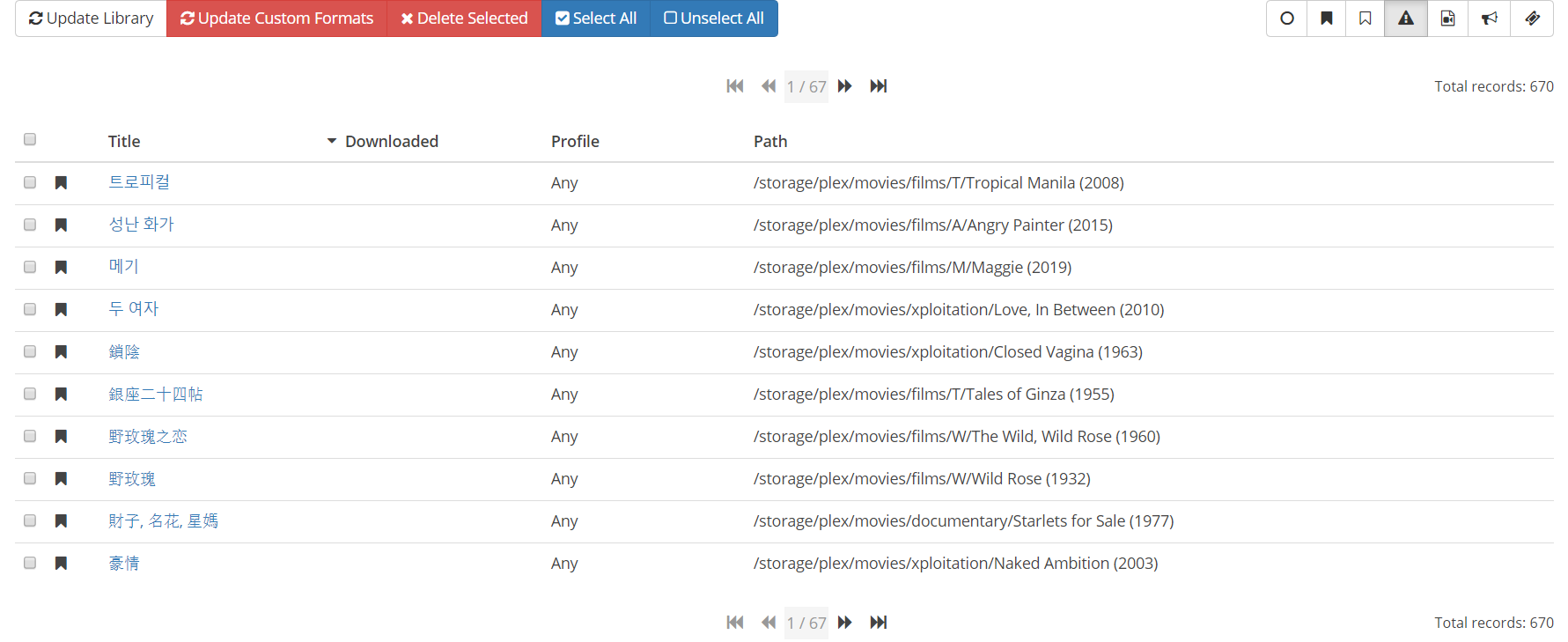
How do you handle this? Is there any configuration about it?
Thanks.
Regards.
 Zamana
All 23 comments
Same for me:
I have a movie downloaded https://www.themoviedb.org/movie/8697
It was placed in correct folder Who am I
But file name was 我是誰 1998 WEBDLRip 1080p.mkv
 Lonli-Lokli
on 24 Jan 2020
Lonli-Lokli
on 24 Jan 2020
I just noticed this myself, as I've had "Three... Extremes" for awhile, but recently it changed. I haven't dug into it yet to see if this was a change on TMDB's side with how the data is presented or a change in Radarr.
https://www.themoviedb.org/movie/33908-three-monster?language=en-US
 iammanbeard
on 24 Jan 2020
iammanbeard
on 24 Jan 2020
Well, I guess this is a bug, and not only regarding asian titles, but one that affects "foreign" movies with original and American titles in general. Example...
Try to look for the movie "Boredom" from 1998. Its original title is "L'ennui". If you add this movie, when you click in the "Already exists" button, you got a 404 page:
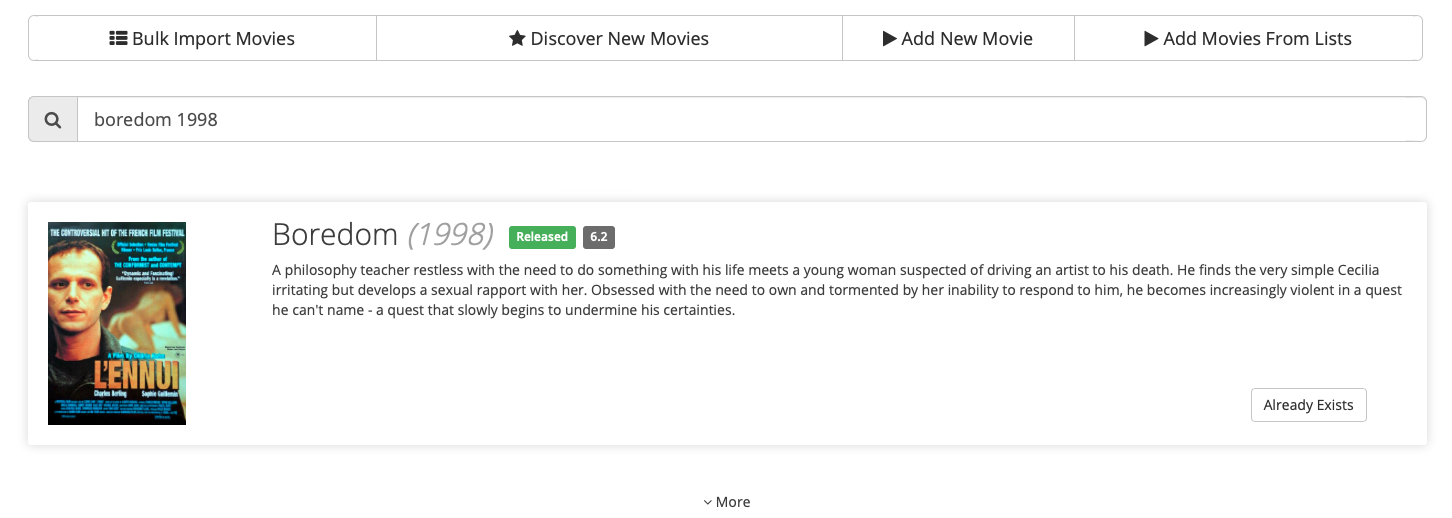

The folder was created as "Boredom (1998)" on my filesystem, but I guess that Radarr is looking for the original title...
Zamana
on 25 Jan 2020
iirc this is a known issue. There is a branch to fix this on v3.
 EnorMOZ
on 7 Feb 2020
EnorMOZ
on 7 Feb 2020
@EnorMOZ actually I kind of like this behavior, will it work with Localized titles?
I think it will be added here https://github.com/Radarr/Radarr/issues/3497 ?
Lonli-Lokli
on 7 Feb 2020
@Zamana your issue should be fixed in 1f72e1de7439951bebba41b3a1f1fcc0ea311a32
 Qstick
on 17 Feb 2020
Qstick
on 17 Feb 2020
This issue is still happening with 0.2.0.1480
 mraniki
on 25 Mar 2020
mraniki
on 25 Mar 2020
I guess that the problem changed a little bit.
In the previous release, the problem was the 404 page. Now it seems that Radarr is not identifying the movie after downloaded it, which causes it is not imported automatically.
As an example we have "J'accuse (2019)" from Polanski, that has the American title as "An Officer and a Spy".
Zamana
on 25 Mar 2020
Linked with #3972
mraniki
on 25 Mar 2020
To resolve this issue, you must select English language in the profile, then delete and add the movie again. Or select the language that you want the movie to be displayed. If you need multiple language then you need to setup a profile per language.
mraniki
on 17 Apr 2020
Hi!
I already has and use English in the profile.
When I add an Asian movie using its English title (example: In The Realm Of The Senses), the folder in the filesystem is created with the English title, but inside Radarr it is recorded with the ideograms (愛のコリーダ).
Zamana
on 17 Apr 2020
if you delete the movie and add it back it will be the english title
- Settings > Profile > "Profile Name" > Language English
- Delete and add the movie again
mraniki
on 18 Apr 2020
Got it. And it really worked. Thanks!
But what happens now with French, Spanish, Italian and Brazilian movies? Do I will need to have one profile name for each one? And one profile for each language for each Video Quality and so on?
Zamana
on 18 Apr 2020
yes one profile per name if you want to have the name of the movie kept in the original name. I switched to v3 and i'm still using any language in profile. Radarr v3 seems to better handle it.
mraniki
on 21 Apr 2020
Great!
I would like to try V3 also. How/where can I get it?
I did read https://github.com/Radarr/Radarr/blob/aphrodite/DEVELOPMENT.md but is not clear how to get it...
Thanks.
Zamana
on 21 Apr 2020
 jcthorne
on 21 Apr 2020
jcthorne
on 21 Apr 2020
Thanks, @jcthorne. I'll try to find a FreeBSD binaries or a way to compile it from sources.
Thanks.
Zamana
on 21 Apr 2020
@Zamana Try the docker version and backup your v2 config before transitioning.
mraniki
on 23 Apr 2020
So the above fix does not work for me but I believe I may have found an explanation for why this occurs. Sorry if someone already realized this. If you find your movie in the TMDB, its "Original Title" is in another language. I suspect Radarr is pulling this field. Using Overlord: The Dark Hero (2017) as an example, we see the original title is "【後編】劇場版総集編 オーバーロード 漆黒の英雄". Now I have not checked all my movies but the ones I spot checked all have this same thing in common where the original title is in another language and Radarr pulls that rather than the alternate title in English(which match my profile language)
https://www.themoviedb.org/movie/477449?language=en-US
 aegisnir
on 11 Jun 2020
aegisnir
on 11 Jun 2020
seeing the same issue with V3 in docker, 3.0.0.3073-ls11, as @aegisnir noted 5 existing movies have changed title for me, folder name and eventully renamed themselves to the origianl language show in TMDB https://www.themoviedb.org/movie/485942-batman-ninja?language=en-US for example. Even with a new clean install of V3 if you go to add move and search for one of the 5 it now shows listed with the original title and no way to change the title to English even with profiles set to Any or English.
 catnip-droid
on 22 Jun 2020
catnip-droid
on 22 Jun 2020
I would like to test V3 regarding this issue, but my environment is FreeBSD...
Does anybody has a FreeBSD binary ready to work? Or at least a source version compilable with Mono (and not .NET Core)?
Thanks.
Regards.
Zamana
on 23 Jun 2020
This issue seems to now be resolved. I just used the Movie Editor tab and selected all my movies, manually specified the root folder(this is what triggers the folder rename), and then waited for that task to complete. I then used the "Rename Files" button while everything was still selected and now all the folder names and individual file names are in the correct language. This exact same method did not resolve my issue on June 11th but it has fixed it this time around. I am on version 3.0.0.3164 at time of writing this.
aegisnir
on 13 Jul 2020
@Zamana https://radarr.servarr.com/v1/update/aphrodite/updatefile?os=linux should give you our mono build of v3. You’ll want mono 5.20 at least
Qstick
on 13 Jul 2020
Related issues
 alpinewinter
·
3Comments
alpinewinter
·
3Comments
 chrisallen
·
3Comments
chrisallen
·
3Comments
 christronyxyocum
·
3Comments
christronyxyocum
·
3Comments
 feerlessleadr
·
3Comments
feerlessleadr
·
3Comments
 willmonahan
·
4Comments
willmonahan
·
4Comments
Most helpful comment
if you delete the movie and add it back it will be the english title