Radarr: [Bug] Missing static / dynamic folder path options in aphrodite
Describe the bug
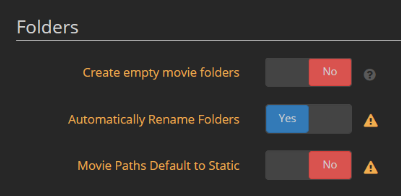
Missing options to manage static / dynamic folders in aphrodite.
3.0.0.2322
 Silent-Remux
All 7 comments
Issue-Label Bot is automatically applying the label bug to this issue, with a confidence of 0.99. Please mark this comment with :thumbsup: or :thumbsdown: to give our bot feedback!
Links: app homepage, dashboard and code for this bot.
![issue-label-bot[bot] picture](https://avatars2.githubusercontent.com/in/27079?v=4&s=40) issue-label-bot[bot]
on 18 Dec 2019
issue-label-bot[bot]
on 18 Dec 2019
Do we really need these? If we allow folder rename in editor similar to Sonarr, the need for these extra settings goes away imo. These options are just confusing to most users... my proposal make paths static and allow users to explicitly rename folders in editor when required.
 Qstick
on 11 Jan 2020
Qstick
on 11 Jan 2020
Do we really need these? If we allow folder rename in editor similar to Sonarr, the need for these extra settings goes away imo. These options are just confusing to most users... my proposal make paths static and allow users to explicitly rename folders in editor when required.
Hard to say. I want my paths to be static but I think the way the year is calculated needs looking at as even when I had dynamic paths off in radarr v2, it would make a new folder and I'd end up with dupe files under different year folders sometimes. (mostly when films not out were added)
Silent-Remux
on 11 Jan 2020
Yea, agree there are some year processing issues, we can look at those as separate issues. I’m not sure how much of that stems back to tmdb and how much is our fault
Qstick
on 11 Jan 2020
Another reason to have this feature back is if you change your folder naming scheme, you have to manually edit every film in your library. What we really need is an option when renaming (or bulk renaming) to rename folders, files, or both.
 brandonscript
on 30 Jun 2020
brandonscript
on 30 Jun 2020
Just go to editor select all you want renamed and change root folder to the same root folder... It will also rename the folders.
Qstick
on 30 Jun 2020
Fair workaround, but that's not exactly an obvious feature :)
brandonscript
on 1 Jul 2020
Related issues
 chrisallen
·
3Comments
chrisallen
·
3Comments
 alpinewinter
·
3Comments
alpinewinter
·
3Comments
 feerlessleadr
·
3Comments
feerlessleadr
·
3Comments
 HitsvilleUK
·
3Comments
HitsvilleUK
·
3Comments
 Rouzax
·
3Comments
Rouzax
·
3Comments
Most helpful comment
Issue-Label Bot is automatically applying the label
bugto this issue, with a confidence of 0.99. Please mark this comment with :thumbsup: or :thumbsdown: to give our bot feedback!Links: app homepage, dashboard and code for this bot.