Radarr: File quality does not match quality of the grabbed release
Describe the bug
File quality is listed correctly in download queue but doesn't import because of the error "File quality does not match quality of the grabbed release" when a manual import is initiated the quality listed in the manual import dialog is different. This is seemingly only affecting downloads marked as Bluray-1080p, Bluray-720p are importing normally.
To Reproduce
Steps to reproduce the behavior:
- Send movie to downloader
- Movie completes and sent back to Radarr
- See error
Expected behavior
The movie is correctly identified and imported
Screenshots
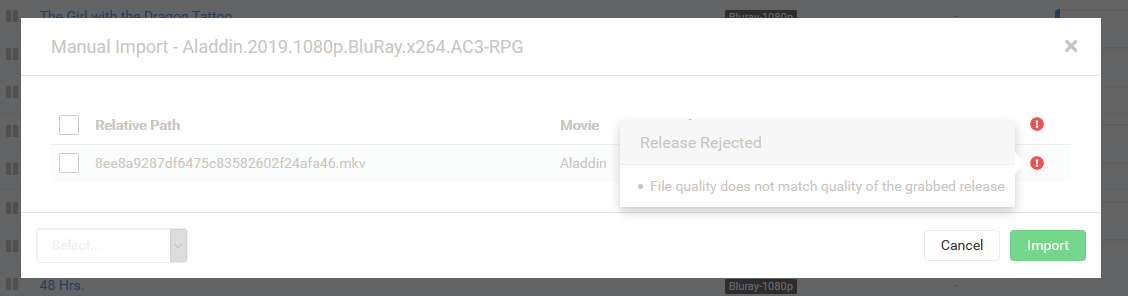
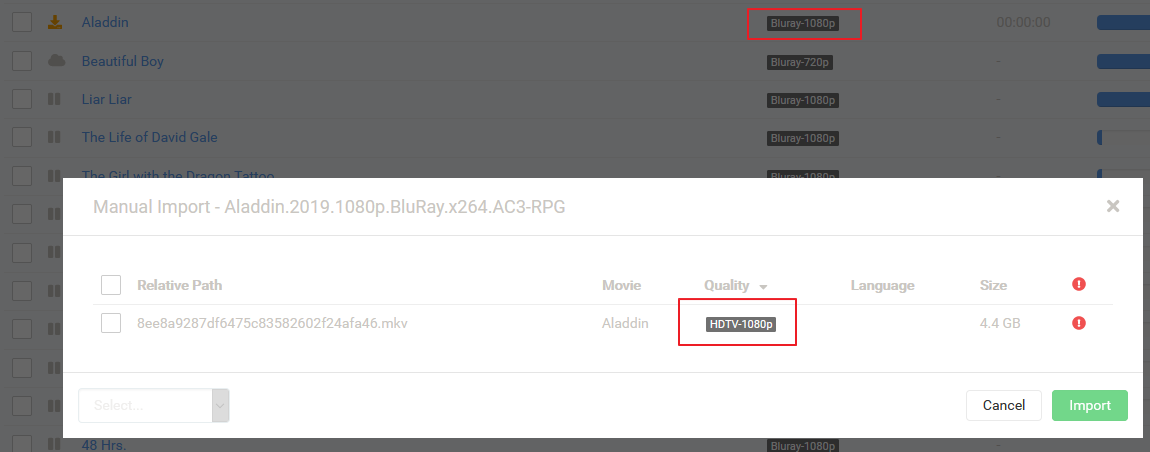
Desktop (please complete the following information):
- OS: Docker (linuxio container)
- Mono Version: 5.20.1.34
- Version: 2.0.0.1427
Debug Logs
radarr.debug.txt
 tehniemer
All 13 comments
Issue-Label Bot is automatically applying the label bug to this issue, with a confidence of 0.94. Please mark this comment with :thumbsup: or :thumbsdown: to give our bot feedback!
Links: app homepage, dashboard and code for this bot.
![issue-label-bot[bot] picture](https://avatars2.githubusercontent.com/in/27079?v=4&s=40) issue-label-bot[bot]
on 1 Sep 2019
issue-label-bot[bot]
on 1 Sep 2019
@Qstick why was this closed? Is there a different place to report Aphrodite issues?
tehniemer
on 1 Sep 2019
No, they are just tracked by label for now. I'll look into this, seems a bit strange, I suspect it is not looking at folder name for some reason and just relying on mediainfo resolution
 Qstick
on 2 Sep 2019
Qstick
on 2 Sep 2019
Here is the sequence that's happening during my parsing phase, resulting in this error:
19-9-7 13:23:12.7|Debug|Parser|Parsing string 'Waterworld.1995.1080p.BluRay.x264.1.AC3-BUYMORE-Obfuscated'
19-9-7 13:23:12.7|Debug|Parser|Movie Parsed. Waterworld - 1995
19-9-7 13:23:12.7|Debug|ParsingService|Language(s) parsed:
19-9-7 13:23:12.7|Debug|QualityParser|Trying to parse quality for A Movie.1995.1080p.BluRay.x264.1.AC3-BUYMORE-Obfuscated
19-9-7 13:23:12.7|Debug|ParsingService|Quality parsed: Bluray-1080p v1 (None)
19-9-7 13:23:12.7|Debug|Parser|Parsing string 'Waterworld.1995.1080p.BluRay.x264.1.AC3-BUYMORE-Obfuscated'
19-9-7 13:23:12.7|Debug|Parser|Movie Parsed. Waterworld - 1995
19-9-7 13:23:12.7|Debug|ImportDecisionMaker|Analyzing 1/1 files.
19-9-7 13:23:12.7|Debug|Parser|Parsing string 'Waterworld (1995).mp4'
19-9-7 13:23:12.7|Debug|Parser|Movie Parsed. Waterworld - 1995
19-9-7 13:23:12.7|Debug|VideoFileInfoReader|Getting media info from /downloads/complete/movies/Waterworld (1995)/Waterworld (1995).mp4
19-9-7 13:23:12.8|Debug|ParsingService|Language(s) parsed:
19-9-7 13:23:12.8|Debug|QualityParser|Trying to parse quality for A Movie (1995)
19-9-7 13:23:12.8|Debug|ParsingService|Quality parsed: Unknown v1 (None)
19-9-7 13:23:12.8|Debug|ImportDecisionMaker|Size: 4296731407
19-9-7 13:23:12.8|Debug|GrabbedReleaseQualitySpecification|Quality for grabbed release (Bluray-1080p v1 (None)) does not match the quality of the file (Unknown v1 (None))
I see two weird things happening here. First, it is parsing the quality of the reformatted name, which doesn't exist anymore, and therefore fails. Second, it keeps subbing in 'A Movie' as the title on pretty much every movie it parses.
 KnottyDyes
on 7 Sep 2019
KnottyDyes
on 7 Sep 2019
Thanks Let me try and reproduce.
Qstick
on 12 Sep 2019
I'm having this same issue @Qstick even when files contain 1080p Bluray (which matches the quality). Only started happening when upgraded to v3

 DaveidWeba
on 13 Sep 2019
DaveidWeba
on 13 Sep 2019
@DaveidWeba, my issue was I didn't have the obfuscation script running after download completion. Make sure your scripts directory is set correctly, and set the deobfuscate.py script to run after download complete.
KnottyDyes
on 1 Oct 2019
You probably can't tell because I blurred the filename, but both the directory and the filename are perfectly named with the title of the movie, year, and quality. All of them come in as HDTV on Radar v3 though. I'm gonna try downgrading soon because it's been a chore manually importing everything.
DaveidWeba
on 1 Oct 2019
Latest update fixes some of that. Also it's about what mediainfo says vs the name. If they contradict each other it will not import.
Qstick
on 1 Oct 2019
@Qstick So far so good today.
tehniemer
on 1 Oct 2019
Having the same issue with only a couple of movies.
https://i.imgur.com/dLiTOLV.png
https://i.imgur.com/GEXkfln.png
 dohomin516
on 13 Mar 2020
dohomin516
on 13 Mar 2020
Also getting this on Aphrodite :(
 HeroXx
on 2 Nov 2020
HeroXx
on 2 Nov 2020
 bakerboy448
Related issues
 davidbonnici1984
·
4Comments
davidbonnici1984
·
4Comments
 jipjan
·
3Comments
jipjan
·
3Comments
 plexecutor
·
3Comments
plexecutor
·
3Comments
 silentw
·
3Comments
silentw
·
3Comments
 chrisallen
·
3Comments
chrisallen
·
3Comments
Most helpful comment
Latest update fixes some of that. Also it's about what mediainfo says vs the name. If they contradict each other it will not import.