I'd like Radarr being able to move files on a mounted drive without having to download them and then reupload.
I have a seedbox, and my radarr location is on a server at home.
Seedbox layout:
/
/gdrive (Mounted Google Drive with rclone)
/gdrive/movies
/gdrive/files

Homeserver:
Seedbox /root mounted with Netdrive over SFTP and assigned drive H:
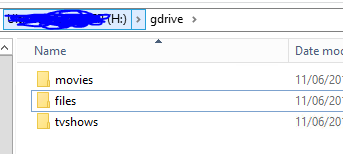
Whenever rtorrent has downloaded a file, it puts it in the /gdrive/files/ directory.
Radarr is configured to put the file in the /movies/nameofmovie/ folder.
Whenever it does this it downloads the file from the seedbox, and then reuploads it. (Copy and delete I assume)
This causes unneeded traffic, and since my internet is 200/20 (Mbit) the uploading part takes ages.
If I however perform a simple move in cmd/powershell. The move is done within seconds.
Example:

Previous issues about this or a similar issue:
https://github.com/Radarr/Radarr/issues/949
https://github.com/Radarr/Radarr/issues/2800
Issue 949 says this could be solved with using a Custom Script. True, but the custom script gets triggered after Radarr has downloaded and uploaded the file to the right location.
Script example that should work.
$movie_path = $env:radarr_movie_path
$movie_title = $env:radarr_movie_title
$movie_file = $env:radarr_moviefile_path
$sourcefile_path = $env:radarr_moviefile_sourcepath
$source_folder = $env:radarr_moviefile_sourcefolder
$logfile = "C:\debug.txt"Debug
write-output "$movie_path $movie_title $movie_file $sourcefile_path $source_folder" | add-content $logfile
move $sourcefile_path $movie_path
My topic on Rclone about this issue:
https://forum.rclone.org/t/rclone-on-seedbox-gdrive-local-sonarr-radarr/10424
If anything about this is unclear, feel free to say so and I'll try to clarify.
 Cookiezzz
All 11 comments
Issue-Label Bot is automatically applying the label feature_request to this issue, with a confidence of 0.88. Please mark this comment with :thumbsup: or :thumbsdown: to give our bot feedback!
Links: app homepage, dashboard and code for this bot.
![issue-label-bot[bot] picture](https://avatars2.githubusercontent.com/in/27079?v=4&s=40) issue-label-bot[bot]
on 12 Jun 2019
issue-label-bot[bot]
on 12 Jun 2019
Or perhaps a different solution: give us the option to run custom import scripts whenever the download clients reports the download is finished, but don't have radarr import it automatically.
Cookiezzz
on 16 Jun 2019
Arrange your paths better or get rclone to do it better. This isn't a Radarr thing.
Edit: Actually, you're right since it is going to copy it'll never work right.
 fryfrog
on 18 Jun 2019
fryfrog
on 18 Jun 2019
Does rclone / gdrive support hard links?
Deep in Sonarr/Radarr/Lidarr is the torrent behavior of copy for seeding torrents, only moving finished ones. I doubt this will ever change.
fryfrog
on 18 Jun 2019
Rclone can't create hardlinks. It can read them without any issues.
Since you're saying it will move finished ones. If I have rtorrent copy the downloaded file to /gdrive/files and then stop the torrent. Any chance it will move the file from /gdrive/files to /gdrive/movies/nameofmovie/
Cookiezzz
on 20 Jun 2019
There are some things Radarr/Sonarr can't do w/ rTorrent, I'm honestly not sure what'll happen if the torrent is paused/stopped when it imports. You'd probably need to hide the file from Sonarr and flip it to stopped/paused before revealing the file because there is a brief time when the torrent is finished, but hasn't moved, then stops and moves and restarts. I have to do this in my rTorrent setup. :/
fryfrog
on 20 Jun 2019
I stopped the torrent as soon as it was done now, but it still did a copy (meaning down & upload). Not even sure about what could be a 'fix' anymore.
Edit: Also just tried using SSHFS instead of SFTP. Same result. Downloading and uploading.
Or perhaps a different solution: give us the option to run custom import scripts whenever the download clients reports the download is finished, but don't have radarr import it automatically.
Any idea if this would be a possibility for a feature request? When using the env variables I can whip up a script that will do the actual move, but then I'd need Sonarr/Radarr to not touch the file.
Cookiezzz
on 20 Jun 2019
Is it possible to move this feature on top?
I am not too happy with current setup - now all my movie files can either be copied or hardlinked.
I prefer case when movies moved to Movie folder with stopped torrent, then hardlink created in Downloads folder and then if needed torrent seeding can be activated.
Is it doable?
 Lonli-Lokli
on 3 Aug 2019
Lonli-Lokli
on 3 Aug 2019
No, and it doesn't matter which way you form a hard link. You're thinking
of a symlink.
On Sat, Aug 3, 2019, 2:40 PM Lonli-Lokli notifications@github.com wrote:
Is it possible to move this feature on top?
I am not too happy with current setup - now all my movie files can either
be copied or hardlinked.
I prefer case when movies moved to Movie folder with stopped torrent, then
hardlink created in Downloads folder and then if needed torrent seeding can
be activated.
Is it doable?—
You are receiving this because you modified the open/close state.
Reply to this email directly, view it on GitHub
https://github.com/Radarr/Radarr/issues/3566?email_source=notifications&email_token=AAAVNRB7FMJCJM55YXCQVS3QCX3NHA5CNFSM4HXR3HRKYY3PNVWWK3TUL52HS4DFVREXG43VMVBW63LNMVXHJKTDN5WW2ZLOORPWSZGOD3PWHIA#issuecomment-517956512,
or mute the thread
https://github.com/notifications/unsubscribe-auth/AAAVNRAIXGSPNWJOODGZOCTQCX3NHANCNFSM4HXR3HRA
.
fryfrog
on 4 Aug 2019
If this ever happens, it'll probably come to Sonarr first and get ported to Radarr.
fryfrog
on 5 Sep 2019
I have this same issue with qBittorrent but I am not seeding at all. Its downloading to 100%, then the state is changed to Completed, yet Sonarr/Radarr copies the file (*.partial~) instead of moving it, to the rclone mount. Because of this, twice the upload bandwidth ends up being used, which becomes an issue when there are monthly quotas.
 agneevX
on 27 Jan 2020
agneevX
on 27 Jan 2020
Related issues
 silentw
·
3Comments
silentw
·
3Comments
 codaamok
·
3Comments
codaamok
·
3Comments
 danielb2
·
3Comments
danielb2
·
3Comments
 NewUser9
·
3Comments
NewUser9
·
3Comments
 scope999
·
3Comments
scope999
·
3Comments
Most helpful comment
Issue-Label Bot is automatically applying the label
feature_requestto this issue, with a confidence of 0.88. Please mark this comment with :thumbsup: or :thumbsdown: to give our bot feedback!Links: app homepage, dashboard and code for this bot.