Radarr: Remote Login Prompt on Local Install
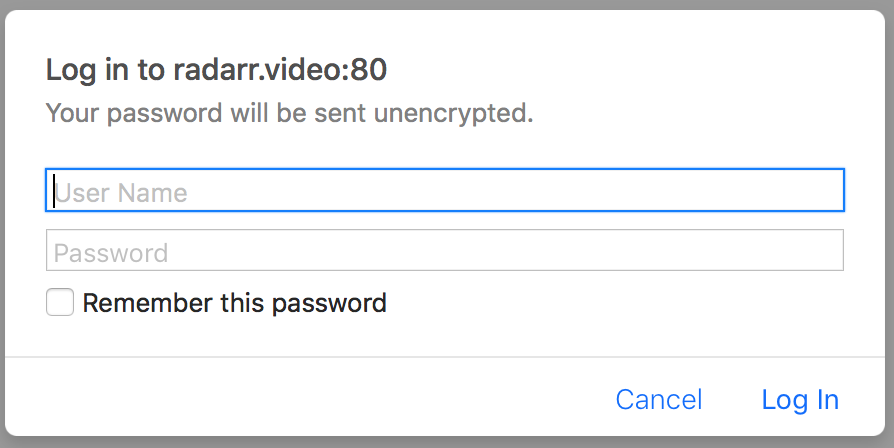
I've had this install running for some time. My current uptime is 34 days with no changes. Today when using the application I started to get prompted for a login. I do not use authentication for Radarr. Looking at the login, it's asking me to login to radarr.video:80, which is the main Radarr website. When I browse to that site, I get the same login prompt. Has something changed that's causing an API or other issue?
Radarr Ver. 0.2.0.910
develop
18-2-4 10:39:39.5|Info|Bootstrap|Starting Radarr - /opt/Radarr/Radarr.exe - Version 0.2.0.910
18-2-4 10:39:42.5|Info|Router|Application mode: Interactive
18-2-4 10:39:42.7|Info|MigrationLogger|* Migrating data source=/root/.config/Radarr/nzbdrone.db;cache size=-10485760;datetimekind=Utc;journal mode=Wal;pooling=True;version=3
18-2-4 10:39:42.9|Info|MigrationLogger| Migrating data source=/root/.config/Radarr/logs.db;cache size=-10485760;datetimekind=Utc;journal mode=Wal;pooling=True;version=3
18-2-4 10:39:42.9|Info|OwinHostController|Listening on the following URLs:
18-2-4 10:39:42.9|Info|OwinHostController| http://:7878/
18-2-4 10:39:43.0|Info|NancyBootstrapper|Starting NzbDrone API
This image is what I see when using my local install.
 gregryman
All 23 comments
Same here... Weird bug
I'm using the docker container: linuxserver/radarr:latest
 Nightbr
on 4 Feb 2018
Nightbr
on 4 Feb 2018
+1. Looks like it's trying to load some js: https://imgur.com/DYW89pK
Edit: Found the JavaScript:
'use strict';
if(window.NzbDrone.Analytics) {
    var d = document;
    var g = d.createElement('script');
    var s = d.getElementsByTagName('script')[0];
    g.type = 'text/javascript';
    g.async = true;
    g.defer = true;
    g.src = 'https://radarr.video/piwik/piwik.js';
    s.parentNode.insertBefore(g, s);
}
 SlothCroissant
on 4 Feb 2018
SlothCroissant
on 4 Feb 2018
+1 i'm having the same problem.
 kohnman
on 4 Feb 2018
kohnman
on 4 Feb 2018
+1 same issue, looks like the radarr.video website is requiring a browser login and part of the local radarr install pulls from https://radarr.video
 escservices
on 4 Feb 2018
escservices
on 4 Feb 2018
+1
 Madseason41
on 5 Feb 2018
Madseason41
on 5 Feb 2018
Looks like this is caused by Analytics being enabled.
Settings->General
Disable Analytics
Then restart
 ParFlesh
on 5 Feb 2018
ParFlesh
on 5 Feb 2018
Can confirm, disabling Analytics fixes the issue.
gregryman
on 5 Feb 2018
Confirmed as well. Annoyed that Radarr's site throwing a 401 caused weird issues with the client, but happy to just turn it off and move on.
SlothCroissant
on 5 Feb 2018
Yep, same problem here.
 kianrafiee
on 5 Feb 2018
kianrafiee
on 5 Feb 2018
Issue is indeed fixed with that workaround. But it doesn't explain why the website of the project suddenly requires a password. Did they get a take down notice from the MPAA?
 cvandend
on 5 Feb 2018
cvandend
on 5 Feb 2018
yes fix worked for me. THX
kohnman
on 5 Feb 2018
the website seems to be on maintenance https://radarr.video/
Disabling Analytics is a good workaround the time they redeploy the piwik for analytics.
Nightbr
on 5 Feb 2018
Sorry about this my webhost erroneously thought the Radarr site was causing heavy server load and shut it down. You should be able to just cancel the prompt. They should have activated the site again not sure why there’s still a login prompt. Will talk to them.
 galli-leo
on 5 Feb 2018
galli-leo
on 5 Feb 2018
Fixed now
galli-leo
on 5 Feb 2018
This is happening again as of 3/5/2018.
SlothCroissant
on 6 Mar 2018
Can also confirm this is happening again.
 TheMonDon
on 6 Mar 2018
TheMonDon
on 6 Mar 2018
Yeah for the same reason as outlined above
galli-leo
on 6 Mar 2018
Same is happening for me. I'm also seeing that my Lists are not working, which may be related to the web site refusing access. Anyone else having problems with their IMDB lists? (Yes I am using the Radarr lists, not the RSS feeds)
 Starseed6
on 6 Mar 2018
Starseed6
on 6 Mar 2018
Yes they are also not working due to the server being down.
galli-leo
on 6 Mar 2018
Happening again here.
 clarkd
on 6 Mar 2018
clarkd
on 6 Mar 2018
I'm getting no recommendations at all.
Thank you,
Lt Cmdr Rezty Felty
Chief Engineer
Warp Core Research
USS Dark Phoenix NCC 74920
816-559-1196
[email protected]
On Tue, Mar 6, 2018 at 3:54 PM, Dave Clarke notifications@github.com
wrote:
Happening again here.
—
You are receiving this because you commented.
Reply to this email directly, view it on GitHub
https://github.com/Radarr/Radarr/issues/2479#issuecomment-370942321, or mute
the thread
https://github.com/notifications/unsubscribe-auth/AF7cSR-JSVc_Io6qMhVzJq9ULVTPo7-Tks5tbwV9gaJpZM4R4rGm
.
 hirezl
on 6 Mar 2018
hirezl
on 6 Mar 2018
Yes, it's being worked on, the server should be back up in a few hours.
galli-leo
on 6 Mar 2018
Disabling analytics seems to resolve the issue like before. Make sure you restart Radarr after disabling it.
escservices
on 7 Mar 2018
Related issues
 feerlessleadr
·
3Comments
feerlessleadr
·
3Comments
 Rouzax
·
3Comments
Rouzax
·
3Comments
 davidbonnici1984
·
4Comments
davidbonnici1984
·
4Comments
 scope999
·
3Comments
scope999
·
3Comments
 chrisallen
·
3Comments
chrisallen
·
3Comments
Most helpful comment
Looks like this is caused by Analytics being enabled.
Settings->General
Disable Analytics
Then restart