Description:
I have set the path several times in my list imports (stevenlu, and trakt anticipated) and it seems that at some point it loses the path, when i go into these lists the path section is blank and when i look at a movie that the lists brought in it has a default windows path which is not correct. see screenshot


Radarr Version:
0.2.0.660
Logs:
Please use the search bar and make sure you are not submitting an already submitted issue.
Visit our Discord server for support or longer discussions.
 astlaurent
All 15 comments
This can happen if you delete that root folder path. We already have an issue open for better validation and I agree that this shouldn't happen. Though the UI is also a bit bugged, in that it will try to display the last selected root folder for lists.
 galli-leo
on 20 Apr 2017
galli-leo
on 20 Apr 2017
@galli-leo I think there is more of an issue then. I have not deleted the root folder, I have tons of movies going into the root folder that I manually added. Something else must be happening to cause the path field to disappear, maybe certain updates?
astlaurent
on 20 Apr 2017
@astlaurent Try creating a new list where you select the path before clicking on Save. I had a similar problem the other day and creating a new list solved the problem. It is still an issue, but at least you can work around it.
 mblennegard
on 22 Apr 2017
mblennegard
on 22 Apr 2017
@astlaurent Can you try what @xandian suggested and report back?
galli-leo
on 24 Apr 2017
I had the same issue a few times and had to update the DB manually afterwards. I think it happens when you edit an existing list and then hit save again.
Now, I try to always click the directory again before clicking save and this seems prevent it from happening.
 4getit
on 24 Apr 2017
4getit
on 24 Apr 2017
I have a similar issue and can't seem to find it elsewhere. I have 2 lists setup with different paths. One should have a folder as A:\Kids Movies the other should have a folder B:\Movies (not real paths). The issues is that whenever I change the folder for one list the other automatically changes as well. I can't seem to have unique folder paths setup. If I change one the other changes and vice versa in a never ending loop.
 staraxis
on 25 Apr 2017
staraxis
on 25 Apr 2017
I have the same issue as staraxis.
Two TMDB list of the same type (Theaters) the difference being one excludes genre ids 10751,16 while the other includes them. Unable to set different folders due to the issue described by staraxis above.
 junestu
on 25 Apr 2017
junestu
on 25 Apr 2017
@staraxis @junestu This is just a visual glitch. If you change the path on one list and click save the path is correct. The dialog just shows the wrong path.
galli-leo
on 25 Apr 2017
In my case the path does not visually disappear and it always appears correct, but anything added from certain lists gets downloaded into a different path regardless of how I set it. In the docker image this seems to default to /opt/radarr/ instead of /movies/
 werkkrew
on 4 May 2017
werkkrew
on 4 May 2017
I have the same issue for lists as well as movies that have been added via Ombi. I am running it in a Docker too (didnt have the issue running outside Docker)
 dcplaya
on 11 Jul 2017
dcplaya
on 11 Jul 2017
👍 Having the same issue as @werkkrew. I've deleted all lists and recreate them as suggest above as well.
 cswelin
on 12 Jul 2017
cswelin
on 12 Jul 2017
I'm having a similar issue. Radarr attempts to move movies added from the Trakt watchlist to root "/" after download rather than the expected /path/to/movies/movie (2017). This move fails as radarr doesn't have permissions.
If I inspect the path in the movie interface it is "/". If I change this to the correct path, moving the movie succeeds.
When inspecting nzbdrone.db/Netimport the RootFolderPath is correctly specified as /path/to/movies/.
 flease
on 15 Jul 2017
flease
on 15 Jul 2017
I am also having this issue. When I try and create a list and click save the path disappears. Movies are downloaded to the correct location via nzbget category , however the path to the movie in media management (Movie Tab) is "\Movie Folder Name\". I am not using docker, Radarr is running on Ubuntu along with Sonarr, nzbget.
I have to manually change the path with movie editor
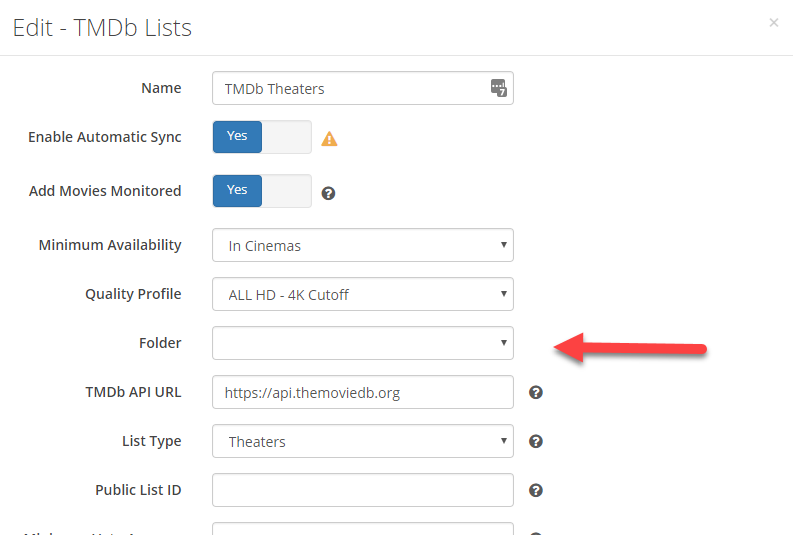
 hang10z
on 28 Jul 2017
hang10z
on 28 Jul 2017
@hang10z Yeah. This is fixed on the latest nightly / does not happen in safari or edge.
galli-leo
on 28 Jul 2017
Me too. I can’t even find the setting to set paths amymore. It’s defaulting to the download client preference.
 andycarver101
on 27 Dec 2017
andycarver101
on 27 Dec 2017
Related issues
 HitsvilleUK
·
3Comments
HitsvilleUK
·
3Comments
 Silent-Remux
·
4Comments
Silent-Remux
·
4Comments
 jipjan
·
3Comments
jipjan
·
3Comments
 christronyxyocum
·
3Comments
christronyxyocum
·
3Comments
 danielb2
·
3Comments
danielb2
·
3Comments
Most helpful comment
In my case the path does not visually disappear and it always appears correct, but anything added from certain lists gets downloaded into a different path regardless of how I set it. In the docker image this seems to default to /opt/radarr/ instead of /movies/