Radarr: Check For Finished Download interval?
Description:
I see that the Check For Finished Download task has an interval of "1 few seconds" and seem to basically be constantly running because of that, with it eating up cpu cycles for no good reason. I also know that Sonarr has it defaulted to 1 minute... Ideally, I'd love to be able to customize all of these task intervals. but baring that, 1 second is too much.
 darknessgp
All 29 comments
It's actually 30 seconds. The ui just cannot display it correctly.
 galli-leo
on 22 Feb 2017
galli-leo
on 22 Feb 2017
I still want to have an option to set the interval.
galli-leo
on 23 Feb 2017
This issue has been automatically marked as stale because it has not had recent activity. Please verify that this is still an issue with the latest version of Radarr and report back. Else this issue will be closed.
![stale[bot] picture](https://avatars3.githubusercontent.com/in/1724?v=4&s=40) stale[bot]
on 11 Mar 2018
stale[bot]
on 11 Mar 2018
I'm going to bump this from going stale, as we cannot currently customize the interval.
darknessgp
on 13 Mar 2018
I would love to see this feature. Currently, every 30 seconds I see CPU usage from radarr jump to 100% as these checks complete. I'd be more than happy to have this complete every 5 minutes to reduce CPU use (although it seems that radarr can be smarter in what it checks since 100% of the items in my downloader are completed and don't need to be checked anymore).

 mynameisfiber
on 29 Mar 2018
mynameisfiber
on 29 Mar 2018
@mynameisfiber Hmm that seems bad, do you have that in Sonarr as well? (Just in a lower frequency). Also I just checked the code, most of the logic should be cached, so not sure why you get such a spike.
galli-leo
on 29 Mar 2018
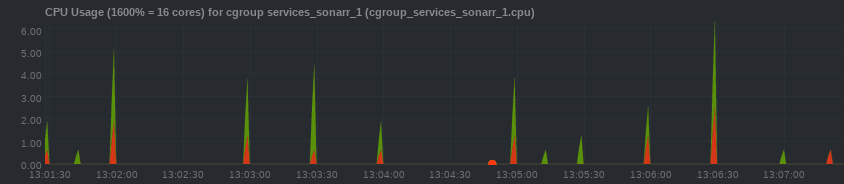
@galli-leo Yea... I do have sonarr but it's utilization is much less aggressive (granted, I remove those items from my download client a lot sooner than for radarr where I try to seed as long as possible). Radarr seems to have 150 things "active" (although they are _all_ seeding), while sonarr only has 3 active.
mynameisfiber
on 29 Mar 2018
@mynameisfiber Can you try moving about half of the Radarr items to a different label?
galli-leo
on 29 Mar 2018
@galli-leo sorry... I don't know what you mean by a different label.
mynameisfiber
on 29 Mar 2018
@mynameisfiber Your download client has different labels (or categories) for different items. For example, radarr might have the movies label (or category). Try changing all items from the Radarr label to a new one.
galli-leo
on 31 Mar 2018
@galli-leo sorry for the delay. What I did was change the default category for my downloader in radarr that way all the existing things in the client don't get found (I couldn't find a way to change the category for existing downloads). This removed all of the 150 active items in radar and changed the CPU use quite a lot (can you see in the screenshot when I changed the label? :))

I do think though that this issue still needs resolution... the number of things in radarr's activity is just going to grow again. Being able to change the check interval would be one way of at least reducing the effective CPU use and let my system to into idle.
mynameisfiber
on 9 Apr 2018
This issue has been automatically marked as stale because it has not had recent activity. Please verify that this is still an issue with the latest version of Radarr and report back. Otherwise this issue will be closed.
stale[bot]
on 8 Jun 2018
Still an issue .
 blkhwk0833
on 3 Jul 2018
blkhwk0833
on 3 Jul 2018
Really need to be able to change .
blkhwk0833
on 3 Jul 2018
I second this, must be able to change..
 oleroc
on 8 Aug 2018
oleroc
on 8 Aug 2018
Would be a great addition especially for lowering cpu utilization and drive run times.
 Thatindianbruh
on 21 Sep 2018
Thatindianbruh
on 21 Sep 2018
Still an issue.
 broizter
on 11 Nov 2018
broizter
on 11 Nov 2018
I'll add my name to the list.
 timekills
on 16 Nov 2018
timekills
on 16 Nov 2018
On the latest develop release the interval was reset to Sonarr‘s original value (1 minute)
galli-leo
on 17 Nov 2018
Big improvement now that it's only 1 minute, but the CPU spike still seems a bit excessive. I would love if there was either an option to disable the check (since I have no use for it personally) or to modify the timer easily from the gui.
broizter
on 20 Nov 2018
How is this not a thing? Every other client I use I can configure this. I have a 5bay nas and this stops the disks ever spinning down. Am I forced to download the source and change this myself?
 scrouchman
on 2 Dec 2018
scrouchman
on 2 Dec 2018
@scrouchman That’s the beauty of open source, you can do that and change whatever you wish! Go for it!
I don’t quite understand how Radarr talking to your download client every minute is stopping all 5 disks from spinning down?
Radarr only scans your actual stored movie files once a day. And only scans your download directory if you have dronefolder setup (not recommended) or if your download client says something is finished and ready to move.
 Qstick
on 2 Dec 2018
Qstick
on 2 Dec 2018
To be fair any disk access will do it, which is why I was changing everything to a longer timeout.
I thought I did have directory scanning enabled but it looks like I no longer do, good to know its only talking to the download client and nothing more.
That being said clearly I'm not the only one that wants to change this, I'll look at the source and see how easy it is to do
scrouchman
on 2 Dec 2018
scrouchman
on 4 Dec 2018
This issue has been automatically marked as stale because it has not had recent activity. Please verify that this is still an issue with the latest version of Radarr and report back. Otherwise this issue will be closed.
stale[bot]
on 4 Feb 2019
Bumping this as its not stale, I have an open pr to fix it
scrouchman
on 4 Feb 2019
Mind=blown this isn’t a feature. My array is constantly spinning
 Bau250
on 28 Feb 2019
Bau250
on 28 Feb 2019
Don't assume it's this thats keeping your array awake. For me I use deluge for torrents, that writes a file every 3 minutes even if everything is paused. To get round that I have a script for stopping and starting it.
The problem radarr has is it runs this check every minute and if deluge isn't running it logs an error
scrouchman
on 28 Feb 2019
This issue has been automatically marked as stale because it has not had recent activity. Please verify that this is still an issue with the latest version of Radarr and report back. Otherwise this issue will be closed.
stale[bot]
on 29 Apr 2019
Related issues
 HitsvilleUK
·
3Comments
HitsvilleUK
·
3Comments
 davidbonnici1984
·
4Comments
davidbonnici1984
·
4Comments
 silentw
·
3Comments
silentw
·
3Comments
 Silent-Remux
·
4Comments
Silent-Remux
·
4Comments
 codaamok
·
3Comments
codaamok
·
3Comments
Most helpful comment
I still want to have an option to set the interval.