Rack: VCV Rack crushing all the time for no apparent reason!
Hi
I've recently discovered VCV Rack and fell immediately in love with it. VCV helped me to get my pleasure of making music and my creative juices cooking. The problem is it is crushing on me constantly! So I've contacted the support team. They've told me that:
"You probably updated the squinkylabs modules, remove those (remove the folder from the modules-v1 folder) and install this : https://github.com/squinkylabs/SquinkyVCV/releases/tag/v1.0.14"
I did as I’ve been told and its got a tiny bit better yet kept crushing, sometimes while doing noting more than listening to a sequenced melody. I've read the threads with similar concerns but the support team assured me that my issue was unique and told me to create a new thread.
I am now unable to trust the program because it is crushing anytime (it seems) under any condition and worst of all in the middle of recordings session or any damn time it pleases.
I'm using VCV Rack 1.1.6 with my
ASUS Zenbook 14 UX425JA-PURE3
Standard / 14" / 1920 x 1080 / Core i7 / I7-1065G7 / 16 GB / 512 GB /
Intel Iris Plus Graphics / Realtek audio
Windows 10 Home
In other words I'm using a laptop that is powerful enough for system requirements
In summary
VCV Rack crushes all the time seemingly for no reason and support team is unable to help
Steps to reproduce
Unfortunately there are no actual steps I can suggest other than the fact that I start the VCV Rack and within 5-10 min it crushes. It says here that "If developers cannot reproduce the bug, it cannot be fixed". Yet I've no concrete steps to offer other than the log file and hope that somebody smart and good hearted will help me solve this issue.
Sincerely/Urunc
 Urunc
Urunc
All 22 comments
To isolate the problem, could you remove all plugins from your <Rack user folder>/plugins-v1/ folder and see if Rack crashes? If not, add half of the plugins and repeat the experiment.
Your log file shows that Rack is closing cleanly, as if a plugin called APP->window->close() or another program is asking Rack to close. It suggests Rack is not actually crashing.
 AndrewBelt
on 6 Nov 2020
AndrewBelt
on 6 Nov 2020
@Urunc Might want to define your use of the word "crushing" here. I'm guessing you mean like bit-crushing, where your sound suddenly changes from beautiful music to buzzing or noise.
 bobfrankly
on 6 Nov 2020
bobfrankly
on 6 Nov 2020
Ohh, I assumed it was a bad translation/misspelling of the word "crashing". Do you mean stuttering as defined by https://vcvrack.com/manual/FAQ#how-do-i-improve-performance-of-vcv-rack ? If so, performance issues are not necessarily a bug, especially considering that your laptop does not satisfy the system requirements at https://vcvrack.com/manual/Installing#system-requirements, so this issue should be closed.
AndrewBelt
on 6 Nov 2020
Sorry, I mean it freezes, and than must be shut down manually from the task manager.
I've bought my laptop a month ago and today I've updated the bios on my laptop, it seems like its working, VCV didn't freeze yet, but I'm not sure, updated 15 min ago.
Urunc
on 6 Nov 2020
It froze again :( while I was trying to record some sounds :(
Urunc
on 6 Nov 2020
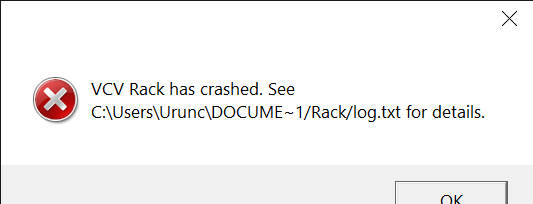
Okay, so not audio stuttering? When Rack freezes, does it recover? Does it close automatically after some time? Is there a Windows "Not Responding" message before the Rack window disappears?
AndrewBelt
on 6 Nov 2020
Urunc
on 6 Nov 2020
Interesting, so Rack's crash dialog appears, but the log doesn't contain a stack trace.
Did you try to isolate the problem with the above experiment? https://github.com/VCVRack/Rack/issues/1863#issuecomment-723124494
AndrewBelt
on 6 Nov 2020
It crashes like this and the sound continues on the background sometimes but any operations such as recording is canceled. When I hit the ok button screen turns white and after a while it shuts down...if lucky.. other times it freezes completely and i have to shut it down manually via task manager
Urunc
on 6 Nov 2020
Urunc
on 6 Nov 2020
Ill do the experiment now
Urunc
on 6 Nov 2020
Ok, the experiment started nice, without any plug in, no problems, VCV works with its fundamental modules. Than I've added half of the plug ins as instructed and it still did work fine. Than I've added half more and it started to feel unstable as if some very minor stutter of the sound here and there as if the memory is not enough but my laptop is more than strong enough so I've added all except Squinky Labs and it kept going without crashing. Finally after 20 min without crash I've added Stinky Labs and it seemed as if it was going to be fine but after a while it crashed again. But it could have crashed before the Stinky Labs, I'm not sure.
Back to square one :(
Urunc
on 6 Nov 2020
Urunc
on 6 Nov 2020
Technical note: The stack trace looks like stack corruption because Svg::load isn't called within nvgEndFrame.
Can you use Rack without Squinky Labs installed for an extended period and let me know if it ever crashes?
AndrewBelt
on 6 Nov 2020
Will do that. Thank you Andrew.
Urunc
on 6 Nov 2020
I've unsubbed Squinky from the library, deleted from the plug in folder, restarted the computer yet, I'm sorry to report that it is still crashing :( specially when trying to record. Trying to record is a pretty efficient way of speeding the process of testing it seems.
log.txt
Urunc
on 6 Nov 2020
Okay, we can rule out Squinky Labs then. Perhaps it's related to an Intel Iris driver bug. VCV doesn't support Intel integrated GPUs since I've never tested Rack on Iris.
AndrewBelt
on 6 Nov 2020
So what can I do on my end? Buy a new laptop? Which one do you recommend? Or should I wait until you do some tests and come back with new ideas?
Yet it is not crashing as often as it used to, much better without Squinky, maybe another plug in is buggy too? Here is the list of the plug
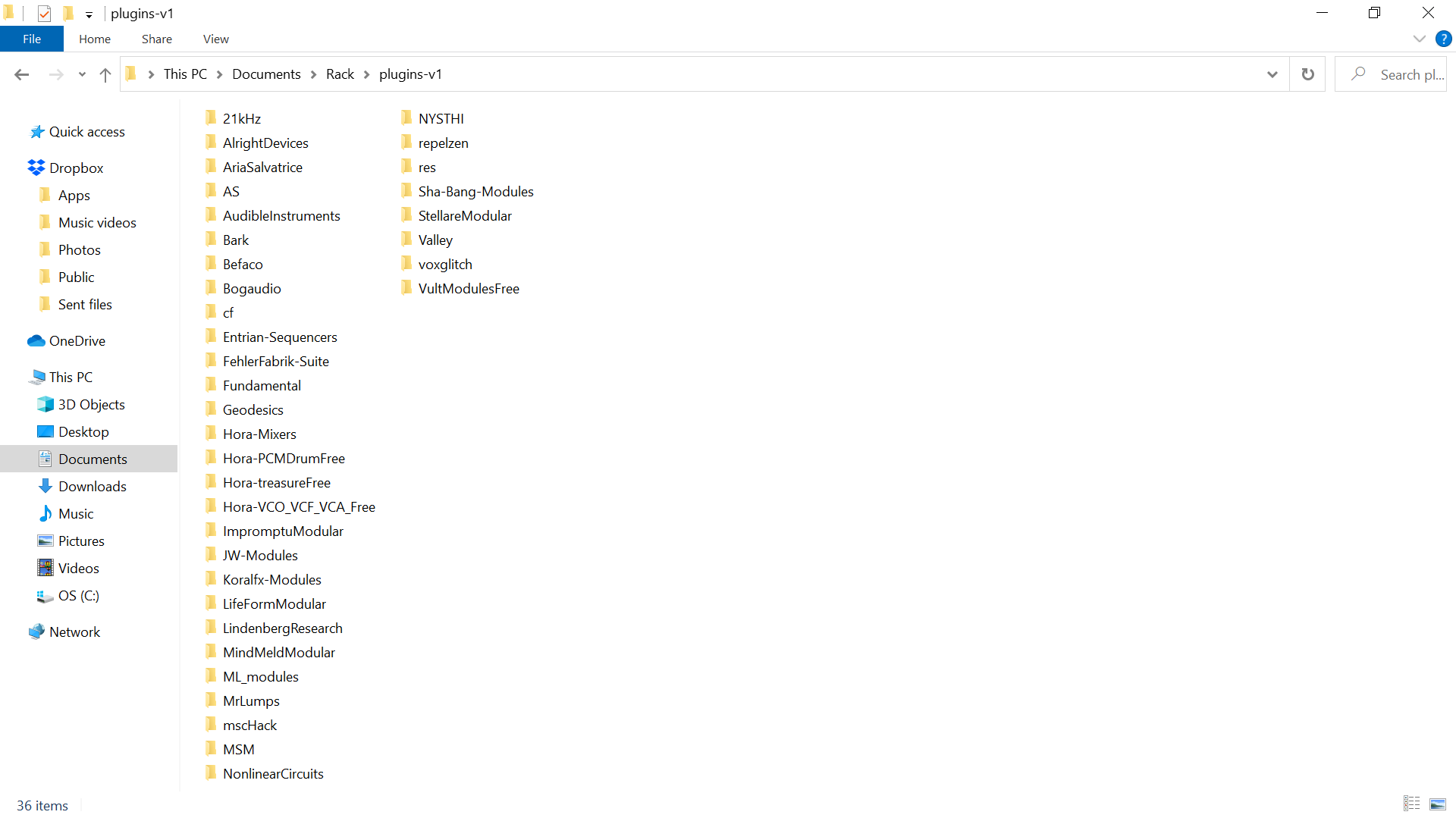
ins I've downloaded
Urunc
on 6 Nov 2020
Here is my findings, keep in mind that im not a programmer but a mere mortal musician.
Without Squinky labs, things are much better. But most importantly, I believe it is about the visual cortex of the laptop. No problem with creation and recreation of sounds but the vision part is harder to organize for the laptop I believe.
I've lower the frame rate to 10 hz and the crashes are lowered with it. It still crashes but much less frequently
Urunc
on 19 Nov 2020
@AndrewBelt In which log are you seeing the SVG / nvg crash? Even if SquinkyLabs isn't the culprit I'd like to see if something is amiss.
 squinkylabs
on 22 Nov 2020
squinkylabs
on 22 Nov 2020
@squinkylabs https://github.com/VCVRack/Rack/issues/1863#issuecomment-723196805
AndrewBelt
on 22 Nov 2020
@AndrewBelt : Thanks. I often load SVG from the widget constructor. I assume that's ok?
squinkylabs
on 22 Nov 2020
Related issues
 jaffasplaffa
·
7Comments
AndrewBelt
·
4Comments
AndrewBelt
·
7Comments
jaffasplaffa
·
7Comments
AndrewBelt
·
4Comments
AndrewBelt
·
7Comments
 Coirt
·
7Comments
Coirt
·
7Comments
 LazyPike
·
6Comments
LazyPike
·
6Comments
Most helpful comment
Sorry, I mean it freezes, and than must be shut down manually from the task manager.
I've bought my laptop a month ago and today I've updated the bios on my laptop, it seems like its working, VCV didn't freeze yet, but I'm not sure, updated 15 min ago.