Rack: Changing patch format to be a ZIP file to support patch assets
Problem
Some Rack modules need to have "internal storage" for readable/writable assets such as samples, audio clips, automation data, wavetables, machine-learned data, video game save state, etc. If a module's internal storage is less than ~100KB, it can simply be serialized to JSON, possibly with string::toBase64() if the data is binary and/or string::compress() if the data has low entropy.
For assets >100KB, there is no VCV-standardized method for serializing state assets. If a user has 10 modules, each serializing 1MB of assets with base64, autosaving every 15 seconds might visually lag the UI for 10's of milliseconds. A 10MB JSON file isn't elegant but works, but a 100MB-10GB JSON file is not acceptable.
Modules have worked around this issue by creating assets in non-standardized locations in the Rack user folder or in the folder of the patch file. But this is not portable, meaning that users cannot easily share patches with friends or transfer them to another computer, and since files aren't one-to-one associated with a Rack patch, they can be modified (or even deleted) by another patch, breaking the original patch.
Proposed solution
Instead of a Rack patch being a JSON file, it will be a ZIP archive containing
/patch.jsoncontaining the serialized modules, cables, and patch settings./modules/<moduleId>/containing assets for each module. This folder only exists if the module has requested to create a patch asset.
When a user loads a .vcv file, Rack will extract the ZIP archive to <Rack user folder>/autosave/.
If a previous autosave folder exists, it will be deleted.
Modules can call Module::asset(std::string filename) to get the absolute path of a patch asset. They can then call fopen() or std::fstream() to create that file.
Modules must delete their own assets when they are finished using them. For example, if a user requests to delete a recorded clip from a timeline module, the module should delete the file.
When a user deletes a module, the module asset folder will not be deleted. This is so the user can undo the deletion and continue using the module's assets.
When a user saves a .vcv file, Rack will serialize its state to patch.json and ZIP the autosave folder.
The archiver will skip /modules/<moduleId>/ folders for modules that do not exist in the patch, which effectively garbage-collects deleted modules' assets.
Potential issues
- Loading a patch with 10GB of recorded samples will extract all samples before the patch appears, which would take a long time. Some hard drives are as slow as 100MB/s, making saving/loading patches take up to 100 seconds. However, patches of this size are rare with Rack. If ZIP is the bottleneck (I'd guess it isn't), a different archive format could be used.
- There is no way to undo operations that delete files, since modules must delete assets when the user requests. However, if plugin developers want to get fancy, they could move files to the OS's recycle bin and push a Rack history action that restores the file from the recycle bin.
 AndrewBelt
All 45 comments
Rack will extract the ZIP archive to
<Rack user folder>/autosave/. If a previous autosave folder exists, it will be deleted.
Won't that preclude running multiple instances at once? Rack for DAWs must require that, even if standalone Rack doesn't allow it.
 RichieHindle
on 30 Jun 2020
RichieHindle
on 30 Jun 2020
What about directly using a folder structure to store patches ? Users would still be able to manually zip/unzip them for patch sharing, and rack wouldn't need to uncompress them on load.
Also another side effect to consider with a monolithic approach is users saving multiple versions of a patch. which could turn into a huge waste of space.
 RemiCollin
on 30 Jun 2020
RemiCollin
on 30 Jun 2020
- There is no way to undo operations that delete files, since modules must delete assets when the user requests.
How about adding an additional folder /recycleBin/<moduleId> and an undo action like MoveAssetToRecycleBinAction?
This folder should be skipped by the archiver and will be cleared when unloading a patch.
 stoermelder
on 30 Jun 2020
stoermelder
on 30 Jun 2020
@RichieHindle Rack doesn't support running multiple instances, so this isn't a problem. Rack for DAWs does, but it doesn't have autoload/autosave so its working folder could be a random temp directory.
@RemiCollin
What about directly using a folder structure to store patches ?
There's not really a reason to do this. Extracting a ZIP is actually faster than copying a folder because ZIPs are smaller (and therefore less bytes to read). The bottleneck of loading will be disk read/write, not the decompression algorithm.
users saving multiple versions of a patch. which could turn into a huge waste of space.
The point of saving multiple versions is to well, have multiple versions, right? If all versions of a patch reference an absolute path of an asset, then you don't have multiple versions of that asset.
@stoermelder Sure, that works. It's a minor issue so I'll probably ignore it for now, but it's good to know the issue has a simple solution.
AndrewBelt
on 30 Jun 2020
There's not really a reason to do this. Extracting a ZIP is actually faster than copying a folder because ZIPs are smaller (and therefore less bytes to read). The bottleneck of loading will be disk read/write, not the decompression algorithm.
The point was actually not to copy the folder, but after thinking a bit about it I guess it could increase complexity by having to manage temporary vs asset saved in previous patch version. So I agree the simpler, the better.
Also what about module presets with assets, would they follow the same pattern ?
RemiCollin
on 30 Jun 2020
module presets with assets
Good question. Module presets cannot contain assets. They are simply JSON files. They are designed to provide a starting point of common parameter configurations. If you record an audio clip to a hypothetical timeline module and save a preset, it will only save the settings of the module, not the audio clip itself. I can't think of a great use case for module presets to include assets.
If you a plugin developer and want to use assets in factory module presets, don't attempt to use module assets at all. Instead, load read-only assets from the plugin directory which is distributed in your plugin package.
AndrewBelt
on 30 Jun 2020
Perhaps /assets/
 Torinbob
on 30 Jun 2020
Torinbob
on 30 Jun 2020
Would there be a method for modules to import only once files to be made readable to multiple instances of modules by the same developer?
 AriaSalvatrice
on 30 Jun 2020
AriaSalvatrice
on 30 Jun 2020
Would an option to collate assets be considered, possibly with a warning of copyright. A typical use case I often have:
I have a local sample folder where I have a large collection of audio files, with a variety of licenses. I load some of these into a module in vcv rack and save the patch. Would the intention be to automatically include these assets in the zipped patch, or to present this as an option?
The way I have handled this scenario previously when collaborating in alternative DAWs, is both artists purchase the sample pack, and only samples we own the copyright are included when sharing files.
I think including assets in the zip file is an excellent idea, given that VCV Rack has a nice community spirit where patches are commonly shared, but users should be informed when this happens, to stop accidentally spreading proprietary products.
 curlymorphic
on 30 Jun 2020
curlymorphic
on 30 Jun 2020
@Torinbob Technically a good URI scheme would be /modules/<moduleId>/assets/ since assets belong to a module, which belongs to the set of modules. But because nothing else will go in each module folder, I've omitted the assets/ subfolder.
@AriaSalvatrice What is your use case? Although it would be non-standardized, you could simply place your asset at the root level of the patch folder, where patch.json would be.
@curlymorphic When a module loads an asset (such as a sample), it can either read the file directly and serialize its absolute path, or it can copy the asset to the patch folder. This proposal encourages the latter.
If you want to avoid distributing assets you do not have permission to distribute in your patches, do not use them or do not distribute the patch. In the two implementation possibilities above, you will either be violating its copyright, or the patch won't load correctly.
AndrewBelt
on 30 Jun 2020
If you want to avoid distributing assets you do not have permission to distribute in your patches, do not use them or do not distribute the patch. In the two implementation possibilities above, you will either be violating its copyright, or the patch won't load correctly.
How would one collaborate on projects where all contributors own the rights to use the samples, but not to distribute, as is common with most of the sample packs I have purchased?
curlymorphic
on 30 Jun 2020
@curlymorphic If you think it's an issue, you can remove the files from the patch file yourself.
AndrewBelt
on 30 Jun 2020
@curlymorphic If you think it's an issue, you can remove the files from the patch file yourself.
That is one solution, but it would be very onerous on every iteration of a project to remove the samples, document the required files, send out to members of the team, who would then need to reinstate the files, prior to opening the project.
An improvement on the design would be to make the collation of the assets optional, so the patch could store a uri to the asset in the zip file, or to a local location.
curlymorphic
on 30 Jun 2020
I feel that your scenario is pathological. I can't think of a real-world case where someone wants to share a patch with someone who has the same exact samples, in the exact same file path, and cares at all about avoiding distributing samples they own to someone else who also owns them.
make the collation of the assets optional
This is dependent on the module, not this proposal.
Let's move on from this point.
AndrewBelt
on 30 Jun 2020
Loading a patch with 10GB of recorded samples will extract all samples before the patch appears, which would take a long time. Some hard drives are as slow as 100MB/s, making saving/loading patches take up to 100 seconds. However, patches of this size are rare with Rack. If ZIP is the bottleneck (I'd guess it isn't), a different archive format could be used
could it be an optional feature?, the user can select from a preferences menu "auto zip files" if it option is not selected , the file only will be zipped if is requested by the user as a save option "save zip" making all the necessary changes in the file
I use some software that use lots of external assets, the zip option is only an optional feature for reduce the space, I don't not how it work but instead of zip the file, the software file is a directory itself , you can navigate in the file (only available with the software browser) and manage all the data , imports assets from a file to another, and place the assets in your system
 infamedavid
on 1 Jul 2020
infamedavid
on 1 Jul 2020
@infamedavid You're quoting me as if you're responding to the performance issue, but you don't mention performance in your post so I'll assume you're not talking about performance.
Rack could save/load folder patches, but this is really confusing for new users. "Why are there two 'Save' options??"
Also, an important question when saving to a folder is whether you delete the existing directory before copying files to it.
- If Rack deletes the folder, saving becomes a dangerous task that could delete important files. What if the user accidentally saves a patch to
My Documents? - If Rack doesn't delete the folder, module assets that were deleted while editing the patch won't be deleted in the "merged" directory.
Therefore saving to patch folders is a bad idea. There's a really simple workaround. If you want to muck around with the module assets, simply open the patch with Rack, muck around with <Rack user folder>/autosave/, and save the patch with Rack. You may close Rack while mucking around with files if you wish.
AndrewBelt
on 1 Jul 2020
yes I talk about performance, if you not zip the folder you will not have a performance issue since not allways when you are using external data is necessary packet it , perhaps I not explain myself correctly sorry
what I mean is for user they only see a .vcv file, but for the software it is a folder, I don't know if it is possible
there is the same file in the picture , the file"ejemplo.blend" one is a view from the system browser, is a single file but from the software browser the file have multiple asset folders
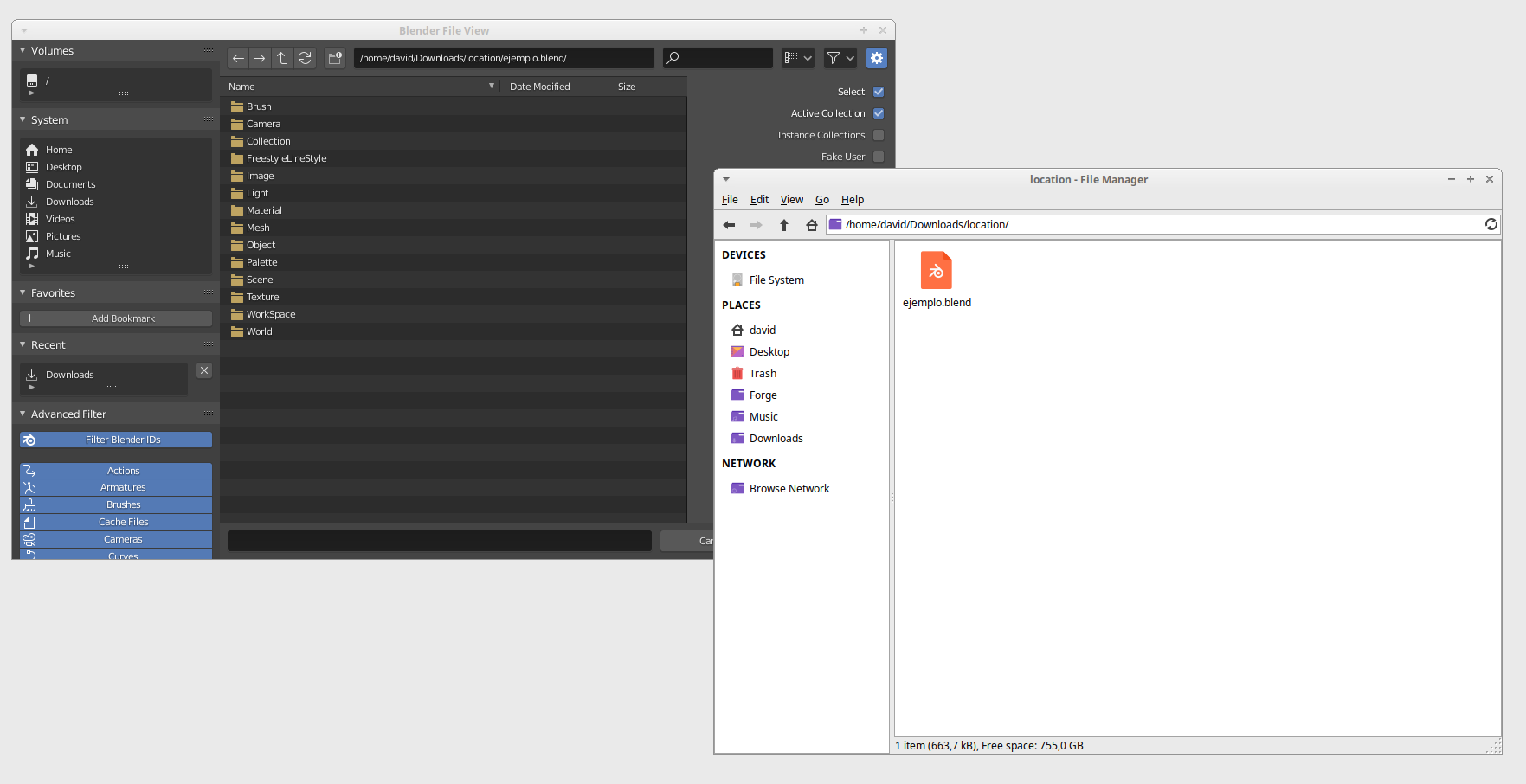
edited: btw this is especially good to manage data between files
infamedavid
on 1 Jul 2020
@infamedavid When the user saves a patch file, the two implementation options are to
- save the patch as a folder
- save the patch as a ZIP
In theory and in my preliminary tests, archiving lots of data as a ZIP is faster than copying the folder.
What I suspect you're thinking is that "Hey, why not just work in the patch directory directly instead of copying/extracting it to <Rack user folder>/autosave/?" If we do that, then we lose consistency of patch files. If the user says "I don't like what I've done to this patch, I'm going to reload/revert it to when I last saved it" then they can't, because what you're suggesting is to make destructive changes directly to the patch assets. "Lost consistency" means that we have an old /patch.json file (because we haven't saved the patch yet), but we've made changes to patch assets, so when we reload/revert the patch, we're loading an inconsistent/broken patch with a bad mix of old and new stuff. Make sense? Or am I not correctly understanding what you're suggesting?
AndrewBelt
on 1 Jul 2020
yes , sunvox use to zip the files that use samples and I can't notice difference in the performance, even using it in my phone
what I suggest if is possible, is store the different kind of data in different folders inside of a .vcv rack file, samples , automation, presets , groups of modules and so on, allowing to the user load this resources even from other project files.
infamedavid
on 2 Jul 2020
store the different kind of data in different folders
Rack cannot make a distinction between file types. It is completely up to the plugin developer to decide how to organize assets in a patch module folder.
AndrewBelt
on 2 Jul 2020
I see, that is what I supposed , sorry for bothered you a lot with it
infamedavid
on 2 Jul 2020
There is no way to undo operations that delete files, since modules must delete assets when the user requests. However, if plugin developers want to get fancy, they could move files to the OS's recycle bin and push a Rack history action that restores the file from the recycle bin.
Everything has its drawbacks, but how about just do not remove them while user work. Probably it’s better to do this when you exit the application or make some kind of asset manager with cleanup possibilities like the other DAW's have: something like shared storage could work, so that other modules have access to files(load sample into another sampler) etc.
 Shantarli
on 3 Jul 2020
Shantarli
on 3 Jul 2020
Probably it’s better to do this when you exit the application or make some kind of asset manager with cleanup possibilities
Module asset "garbage collection" wouldn't work because patch saving happens at arbitrary times (when the user saves the patch), not upon close.
AndrewBelt
on 3 Jul 2020
The ZIP format seems like a good idea, as long as the actual patch stays in json (so that custom tools can modify it, e.g. for injecting midi mappings, splitting/merging patches etc.).
There are compression algorithms that are more optimized for speed (like Snappy) but ZIP is "good enough" and maximally compatible. It's widely used for project files, e.g. Ableton .als files are zipped XML files.
@curlymorphic
How would one collaborate on projects where all contributors own the rights to use the samples, but not to distribute, as is common with most of the sample packs I have purchased?
The "right to distribute" means "distribute to people who don't have the rights" (i.e. piracy).
Of course you can send the samples to someone who also has the rights to these samples (it wouldn't be piracy), as long as you don't do it over a public channel where the samples can be captured by someone who doesn't have the rights (like a public file hosting service).
https://definitions.uslegal.com/d/distribution-right/
A distribution right refers to a copyright holder’s exclusive right to sell, lease, or transfer copies of the protected work to the public. It is also known as first sale doctrine. Distribution right authorizes a copyright holder to distribute copies or phonorecords of a copyrighted work to the public by sale or other transfer of ownership, or by rental, lease, or lending.
Notice the word "public".
 Boscop
on 4 Jul 2020
Boscop
on 4 Jul 2020
@Boscop I was actually thinking of one specific instance, On a forum where we used to pass tracks between members, and each member then updated before passing the project on. At the start of the project, we used to select a sample pack. This was using Ableton that has the option to locate missing files, and we each purchased the sample pack. As the project files were passed on a public forum, as encouragement for any members to collaborate we never included the samples.
This is probably an edge use case, but I wanted to raise the issue for consideration in case it was of concern.
curlymorphic
on 4 Jul 2020
I think some of you are missing the point of this proposal.
No module has to store its assets in the suggested folder structure which will be zipped. Actually, if a module‘s developer does not update the code for this new API, the module will handle assets the same way as in v1. This proposal provides an option for modules to store their assets within the patch. Modules can offer options for _linking_ or _importing_ assets in the future, currently only _linking_ is possible.
stoermelder
on 4 Jul 2020
I like the idea of compressed patches but what about switching to zstd intead of ZIP/deflate? With configurable compression level it may offer considerably better compression ratio for sound sample data, approaching LZMA efficiency, and is much faster during decompression.
 milkowski
on 4 Jul 2020
milkowski
on 4 Jul 2020
@milkowski I compressed a folder of WAV files with ZIP and zstd and it made a negligible difference of filesize. In order to use something other than ZIP, I'd like it to do better than 75% the filesize of ZIP, since fewer users know how to use zstd if they want to extract/compress patch files manually.
AndrewBelt
on 4 Jul 2020
@AndrewBelt But isn't over 5x faster compression speed worth it for bigger patches?
milkowski
on 6 Jul 2020
I was mistaken above in https://github.com/VCVRack/Rack/issues/1807#issuecomment-651713921. ZIP/Deflate's fastest setting is 26MB/s on my laptop, which means compression is the bottleneck, not disk transfer.
If another compression algorithm is used, a really nice contribution to the Rack project would be for someone to write two C/C++ functions using whatever open-source libraries you need:
compressFolder(std::string folder, std::string archive)compresses a folder, preserving the file structure and overwriting the archive filedecompressToFolder(std::string folder, std::string archive)decompresses an archive to a folder
If Zstandard, brotli, snappy, lz4, etc are used, an archive format such as tar would also have to be used.
A bonus is to use an archive/compression format that is standard enough to have a command line utility that can be installed on Mac/Windows/Linux to archive/unarchive. Then we can also switch plugin packages (e.g. MyPlugin-1.0.0-lin.zip) to this format. We can use the .vcvplugin extension.
AndrewBelt
on 6 Jul 2020
A bonus is to use an archive/compression format that is standard enough to have a command line utility that can be installed on Mac/Windows/Linux to archive/unarchive.
Btw, 7zip with zstd support can be used & installed via command line on Windows: scoop install 7zip-zstd.
(The normal 7zip is also available via scoop install 7zip.)
Boscop
on 6 Jul 2020
Libarchive https://www.libarchive.org/ is all-in-one solution that already combines zstd compressor with tar archiver among other configurations. It should be pretty simple to wrap compressToFolder() and decompressToFolder() functions around it.
milkowski
on 6 Jul 2020
@milkowski Ah, I figured I'd have to use libarchive for a quick tar implementation, but I didn't know it included zstandard. That makes things easy so I'll just write it.
AndrewBelt
on 6 Jul 2020
libarchive is super bloated for just it for tar and a zstd frontend. The smallest I can get is 4.8MB on Linux. I might as well use a tiny tar implementation, since the format is really simple.
AndrewBelt
on 8 Jul 2020
I recognize that I'm late to this party & I'm speaking as a VCV Rack user, and not as a plugin developer, but nonetheless..
One thing I like doing that I think would be no longer possible (in the same way) if the stored format for patches were to become zipped files is keep my patches under source control. A private git repository allows me to version my patches, track & revert changes, branch, etc. It also allows me to easily sync them between multiple machines. Switching to zipped (or any other single-file) format would (largely) preclude this use case, as git (and other source-control systems) are lousy at tracking changes within such files.
(parenthetical qualifiers added upon proofing to acknowledge that one _can_ keep zipped files under source control, albeit without retaining the ability to see what changed between versions)
 dheles
on 29 Jul 2020
dheles
on 29 Jul 2020
I've implemented most of the behavior in this proposal, and so far it looks good so I'm officially accepting it.
Tar Zstandard patch file
.vcv patch files will be .tar.zst files (POSIX tar compressed with Zstandard using compression level 1). Rack always works in the <Rack user folder>/autosave directory (See Where is the “Rack user folder”?), using a ./patch.json file at its root. To extract a patch manually, use GNU or BSD tar with Zstandard support and run
tar -xf patch.vcv --zstd -C patchDir
To create a patch, run
tar -cf patch.vcv --zstd -C patchDir .
Or you can just load the patch in Rack, edit the files in <Rack user folder>/autosave, and re-save it in Rack.
Per-module patch assets
Sometimes Module instances need to save large amounts of data that would be too much to store in a JSON file. For example, Mutable Instruments Clouds saves/restores recorded bank audio over power cycles. Audible Instruments Texture Synthesizer should do that same, but ~1MB is too much to save in a JSON file (and base64 encoding/decoding is another annoying step). Instead, it could create a module patch asset by creating a file on the filesystem and manipulating it with simple fopen/fwrite/fread or similar.
To create a module patch asset, you first need to create the module patch directory since this is not automatically done for you. (Perhaps this will change before Rack v2.0 is released, but I can't think of a good way to do it.) Inside your Module subclass, run
system::createDirectories(asset::module(this));
Then you can create, modify, and delete files within this directory.
std::string recordingPath = asset::module(this, "recording_001.wav");
FILE* f = std::fopen(recordingPath.c_str(), "w");
(Off-topic UTF-8 note: Rack hacks fopen to support UTF-8 paths on Windows, so if using std::fstream or handling files in other ways, use string::U8toU16(path) to get a std::wstring path in Rack v2.)
Rack plugin packages
Rack v1 includes an unzipper via libzip and libz. Since it would be redundant to statically link those libraries and libarchive/zstdandard in Rack, they have been removed.
In Rack v2, plugins will be archived as .tar.zst files when building, and unarchived by Rack when installing them. The file extension .vcvplugin will be used instead of .zip. A benefit is that plugin unarchival by Rack will be faster than in Rack v1, plugin packages will have smaller file sizes, and downloads will be faster. For example, Fundamental-2.0.0-lin.zip is 484K while Fundamental-2.0.0-lin.vcvplugin is 349K.
Unfortunately, plugin packaging (with make dist) will be slower because a high compression level will be used (around 16 to 19).
If you'd like to experiment with Rack v2's new patch format, try one here. (Ironically zipped to get around GitHub's file restrictions.)
test.vcv.zip
AndrewBelt
on 8 Sep 2020
Only just noticed this, have you ever looked at SQLite sqlar format?
https://sqlite.org/sqlar.html
https://sqlite.org/affcase1.html
 Moaneschien
on 8 Sep 2020
Moaneschien
on 8 Sep 2020
@Moaneschien When making a suggestion in proposal threads, you should list the advantages and disadvantages of your suggestion so that there is some context for making decisions. Right now, I have no idea why someone would suggest that software.
AndrewBelt
on 8 Sep 2020
An SQLite Archive supports only the Deflate compression method. Tarballs and ZIP Archive support a wider assortment of compression methods.
kind of makes it a non-starter anyways.
 JerrySievert
on 8 Sep 2020
JerrySievert
on 8 Sep 2020
sorry, missed some history... what's the API for a plugin to read/write to the patch folder?
 squinkylabs
on 9 Sep 2020
squinkylabs
on 9 Sep 2020
@AndrewBelt I could describe it in my own words, but the text in the second link (https://sqlite.org/affcase1.html) explains that much better than I could. The first link is more on the tech side.
You want to serialise data, SQLite is good at that, write data to a blob. The file format works on "all" platforms. The database-engine is pre-installed on many platforms. It's a recognised archival file format and updates are atomic. It is fast. Everything bundeled in one single file. If you want to compress that file it is possible and SQLite has the sqlar format for it. That makes incremental updates possible which is more complex with a zip. For me just bundeling of data would be more important than the compression.
Moaneschien
on 9 Sep 2020
@squinkylabs See the "Per-module patch assets" section above. There is only one new API symbol:
namespace asset {
/** Returns the path to an asset in the module patch folder.
The module patch folder is *not* created automatically. Before creating files at these paths, call
    system::createDirectories(asset::module(module))

Examples:
    asset::module(module, "recordings/00.wav") // "/path/to/Rack/user/folder/autosave/modules/1234/recordings/00.wav"
*/
std::string module(engine::Module* module, const std::string& filename = "");
}
@Moaneschien
1) This proposal doesn't need "incremental archival/unarchival". When saving a patch, Rack archives the autosave folder. When loading a patch, Rack clears the autosave folder and unarchives the patch into it.
2) What you're suggesting is a "virtual filesystem library", and there are far better libraries in this category than SQLite. But again, this proposal doesn't need them.
Suggestions to this proposal are welcome, but please read the proposal before making suggestions.
AndrewBelt
on 9 Sep 2020
It's not about a virtual filesystem, it's about an application file format (however short lived) and indeed fopen()
Moaneschien
on 9 Sep 2020
Just for fun, I made Rack take a screenshot of the window framebuffer and save it to ./screenshot.png inside the patch file. An example patch filesystem structure might look like this.
.
├── modules
│   └── 1997138956232866
│       └── test.txt
├── patch.json
└── screenshot.png
I'll turn this off by default, but if users want this feature, I'll add a menu option. Depending on the window size and the level of visual detail, screenshots are typically 500-3000kB. Since PNGs are already compressed with DEFLATE, Zstandard compression can't do much, so it adds 500-3000kB to the final patch file.
Now, how do you view these screenshots? I don't know, that would be difficult. Thus it being a hidden feature disabled by default.
AndrewBelt
on 11 Sep 2020
All functionality for this proposal has been implemented.
AndrewBelt
on 19 Sep 2020
Related issues
 jaffasplaffa
·
7Comments
jaffasplaffa
·
7Comments
 oblivionratula
·
7Comments
oblivionratula
·
7Comments
 LazyPike
·
6Comments
LazyPike
·
6Comments
 ShofB
·
4Comments
AndrewBelt
·
7Comments
ShofB
·
4Comments
AndrewBelt
·
7Comments
Most helpful comment
All functionality for this proposal has been implemented.