Rack: Error on launch “Rack’s resource directory “n_…/res” does not exist” on Mac
Details
Operating system: OS X 10.14.6 (Mojave)
Rack version: v1.1.6
Hardware relevant to your issue (e.g. graphic card model, audio/MIDI device):
MacBook Pro (15 inch, 2019)
Summary
Downloaded version1.1.6 for OS X, and launched. This alert window appears:
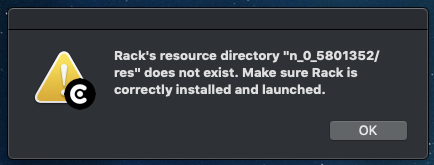
No rack window is created. Subsequent launches do not produce the alert, but still do not create a rack window.
[EDIT] Here is the content of log.txt after running 1.1.6.
[0.001 info src/main.cpp:119] VCV Rack v1.1.6
[0.001 info src/main.cpp:120] Darwin 18.7.0 Darwin Kernel Version 18.7.0: Tue Aug 20 16:57:14 PDT 2019; root:xnu-4903.271.2~2/RELEASE_X86_64 x86_64
[0.001 info src/main.cpp:126] Args: /Applications/Rack-1.1.6.app/Contents/MacOS/Rack -psn_0_6501939
[0.001 info src/main.cpp:129] System directory: n_0_5801352
[0.001 info src/main.cpp:130] User directory: /Users/<me>/Documents/Rack
[0.001 info src/main.cpp:132] Bundle path:
[0.001 info src/settings.cpp:206] Loading settings /Users/<me>/Documents/Rack/settings-v1.json
Version 1.1.5 continues to work just fine.
The (apparently random) "System directory" name matches the missing "/res" folder parent.
Steps to reproduce
I deleted and DL'ed again, with identical results.
 bitfetcher
All 24 comments
Same here
 lifter035
on 7 Nov 2019
lifter035
on 7 Nov 2019
This is a result of app translocation on Mac 10.12.0 and above messing with Rack's -s command line argument (notice the -psn_... nonsense in the arguments).
@bitfetcher Did you download the Rack ZIP with the browser, or did you update Rack using Help > Update in Rack itself?
When downloading the ZIP, your browser adds the com.apple.quarantine xattr, and when using Apple's Archive Utility (by double-clicking on the ZIP), the Rack.app inherits that xattr. This causes the app to be translocated on launch.
However, on my Mac 10.15 machine, when launching the Rack app the second time, it opens successfully, despite the quarantine xattr still being there. @bitfetcher, can you attach your log.txt file after attempting a second launch (when the "Rack's resource directory" doesn't display)?
In an attempt to find a workaround without changing Rack code, the linked document explains that app translocation does not occur when the app is moved by Finder. However, doing this does not appear to remove the quarantine xattr on my machine, so maybe this has been changed. My guess is that Rack might be opening due to an unrelated problem. However, if your log.txt file shows that the system directory is still n_..., then it's not a different problem.
Removing the quarantine xattr manually seems to disable app translocation. You can run this in Terminal.
xattr -d com.apple.quarantine ~/Documents/Rack/Rack.app
In an attempt to find a workaround with changing Rack code in a future version, my first attempt would be to ignore the -psn_... flag. However, in your log.txt, the flag after -ps is n_0_6501939, while your system directory is n_0_5801352. This could mean that the issue is in asset::init() rather than in the command line parsing code. @bitfetcher Are you manually editing your log.txt file? This is one of the reasons we ask to attach the log.txt file instead of copy/pasting into the post.
 AndrewBelt
on 7 Nov 2019
AndrewBelt
on 7 Nov 2019
Andrew, thanks for the reply!
Since my post, things have mysteriously improved. I still get the first-run alert, but now it succeeds on a second launch. I have NO IDEA what changed, except that I was noodling on a patch in 1.1.5, so the autosave-v1.vcv file would have changed; I personally doubt it was a plugin-related issue though...
To answer your questions, yes, I (reflexively?) downloaded, copied to the Applications folder and launched, rather than update from within the app (duh...). I was able to duplicate the second-launch failure several times, but I am now not able to replicate that, but the missing folder alert still does appear on first launch.
Also, the discrepancy of the no_0_####### folder name is my fault. I added the log.txt as an afterthought and was trying to kludge the folder names into agreement. In every case, the folder name in the alert IS shown in the log.txt following the first launch.
Below, though less useful now... is the log.txt after first and second launch of a fresh download.
I am fairly positive that I looked at log.txt after a 2nd launch when no rack window was being produced, and it was the same short log as the first, but the "System directory" field was blank.
After 1st launch:
[0.000 info src/main.cpp:119] VCV Rack v1.1.6
[0.000 info src/main.cpp:120] Darwin 18.7.0 Darwin Kernel Version 18.7.0: Tue Aug 20 16:57:14 PDT 2019; root:xnu-4903.271.2~2/RELEASE_X86_64 x86_64
[0.000 info src/main.cpp:126] Args: /Applications/Rack-1.1.6.app/Contents/MacOS/Rack -psn_0_7317242
[0.000 info src/main.cpp:129] System directory: n_0_7317242
[0.000 info src/main.cpp:130] User directory: /Users/<me>/Documents/Rack
[0.000 info src/main.cpp:132] Bundle path:
[0.000 info src/settings.cpp:206] Loading settings /Users/<me>/Documents/Rack/settings-v1.json
After second launch:
[0.000 info src/main.cpp:119] VCV Rack v1.1.6
[0.000 info src/main.cpp:120] Darwin 18.7.0 Darwin Kernel Version 18.7.0: Tue Aug 20 16:57:14 PDT 2019; root:xnu-4903.271.2~2/RELEASE_X86_64 x86_64
[0.000 info src/main.cpp:126] Args: /Applications/Rack-1.1.6.app/Contents/MacOS/Rack
[0.000 info src/main.cpp:129] System directory: /Applications/Rack-1.1.6.app/Contents/Resources
[0.000 info src/main.cpp:130] User directory: /Users/<me>/Documents/Rack
[0.000 info src/main.cpp:132] Bundle path: /Applications/Rack-1.1.6.app
[0.000 info src/settings.cpp:206] Loading settings /Users/<me>/Documents/Rack/settings-v1.json
[0.000 info src/main.cpp:155] Initializing environment
[truncated]
[3.554 info src/main.cpp:189] Starting engine
[3.554 info src/main.cpp:201] Running window
Again, for some mysterious reason, the second launch now gives me a functioning rack window. I was careful to make SURE I was seeing a potential bug before posting the original issue. I hope I have not burned any of your time needlessly.
PS: And endless thanks for this incredible project you are steering!
bitfetcher
on 8 Nov 2019
@bitfetcher Okay, thanks for the addressing my three questions.
I've implemented a fix for future Rack versions.
For now, I recommend users to follow this process if Rack 1.1.6 fails to launch on Mac.
- Try launching it again.
- If that doesn't work, drag the Rack app to
/Applicationsand launch it again. - If that doesn't work, open Terminal and run
xattr -d com.apple.quarantine /Applications/Rack.app
and launch it again.
- If that doesn't work, create a bug report.
AndrewBelt
on 8 Nov 2019
wanted to add I had the issue on 1.1.6, had it start working after the second run, all was good.
until I attempted to open by using a .vcv file, then started getting the issue again when opening with that method.
running the xattr command does not fix it. opening directly still works as expected.
 JerrySievert
on 24 Nov 2019
JerrySievert
on 24 Nov 2019
Also seeing this issue when opening patches I download from other users. Doesn't appear to happen from patches I've created on my Mac. Tried the Terminal suggestion, but that didn't help. Log attached. @
log.txt
 jjdeprisco
on 20 Dec 2019
jjdeprisco
on 20 Dec 2019
Hi!
I ´ve installed Rack-1.1.6 on OS 10.10.5 (Yosemite) and it shows "Rack's resource directory "n_0_192559/res" does not exist". I´ve tried the terminal command, but still it doesn´y launch.
This is the Log.
[0.000 info src/main.cpp:119] VCV Rack v1.1.6
[0.000 info src/main.cpp:120] Darwin 14.5.0 Darwin Kernel Version 14.5.0: Sun Jun  4 21:40:08 PDT 2017; root:xnu-2782.70.3~1/RELEASE_X86_64 x86_64
[0.000 info src/main.cpp:126] Args: /Applications/Rack.app/Contents/MacOS/Rack
[0.000 info src/main.cpp:129] System directory: /Applications/Rack.app/Contents/Resources
[0.000 info src/main.cpp:130] User directory: /Users/tomasmena/Documents/Rack
[0.000 info src/main.cpp:132] Bundle path: /Applications/Rack.app
[0.000 info src/settings.cpp:206] Loading settings /Users/tomasmena/Documents/Rack/settings-v1.json
[0.000 info src/main.cpp:155] Initializing environment
 tomasmena
on 28 Dec 2019
tomasmena
on 28 Dec 2019
Hi @AndrewBelt ,
I'm getting a similar issue in 1.1.6 with a plugin I am working on... I traced it down to trying to set the text value on a ui::Label instance when overriding the step() method of the widget.
It basically crashes Rack when I try to open the module browser, and on relaunch this popup shows up... Any idea how I could address this ?
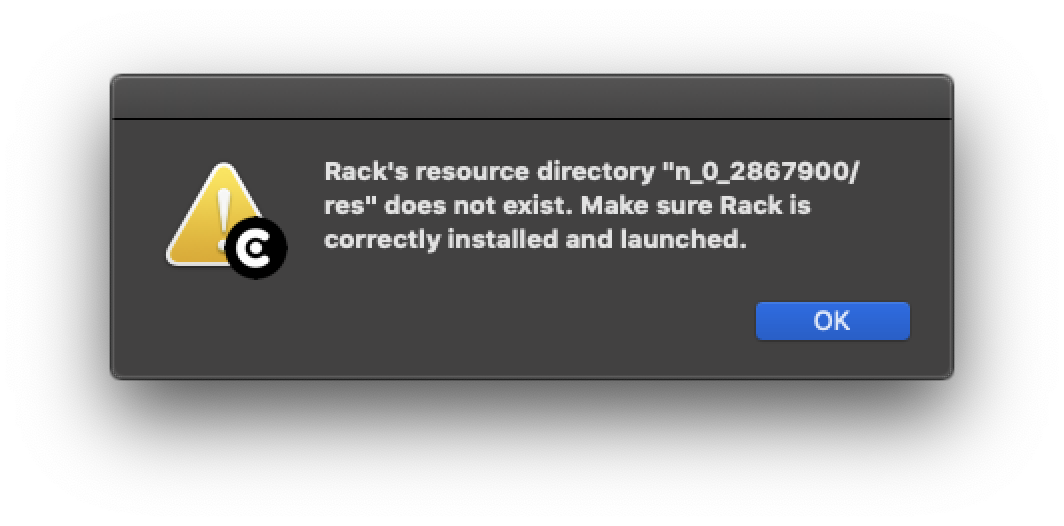
Regards,
Stefan
here is the code:
  void step() override
  {
    // these first four lines are causing the error to occur
    int r = module->params[QuadSequencer::ROOT_PARAM].getValue();
    rootLabel->text = QuantizerUtils::getNoteLabel(r);
    int s = module->params[QuadSequencer::SCALE_PARAM].getValue();
    scaleLabel->text = QuantizerUtils::getScaleLabel(s);

    ModuleWidget::step();
  };
 stephanepericat
on 13 Jan 2020
stephanepericat
on 13 Jan 2020
update: trying to get the param value in the context of the browser was causing it to crash... solved it like this:
int r = module ? module->params[QuadSequencer::ROOT_PARAM].getValue() : 0;
rootLabel->text = QuantizerUtils::getNoteLabel(r);
int s = module ? module->params[QuadSequencer::SCALE_PARAM].getValue() : 0;
scaleLabel->text = QuantizerUtils::getScaleLabel(s);
Just got into this issue, fresh Mac, fresh Rack install, first two times trying to run the app, same error. Third time lucky and now it works fine...
 Kieleth
on 15 Feb 2020
Kieleth
on 15 Feb 2020
Yeah, I still get this error quite frequently, but only when trying to double-click on a VCV file to open it. Usually it's files I get from other folks. If I use Open File from within VCV, then it's fine. My own files also seem to be OK to open with double-click outside of VCV.
jjdeprisco
on 15 Feb 2020
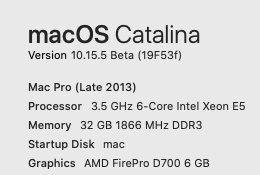
Same issue here. Tried all the steps, but still no luck: I can open VCV rack and file open works fine, but double-click on a .vcv file reports that error. Rack.app is in /Applications.
Running that line reports this error:
~~~~
[~]$ xattr -d com.apple.quarantine /Applications/Rack.app
xattr: /Applications/Rack.app: No such xattr: com.apple.quarantine
~~~~
 erwincoumans
on 6 Apr 2020
erwincoumans
on 6 Apr 2020
I think it's important to note that my experience is that .VCV files from other people (Omri, VCV Rack Ideas etc) won't load with double-click, and require File/Open. My own .VCV files open with double-click just fine.
If I open someone else's .VCV file, I need to Save As to get it to open with double-click in future sessions.
Related point: I'll put in a feature request, but the lack of a "recent projects" option under File makes this whole procedure a bit more frustrating. But even if the issue above is fixed, a "recent projects" option would be helpful (most DAWs provide this).
jjdeprisco
on 6 Apr 2020
Hi
When I got this "Rack's resource directory is missing" message I right clicked on Rack in my applications folder, showed package content, created in /Resources a sub folder with the n_0_xxxyyyy missing as name, copied the present res folder into it and started Rack. It worked. After quitting I erased the n_O_xxxyyy folder and Rack still loads now without it.
It's a dirty way of doing things and frankly I'm not sure why it works now. If it can help.
 iandelord
on 3 May 2020
iandelord
on 3 May 2020
I have the same issue on macOS Big Sur developer beta 2, however, launching the binary as sudo worked:
Open a terminal and just enter sudo /path/to/your/Rack.app/Contents/MacOS/Rack did the trick for me.
Sounds like it could be a permission problem.
 samuel-larsson
on 16 Jul 2020
samuel-larsson
on 16 Jul 2020
@AndrewBelt xattr -d com.apple.quarantine /Applications/Rack.app solved it for me. I'm currently on macOS Catalina 10.15.5.
Thanks!
 todrobbins
on 18 Jul 2020
todrobbins
on 18 Jul 2020
@samuel-larsson Do not launch Rack with sudo. This causes Rack to create files owned by root, so when Rack is later launched as an unprivileged user, it does not have the permission to edit files it created in the first launch.
There is no reason that launching Rack as root will solve any problem.
Sounds like it could be a permission problem.
This issue has nothing to do with permissions. I already explained the cause in https://github.com/VCVRack/Rack/issues/1623#issuecomment-551278442
AndrewBelt
on 30 Jul 2020
This issue was fixed a few months ago in my (currently private) v2 branch.
I could not figure out how to stop Mac from adding a -psn_... argument when launching the app, so I have reserved the -p flag to accept a arbitrary string value and then ignore it. In other words, the argument parser will consume the -p flag along with the value sn_..., which will prevent the -s flag from triggering with a value of n_....
AndrewBelt
on 30 Jul 2020
@samuel-larsson Do not launch Rack with
sudo. This causes Rack to create files owned by root, so when Rack is later launched as an unprivileged user, it does not have the permission to edit files it created in the first launch.
There is no reason that launching Rack as root will solve any problem.Sounds like it could be a permission problem.
This issue has nothing to do with permissions. I already explained the cause in #1623 (comment)
Running it privileged is currently the only thing that works for me. Disabling translocation on the folders and app bundle didn’t help. I’ll come back with logs from my attempts ASAP.
samuel-larsson
on 30 Jul 2020
@samuel-larsson
Running it privileged is currently the only thing that works for me
That's no surprise because as I said above, "when Rack is later launched as an unprivileged user, it does not have the permission to edit files it created in the first launch", so it will not be able to launch.
To fix, delete your ~/Documents/Rack directory and follow my workaround at https://github.com/VCVRack/Rack/issues/1623#issuecomment-551374084.
AndrewBelt
on 30 Jul 2020
To fix, delete your
~/Documents/Rackdirectory and follow my workaround at #1623 (comment).
I have already followed all of the above. I delete the app bundle and user files between every attempt as well. A fresh attempt running it regularly results in the same error message and log as everyone else is getting. However, I just noticed that opening the binary inside the bundle from Terminal without elevating works as well.
Log file from normal "double click .app" attempt:
[0.000 info src/main.cpp:119] VCV Rack v1.1.6
[0.000 info src/main.cpp:120] Darwin 20.0.0 Darwin Kernel Version 20.0.0: Sat Jun 13 17:58:16 PDT 2020; root:xnu-7090.0.0.111.5~1/RELEASE_X86_64 x86_64
[0.000 info src/main.cpp:126] Args: /Applications/Rack.app/Contents/MacOS/Rack -psn_0_671908
[0.000 info src/main.cpp:129] System directory: n_0_671908
[0.000 info src/main.cpp:130] User directory: /Users/<username>/Documents/Rack
[0.000 info src/main.cpp:132] Bundle path:
[0.000 info src/settings.cpp:206] Loading settings /Users/<username>/Documents/Rack/settings-v1.json
Log file from opening via Terminal:
[0.000 info src/main.cpp:119] VCV Rack v1.1.6
[0.000 info src/main.cpp:120] Darwin 20.0.0 Darwin Kernel Version 20.0.0: Sat Jun 13 17:58:16 PDT 2020; root:xnu-7090.0.0.111.5~1/RELEASE_X86_64 x86_64
[0.000 info src/main.cpp:126] Args: /Applications/Rack.app/Contents/MacOS/Rack
[0.000 info src/main.cpp:129] System directory: /Applications/Rack.app/Contents/Resources
[0.000 info src/main.cpp:130] User directory: /Users/<username>/Documents/Rack
[0.000 info src/main.cpp:132] Bundle path: /Applications/Rack.app
[0.000 info src/settings.cpp:206] Loading settings /Users/<username>/Documents/Rack/settings-v1.json
[0.000 info src/main.cpp:155] Initializing environment
[3.162 info src/plugin.cpp:154] Loaded plugin Core v1.1.6 from
[3.163 info src/plugin.cpp:221] Extracting bundled Fundamental package
[3.268 info src/bridge.cpp:384] Bridge server started
[4.794 info src/plugin.cpp:154] Loaded plugin Fundamental v1.3.1 from /Users/<username>/Documents/Rack/plugins-v1/Fundamental
[4.850 info src/main.cpp:171] Initializing app
[6.346 info src/window.cpp:238] Window content scale: 2.000000
[6.613 info src/window.cpp:279] Renderer: AMD Radeon Pro 5300M OpenGL Engine
[6.613 info src/window.cpp:280] OpenGL: 2.1 ATI-4.0.24
[6.617 info src/window.cpp:33] Loaded font /Applications/Rack.app/Contents/Resources/res/fonts/DejaVuSans.ttf
[6.617 info src/window.cpp:72] Loaded SVG /Applications/Rack.app/Contents/Resources/res/ComponentLibrary/RackBusboard.svg
[6.617 info src/settings.cpp:189] Saving settings /Users/<username>/Documents/Rack/settings-v1.json
[6.617 info src/patch.cpp:163] Loading patch /Users/<username>/Documents/Rack/autosave-v1.vcv
[6.617 info src/patch.cpp:163] Loading patch /Users/<username>/Documents/Rack/template-v1.vcv
[6.617 info src/patch.cpp:163] Loading patch /Applications/Rack.app/Contents/Resources/template.vcv
[6.618 info src/patch.cpp:273] Patch was made with Rack v1.dev.82b817e, current Rack version is v1.1.6
[6.638 info src/window.cpp:72] Loaded SVG /Applications/Rack.app/Contents/Resources/res/Core/AudioInterface.svg
[6.638 info src/window.cpp:72] Loaded SVG /Applications/Rack.app/Contents/Resources/res/ComponentLibrary/ScrewSilver.svg
[6.638 info src/window.cpp:72] Loaded SVG /Applications/Rack.app/Contents/Resources/res/ComponentLibrary/PJ301M.svg
[6.638 info src/window.cpp:33] Loaded font /Applications/Rack.app/Contents/Resources/res/fonts/ShareTechMono-Regular.ttf
[6.638 info src/engine/Module.cpp:113] Patch created with Core v1.0.0, currently using v1.1.6.
[6.640 info src/window.cpp:72] Loaded SVG /Users/<username>/Documents/Rack/plugins-v1/Fundamental/res/VCMixer.svg
[6.640 info src/window.cpp:72] Loaded SVG /Applications/Rack.app/Contents/Resources/res/ComponentLibrary/RoundLargeBlackKnob.svg
[6.640 info src/window.cpp:72] Loaded SVG /Applications/Rack.app/Contents/Resources/res/ComponentLibrary/LEDSlider.svg
[6.640 info src/window.cpp:72] Loaded SVG /Applications/Rack.app/Contents/Resources/res/ComponentLibrary/LEDSliderHandle.svg
[6.640 info src/window.cpp:72] Loaded SVG /Users/<username>/Documents/Rack/plugins-v1/Fundamental/res/LEDSliderHandle.svg
[6.640 info src/window.cpp:72] Loaded SVG /Applications/Rack.app/Contents/Resources/res/ComponentLibrary/LEDSliderHandle.svg
[6.640 info src/window.cpp:72] Loaded SVG /Applications/Rack.app/Contents/Resources/res/ComponentLibrary/LEDSliderHandle.svg
[6.640 info src/window.cpp:72] Loaded SVG /Applications/Rack.app/Contents/Resources/res/ComponentLibrary/LEDSliderHandle.svg
[6.641 info src/engine/Module.cpp:113] Patch created with Fundamental v1.0.0, currently using v1.3.1.
[6.642 info src/window.cpp:72] Loaded SVG /Users/<username>/Documents/Rack/plugins-v1/Fundamental/res/VCO-1.svg
[6.642 info src/window.cpp:72] Loaded SVG /Applications/Rack.app/Contents/Resources/res/ComponentLibrary/CKSS_0.svg
[6.642 info src/window.cpp:72] Loaded SVG /Applications/Rack.app/Contents/Resources/res/ComponentLibrary/CKSS_1.svg
[6.642 info src/window.cpp:72] Loaded SVG /Applications/Rack.app/Contents/Resources/res/ComponentLibrary/RoundHugeBlackKnob.svg
[6.642 info src/engine/Module.cpp:113] Patch created with Fundamental v1.0.0, currently using v1.3.1.
[6.643 info src/window.cpp:72] Loaded SVG /Users/<username>/Documents/Rack/plugins-v1/Fundamental/res/VCF.svg
[6.643 info src/engine/Module.cpp:113] Patch created with Fundamental v1.0.0, currently using v1.3.1.
[6.644 info src/window.cpp:72] Loaded SVG /Applications/Rack.app/Contents/Resources/res/Core/MIDI-CV.svg
[6.644 info src/engine/Module.cpp:113] Patch created with Core v1.0.0, currently using v1.1.6.
[6.644 info src/window.cpp:72] Loaded SVG /Users/<username>/Documents/Rack/plugins-v1/Fundamental/res/ADSR.svg
[6.644 info src/engine/Module.cpp:113] Patch created with Fundamental v1.0.0, currently using v1.3.1.
[6.645 info src/window.cpp:72] Loaded SVG /Users/<username>/Documents/Rack/plugins-v1/Fundamental/res/Scope.svg
[6.645 info src/window.cpp:33] Loaded font /Users/<username>/Documents/Rack/plugins-v1/Fundamental/res/sudo/Sudo.ttf
[6.646 info src/window.cpp:72] Loaded SVG /Applications/Rack.app/Contents/Resources/res/ComponentLibrary/RoundBlackKnob.svg
[6.646 info src/window.cpp:72] Loaded SVG /Applications/Rack.app/Contents/Resources/res/ComponentLibrary/CKD6_0.svg
[6.646 info src/window.cpp:72] Loaded SVG /Applications/Rack.app/Contents/Resources/res/ComponentLibrary/CKD6_1.svg
[6.646 info src/engine/Module.cpp:113] Patch created with Fundamental v1.0.0, currently using v1.3.1.
[6.646 info src/window.cpp:72] Loaded SVG /Applications/Rack.app/Contents/Resources/res/Core/Notes.svg
[6.646 info src/engine/Module.cpp:113] Patch created with Core v1.0.0, currently using v1.1.6.
[6.646 info src/main.cpp:189] Starting engine
[6.646 info src/main.cpp:201] Running window
[8.287 info src/main.cpp:203] Stopped window
[8.287 info src/main.cpp:205] Stopping engine
[8.287 info src/patch.cpp:86] Saving patch /Users/<username>/Documents/Rack/autosave-v1.vcv
[8.289 info src/main.cpp:212] Destroying app
[8.297 info src/settings.cpp:189] Saving settings /Users/<username>/Documents/Rack/settings-v1.json
[8.298 info src/main.cpp:217] Destroying environment
[8.377 info src/bridge.cpp:365] Bridge server closed
[8.378 info src/main.cpp:225] Destroying logger
I have unzip the "Rack-1.1.6-mac" using Keka and it solved the issue!
macOS Catalina Version 10.15.5
 sabdamusic
on 25 Oct 2020
sabdamusic
on 25 Oct 2020
xattr -d com.apple.quarantine /Applications/Rack.app
Worked great for me, thanks @AndrewBelt.
Running Mojave 10.14.16 and VCV Rack 1.1.6
 inci90
on 14 Nov 2020
inci90
on 14 Nov 2020
xattr -d com.apple.quarantine /Applications/Rack.app
Worked for me. I had the OP issue while opening Rack after updating it from the menu.
Running Rack 1.1.6 on OSX 10.13.6 (17G14033) on MBP 13" Early 2011
Thank you
 RaffaeleT
on 28 Dec 2020
RaffaeleT
on 28 Dec 2020
Related issues
 synthi
·
4Comments
synthi
·
4Comments
 antoniotuzzi
·
5Comments
antoniotuzzi
·
5Comments
 PixelBulb
·
4Comments
PixelBulb
·
4Comments
 gogobanziibaby
·
4Comments
gogobanziibaby
·
4Comments
 oblivionratula
·
7Comments
oblivionratula
·
7Comments
Most helpful comment
This is a result of app translocation on Mac 10.12.0 and above messing with Rack's
-scommand line argument (notice the-psn_...nonsense in the arguments).@bitfetcher Did you download the Rack ZIP with the browser, or did you update Rack using
Help > Updatein Rack itself?When downloading the ZIP, your browser adds the
com.apple.quarantinexattr, and when using Apple's Archive Utility (by double-clicking on the ZIP), theRack.appinherits that xattr. This causes the app to be translocated on launch.However, on my Mac 10.15 machine, when launching the Rack app the second time, it opens successfully, despite the quarantine xattr still being there. @bitfetcher, can you attach your log.txt file after attempting a second launch (when the "Rack's resource directory" doesn't display)?
In an attempt to find a workaround without changing Rack code, the linked document explains that app translocation does not occur when the app is moved by Finder. However, doing this does not appear to remove the quarantine xattr on my machine, so maybe this has been changed. My guess is that Rack might be opening due to an unrelated problem. However, if your log.txt file shows that the system directory is still
n_..., then it's not a different problem.Removing the quarantine xattr manually seems to disable app translocation. You can run this in Terminal.
In an attempt to find a workaround with changing Rack code in a future version, my first attempt would be to ignore the
-psn_...flag. However, in yourlog.txt, the flag after-psisn_0_6501939, while your system directory isn_0_5801352. This could mean that the issue is inasset::init()rather than in the command line parsing code. @bitfetcher Are you manually editing yourlog.txtfile? This is one of the reasons we ask to attach thelog.txtfile instead of copy/pasting into the post.