Rack: UI drawing issues with certain plugins
Operating system: GNU/Linux Ubuntu 18.04
Rack version: v1.0.0.dev (1ea9afc)
Adding Valley Dexter plugin does not draw all UI elements (knobs).
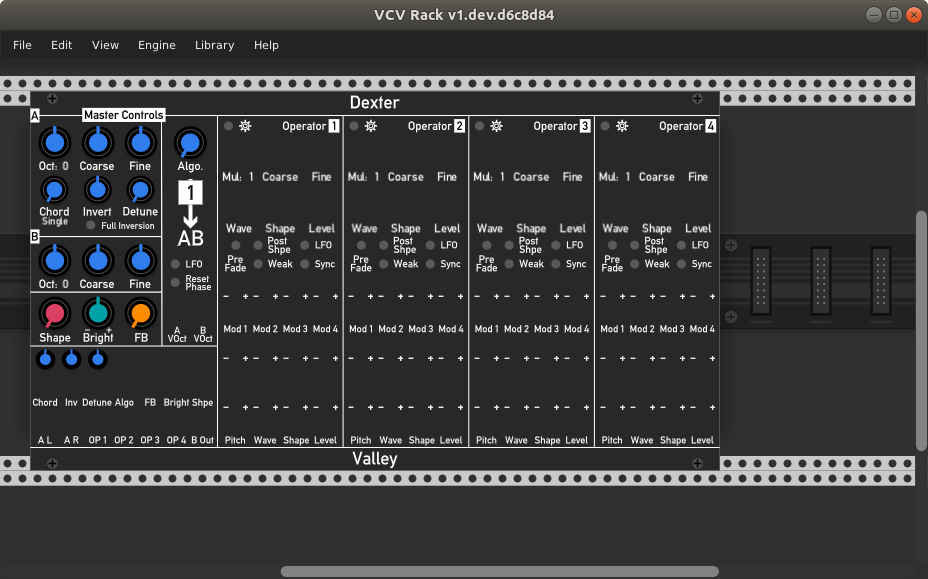
Zooming out does not solve the issue, but zooming in until the plugin reaches the edge of the viewport and disappears partly will redraw all UI elements.
Also, resizing the screen at the top or bottom in steps will (step by step) redraw the UI elements also.
Same with the Plugin Manager issue, where modules were showing black: resizing the screen will redraw them.
EDIT: Also observed similar weirdness with a Geodesics plugin. Zooming refresh solved the issue.
 cschol
All 29 comments
EDIT: Also observed similar weirdness with a Geodesics plugin. Zooming refresh solved the issue.
Also saw it with : Impromptu, JW , Bog Audio , Audiable Instruments, vcv.
Zooming in/out is causing and solving this.
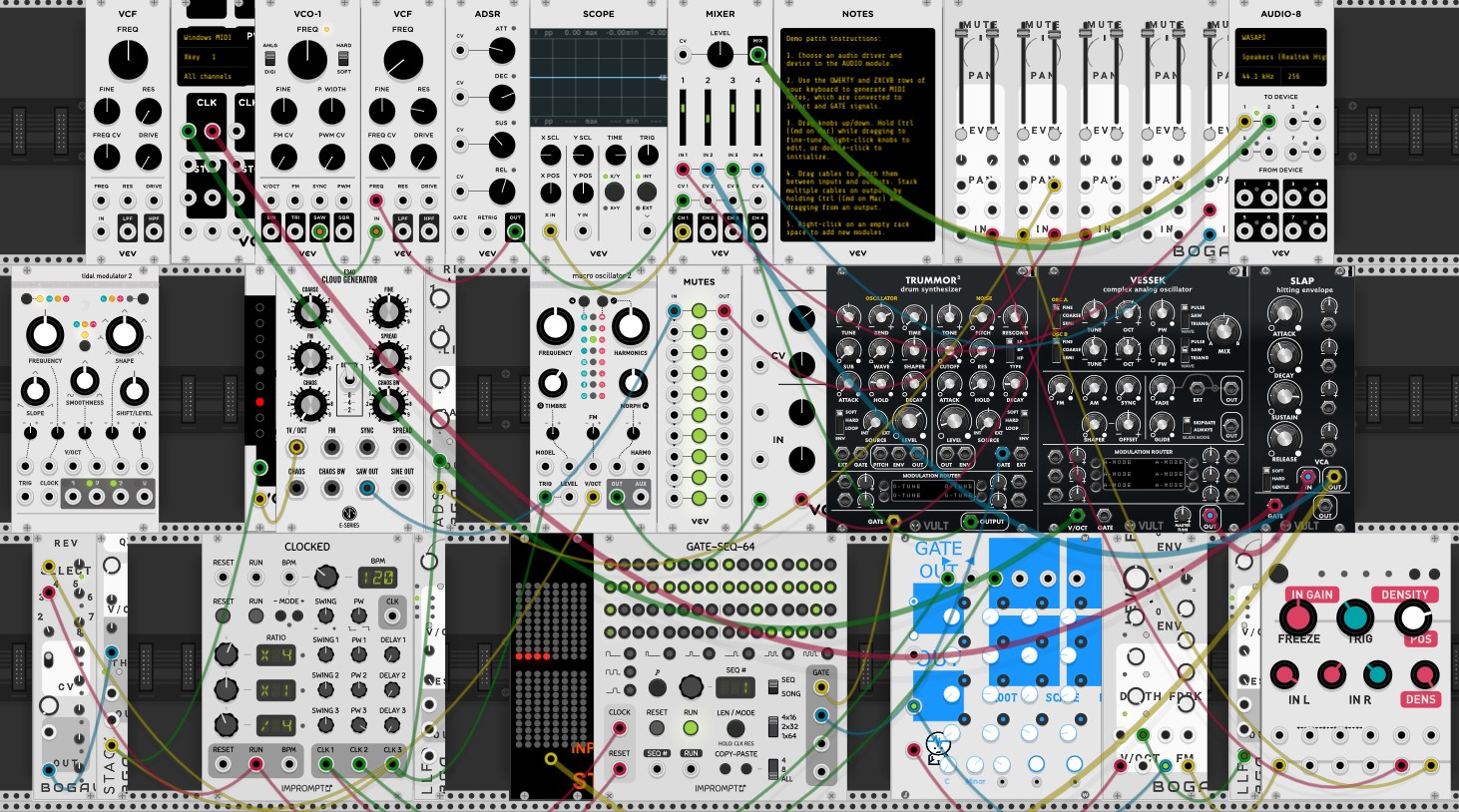
Some random screenshot, sometimes there are other plugins looking weird.
 Petervos2018
on 16 Jun 2019
Petervos2018
on 16 Jun 2019
Similar symptoms indeed. I traced it to oversampling in the Framebufferwidget in Dexter. I wonder if other plugins do that, too.
cschol
on 16 Jun 2019
Valley, LindenbergResearch, and squinkylabs all apply this oversampling feature in their widgets of some modules. I don't see any of them in the patch above, but that doesn't mean any other module (e.g. Vult or Audible Instruments) does not.
@AndrewBelt Could this be a bug in Rack after all?
cschol
on 17 Jun 2019
This is my best one yet : just a fast zoom in/out
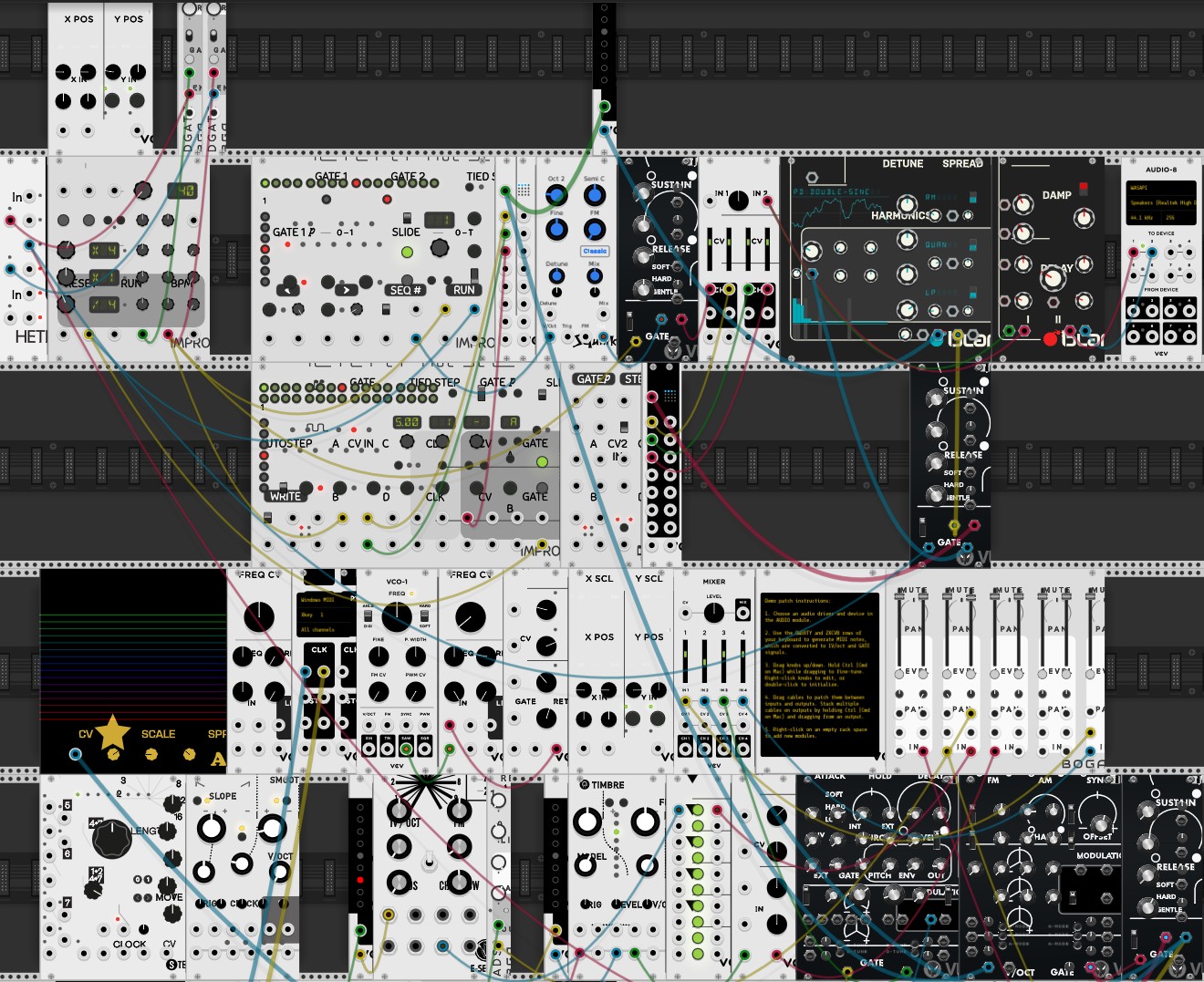
I just know someone is going to tell me its my graphics card...
Petervos2018
on 17 Jun 2019
Issue is in FramebufferWidget.cpp. I can't find it, but anyone is welcome to.
 AndrewBelt
on 17 Jun 2019
AndrewBelt
on 17 Jun 2019
It is related to the oversampling section: https://github.com/VCVRack/Rack/blob/v1/src/widget/FramebufferWidget.cpp#L83
I comment that section out and Valley looks correct and behaves correctly. I'll take a look around.
cschol
on 17 Jun 2019
This could be the same bug that came up in Antonio's post a little while ago, and something that I also noticed when initially porting to v1. Referencing it here in case it's relevant.
https://community.vcvrack.com/t/nysthi-v1-panel-svg-rendering-issue/2635
 MarcBoule
on 17 Jun 2019
MarcBoule
on 17 Jun 2019
The following change solves the issue with the incorrect "algorithm component" in Dexter (it looks too big):
diff --git a/src/widget/FramebufferWidget.cpp b/src/widget/FramebufferWidget.cpp
index 78d1b63..b02739f 100644
--- a/src/widget/FramebufferWidget.cpp
+++ b/src/widget/FramebufferWidget.cpp
@@ -60,7 +60,7 @@ void FramebufferWidget::step() {
        math::Vec newFbSize = fbBox.size.mult(APP->window->pixelRatio).ceil();

        // Create framebuffer if a new size is needed
-       if (!fb || !newFbSize.isEqual(fbSize)) {
+       if (!fb || !newFbSize.isEqual(fbSize) || oversample != 1.f) {
                fbSize = newFbSize;
                // Delete old framebuffer
                if (fb)
This forces the oversampled framebuffer to be created when oversampling is used (!= 1.0).
However, this does not fix the redraw issue with the missing knobs. Still looking.
cschol
on 17 Jun 2019
Here is another hint: the knobs are not redrawn when moving them. The values change, i.e. the knob acts as if it was turned, but on the screen the knobs are not redrawn in the new position.
All of this weird behavior goes away when disabling the swapping of the framebuffers (line 112-113).
cschol
on 17 Jun 2019
Found it:
// It's more important to not lag the frame than to draw the framebuffer
if (APP->window->isFrameOverdue())
    return;
Apparently, Dexter takes too much time with all of its knobs? I comment those lines above out and it draws correctly.
Not sure what the solution here is though. I assume this framerate check was put in for a reason.
cschol
on 17 Jun 2019
That feature must stay, the issue is elsewhere. If isFrameOverdue() returns true, the FramebufferWidget will just try to redraw next frame, since dirty is not set to false.
AndrewBelt
on 17 Jun 2019
What if the Frame is overdue a LOT? I put a counter in and it returned 199 "overdues" in a row before 1 normal frame and then again 199 overdue frames and 1 normal frame. Not sure what it means.
I agree, something doesn't look right and the issue might be elsewhere.
cschol
on 17 Jun 2019
I think I got it now:
Dexter is using oversampling of 2.0 in the Algorithm component, which is derived from FramebufferWidget. In its step function it is always setting dirty = true and executing FramebufferWidget::step. If I only set dirty = true when the algorithm changes (rotate knob), the module works correctly.
Now, it does require the additional change to FramebufferWidget I proposed above to work. Otherwise, the oversampled widget is not drawn correctly.
cschol
on 19 Jun 2019
This is the proposed change in Dexter:
diff --git a/src/Dexter/Dexter.hpp b/src/Dexter/Dexter.hpp
index 36eb4b5..9df9565 100755
--- a/src/Dexter/Dexter.hpp
+++ b/src/Dexter/Dexter.hpp
@@ -455,8 +456,12 @@ struct AlgoGraphic : FramebufferWidget {
             styleOffset = 0;
         }
         int index = clamp(value + styleOffset, 0, frames.size() - 1);
+        if (index != lastIndex) {
+            lastIndex = index;
+            dirty = true;
+        }
+
         sw->setSvg(frames[index]);
-        dirty = true;
         FramebufferWidget::step();
     }
 };
What Dexter does might be weird, but it should be correct. What I want to know is why it behaves incorrectly, which is Rack's FramebufferWidget code. My guess is that on frame N, stuff is set, and in frame N+M, it's finally rendered, but the stuff is then incorrect.
AndrewBelt
on 19 Jun 2019
What do mean by "incorrect"?
cschol
on 19 Jun 2019
Setting dirty = true shouldn't prevent a FramebufferWidget from rendering, so Rack is handling this request incorrectly somehow.
AndrewBelt
on 19 Jun 2019
The framerate determines how much time there is to perform the rendering operation. If the oversampled FramebufferWidget (the Algorithm component) is rendered every time since dirty = true always, could it be that we are just running out of time in the frame and never catch up really? It is doing twice as much work in that oversampled case. This theory is supported by the evidence that if I disable oversampling, it works fine.
cschol
on 19 Jun 2019
Just saw the same issue with the new Erica Synth plugins too, just to add to this.
 fractalgee
on 19 Jun 2019
fractalgee
on 19 Jun 2019
@cschol I believe that theory is wrong for two reasons. If the plugin is placed in the rack (so that each knob is its own FramebufferWidget), and if rendering each knob takes more time than an entire frame, the rendering will not be interrupted. It will still wait for completion and only check if it's overdue at the beginning before starting to render. This means that at worst, 1 knob will render each frame until all N knobs are rendered after N frames.
Also, in the ModuleBrowser, each ModuleWidget is drawn in a FramebufferWidget. If there are nested FramebufferWidget, the renderer will realize this and instead of drawing to a framebuffer, it will draw directly to the current nanovg context.
So the fact that Dexter is breaking when setting dirty = true each frame is a big hint, but I still can't see why that would break it.
AndrewBelt
on 19 Jun 2019
@AndrewBelt OK. I think I get what you are saying. The effect would look like what I would describe as "curtain effect" of drawing widgets from left to right. I see something like this for NYSTHI's AttackSustainRelease16, which has a ton of ports and knobs. It renders fine ultimately, but it takes a few frames.
OK. I think I got farther along:
- I disabled the check for
oversample != 1.0inFramebufferWidget(noif), so we are doing that second copying work all the time now. This makes rendering really slow, but it modules with a lot of knobs render successfully after a N frames. Dexter still does not render correctly. - Dexter includes an
SvgWidgetin the Algorithm component. If I remove that widget from the component, everything starts working (albeit slow due to the forced double-work). Does that point to theSvgWidget? Or an interaction between oversampling and theSvgWidget?
cschol
on 20 Jun 2019
I don't have any answers, but my experience might provide a clue.
I was drawing my backgrounds using nanovg into a FrameBufferWidget, rather than using an Svg.
What I was finding was that everything rendered correctly at startup, but if I caused the image to be dirty, it was always being redrawn at exactly twice the size it should be. Zooming would then fix it until the next time it was dirty.
I took out the line that set oversample to 2.0 and the problem went away. It felt as though the scaling that was applied for oversampling was then being misapplied later, at the wrong time or to the wrong thing.
This was code that had worked in v0.6
 david-c14
on 24 Jun 2019
david-c14
on 24 Jun 2019
Could it be that the cause of the problem is related to the following (hopefully correct) observation in FramebufferWidget::step() (https://github.com/VCVRack/Rack/blob/v1/src/widget/FramebufferWidget.cpp#L18):
In line 63 the fbSize is compared to the newFbSize. When not equal, a new framebuffer is allocated in line 70 with a multiplier on the size of the framebuffer to account for oversampling.
As an example, say oversampling is 2 and the sizes were different and the new fbSize is 100x100. Thus the new fb that is allocated is 200x200.
Then in line 83 there is a test of oversample != 1.0. This is true in my example, so in the related if block, a new framebuffer of normal size is allocated (called newFb), which in this case will be 100x100. The larger oversampled framebuffer fb is correcty rendered into this normal size buffer, and then at the end of the method (line 113), we have
fb = newFb;
such that the "real" framebuffer fb now becomes 100x100.
Could this be problematic in the sense that when the step() method executes again (because of a dirty=true that happened somewhere else), and the fbSize has not changed (still 100x100), the fb is not reallocated because line 70 doesn't execute, and it thus stays at 100x100, while the actual drawing that is about to happen in drawFramebuffer() knows that oversampling is still 2, so it will draw the frame again using this oversampling factor. In other words, it will draw to 100x100 but it thinks it is 200x200, which is the cause of the improper zoom bug discussed in this issue?
As david-c14 mentioned, leaving oversampling at 1 is one way of side-stepping the problem, and in my tests, replacing line 63 with if (true) is different way to mask the problem, so although this is not a solution, perhaps it can help zoom in on the issue.
MarcBoule
on 7 Sep 2019
Hi @AndrewBelt , I have something a bit more concrete to bring to this issue. It's based on a few observations that I'll list before presenting my proposed solution.
My proposal concerns the step() method in src/widget/FramebufferWidget.cpp.
Observations
- The rendering issue happens when
oversample > 1 - The
drawFramebuffer()call (L79) made in this method assumes that thefbframebuffer has been allocated in its larger (oversampled) size and will render according to this - When leaving the method, the
fbframebuffer is always sized to its non-oversampled size (L113) - When a call is made to
step()wheredirtyis true but the size of the framebuffer is unchanged compared to the previous time it was drawn, a bigger (oversampled)fbis _not_ created (since L70 does not execute), and the code will use the current normal-sizedfb(i.e. not oversampled in size). This causes the rendering issue.
How to reproduce
Two ways:
- In a widget, set its
dirtyto true (say from within a button click or another event unrelated to rendering) while keeping the size of the widget unchanged. The widget will not render correctly. - Add any module you want from any plugin to an empty patch. Set the zoom slider in the view menu to something low (like 70-80%), to make sure
oversampleis greater than 1, and move the zoom slider as slowly as possible. Depending on the rounding, in certain cases the change to the zoom is sufficiently small that the actualfbSizeis unchanged. Since the zoom is nonetheless calling for a redraw (dirty), thefbwill not be allocated to its oversampled size (as per point 4 above) and the issue occurs.
Proposal for a solution
Could we make a small change to L63, from this
if (!fb || !newFbSize.isEqual(fbSize)) {
to this
if (!fb || !newFbSize.isEqual(fbSize) || oversample != 1.0f) {
to force the fb to always be allocated according to the oversample value when oversample is not 1? With this, the issue does not manifest itself in my experiments.
Discussion
A critique of the solution could be that by forcing this if statement to always execute when oversample > 1.0f, we are allocating framebuffers more often (performance issue). However, anytime we are zooming and the change in zoom is big enough (which is 99% of the time), the if statement is always executing anyways, so no loss actually. When dirty is false, all this code does is not even executing.
Another solution could be envisioned that would also permanently keep the larger (oversampled) framebuffer allocated, as long as the size doesn't change, thus avoiding the overhead with nvgluDeleteFramebuffer() and nvgluCreateFramebuffer() that happens on each step() that redraw is needed.
Hope this is readable and that something in here is usable to help solve this issue. I'm still seeing it creep up from time to time, and it would be really cool to stomp this one :-)
MarcBoule
on 21 Nov 2019
The issue concerns all plugins, and depending on the zoom level, it will happen to different plugins at different zoom levels. When using the zoom method I mention above to reproduce the issue, in one of my tests I was lucky and it happened to 7 modules simultaneously:
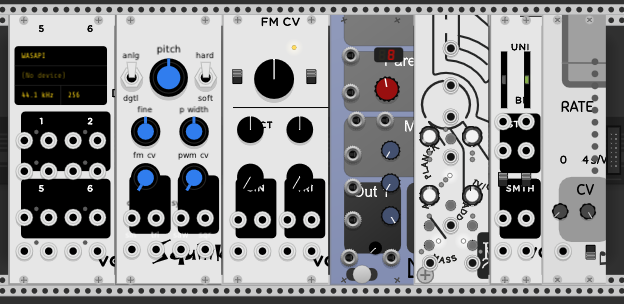
The modules are (in order):
- VCV Audio-8
- SquinkyLabs Functional VCO-1
- VCV VCO-1
- ML Evolution
- Geodesics Energy
- VCV Random
- Impromptu Tact-1
MarcBoule
on 21 Nov 2019
When I use a 2nd monitor, things will look correct when I launch Rack on any monitor, but when moving the window from monitor 1 to 2 everything looks wrong and no amount of zooming or panning will solve it. Moving it back to monitor 1 instantly redraws all modules correctly. Closing and restarting rack on the 2nd screen also draws correctly (but moving the window to the 1st and back messes it up again)
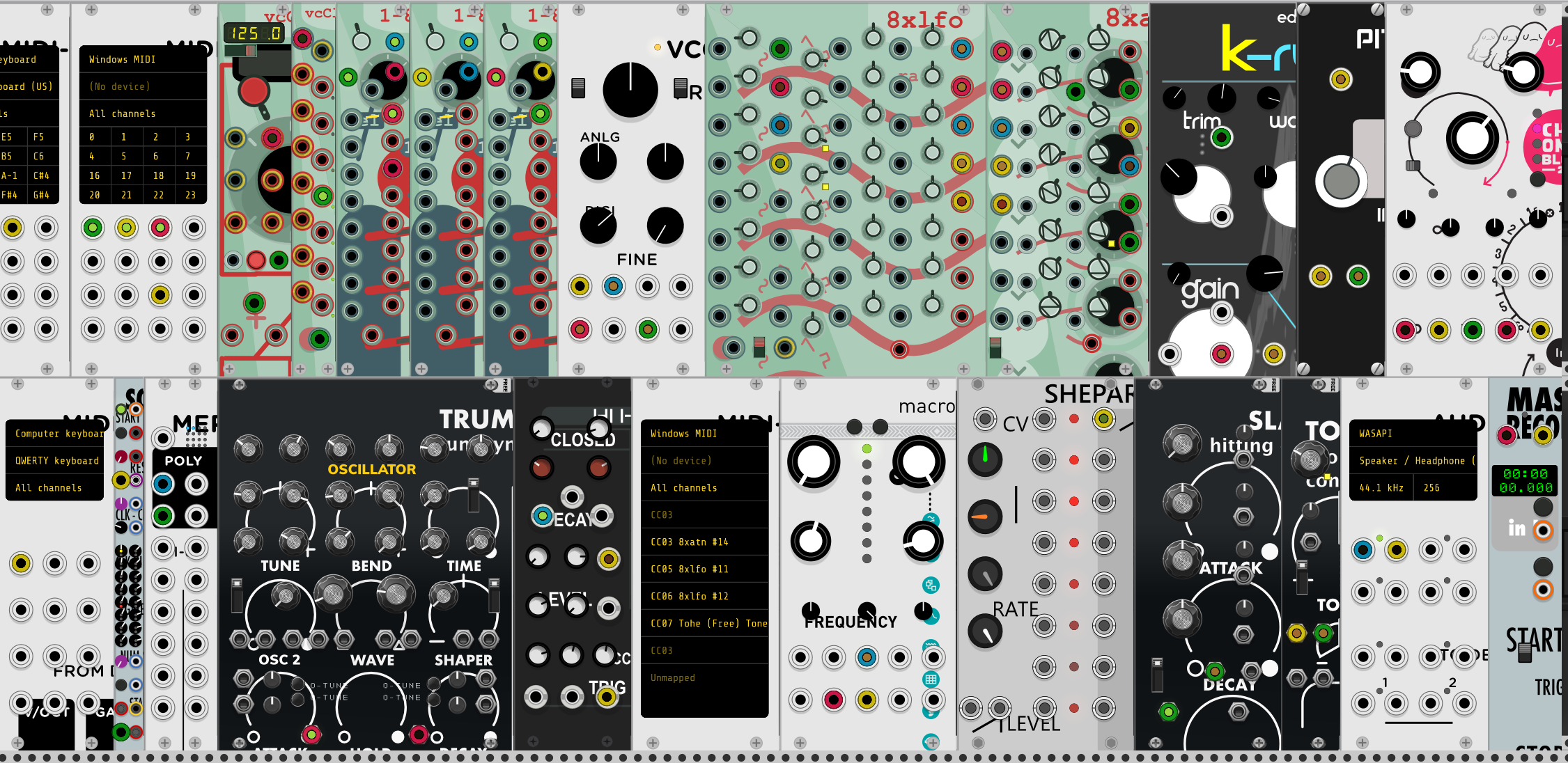
 catronomix
on 14 Jan 2020
catronomix
on 14 Jan 2020
@catronomix Please give details of your setup, such as monitor resolutions, DPIs, and OS.
AndrewBelt
on 14 Jan 2020
OS: Windows 10
Monitor 1: 1080p
Monitor 2: 2160p
OS DPI Scaling: 150%
edit: setting the second display to 1080p as well does not produce the glitch (Quickly zooming in and out still sometimes produces it on any display at any res, but only for a few random modules at a time)
edit 2: Windows automatically sets DPI scaling amounts based on the resolutions selected.
It seems only the 2nd screen goes to 150% and the first one to 125%
Setting them to an equal amount makes the problem go away. Having different amounts produces the problem, regardless of display resolution.
edit 3: After recompiling Rack with oversample set to 1 (in every occurence where it was set to 2) I am unable to reproduce the problem in any way. It also seems to improve the performance a lot so I'm keeping it like that for now, I don't care too much for subpixel detail :)
catronomix
on 14 Jan 2020
@cschol's issue is disappearing Widgets on modules. This has not been fixed, as I cannot reproduce the issue.
@Petervos2018, @MarcBoule, and @catronomix's issue is incorrect zoom levels in FramebufferWidgets. This has been fixed several months ago in Rack v2. However, I will not close this issue page because the zoom issue is not @cschol's issue in the original post.
AndrewBelt
on 18 Aug 2020
Related issues
 LazyPike
·
6Comments
LazyPike
·
6Comments
 gogobanziibaby
·
4Comments
gogobanziibaby
·
4Comments
 jonheal
·
4Comments
jonheal
·
4Comments
 jaffasplaffa
·
7Comments
jaffasplaffa
·
7Comments
 vogelscheiss
·
5Comments
vogelscheiss
·
5Comments
Most helpful comment
Hi @AndrewBelt , I have something a bit more concrete to bring to this issue. It's based on a few observations that I'll list before presenting my proposed solution.
My proposal concerns the
step()method insrc/widget/FramebufferWidget.cpp.Observations
oversample > 1drawFramebuffer()call (L79) made in this method assumes that thefbframebuffer has been allocated in its larger (oversampled) size and will render according to thisfbframebuffer is always sized to its non-oversampled size (L113)step()wheredirtyis true but the size of the framebuffer is unchanged compared to the previous time it was drawn, a bigger (oversampled)fbis _not_ created (since L70 does not execute), and the code will use the current normal-sizedfb(i.e. not oversampled in size). This causes the rendering issue.How to reproduce
Two ways:
dirtyto true (say from within a button click or another event unrelated to rendering) while keeping the size of the widget unchanged. The widget will not render correctly.oversampleis greater than 1, and move the zoom slider as slowly as possible. Depending on the rounding, in certain cases the change to the zoom is sufficiently small that the actualfbSizeis unchanged. Since the zoom is nonetheless calling for a redraw (dirty), thefbwill not be allocated to its oversampled size (as per point 4 above) and the issue occurs.Proposal for a solution
Could we make a small change to L63, from this
to this
to force the
fbto always be allocated according to the oversample value when oversample is not 1? With this, the issue does not manifest itself in my experiments.Discussion
A critique of the solution could be that by forcing this
ifstatement to always execute when oversample > 1.0f, we are allocating framebuffers more often (performance issue). However, anytime we are zooming and the change in zoom is big enough (which is 99% of the time), theifstatement is always executing anyways, so no loss actually. When dirty is false, all this code does is not even executing.Another solution could be envisioned that would also permanently keep the larger (oversampled) framebuffer allocated, as long as the size doesn't change, thus avoiding the overhead with
nvgluDeleteFramebuffer()andnvgluCreateFramebuffer()that happens on each step() that redraw is needed.Hope this is readable and that something in here is usable to help solve this issue. I'm still seeing it creep up from time to time, and it would be really cool to stomp this one :-)