Rack: Running/compiling Rack on Ubuntu 14.04
OS (if applicable): xubuntu 14.04 64-bit
Version (or "dev" if compiling from source): master
I was just trying to run Rack on Ubuntu 14.04. The official 64-bit binary downloaded from the official website failed to run:
./Rack.sh
./Rack: relocation error: ./librtmidi.so.4: symbol _ZTVNSt7__cxx1119basic_ostringstreamIcSt11char_traitsIcESaIcEEE, version GLIBCXX_3.4.21 not defined in file libstdc++.so.6 with link time reference
So I decided to try to compile Rack myself from cloned master source.
After upgrading gcc and g++ to version 7.2.0, I managed to 'make run' and see the Rack at last.
However, it is missing all the "Register", "Manage plugins", "Refresh plugins" and "Log in" buttons/fields and I am able to see only Core and Fundamentals in my "Add module" menu.
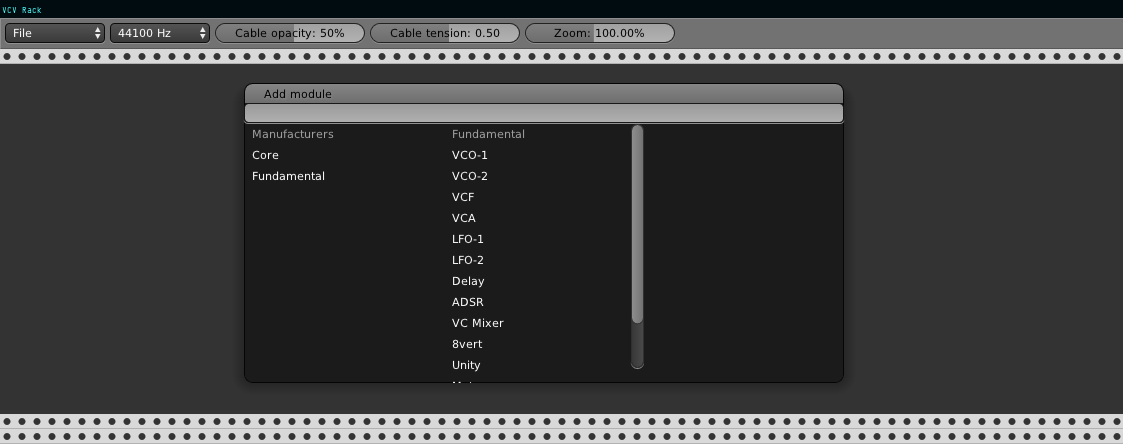
Is it normal in current master?
 freemanfromgodotengine
All 31 comments
Ubuntu lower than 16.04 is not supported by the release builds because the glibc version is too low.
Yes, the dev version disables the VCV login manager. If you tried to download plugins with that method, they would not be ABI compatible and not work anyway. You can check out the v0.5 branch and build with make VERSION=0.5.0 to enable the release build, but Rack's local directory will be in ~/.Rack/ instead of ./.
 AndrewBelt
on 1 Dec 2017
AndrewBelt
on 1 Dec 2017
Thank you @AndrewBelt . I will try v0.5 branch.
Pity ubuntu 14.04 is not supported. It's still officially supported Ubuntu (until April 2019 if I remember correctly).
Many people still use it because of the stability.
freemanfromgodotengine
on 1 Dec 2017
Oracle supports Solaris, but that doesn't mean I also support Solaris. It is also known for its stability.
AndrewBelt
on 1 Dec 2017
When trying to compile 5.0, after successfully building all dependencies, next step - make does:
#
Built all dependencies successfully
#
Rack-0.5.0$ make
g++ -Iinclude -Idep/include -Idep/lib/libzip/include -MMD -g -O3 -march=nocona -ffast-math -fno-finite-math-only -Wall -Wextra -Wno-unused-parameter -DARCH_LIN -Wsuggest-override -std=c++11 -c -o build/src/app.cpp.o src/app.cpp
In file included from include/app.hpp:4:0,
from src/app.cpp:1:
include/widgets.hpp:5:10: fatal error: ../ext/nanovg/src/nanovg.h: No such file or directory
#include "../ext/nanovg/src/nanovg.h"
^~~~~~~~
compilation terminated.
make: * [build/src/app.cpp.o] Error 1
freemanfromgodotengine
on 1 Dec 2017
From the README
Clone submodules.
git submodule update --init --recursive
AndrewBelt
on 1 Dec 2017
I do not have much experience with github and pulling/cloning releases. I think I copied 5.0 zip and it was a mistake. If I find it right, I should rather:
git clone --branch v0.5.0 https://github.com/VCVRack/Rack.git
freemanfromgodotengine
on 1 Dec 2017
git clone is sufficient. It will pull the v0.5 branch by default. The master.zips don't work.
AndrewBelt
on 1 Dec 2017
git clone https://github.com/VCVRack/Rack.git was what I did last time and there was no extra modules nor I was able to log in after successful compilation.
freemanfromgodotengine
on 1 Dec 2017
oh, you gave me the instruction to use 'make VERSION=0.5.0'... I will try that. Maybe it helps.
freemanfromgodotengine
on 1 Dec 2017
You can make sure you're on the v0.5 branch with git status
AndrewBelt
on 1 Dec 2017
I did 'make VERSION=0.5.0 dep', but after successful compilation of all dependencies git status gives me:
Not currently on any branch.
I' waiting for the outcome of make VERSION=0.5.0 now.
freemanfromgodotengine
on 1 Dec 2017
no luck.
make VERSION=0.5.0g++ -Iinclude -Idep/include -Idep/lib/libzip/include -DVERSION=0.5.0 -MMD -g -O3 -march=nocona -ffast-math -fno-finite-math-only -Wall -Wextra -Wno-unused-parameter -DARCH_LIN -Wsuggest-override -std=c++11 -c -o build/src/core/AudioInterface.cpp.o src/core/AudioInterface.cpp
src/core/AudioInterface.cpp:11:10: fatal error: rtaudio/RtAudio.h: No such file or directory
#include
^~~~~~~
compilation terminated.
make: * [build/src/core/AudioInterface.cpp.o] Error 1
freemanfromgodotengine
on 1 Dec 2017
Make sure to check out the latest source in the v0.5 branch, not the v0.5.0 tag.
AndrewBelt
on 1 Dec 2017
So, to make it 100% clear to me, I have to ask - I should use series of commands:
git clone https://github.com/VCVRack/Rack.git
cd ./Rack
git submodule update --init --recursive
make dep
make VERSION=0.5.0
and if all goes well:
make run
right?
freemanfromgodotengine
on 1 Dec 2017
Yes, I believe that should do it.
AndrewBelt
on 1 Dec 2017
@AndrewBelt Everything compiled without errors!
I can see the buttons/fields to register, email and password and manage modules etc., now.
Rack plays sound using ALSA with 512 block size buffer, and the sound is fine without problems.
I just still can't see any of the downloaded and unzipped into /.Rack/plugins/ Grayescale, ESeries, Befaco nor AudiableInstruments that I added to my account at https://vcvrack.com/ when checking Rack under OSX the other day.
freemanfromgodotengine
on 1 Dec 2017
OK, I think I know where I made another mistake. Precompiled, binary modulesdownloaded from website do not work with my 'special' compiled myself version of Rack, so I had to compile all additional modules from source myself. Now AudiableInstruments work just fine. Time to compile the rest.
freemanfromgodotengine
on 1 Dec 2017
Hmm, you shouldn't have to. The binaries are compatible with the v0.5 branch. If you use "Refresh Plugins" and no Audible Instruments, etc. plugins are downloaded, could you post the ~/.Rack/log.txt file?
AndrewBelt
on 1 Dec 2017
Now, after compilation of Audible Instruments ~/.Rack/log.txt
[info] Rack v0.5.0
[info] Current working directory: /home/user/Software/Github/VcVRack/Rack
[info] Global directory: ./
[info] Local directory: /home/user/.Rack/
[info] Loading plugins from ./plugins
[info] Loaded plugin ./plugins/Fundamental/plugin.so
[info] Loaded plugin ./plugins/AudibleInstruments/plugin.so
[info] Loading plugins from /home/user/.Rack/plugins
[warning] Failed to load library /home/user/.Rack/plugins/Grayscale/plugin.so: /home/user/.Rack/plugins/Grayscale/plugin.so: undefined symbol: _ZN4rack11assetPluginEPNS_6PluginENSt7__cxx1112basic_stringIcSt11char_traitsIcESaIcEEE
[warning] Failed to load library /home/user/.Rack/plugins/ESeries/plugin.so: /home/user/.Rack/plugins/ESeries/plugin.so: undefined symbol: _ZN4rack11assetPluginEPNS_6PluginENSt7__cxx1112basic_stringIcSt11char_traitsIcESaIcEEE
[warning] Failed to load library /home/user/.Rack/plugins/Befaco/plugin.so: /home/user/.Rack/plugins/Befaco/plugin.so: undefined symbol: _ZN4rack11assetPluginEPNS_6PluginENSt7__cxx1112basic_stringIcSt11char_traitsIcESaIcEEE
[warning] Failed to load library /home/user/.Rack/plugins/AudibleInstruments/plugin.so: /home/user/.Rack/plugins/AudibleInstruments/plugin.so: undefined symbol: _ZN4rack11assetPluginEPNS_6PluginENSt7__cxx1112basic_stringIcSt11char_traitsIcESaIcEEE
[info] Loaded font ./res/DejaVuSans.ttf
[info] Loading patch /home/user/.Rack/autosave.vcv
[info] Requesting http://api.vcvrack.com/version
[info] Loaded SVG ./res/ComponentLibrary/PJ3410.svg
[debug] Opening audio stream 4
[debug] Starting audio stream 4
[info] Loaded SVG ./plugins/Fundamental/res/VCO-1.svg
[info] Loaded SVG ./res/ComponentLibrary/ScrewSilver.svg
[info] Loaded SVG ./res/ComponentLibrary/CKSS_0.svg
[info] Loaded SVG ./res/ComponentLibrary/CKSS_1.svg
[info] Loaded SVG ./res/ComponentLibrary/RoundBlack.svg
[info] Loaded SVG ./res/ComponentLibrary/PJ301M.svg
[info] Loaded SVG ./plugins/Fundamental/res/VCA.svg
[info] Loaded SVG ./plugins/Fundamental/res/ADSR.svg
[info] Loaded SVG ./plugins/Fundamental/res/SEQ3.svg
[info] Loaded SVG ./res/ComponentLibrary/LEDButton.svg
[info] Loaded SVG ./plugins/Fundamental/res/8vert.svg
[info] Loading settings /home/user/.Rack/settings.json
[info] Loaded image ./plugins/AudibleInstruments/res/Braids.png
[info] Loaded font ./plugins/AudibleInstruments/res/hdad-segment14-1.002/Segment14.ttf
[info] Loaded SVG ./res/ComponentLibrary/Rogan2SGray.svg
[info] Loaded SVG ./res/ComponentLibrary/Rogan2PSWhite.svg
[info] Loaded SVG ./res/ComponentLibrary/Rogan2PSGreen.svg
[info] Loaded SVG ./res/ComponentLibrary/Rogan2PSRed.svg
[info] Saving patch /home/user/.Rack/autosave.vcv
[info] Saving settings /home/user/.Rack/settings.json
[info] Saving patch /home/user/.Rack/autosave.vcv
[info] Saving settings /home/user/.Rack/settings.json
[info] Saving patch /home/user/.Rack/autosave.vcv
[info] Saving settings /home/user/.Rack/settings.json
[info] Saving patch /home/user/.Rack/autosave.vcv
[info] Saving settings /home/user/.Rack/settings.json
[info] Saving patch /home/user/.Rack/autosave.vcv
[info] Saving settings /home/user/.Rack/settings.json
[info] Saving patch /home/user/.Rack/autosave.vcv
[info] Saving settings /home/user/.Rack/settings.json
[info] Saving patch /home/user/.Rack/autosave.vcv
[info] Saving settings /home/user/.Rack/settings.json
[info] Saving patch /home/user/.Rack/autosave.vcv
[info] Saving settings /home/user/.Rack/settings.json
[info] Saving patch /home/user/.Rack/autosave.vcv
[info] Saving settings /home/user/.Rack/settings.json
[info] Saving patch /home/user/.Rack/autosave.vcv
[info] Saving settings /home/user/.Rack/settings.json
[info] Saving patch /home/user/.Rack/autosave.vcv
[info] Saving settings /home/user/.Rack/settings.json
[info] Saving patch /home/user/.Rack/autosave.vcv
[info] Saving settings /home/user/.Rack/settings.json
[info] Saving patch /home/user/.Rack/autosave.vcv
[info] Saving settings /home/user/.Rack/settings.json
[info] Saving patch /home/user/.Rack/autosave.vcv
[info] Saving settings /home/user/.Rack/settings.json
[info] Saving patch /home/user/.Rack/autosave.vcv
[info] Saving settings /home/user/.Rack/settings.json
[info] Saving patch /home/user/.Rack/autosave.vcv
[info] Saving settings /home/user/.Rack/settings.json
[info] Saving patch /home/user/.Rack/autosave.vcv
[info] Saving settings /home/user/.Rack/settings.json
[info] Saving patch /home/user/.Rack/autosave.vcv
[info] Saving settings /home/user/.Rack/settings.json
[info] Saving patch /home/user/.Rack/autosave.vcv
[info] Saving settings /home/user/.Rack/settings.json
[info] Saving patch /home/user/.Rack/autosave.vcv
[info] Saving settings /home/user/.Rack/settings.json
[info] Loaded image ./plugins/AudibleInstruments/res/Tides.png
[info] Loaded image ./plugins/AudibleInstruments/res/Sheep.png
[info] Loaded SVG ./res/ComponentLibrary/CKD6_0.svg
[info] Loaded SVG ./res/ComponentLibrary/CKD6_1.svg
[info] Loaded SVG ./res/ComponentLibrary/Rogan3PSGreen.svg
[info] Loaded SVG ./res/ComponentLibrary/Rogan1PSGreen.svg
[info] Loaded SVG ./res/ComponentLibrary/Rogan1PSWhite.svg
[info] Saving patch /home/user/.Rack/autosave.vcv
[info] Saving settings /home/user/.Rack/settings.json
[info] Loaded image ./plugins/AudibleInstruments/res/Rings.png
[info] Loaded SVG ./res/ComponentLibrary/TL1105_0.svg
[info] Loaded SVG ./res/ComponentLibrary/TL1105_1.svg
[info] Loaded SVG ./res/ComponentLibrary/Rogan3PSWhite.svg
[info] Loaded SVG ./res/ComponentLibrary/Rogan1PSWhite.svg
[info] Loaded SVG ./res/ComponentLibrary/Trimpot.svg
[info] Saving patch /home/user/.Rack/autosave.vcv
[info] Saving settings /home/user/.Rack/settings.json
[info] Saving patch /home/user/.Rack/autosave.vcv
[info] Saving settings /home/user/.Rack/settings.json
[info] Saving patch /home/user/.Rack/autosave.vcv
[info] Saving settings /home/user/.Rack/settings.json
[info] Saving patch /home/user/.Rack/autosave.vcv
[info] Saving settings /home/user/.Rack/settings.json
[info] Saving patch /home/user/.Rack/autosave.vcv
[info] Saving settings /home/user/.Rack/settings.json
[info] Saving patch /home/user/.Rack/autosave.vcv
[info] Saving settings /home/user/.Rack/settings.json
[info] Saving patch /home/user/.Rack/autosave.vcv
[info] Saving settings /home/user/.Rack/settings.json
[info] Saving patch /home/user/.Rack/autosave.vcv
[info] Saving settings /home/user/.Rack/settings.json
[info] Saving patch /home/user/.Rack/autosave.vcv
[info] Saving settings /home/user/.Rack/settings.json
[info] Saving patch /home/user/.Rack/autosave.vcv
[info] Saving settings /home/user/.Rack/settings.json
[info] Saving patch /home/user/.Rack/autosave.vcv
[info] Saving settings /home/user/.Rack/settings.json
[info] Saving patch /home/user/.Rack/autosave.vcv
[info] Saving settings /home/user/.Rack/settings.json
[info] Saving patch /home/user/.Rack/autosave.vcv
[info] Saving settings /home/user/.Rack/settings.json
[info] Saving patch /home/user/.Rack/autosave.vcv
[info] Saving settings /home/user/.Rack/settings.json
[info] Saving patch /home/user/.Rack/autosave.vcv
[info] Saving settings /home/user/.Rack/settings.json
[info] Saving patch /home/user/.Rack/autosave.vcv
[info] Saving settings /home/user/.Rack/settings.json
[info] Saving patch /home/user/.Rack/autosave.vcv
[info] Saving settings /home/user/.Rack/settings.json
[info] Saving patch /home/user/.Rack/autosave.vcv
[info] Saving settings /home/user/.Rack/settings.json
[info] Saving patch /home/user/.Rack/autosave.vcv
[info] Saving settings /home/user/.Rack/settings.json
[info] Saving patch /home/user/.Rack/autosave.vcv
[info] Saving settings /home/user/.Rack/settings.json
[info] Saving patch /home/user/.Rack/autosave.vcv
[info] Saving settings /home/user/.Rack/settings.json
[info] Saving patch /home/user/.Rack/autosave.vcv
[info] Saving settings /home/user/.Rack/settings.json
[info] Saving patch /home/user/.Rack/autosave.vcv
[info] Saving settings /home/user/.Rack/settings.json
[info] Saving patch /home/user/.Rack/autosave.vcv
[info] Saving settings /home/user/.Rack/settings.json
[info] Saving patch /home/user/.Rack/autosave.vcv
[info] Saving settings /home/user/.Rack/settings.json
[info] Saving patch /home/user/.Rack/autosave.vcv
[info] Saving settings /home/user/.Rack/settings.json
[info] Saving patch /home/user/.Rack/autosave.vcv
[info] Saving settings /home/user/.Rack/settings.json
[info] Saving patch /home/user/.Rack/autosave.vcv
[info] Saving settings /home/user/.Rack/settings.json
I may delete it and try to download modules again, with not working versions. Give me a moment.
freemanfromgodotengine
on 1 Dec 2017
This will be more helpful. After deleting everything from ~/.Rack/plugins folder , then running Rack again and pressing Refresh plugins button:
[info] Rack v0.5.0
[info] Current working directory: /home/user/Software/Github/VcVRack/Rack
[info] Global directory: ./
[info] Local directory: /home/user/.Rack/
[info] Loading plugins from ./plugins
[info] Loaded plugin ./plugins/Fundamental/plugin.so
[info] Loaded plugin ./plugins/AudibleInstruments/plugin.so
[info] Loading plugins from /home/user/.Rack/plugins
[info] Loaded font ./res/DejaVuSans.ttf
[info] Loading patch /home/user/.Rack/autosave.vcv
[info] Requesting http://api.vcvrack.com/version
[info] Loaded SVG ./res/ComponentLibrary/PJ3410.svg
[debug] Opening audio stream 4
[debug] Starting audio stream 4
[info] Loaded SVG ./plugins/Fundamental/res/VCO-1.svg
[info] Loaded SVG ./res/ComponentLibrary/ScrewSilver.svg
[info] Loaded SVG ./res/ComponentLibrary/CKSS_0.svg
[info] Loaded SVG ./res/ComponentLibrary/CKSS_1.svg
[info] Loaded SVG ./res/ComponentLibrary/RoundBlack.svg
[info] Loaded SVG ./res/ComponentLibrary/PJ301M.svg
[info] Loaded SVG ./plugins/Fundamental/res/VCA.svg
[info] Loaded SVG ./plugins/Fundamental/res/ADSR.svg
[info] Loaded SVG ./plugins/Fundamental/res/SEQ3.svg
[info] Loaded SVG ./res/ComponentLibrary/LEDButton.svg
[info] Loaded SVG ./plugins/Fundamental/res/8vert.svg
[info] Loading settings /home/user/.Rack/settings.json
[info] Requesting http://api.vcvrack.com/purchases?token=rloA7VyU0pINHZO0ZSkI
[info] Downloading http://api.vcvrack.com/download?product=AudibleInstruments&version=0.5.0&token=rloA7VyU0pINHZO0ZSkI
[info] Saving patch /home/user/.Rack/autosave.vcv
[info] Saving settings /home/user/.Rack/settings.json
[warning] Failed to load library /home/user/.Rack/plugins/AudibleInstruments/plugin.so: /home/user/.Rack/plugins/AudibleInstruments/plugin.so: undefined symbol: _ZN4rack11assetPluginEPNS_6PluginENSt7__cxx1112basic_stringIcSt11char_traitsIcESaIcEEE
[info] Downloading http://api.vcvrack.com/download?product=Befaco&version=0.5.0&token=rloA7VyU0pINHZO0ZSkI
[warning] Failed to load library /home/user/.Rack/plugins/Befaco/plugin.so: /home/user/.Rack/plugins/Befaco/plugin.so: undefined symbol: _ZN4rack11assetPluginEPNS_6PluginENSt7__cxx1112basic_stringIcSt11char_traitsIcESaIcEEE
[info] Downloading http://api.vcvrack.com/download?product=ESeries&version=0.5.0&token=rloA7VyU0pINHZO0ZSkI
[warning] Failed to load library /home/user/.Rack/plugins/ESeries/plugin.so: /home/user/.Rack/plugins/ESeries/plugin.so: undefined symbol: _ZN4rack11assetPluginEPNS_6PluginENSt7__cxx1112basic_stringIcSt11char_traitsIcESaIcEEE
[info] Downloading http://api.vcvrack.com/download?product=Grayscale&version=0.5.0&token=rloA7VyU0pINHZO0ZSkI
[warning] Failed to load library /home/user/.Rack/plugins/Grayscale/plugin.so: /home/user/.Rack/plugins/Grayscale/plugin.so: undefined symbol: _ZN4rack11assetPluginEPNS_6PluginENSt7__cxx1112basic_stringIcSt11char_traitsIcESaIcEEE
[info] Saving patch /home/user/.Rack/autosave.vcv
[info] Saving settings /home/user/.Rack/settings.json
freemanfromgodotengine
on 1 Dec 2017
Maybe your compiler is producing an ABI-incompatible build for some reason. Post the results of nm Rack | grep assetPlugin when run in the folder where Rack lives.
AndrewBelt
on 1 Dec 2017
It gives nothing.
I have to run Rack with make run command.
Running only ./Rack or ./Rack.sh gives:
./Rack: error while loading shared libraries: libGLEW.so.2.1: cannot open shared object file: No such file or directory
freemanfromgodotengine
on 1 Dec 2017
I notice - I'm not sure it's normal or not - that plugins downloaded and unzipped when pressing 'Refresh plugins' land in the ~/.Rack/plugins, but when I compile them from source, they are in my /Github/Rack/plugins and Rack uses them only from there, because I can delete everything from ~/.Rack/plugins and compiled plugins are still present when I run Rack again. No errors no nothing.
Is Rack using both paths to look for plugins?
freemanfromgodotengine
on 1 Dec 2017
regarding libGLEW.so.2.1 - delete the .Rack folder/directory, and the next time you run Rack that won't happen. I went through this just today. You can delete every instance of your Rack folder, and as long as /.Rack is still around it will run. And then give that error if you try to run ./Rack.sh from a new location that is other than where it was when /.Rack was created.
I hope that makes sense. TL;DR - delete /.Rack to fix the library path error for libGLEW.so.2.1 - there's probably a better or more correct way, but I don't know it.
 KrisMcKenna
on 2 Dec 2017
KrisMcKenna
on 2 Dec 2017
The script sets looks in the wrong path. I use the following for the non-binary version in Rack.sh:
#!/bin/bash
LD_LIBRARY_PATH="$(pwd)/dep/lib"
export LD_LIBRARY_PATH
./Rack
 spktkpkt
on 3 Dec 2017
spktkpkt
on 3 Dec 2017
Hi @AndrewBelt
Same issue here -except I'm not running ubuntu by voidlinux-, when running self compiled version of Rack, which is on top of v0.5 branch, every plugins downloaded using plugins manager failed with a similar error (Grayscale by example):
[warning] Failed to load library /home/me/.Rack/plugins/Grayscale/plugin.so: /home/me/.Rack/plugins/Grayscale/plugin.so: undefined symbol: _ZN4rack11assetPluginEPNS_6PluginENSt7__cxx1112basic_stringIcSt11char_traitsIcESaIcEEE
Listing symbols show that it's not available on Rack binary, but something similar exists:
$ nm Rack | grep assetPlugin
00000000000a1b41 T _ZN4rack11assetPluginEPNS_6PluginESs
00000000001338e0 r _ZZN4rack11assetPluginEPNS_6PluginESsE19__PRETTY_FUNCTION__
By the way if I download and compile plugins from sources it works as expected.
But by example Grayscale sources are not available.
Do you know how to fix that?
 WnP
on 28 Dec 2017
WnP
on 28 Dec 2017
@spktkpkt That's what make run is for.
@WnP What is your compiler version? It works for me.
AndrewBelt
on 28 Dec 2017
@AndrewBelt gcc 7.2.0
WnP
on 28 Dec 2017
I'm having the same issue on ubuntu studio 16 (didn't have this issue on AVLinux 64 bit).
nm Rack | grep assetPlugin gives me:
0000000000457992 T _ZN4rack11assetPluginEPNS_6PluginENSt7__cxx1112basic_stringIcSt11char_traitsIcESaIcEEE
00000000004c1e60 r _ZZN4rack11assetPluginEPNS_6PluginENSt7__cxx1112basic_stringIcSt11char_traitsIcESaIcEEEE19__PRETTY_FUNCTION__
 jamescaf
on 25 Feb 2018
jamescaf
on 25 Feb 2018
My gcc version is 5.4.0
jamescaf
on 25 Feb 2018
I'm closing this issue. Ubuntu 14.04 has officially reached EOL. If there are existing issues not related to Ubuntu 14.04 feel free to open a new issue with the necessary information.
 modlfo
on 3 Jun 2019
modlfo
on 3 Jun 2019
Related issues
 DomiKamu
·
6Comments
DomiKamu
·
6Comments
 dilom
·
7Comments
AndrewBelt
·
5Comments
dilom
·
7Comments
AndrewBelt
·
5Comments
 vogelscheiss
·
5Comments
vogelscheiss
·
5Comments
 ShofB
·
4Comments
ShofB
·
4Comments
Most helpful comment
Oracle supports Solaris, but that doesn't mean I also support Solaris. It is also known for its stability.