Rack: Eats too many CPU cycles on Linux - 45% on i7 only with audio output module!
OS (if applicable): XUbuntu 16.04
Version (or "dev" if compiling from source): 0.5
This software currently eats too many cpu cycles - on a fast i7-2760QM CPU @ 2.40GHz it uses about 45% of cpu (seen with htop) - with only one audio output module loaded (ALSA), nothing else! Also Rack triggers a very high cpu usage of the lightdm window manager - when I have rack running, the lightdm process goes up to 20% cpu usage, what goes down to < 1% normal level again after closing Rack.
 COLABORATI
All 50 comments
it seems i have the same issue on macos. the rack process averages 50% cpu usage or more. audio glitches appear whenever i switch between other apps and scroll in windows, or use my os in general. this happens with external audio interfaces or the built-in interface.
rack 0.5.0
os: macos 10.11.6
cpu: 3 GHz Intel Core i7
ram: 16 GB 1600 MHz DDR3.
audio inferface: Focusrite Scarlett 2i2
 htor
on 24 Nov 2017
htor
on 24 Nov 2017
1) Do you see any Alsa Underruns in your terminal when starting rack?
2) Do you have and use an external graphics card ?
There have been many reported issues regarding performance before, so please consider reading through other issues (open and closed) and see whether your issue is related.
 bontric
on 24 Nov 2017
bontric
on 24 Nov 2017
20-40% is pretty normal. Nothing really wrong here.
 AndrewBelt
on 24 Nov 2017
AndrewBelt
on 24 Nov 2017
@AndrewBelt using a patch with 10 modules, the cpu usage is around 20-65% here with the engine at 44.1khz, and 20% with the engine off/idle. i still think that is a bit too much, personally. a daw like ableton live uses around 6% cpu while idling in comparison. these two are maybe not comparable, but i do notice one thing - rack has a very high idle wake up number - the number of times a thread wakes up an idle cpu. don't know if that is normal or not:

the idle wake up number here is 4038.
also, there are audible glitches occurring when i do anything outside of rack, like switching applications. might be related to this as well.
htor
on 24 Nov 2017
Is the high CPU usage you're experiencing on the graphics thread (main thread) or the audio thread (the other significant one)?
AndrewBelt
on 24 Nov 2017
not sure how to determine which thread is causing it? i ran dtruss -ap 57845 for couple of seconds to analyse the threads. 57845 is the PID of rack. i got alot of these:
....
57845/0x28230e:  1221044860    1759      5 __semwait_signal(0x1007, 0x0, 0x1)        = -1 Err#60
57845/0x28230e:  1221045913    1641      6 __semwait_signal(0x1007, 0x0, 0x1)        = -1 Err#60
57845/0x28230e:  1221047954    1603     31 __semwait_signal(0x1007, 0x0, 0x1)        = -1 Err#60
57845/0x28230e:  1221049256    1851     13 __semwait_signal(0x1007, 0x0, 0x1)        = -1 Err#60
57845/0x28230e:  1221050381    1517     18 __semwait_signal(0x1007, 0x0, 0x1)        = -1 Err#60
57845/0x28230e:  1221051460    1473      7 __semwait_signal(0x1007, 0x0, 0x1)        = -1 Err#60
57845/0x28230e:  1221052092    1825      5 __semwait_signal(0x1007, 0x0, 0x1)        = -1 Err#60
57845/0x28230e:  1221053257    1846     11 __semwait_signal(0x1007, 0x0, 0x1)        = -1 Err#60
57845/0x28230e:  1221055100    1563     16 __semwait_signal(0x1007, 0x0, 0x1)        = -1 Err#60
57845/0x28230e:  1221056535    1897     24 __semwait_signal(0x1007, 0x0, 0x1)        = -1 Err#60
57845/0x28230e:  1221057597    1886     32 __semwait_signal(0x1007, 0x0, 0x1)        = -1 Err#60

CALL                                        COUNT
bsdthread_ctl                                   2
workq_kernreturn                                2
__disable_threadsignal                          3
bsdthread_terminate                             3
__semwait_signal                             1393
it looks like one thread is waiting forever for something to happen? i'm not a c++ developer, but it looks funky.
htor
on 24 Nov 2017
Apple Instruments for example?
AndrewBelt
on 24 Nov 2017
Same issue on Windows 10, 64 bit, i7 with VCV 0.5.
Consistent ~20% AVERAGE CPU load (across 8 logical processors) with multiple processors pretty periodically RAILING at 100% utilization (as seen in the Task Manager).
Utilization starts spiking as soon as you add an Audio Interface AND select a device from the dropdown (I am just using the DirectSound Default device on Windows).
You can add modules without an audio interface, connect them, and have them operate (without sound output obviously) and no consistent spikes happen (7 different modules in this patch, incl. advanced modules). This, to me, points to the audio processing and not the graphics thread. As soon as you add the Audio Interface the utilization spikes, my laptop fan kicks in signaling HEAVY load on the system. You remove the Audio Output module and utilization immediately drops to ~5% for this patch with NONE of the processors railing at 100%.
Just for reference, I never have had these issues using Ableton, Reaper, or other DAWs even with a boat load of VSTs running. This is not normal utilization in my opinion.
Please let me know if there is anything I can do to help troubleshoot this. LOVE the program and I am happy to help.
 cschol
on 24 Nov 2017
cschol
on 24 Nov 2017
If you or anyone would like to take on the issue of high CPU, pull out a profiler and determine which function within Rack's source is spending a lot of CPU. (That's your first test.) I will discuss what will be required to make that function faster or called less, give you an estimate of your own required time, and give you the go-ahead.
AndrewBelt
on 25 Nov 2017
I took a quick look at this issue, as on my system CPU load is quite as well (30-40%).
First thing that caught my eye was this:

Both Rack and my audio interface run on the same samplerate, so it doesn't really make sense for src_process to be called at all.
I added a quick workaround at samplerate.hpp (of course, maybe I'm missing something, but Rack seems to be working fine with it):
...
void process(const Frame<CHANNELS> *in, int *inFrames, Frame<CHANNELS> *out, int *outFrames) {
        if (data.src_ratio == 1.0) {
            memcpy(out, in, *inFrames * CHANNELS * sizeof(float));
            *outFrames = *inFrames;
            return;
        }
...
This brought CPU load down to 15%. But of course this one won't change much for users who need resampling there.
Next, I looked at main thread, that seems to take a bit much time as well:

While there's nothing obvious there, but it might be a good idea to offer rendering at lower framerates for people with slower machines. For me, capping it at 30 FPS meant 3-4% less CPU time spent. On one hand it's not a huge deal, but may be critical in some cases. Just a thought.
 disabled
on 25 Nov 2017
disabled
on 25 Nov 2017
@COLABORATI
i guess you can change the title of this issue, so it is not tied to linux + i7 processor only. makes it easier to locate the issue for others having performance issues on macos and windows.
htor
on 25 Nov 2017
@disabled Good job. Pick one of those, are you better at graphics or DSP? If you can't decide, sample rate conversion would be easier.
If sample rate, I posted a description at https://github.com/VCVRack/Rack/issues/194
AndrewBelt
on 25 Nov 2017
@AndrewBelt Thanks. I doubt I'll have much time for the next couple of days, though. If no one will pick #194 by the the time I'll be free, I'll take it.
disabled
on 25 Nov 2017
I added @disabled's workaround code snippet from above and my CPU load did not change. My laptop fan still went up like crazy from the load. This to me means, that the sample rate conversion is not (the only) contributor to the excessive CPU load. I commented out the sample rate conversion altogether and the result was the same: still high load.
I then commented out the TIMED_SLEEP_LOCK sections in the step() function in AudioInterface.cpp. Load dropped to ~2-3%. Now, audio was choppy (buffer sync issues), but my fan never kicked in.
The high CPU load seems to be caused to the "buffer synchronization" using the TIMED_SLEEP_LOCK macros in step() and stepStream() in AudioInterface.cpp (specifically, the ones who deal with inputSrcBuffer).
I don't understand the code enough yet to propose an alternative solution, but I figured I'd capture this information here in case someone looks at this.
@AndrewBelt, does this make sense?
cschol
on 29 Nov 2017
@cschol I'll need to review that, but commenting out TIMED_SLEEP_LOCK might have a side effect of preventing the sample rate conversion from being done at all. If it's commented out, the audio device thread will just rush straight through, and since there are no samples ready yet (since it didn't wait on them), it doesn't convert them.
If you convince me that TIMED_SLEEP_LOCK is a problem, it could probably be replaced with a timed mutex pretty easily, but I don't think sleeping and checking a condition every 0.1ms takes hardly any CPU time.
AndrewBelt
on 29 Nov 2017
@disabled's code snippet is not exactly correct. It should be
        if (nearf(data.src_ratio, 1.0)) {
            int len = mini(*inFrames, *outFrames);
            memcpy(out, in, len * sizeof(Frame<CHANNELS>));
            *inFrames = len;
            *outFrames = len;
            return;
        }
It does make a huge difference for me. A VCO going to Audio Interface, both Rack internal and Audio Interface sample rate set to 44100Hz, the difference is 10% instead of 20% on the audio thread and 1% vs 9% on the audio device thread.
So I believe a rewrite of samplerate.hpp is in fact very low hanging fruit.
AndrewBelt
on 29 Nov 2017
@AndrewBelt I just tried your snippet. There is no difference in the overall load (as reported in Task Manager). It is still around 20% and the fan goes wild. The system works really hard.
Same test setup: VCO to Audio Interface using DirectSound, both rates at 44100Hz.
cschol
on 29 Nov 2017
Do you not a measurable different on the audio and audio driver thread?
I don't know how to get that information on default Windows utilities, but https://docs.microsoft.com/en-us/sysinternals/downloads/process-explorer works.
AndrewBelt
on 29 Nov 2017
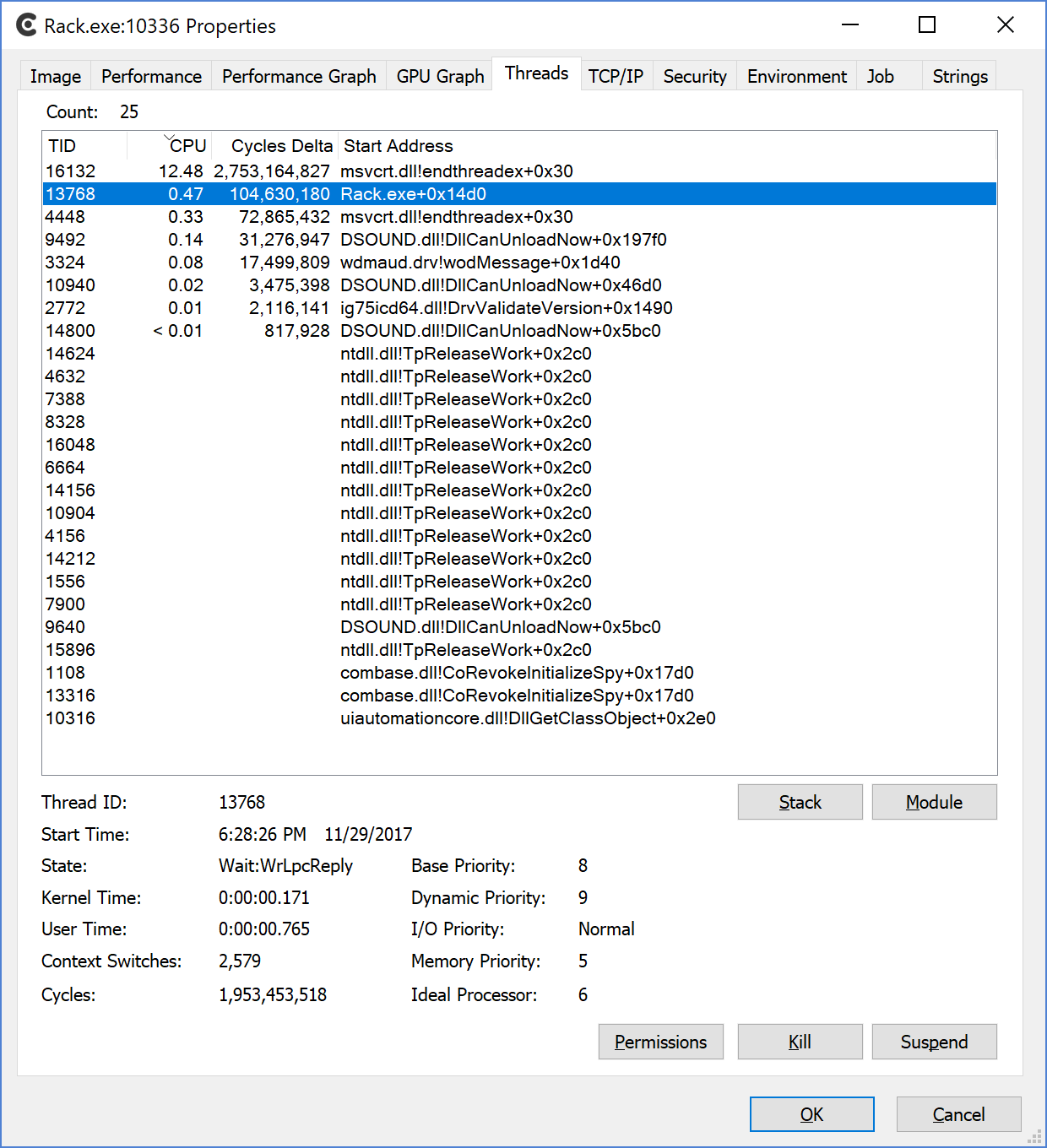
I do see a slight difference with and without the sample rate fix. I am not quite sure yet how to interpret the rest of the data.
Without sample rate fix:
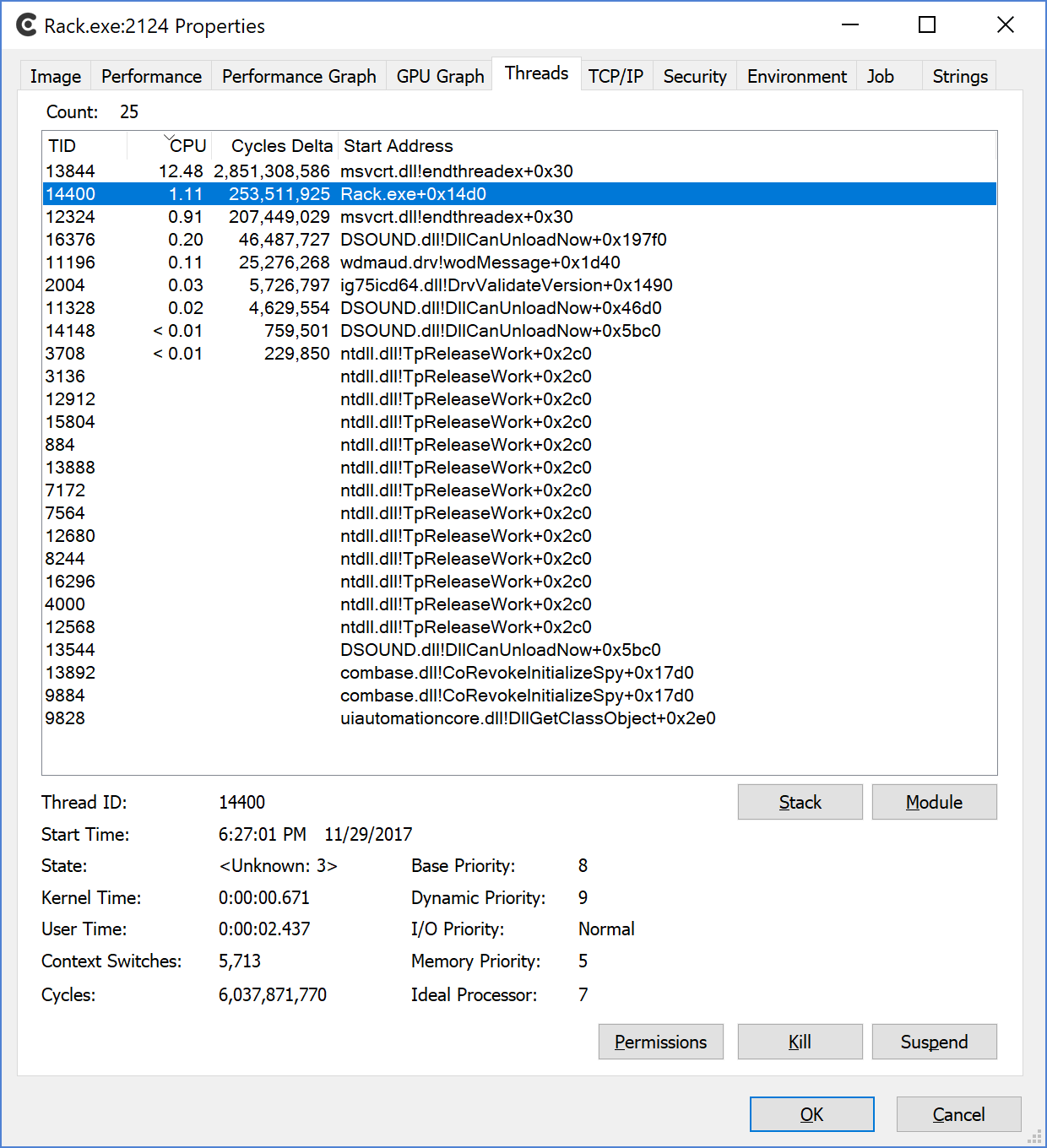
With sample rate fix:
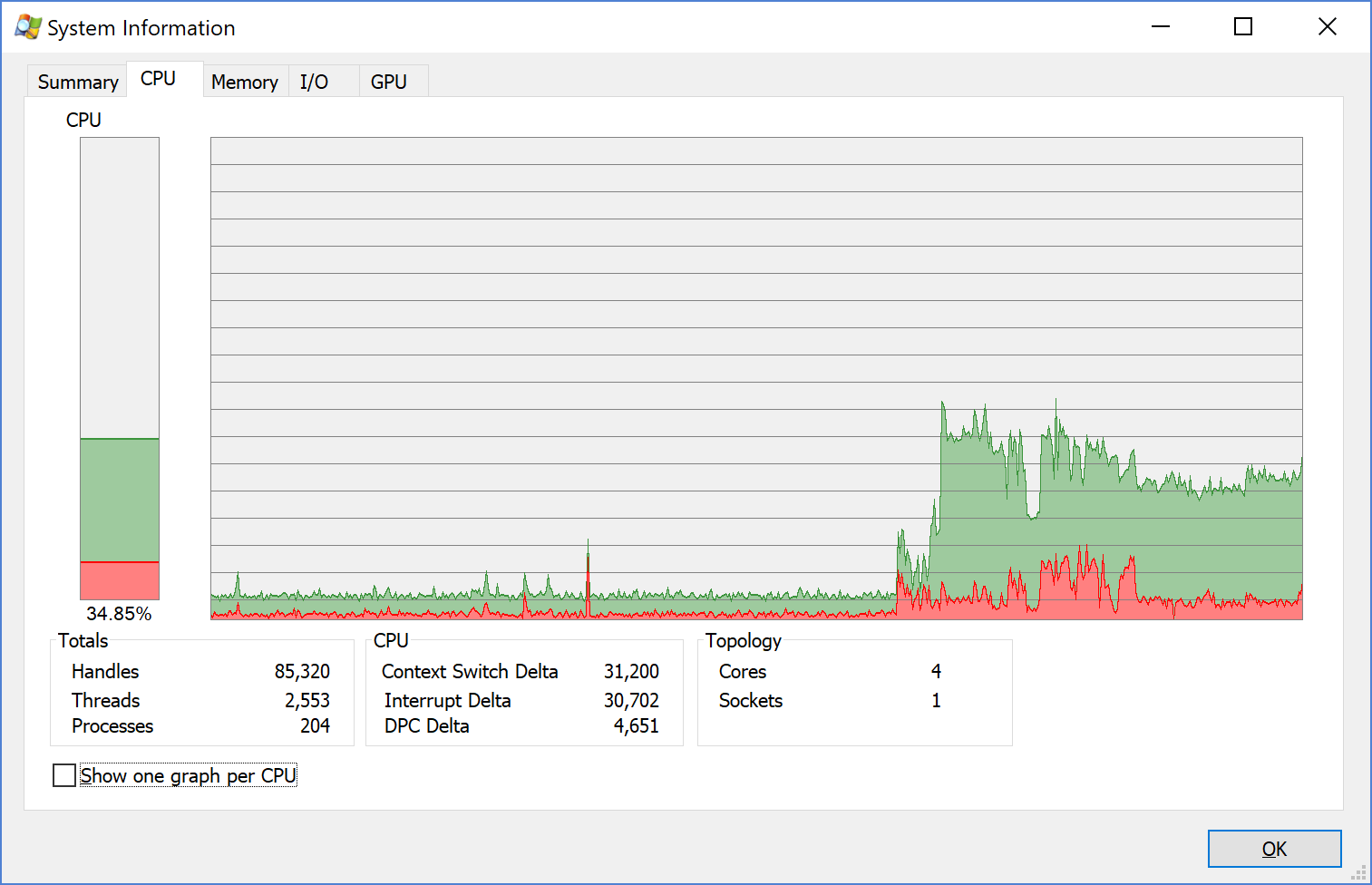
The following shows CPU load from ProcessExplorer. You can clearly see when I started Rack up, the load jumps. This is with the sample rate fix:
cschol
on 30 Nov 2017
Okay well, it's still worth it to rewrite samplerate.hpp and then we can move on to the main thread (nanovg draw lists).
AndrewBelt
on 30 Nov 2017
@AndrewBelt I tried something else: I reduced the spin time to 1e-3 in the TIMED_SLEEP_LOCK functions.
Result with just the simple "VCO into Audio Interface" patch:
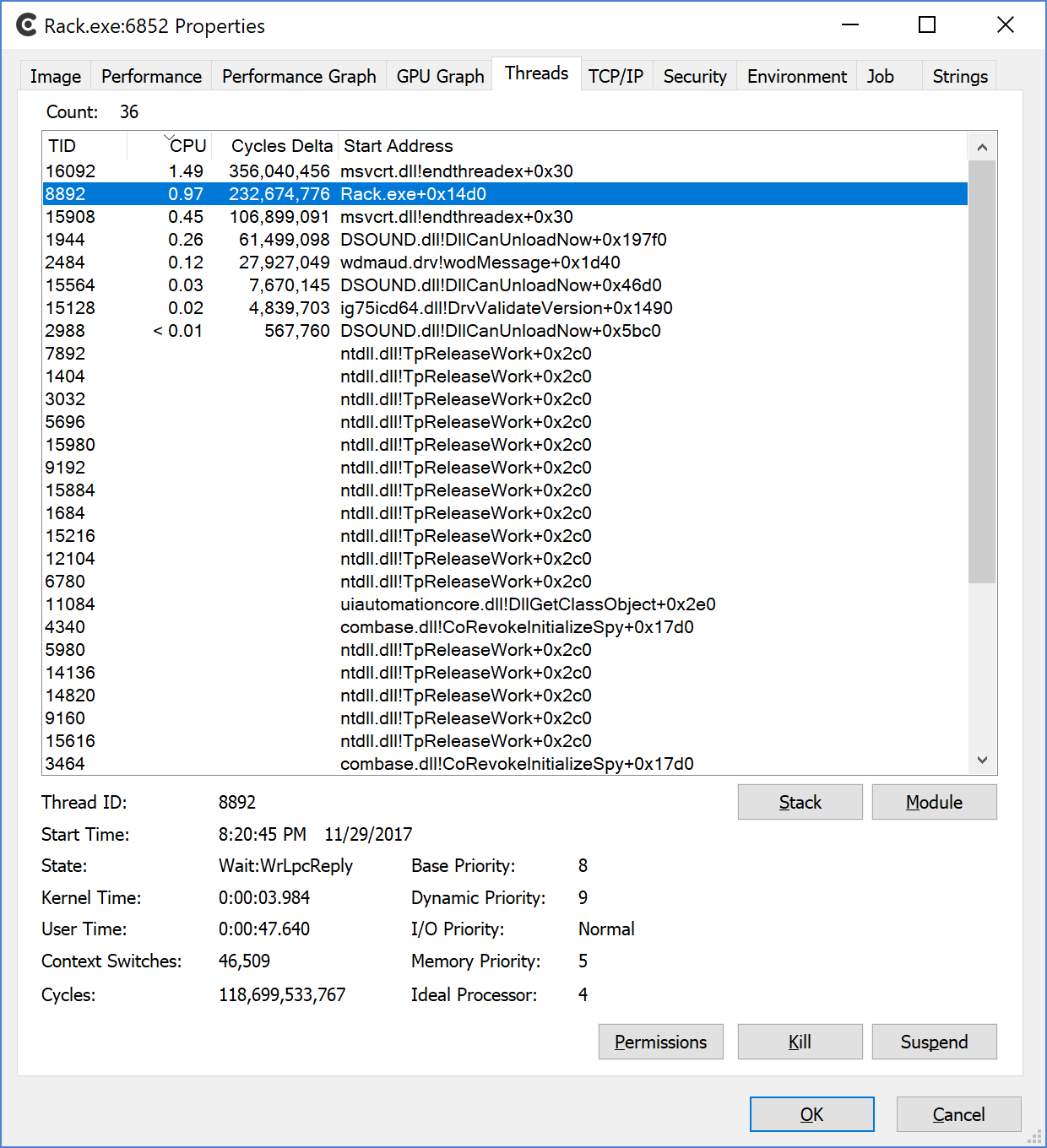
I have fully functional audio at 44100Hz, no dropouts! And no spikes in the CPU load, nor does the fan go wild.
Now a patch with 10 modules:
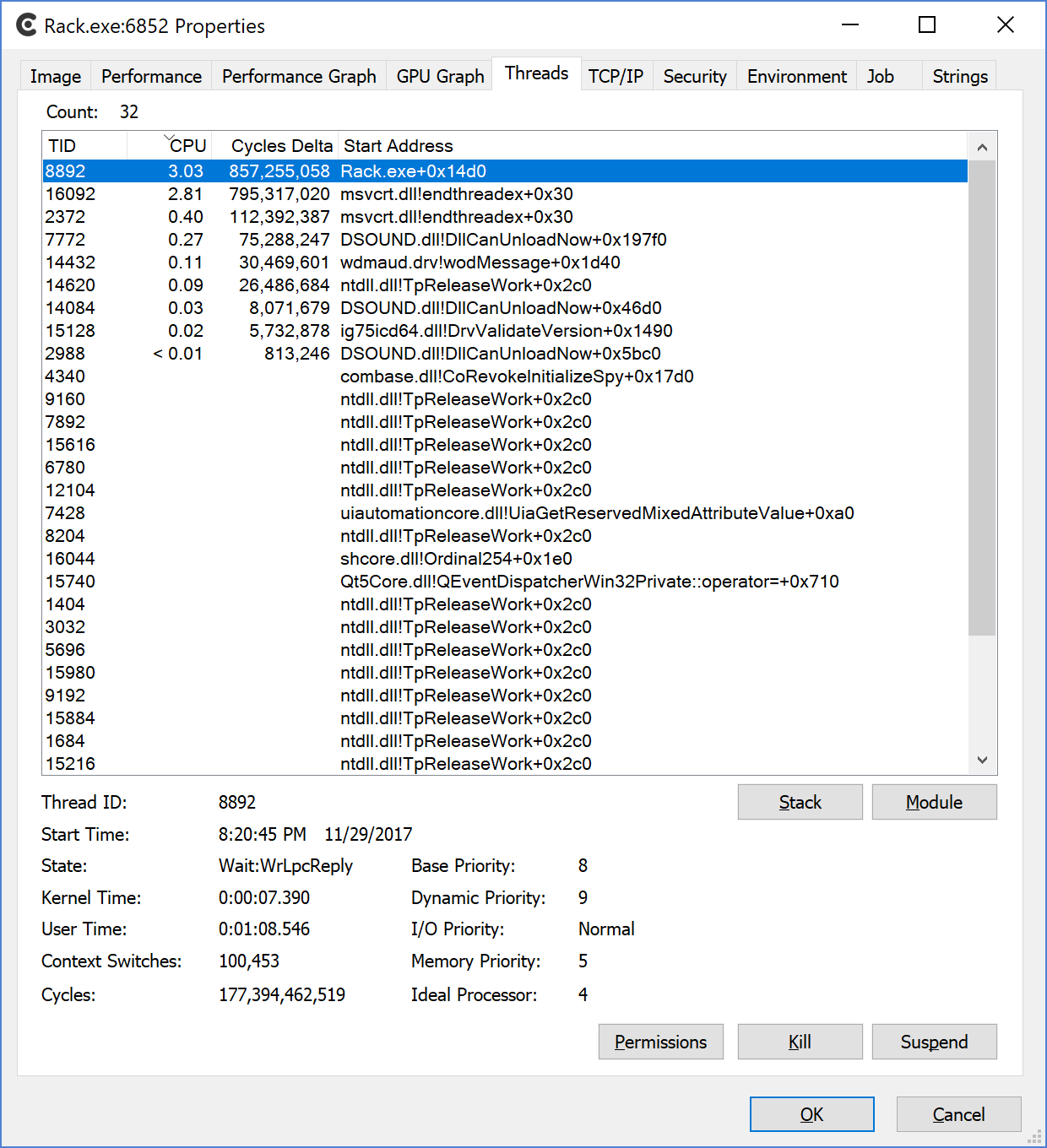
Still, no audio dropouts and what I would consider normal fan usage after letting it run for a while. Task Manager reports CPU load of Rack process at ~5-6%.
cschol
on 30 Nov 2017
You mean increased the spin time to 1e-3? Just making sure we're talking about the same number. I'll test this soon.
AndrewBelt
on 30 Nov 2017
Sorry, yes. Increased to 1e-3.
TIMED_SLEEP_LOCK(inputSrcBuffer.size() >= numFrames, 1e-3, 0.2);
In both functions step() and stepStream().
cschol
on 30 Nov 2017
@AndrewBelt Have you had a chance yet to test this? I have been running with those changes for the last 4 days and even with big patches the performance is much more reasonable. That said, I don't know if there are issues at higher sample rates. I run at 44100Hz and it works well.
cschol
on 4 Dec 2017
@cschol
tried your patch it reduced the cpu usage for my test .vcv from around 75-80% to 50-60%.
nice one. maybe we should all test using the same .vcv file in the future?
htor
on 4 Dec 2017
@htor FYI, I also have Andrew's patch from above applied preventing the sample rate conversion to be executed if the internal and external rate match.
I agree that maybe there should be a "stress test patch" in the repo with just core modules that one can run and evaluate performance with.
cschol
on 5 Dec 2017
Hi everyone. I'm not a programmer/coder and a virgin rack compiler but I would like to share some real world test results based on the code changes discussed in here running third party plugins. MIDI notes and CC (LFO output) are sent from Ableton Live playback.
Here's the benchmark based on the official v0.5:
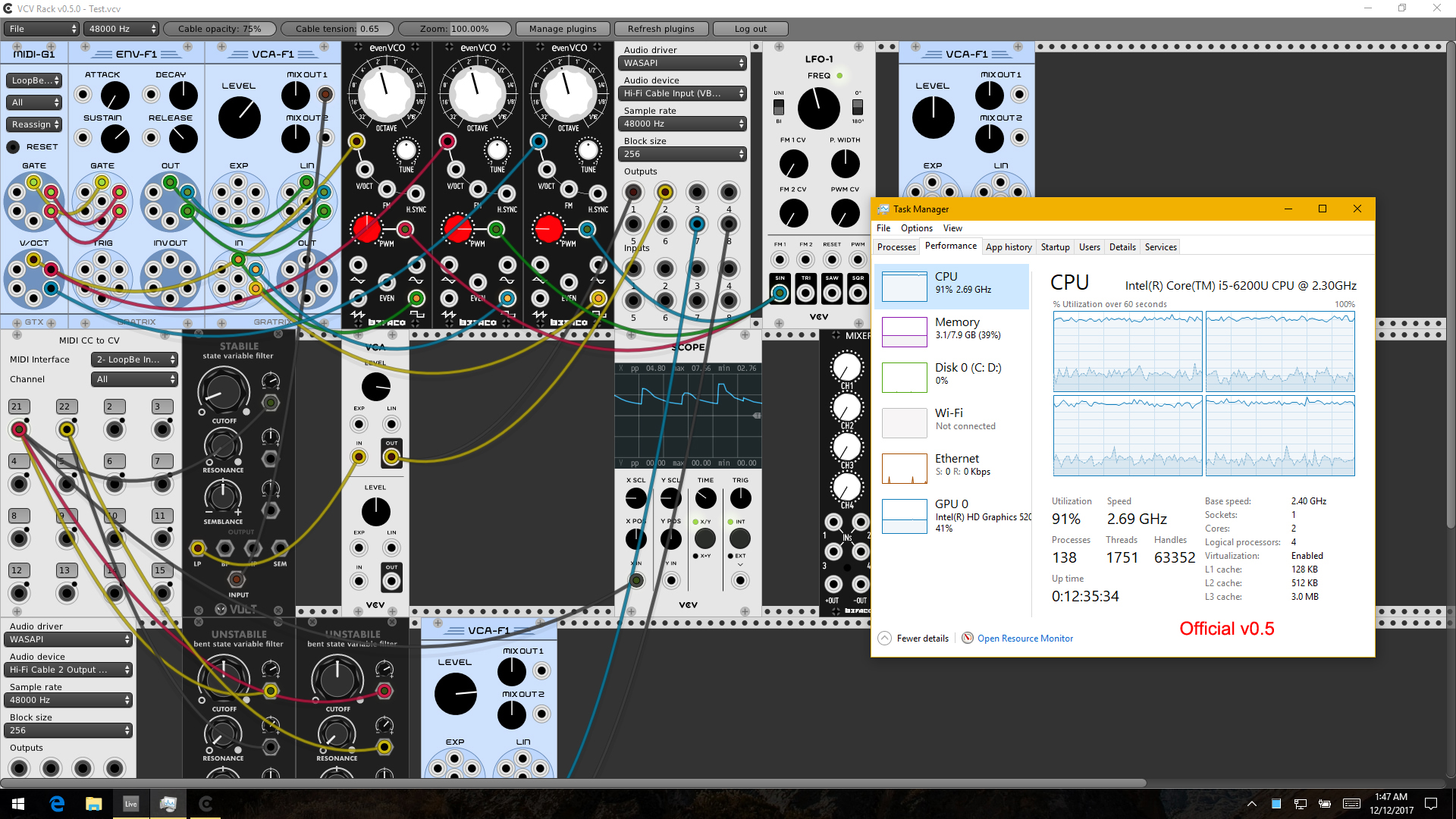
With samplerate.hpp SRC (edited by Andrew) - 1% to 2% improvement:
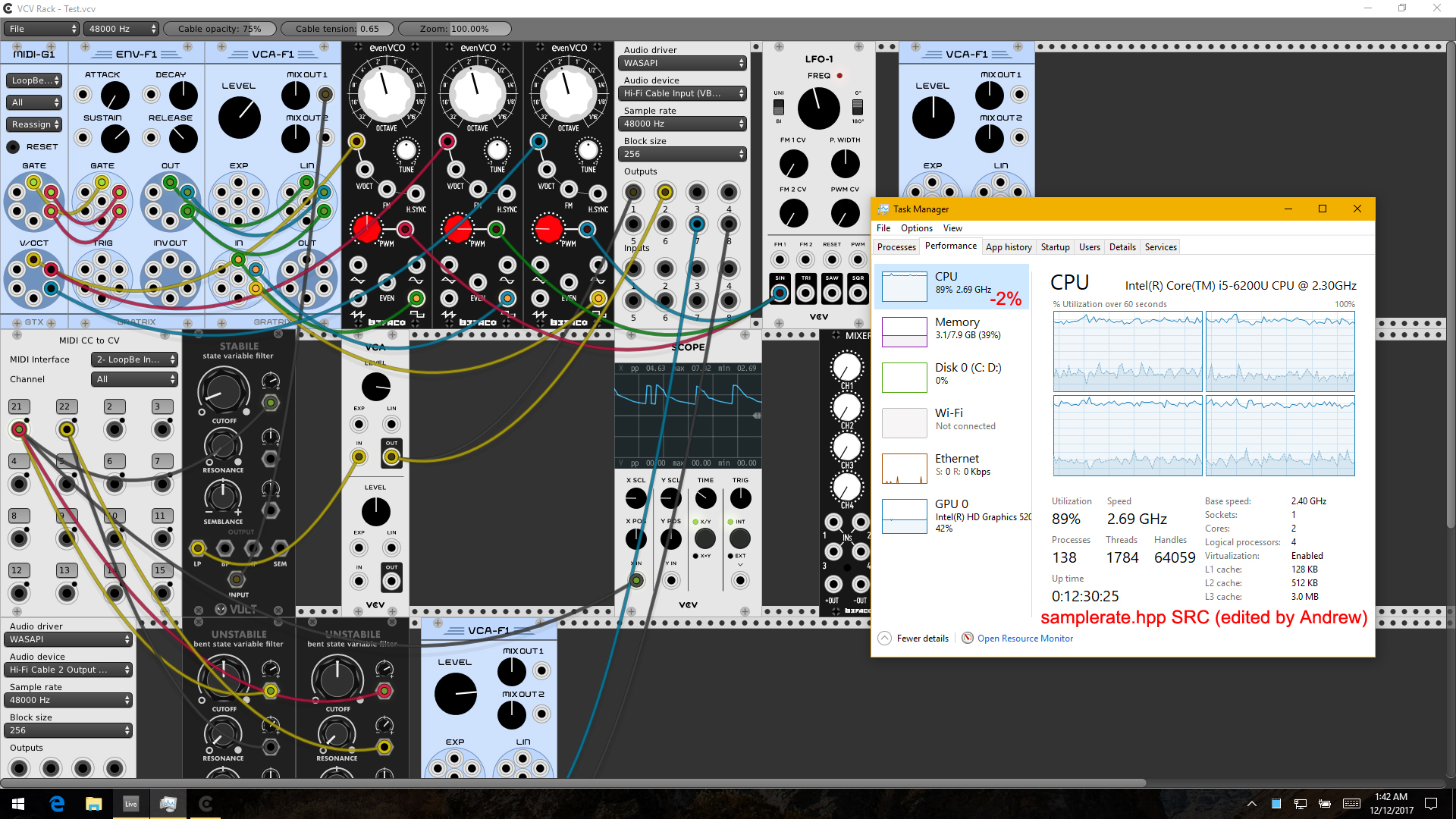
With TIMED_SLEEP_LOCK 1e-3 (by cschol) - 44% improvement:
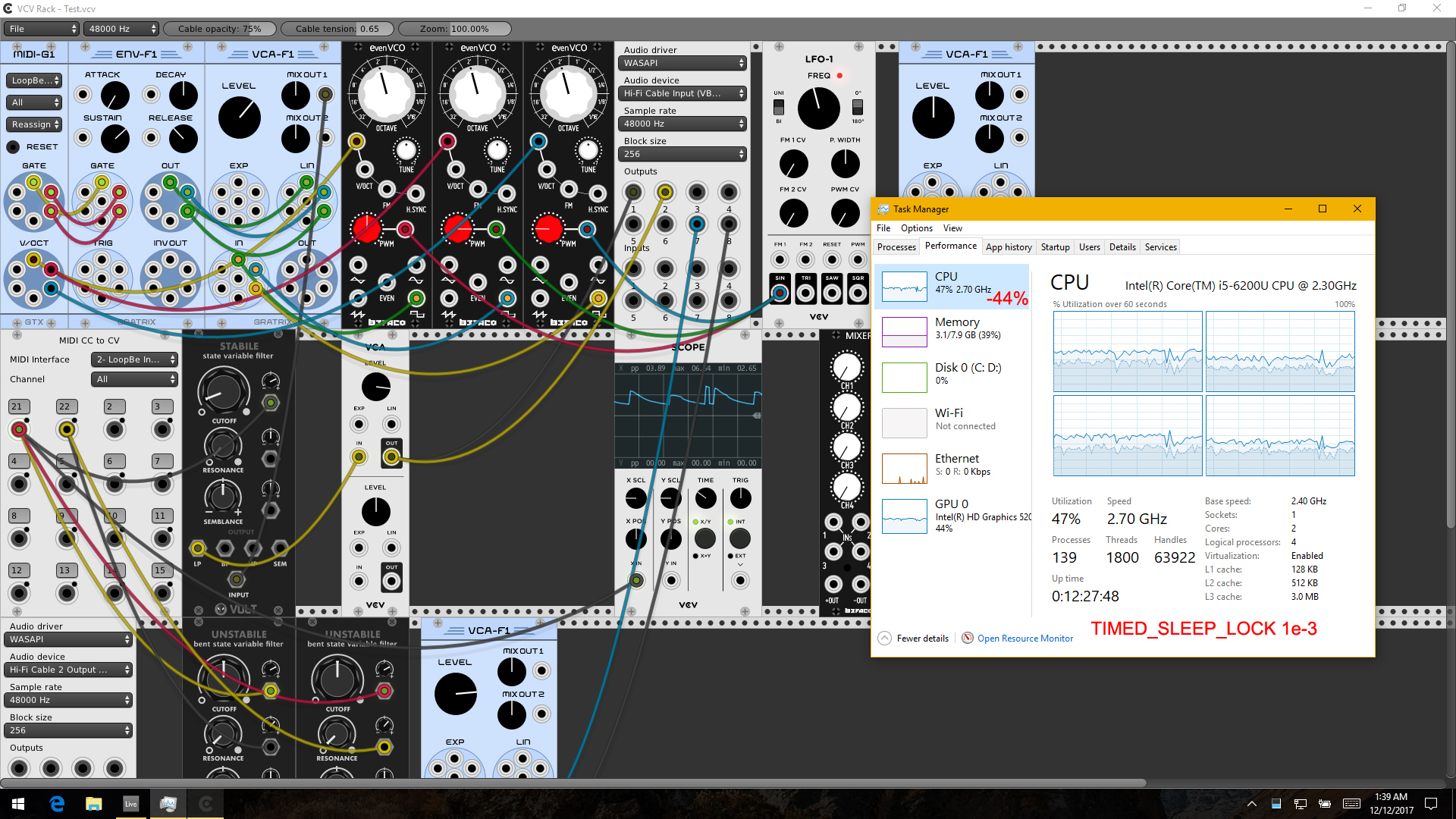
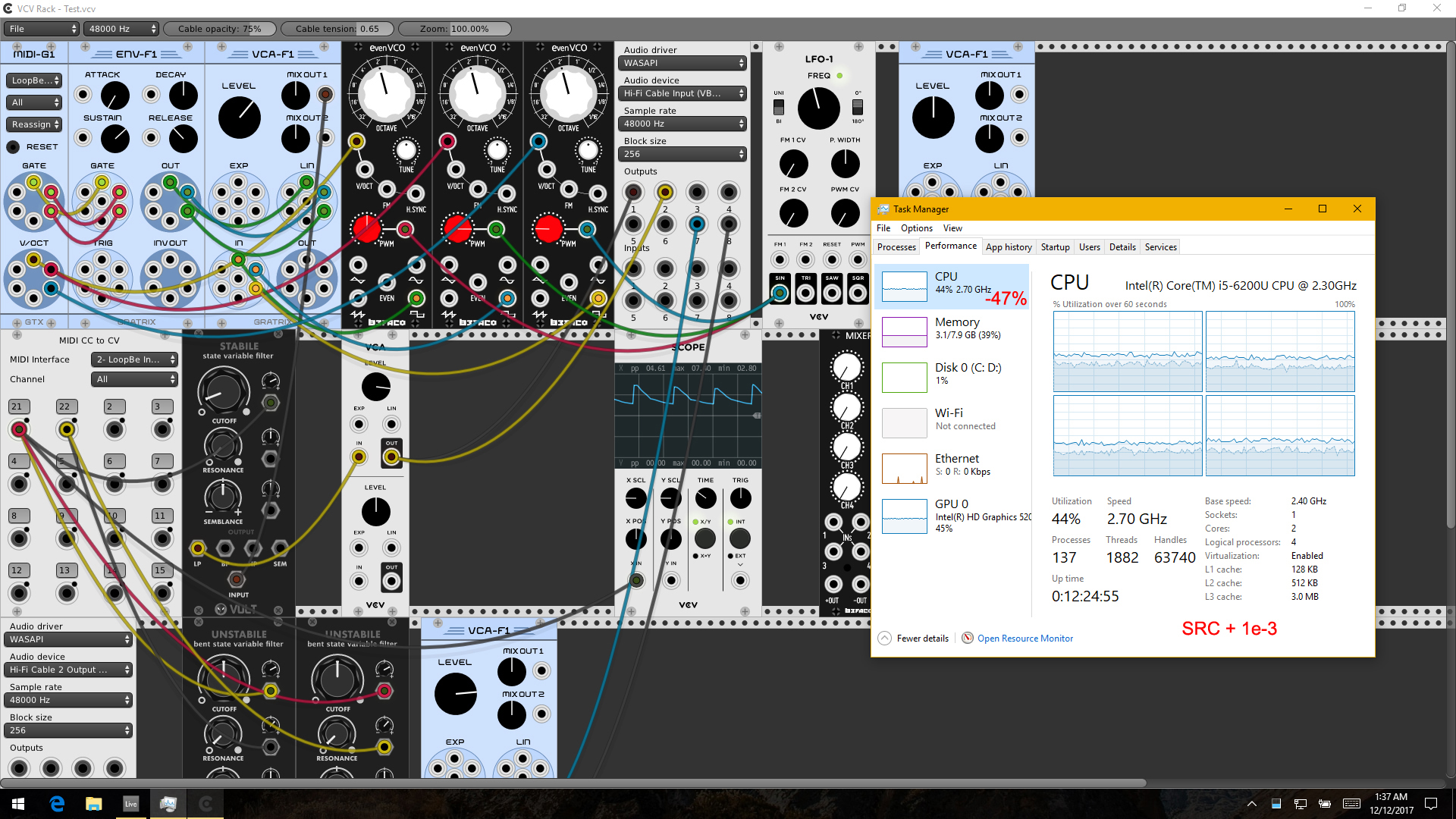
SRC and 1e-3 together - 47% improvement. The extra 3% confirms the improvements from the SRC changes:
Next, I've mentioned this to @AndrewBelt before about limiting the frame rate to 30 FPS or so to not overload the GPU especially for integrated ones on laptops which results in CPU overheating faster than a Ferrari and ending up throttling or even shutting down in worst cases on some systems. I'm not a coder but I can read C++ more or less and so I did a bit of poking and made some changes myself which I think is the frame rate limiter but any real programmer please do step in to correct me if I'm wrong.
In gui.cpp:
bool visible = glfwGetWindowAttrib(gWindow, GLFW_VISIBLE) && !glfwGetWindowAttrib(gWindow, GLFW_ICONIFIED);
Line 444:
double minTime = 1.0 / 90.0;
I changed 90.0 to 30.0, assuming it is what I think it does!
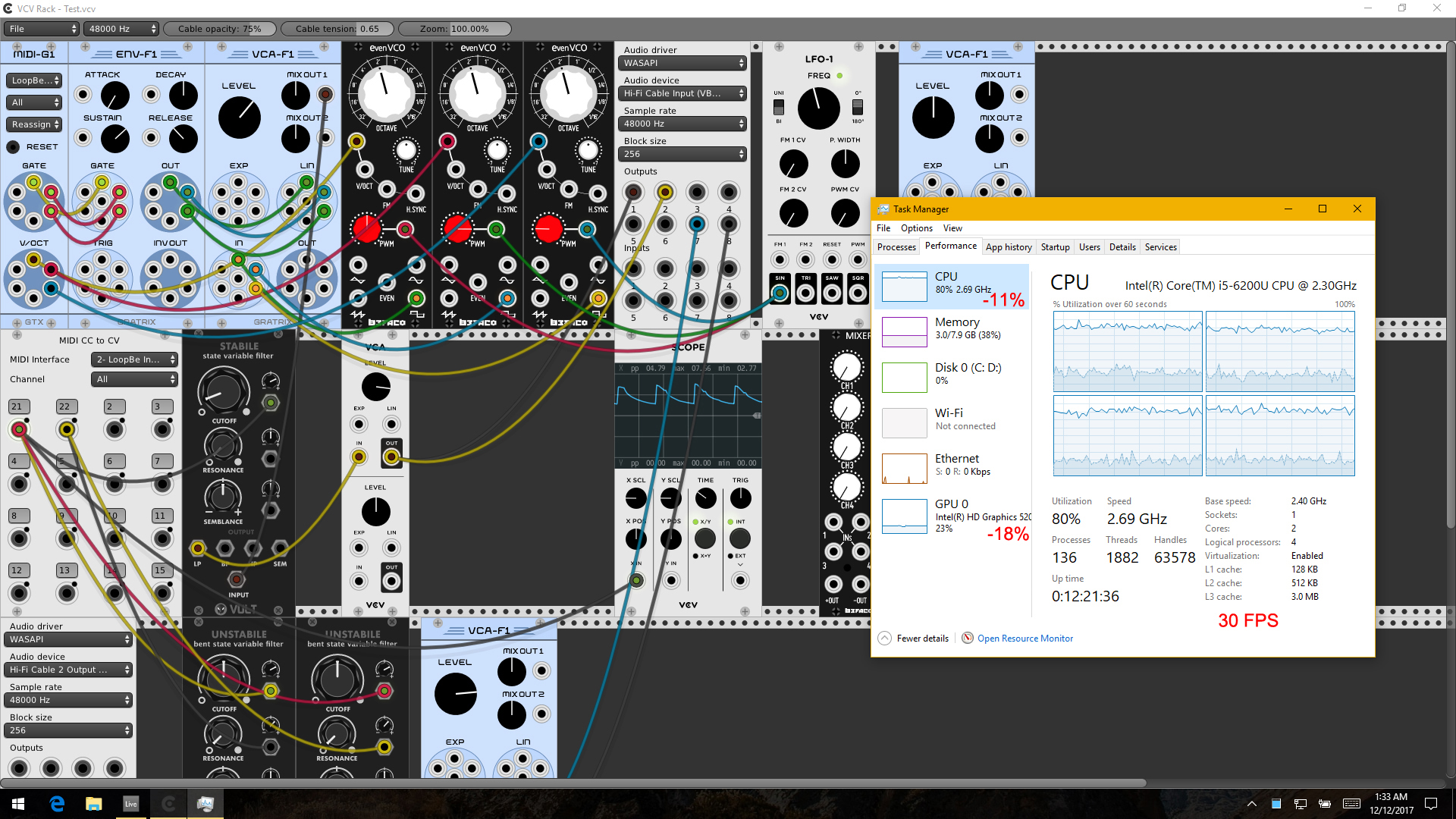
30 FPS hack - 18% improvement on iGPU, resulting in an improvement of 11% on CPU:
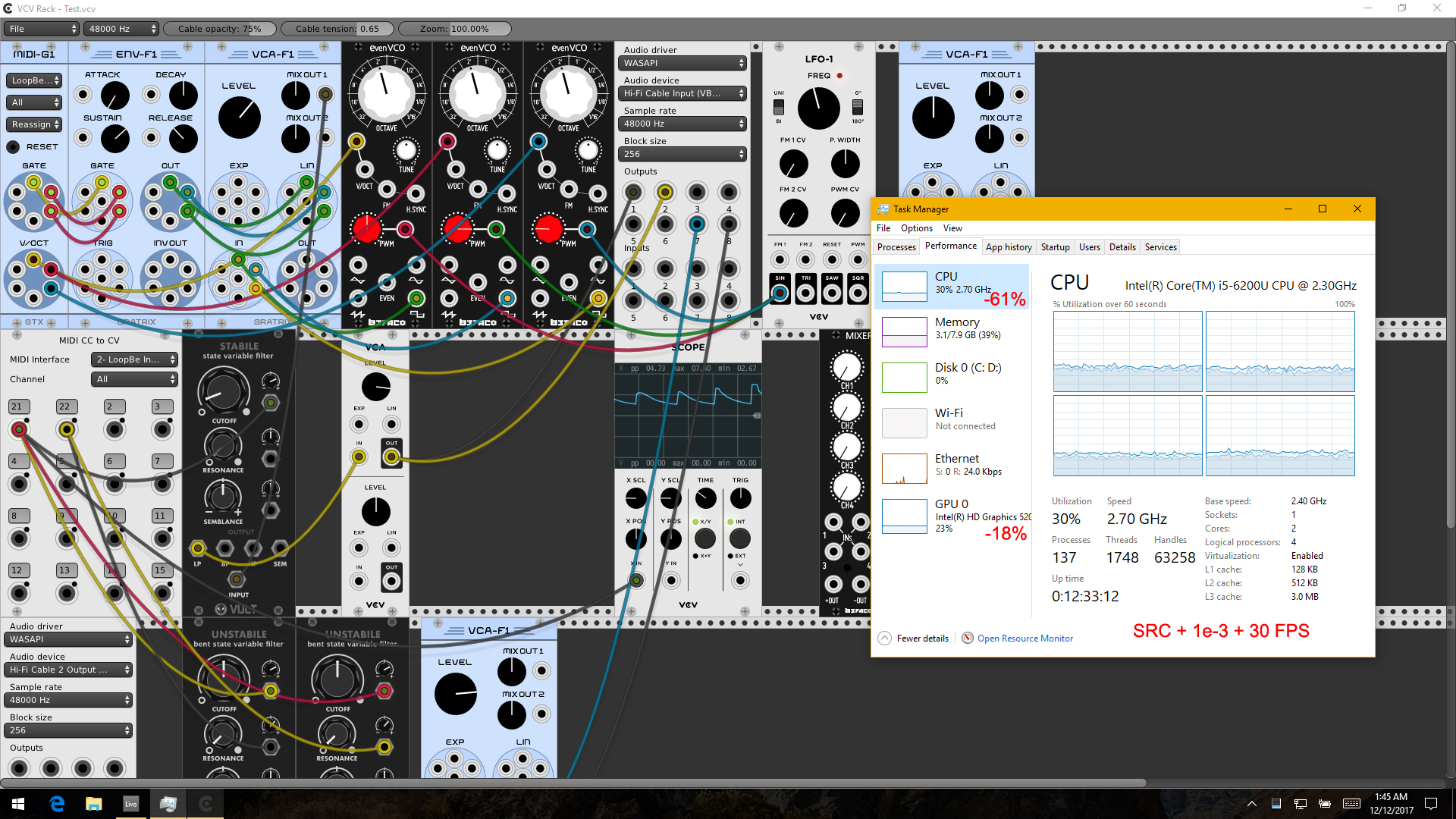
And lastly, all three changes together - 61% total improvement!:
In fact I've been running the last build non-stop while writing up this post with my usual laptop cooler turned off and there's no loud CPU fan or throttling at all. Actually my CPU utilization even goes down to 23% when minimizing the Rack window. I probably could have it running all night without any performance problems.
I've ran all the tests quite a number of times and for a quite while just to be certain and these figures are quite consistent on my Win10 system.
So sorry for such a super looooong first post! I hope it is helpful.
 Uriel-A
on 11 Dec 2017
Uriel-A
on 11 Dec 2017
I’ve been following this discussion as I have two machines with Rack installed. One is an iMac which works great and the other is the latest MacBook Pro which unfortunately overheats and shuts down after using Rack for a while, presumably related to the points you’ve been addressing.
Unfortunately I don’t have anything to contribute but I would like to know what sort of release process/schedule Rack has, and if the code above is likely to make it into a release, when it might happen. If the answer is “when it’s ready” that’s a good enough answer for me.
I’m pretty keen to approach a few plugin devs to talk about contributing some graphics but I would need to get Rack running happily on both machines before I can do that.
 gridsystem
on 16 Dec 2017
gridsystem
on 16 Dec 2017
@gridsystem I'd estimate this issue as priority 5 to 10. Each priority before it will take 2 days to half a week.
AndrewBelt
on 16 Dec 2017
master 144de3943c96f617ad7e70d8ba0a9936cd0d1f52 fixes this issue, in my opinion:
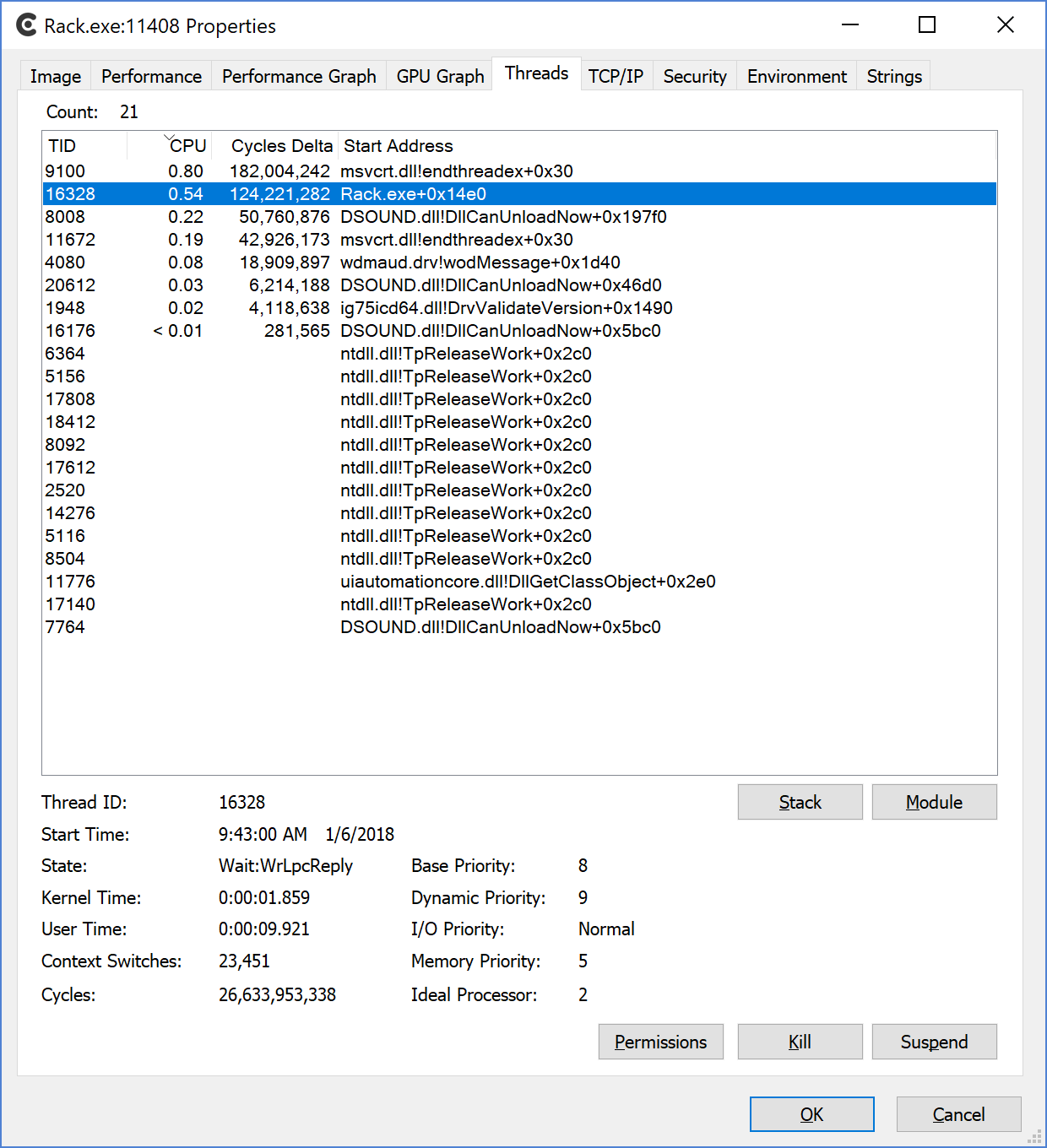
My fan has yet to turn on! Great job @AndrewBelt!
@gridsystem, give the latest master branch a try on your MacBook Pro.
cschol
on 6 Jan 2018
Yup, that solves your TIMED_SLEEP_LOCK optimization by trashing it and using conditional variable signaling. I'm still not limiting the number of channels in sample rate conversion or bypassing it if the ratio is 1, so that'll improve it further.
AndrewBelt
on 6 Jan 2018
Awesome. This is a huge step forward for v0.6! Laptop and MacBook users specifically will be very happy. I saw the "overheating issue" myself on a friend's MacBook Pro. Thank you for putting priority on this.
cschol
on 6 Jan 2018
I'm already very happy with your TIMED_SLEEP_LOCK optimization (and my 30 FPS hack). Will attempt to compile the master branch tomorrow!
Uriel-A
on 6 Jan 2018
It builds and runs. While running Rack my temp has actually been dropping since compiling.
I can't build the fundamental plugins inside the plugins directory to test real world usage, it's just sitting empty with a few Core modules.
c++ -fPIC -I../../include -I../../dep/include -DVERSION=0.5.1 -MMD -g -O3 -march=nocona -ffast-math -fno-finite-math-only -Wall -Wextra -Wno-unused-parameter -DARCH_MAC -mmacosx-version-min=10.7 -std=c++11 -stdlib=libc++ -c -o build/src/Delay.cpp.o src/Delay.cpp
src/Delay.cpp:78:7: error: no member named 'setRates' in 'rack::SampleRateConverter<1>'
src.setRates(ratio * engineGetSampleRate(), engineGetSampleRate());
~~~ ^
1 error generated.
make: * [build/src/Delay.cpp.o] Error 1
gridsystem
on 6 Jan 2018
@gridsystem Do you have the master branch of plugins checked out?
cschol
on 6 Jan 2018
Thanks @cschol when I checked out the latest tagged release of Fundamental it built.
I set up a simple seq, osc, vca, env, mixer patch and let it run for a few minutes and my laptop overheated and shut down again. My cpu speed fluctuated a bit, I didn't record the highest cpu usage %. The last temp I saw on smcfancontrol was 82% but it might have been higher.
gridsystem
on 7 Jan 2018
To be honest I'm not sure if this indicates that my particular MacBook Pro has a flaw causing it to overheat or if this model of MacBook is prone to overheating during certain tasks. I've logged a similar issue for a completely unrelated project, this is the only other use case where my laptop overheats and shuts down. I don't know if it's any interest to you.
gridsystem
on 7 Jan 2018
Latest tagged release? That would be 0.5.1, right? You need to be compiling the HEAD of master of Rack and the plugins. The new changes fixing this issue are not tagged yet. You need to check out master to get them.
cschol
on 7 Jan 2018
I am building master of Rack.
When I tried to build master of Fundamental I had the error above.
When I tried to build 0.5.1 of Fundamental it worked but I still had the shutdown.
gridsystem
on 8 Jan 2018
These fixes makes I'm finally able to run it on my MacBook Pro. Thanks a lot!
 pieterjan
on 10 Jan 2018
pieterjan
on 10 Jan 2018
@pieterjan did you manage to get head of any plugins built with head of Rack? I had the same error on Fundamental and Befaco.
gridsystem
on 10 Jan 2018
I'm not sure but as far as I remember I only made code changes to some third party plug-ins. The RJModules to be exact. Rack and the Core, Fundamental, Befaco and Audible Instruments plugins built fine from the master branch.
pieterjan
on 10 Jan 2018
Sorry, you're absolutely right, git was defaulting to cloning the latest tag instead of master.
I have successfully built master, however it crashes on launch.
DYLD_FALLBACK_LIBRARY_PATH=dep/lib ./Rack
[info] Current working directory: /Users/tom/Downloads/Rack
[info] Global directory: ./
[info] Local directory: ./
[info] Loading plugins from ./plugins
[info] Loaded font ./res/DejaVuSans.ttf
[info] Loading patch ./autosave.vcv
[info] Loading settings ./settings.json
make: *** [run] Abort trap: 6
Posting here / bumping this issue, as this one seems to have resampling mentioned specifically.
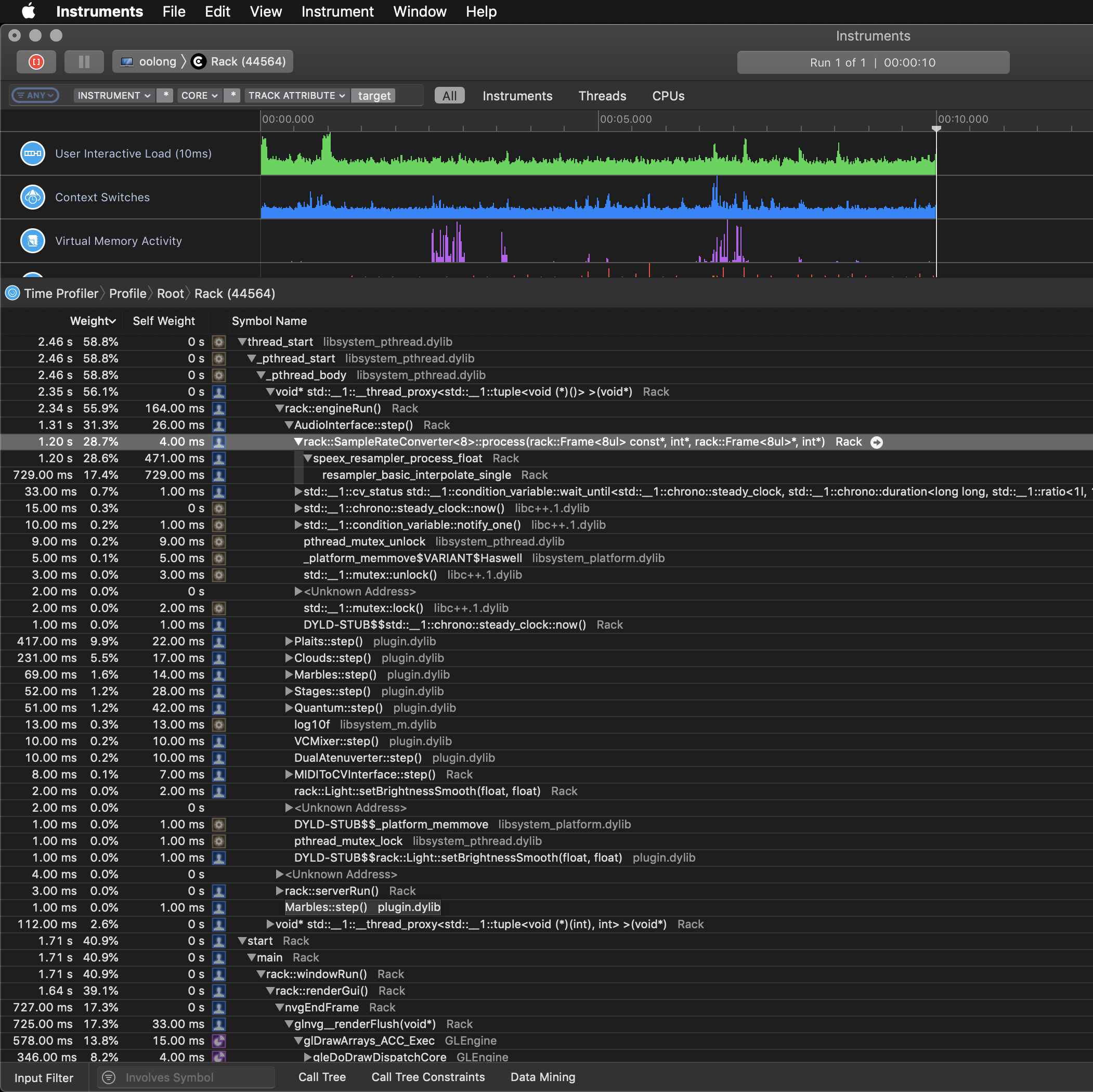
I was profiling Rack, and noted that one of the significant hot spots was indeed resampling. This is on the current version of Rack (0.6.2c) that uses libspeexdsp. Some 28.x% of Rack's CPU usage going to SampleRateConverter and subsequently speex_resampler_process_float.
That 28% was under the AudioInterface module. There are additional percentages in the other modules in the scene, under Plaits and Clouds parts of the perf tree - but less than on the AudioInterface. However that difference could be explained by this - resampling is potentially computed for all 8 channels of the AudioInterface for every audio frame (even if only some of them are used?)
Relevant code in libspeexdsp here. I wonder if there are significantly better alternatives available, as these calls seem to be causing quite a significant perf hit overall; being called from every module that calls resampling.
For the little it may be worth, this was on a relatively simple patch, but one that included Audible Instruments modules - and afaiu those run at different sampling rates. But I would also guess those are rather popular to use.
 Walther
on 20 Feb 2019
Walther
on 20 Feb 2019
Has anyone made their own 'Audio' type module or a modified version of the original without the excessive SampleRateConverter running on all channels? I'd give it a crack, but I'm time strapped and quite invested in the performance of Rack for live stuff.
 jamesb93
on 1 Mar 2019
jamesb93
on 1 Mar 2019
Why not just match the Rack engine sample rate with the Audio device sample rate?
AndrewBelt
on 1 Mar 2019
FYI- VCV 1.0 with empty rack is using 40% CPU and 70% GPU on my Dell XPS 13 9370.
Making VCV Rack pretty much unusable for me anyway.
 bvrp
on 20 Jun 2019
bvrp
on 20 Jun 2019
Lower the frameRateLimit in the settings.json.
cschol
on 20 Jun 2019
I did (to 30), had very little effect.
bvrp
on 20 Jun 2019
Closing since this is old/obsolete/non-concrete.
AndrewBelt
on 29 Nov 2019
Related issues
 ryan-allen
·
5Comments
ryan-allen
·
5Comments
 Coirt
·
7Comments
Coirt
·
7Comments
 vogelscheiss
·
5Comments
vogelscheiss
·
5Comments
 DomiKamu
·
6Comments
AndrewBelt
·
7Comments
DomiKamu
·
6Comments
AndrewBelt
·
7Comments
Most helpful comment
Hi everyone. I'm not a programmer/coder and a virgin rack compiler but I would like to share some real world test results based on the code changes discussed in here running third party plugins. MIDI notes and CC (LFO output) are sent from Ableton Live playback.
Here's the benchmark based on the official v0.5:

With samplerate.hpp SRC (edited by Andrew) - 1% to 2% improvement:

With TIMED_SLEEP_LOCK 1e-3 (by cschol) - 44% improvement:

SRC and 1e-3 together - 47% improvement. The extra 3% confirms the improvements from the SRC changes:

Next, I've mentioned this to @AndrewBelt before about limiting the frame rate to 30 FPS or so to not overload the GPU especially for integrated ones on laptops which results in CPU overheating faster than a Ferrari and ending up throttling or even shutting down in worst cases on some systems. I'm not a coder but I can read C++ more or less and so I did a bit of poking and made some changes myself which I think is the frame rate limiter but any real programmer please do step in to correct me if I'm wrong.
In gui.cpp:
bool visible = glfwGetWindowAttrib(gWindow, GLFW_VISIBLE) && !glfwGetWindowAttrib(gWindow, GLFW_ICONIFIED);
Line 444:
double minTime = 1.0 / 90.0;I changed 90.0 to 30.0, assuming it is what I think it does!
30 FPS hack - 18% improvement on iGPU, resulting in an improvement of 11% on CPU:

And lastly, all three changes together - 61% total improvement!:

In fact I've been running the last build non-stop while writing up this post with my usual laptop cooler turned off and there's no loud CPU fan or throttling at all. Actually my CPU utilization even goes down to 23% when minimizing the Rack window. I probably could have it running all night without any performance problems.
I've ran all the tests quite a number of times and for a quite while just to be certain and these figures are quite consistent on my Win10 system.
So sorry for such a super looooong first post! I hope it is helpful.