Rack: Menu bar is invisible, screen renders with vertical offset
OS (if applicable):windows 10 64bit up to date
Version (or "dev" if compiling from source): 0.4.0 downloaded zip file extracted and running exe.
Running on a dell xps13 on both external monitor and it's own screen(1920x1080) all I can see is the top windows bar, then direct under that is the top rack bar.
Let me know if you need any further info
Cheers
 Mistermoleymole
All 62 comments
Screenshot?
 AndrewBelt
on 9 Nov 2017
AndrewBelt
on 9 Nov 2017
I have also now tried compiling the application, and running but that made no differnece
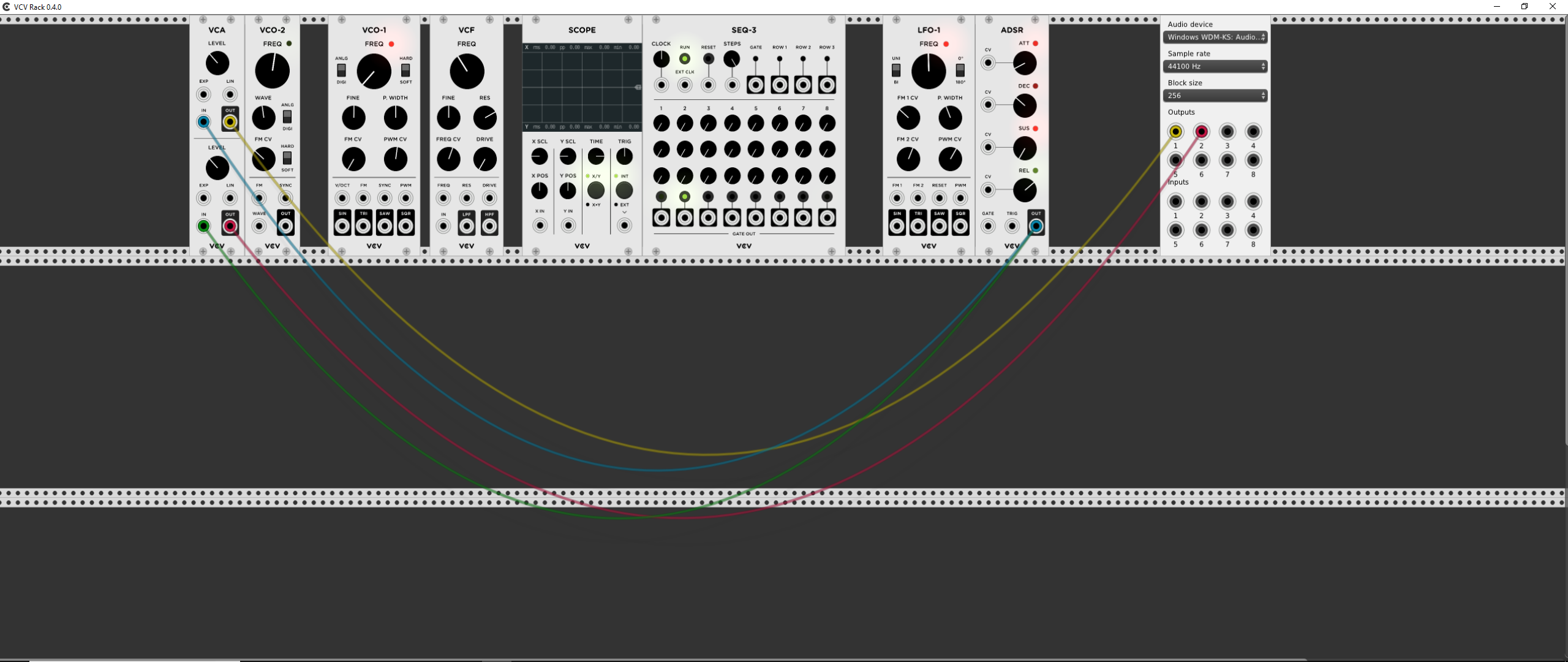
Mistermoleymole
on 9 Nov 2017
I also seem to get mouse pointer issues where a loty of the time the actual position of the pointer is below where it will actually click within the software window.
Mistermoleymole
on 9 Nov 2017
Weird! I have no idea why it could be doing that!
The toolbar must exist, so it is hidden underneath the rack, otherwise a segfault would occur in RackScene::step(), and on line https://github.com/VCVRack/Rack/blob/master/src/app/RackScene.cpp#L45 the position of the rack is set from the height defined https://github.com/VCVRack/Rack/blob/master/src/app/Toolbar.cpp#L100
AndrewBelt
on 9 Nov 2017
Hi Andrew, Is there a way i can get a copy of the older version to try, so i can see if its a version thing or its something to do with my laptop? This is the first time I've ever tried to use your application so have never tried an earlier build.
Cheers
Mistermoleymole
on 10 Nov 2017
Sure, just change the version in the download URL from 0.4.0 to 0.3.2 or 0.3.1.
AndrewBelt
on 10 Nov 2017
ok.. eventually got round to doing this. Tried all versions, all the same, so not a version issue. Could it be the fact its only a 1080 screen? Is there a certain res screen needed?
Mistermoleymole
on 14 Nov 2017
Same issue on xps 15 9560 with a 1080p screen. My desktop with a 1440p screen seemed to work just fine however it doesn't have the creator's update like my laptop.
 bolognam
on 21 Nov 2017
bolognam
on 21 Nov 2017
Is anyone using the dev version?
AndrewBelt
on 21 Nov 2017
Same issue here (mouse offset, no toolbar) with 100% consistency.
Running Windows 10, Dell XPS 15 9550, 1080p laptop.
On 0.5.0 right now (issue occurred on 0.4.0 also) but I'll try dev when I get the time. I'm a software professional so I'm willing to dive in and help debug if you want to sync up.
 http404error
on 22 Nov 2017
http404error
on 22 Nov 2017
Exactly the same hardware and issues as http404error. Will test on different h/w tomorrow.
 Nic-Mendoza
on 22 Nov 2017
Nic-Mendoza
on 22 Nov 2017
@http404error If you can get the build working, I'll pass some patches/edits back and forth.
AndrewBelt
on 22 Nov 2017
@bologna hi mate.... Have you tried plugging your laptop into your desktop screen? Wondering if it's the laptop or the limited 1080 display that could be the issue?
Mistermoleymole
on 24 Nov 2017
I don't have access to that monitor until Monday but I'll try it out then and let you know.
bolognam
on 24 Nov 2017
@bolognamthatbwould be great. Cheers.
Mistermoleymole
on 27 Nov 2017
Here's a build of a17ae2c6cc80882ed3ef7ff926dfa685786b03dc using OpenGL 3.2 instead of OpenGL 2.0. Someone give it a try and report back? It's untested by me, but just throwing it out there.
https://andrewbelt.name/files/VCV/Rack-0.5.0-mac.dmg
AndrewBelt
on 27 Nov 2017
@AndrewBelt Is that a Mac version you've linked too? We will all be windows on XPS machines.
Mistermoleymole
on 27 Nov 2017
Ah right, posted on the wrong thread. But I should prepare Windows builds here anyway.
AndrewBelt
on 27 Nov 2017
God damn it! I got all excited then! :D :)
Mistermoleymole
on 27 Nov 2017
No dice. Both "extend these displays" and "show only on 2" options in Windows with an external 1440p display didn't fix the issue in version 0.5.0. This is still with the Creator's Update. I'll try the same things once Andrew puts out the Windows build. Additionally, I've updated to version 0.5.0 on my desktop and it still works fine; however, I haven't updated my desktop to the Creator's Update yet.
bolognam
on 28 Nov 2017
@bolognam oh well, good test though. Means it must be something to do with the xps graphics rather than the fact its using a 1080p display.
Mistermoleymole
on 28 Nov 2017
A guy i work with has just bought one of the new xps 15s. And he says his works fine. Is everyone here on the latest or a previous model of the xps? Mines a xps13 9350
Mistermoleymole
on 28 Nov 2017
hi, i just got a new xps 15 (4k) and is also doing the same - no file menu and right click/add items is shifted so, mouse needs to be below what you select. hopefully we can figure out what is causing the issue. I tried creating manifest file so, wouldn't default to crazy small on 4k monitor and also, updated all the dell chipset/graphics/bios... still no go.
 citizenknet
on 28 Nov 2017
citizenknet
on 28 Nov 2017
btw,, mine has the nvidia gforce gtx 1050 not intel card inside..
citizenknet
on 28 Nov 2017
Here's my summary system and
XPS Sys Info.txt
full display info from an XPS experiencing these issues if it helps anyone fix.
Nic-Mendoza
on 29 Nov 2017
Ok I got it compiled and running. Issue is still 100% reproducible on master. Will dive in with the debugger next.
http404error
on 29 Nov 2017
Great! There are two reasons the rack widget is at position (0, 0) from the top left of the screen. Either its box position is changed by something, or nanovg / OpenGL is not transforming correctly. Since the mouse clicks seem to be offset correctly but the rack widget is being drawn 31 pixels too high, I think it's the latter, but let's rule out the first. Add
    Vec offset = gRackWidget->getAbsoluteOffset(Vec(0, 0));
    debug("%f %f", offset.x, offset.y);
to RackScene::step() in RackScene.cpp, and it should print the coordinates to the terminal.
AndrewBelt
on 29 Nov 2017
0.00, 31.00
Which would indicate the expected behavior, anyways.
http404error
on 30 Nov 2017
I think I might inadvertently be on this thread. Probably another bologna
you're looking for.
On Thu, Nov 30, 2017 at 12:51 AM, Benjamin Arvey notifications@github.com
wrote:
0.00
31.00So, as expected, not that.
—
You are receiving this because you were mentioned.
Reply to this email directly, view it on GitHub
https://github.com/VCVRack/Rack/issues/369#issuecomment-348098636, or mute
the thread
https://github.com/notifications/unsubscribe-auth/AABNLg8IOyuXVw2yyT1mdLX3VRnXLR_4ks5s7lBxgaJpZM4QXnvi
.
 bologna
on 30 Nov 2017
bologna
on 30 Nov 2017
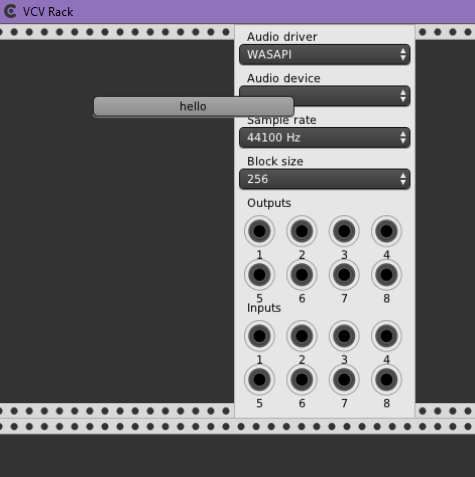
Okay, now let's test whether nvgTranslate() works at all. Place
    Button *b = new Button();
    b->box.pos = Vec(100, 100);
    b->box.size.x = 200;
    b->text = "hello";
    addChild(b);
at the end of RackScene::RackScene() in RackScene.cpp and see if a button appears at the origin or at (100, 100), or not visible at all.
AndrewBelt
on 30 Nov 2017
The button appears at, um, what looks like around (100, 69). Almost like it's measuring from the corner of the title bar.
http404error
on 1 Dec 2017
Unfortunately I don't have the skills to work out what's happening here, but just wondering if anyone's any closer? Cheers all.
Mistermoleymole
on 9 Dec 2017
When I get some free time I will experiment a little with debugging it on
my own, but so far there is no fix available yet, sorry.
On Sat, Dec 9, 2017, 12:17 PM Mistermoleymole notifications@github.com
wrote:
Unfortunately I don't have the skills to work out what's happening here,
but just wondering if anyone's any closer? Cheers all.—
You are receiving this because you were mentioned.
Reply to this email directly, view it on GitHub
https://github.com/VCVRack/Rack/issues/369#issuecomment-350502724, or mute
the thread
https://github.com/notifications/unsubscribe-auth/ACvijD3IHe2MV4iEKj2XXxJ4nVmc_tsxks5s-urxgaJpZM4QXnvi
.
http404error
on 10 Dec 2017
FYI everyone with XPS laptops... just upgraded the new BIOS and chipset dated Dec 12 @ support.dell.com and now all is working. Toolbar/filemenu/login appears and no offset on menu items!!!
citizenknet
on 18 Dec 2017
Dell Support auto detect doesn't offer a Dec 12 BIOS or chipset and the issue remains with my XPS 15 9550 currently on BIOS Version 1.3.0 11/08/2017. What version have you got working?
Nic-Mendoza
on 18 Dec 2017
It appears that this may be available for the XPS 15 9560 only then.
it is dated on the website as Dec 12 release.
BIOS Version is 1.6.2 11/12/17
Filename is XPS_15_9560_1.6.2.exe
citizenknet
on 18 Dec 2017
Thanks. I'll try take this up with Dell Support to see:
- What was included in the update that might have fixed the issue.
- Whether a corresponding update is going to be ported to a 9550 BIOS
- Whether version 1.6.2 is OK to apply to a 9550
Nic-Mendoza
on 18 Dec 2017
FWIW I have the same issue (Dell XPS 13) and I updated my BIOS and chipset as per above instructions but it hasn't seemed to resolve it.
Also, I have a 0.4.0 version lying around which _used_ to work correctly, and now when I open that I have the same issue.
 lanthias
on 26 Dec 2017
lanthias
on 26 Dec 2017
Can you guys take me off of this list? Not sure why I'm on it. Thanks!
On Dec 26, 2017 10:02, "Leo Anthias" notifications@github.com wrote:
FWIW I have the same issue (Dell XPS 13) and I updated my BIOS and chipset
as per above instructions but it hasn't seemed to resolve it.Also, I have a 0.4.0 version lying around which used to work correctly,
and now when I open that I have the same issue.—
You are receiving this because you were mentioned.
Reply to this email directly, view it on GitHub
https://github.com/VCVRack/Rack/issues/369#issuecomment-353983768, or mute
the thread
https://github.com/notifications/unsubscribe-auth/AABNLuxVgddU1MWEQlQUY7qEQmGKh1l8ks5tERiSgaJpZM4QXnvi
.
bologna
on 26 Dec 2017
@bologna I think @Mistermoleymole mis-tagged you in this post https://github.com/VCVRack/Rack/issues/369#issuecomment-346890217 so go to https://github.com/VCVRack/Rack/issues/369 and click Unsubscribe on the sidebar.
AndrewBelt
on 26 Dec 2017
Hi, unfortunately, same issue here on an XPS 15 9550, even with the latest BIOS update (1.6.1., 11-Dec-17), thanks!
 bitquisite
on 1 Jan 2018
bitquisite
on 1 Jan 2018
Have you tried setting Rack.exe to use the NVIDIA processor as preferred through the NVIDIA Control panel? This worked for me.
Nic-Mendoza
on 1 Jan 2018
Indeed, this works! Thank you so much!
bitquisite
on 1 Jan 2018
I have Dell XPS 9560, same issue: mouse off at top of screen, better at bottom.
Upgraded BIOS with Dec 2017 release, all good now.
 mcmonkeys1
on 1 Jan 2018
mcmonkeys1
on 1 Jan 2018
Was having the same issue on my Dell Precision 5510. Solved by upgrading my video drivers which installed Nvidia Control Panel. I am now able to right click "Rack.exe" and select "Run with graphics processor" to choose which GPU to use.
 OldGregg570
on 5 Jan 2018
OldGregg570
on 5 Jan 2018
Currently having this issue on an HP spectre x360. Upgraded my bios and it hasn't worked. Im unable to run it with nvidia control panel due my laptop having chipset graphics. pls help
 themotherland
on 12 Apr 2018
themotherland
on 12 Apr 2018
Same issue on Lenovo X270 Windows 10 64-bit Version 1709 build 16299.492
 joshcann
on 14 Jun 2018
joshcann
on 14 Jun 2018
Couple updates. Nic Mendoza's workaround helped me, but of course that doesn't help users without alternative graphics cards. I found another piece of software that suffers from the same issue (LackeyCCG). I'm fairly certain that it's a bug in the graphics driver for integrated graphics on Windows 10. It might be related to the gui framework or method used but I haven't looked into that avenue much yet.
http404error
on 14 Jun 2018
Can all the people who have posted their laptop model post their graphics card model? That's the relevant hardware for this issue. I believe everyone has an Intel HD3000/4000.
AndrewBelt
on 14 Jun 2018
Hi Andrew,
my laptop model is Dell XPS 15 2016 - the problem exists when using its Intel HD 530 card (default) and disappears after switching to its NVIDIA GeForce GTX 960M card.
Thanx for everything!
Cheers.
bitquisite
on 14 Jun 2018
I have the same hardware as bitquisite just posted.
http404error
on 15 Jun 2018
Intel HD 620
joshcann
on 15 Jun 2018
Having this issue and strangely have the exact configuration as bitquisite and http404error.
 nykwil
on 24 Jun 2018
nykwil
on 24 Jun 2018
FYI - I was experiencing this problem as well. But it seems fixed now, by updating video drivers.
I'm using Windows 10 with Intel Garphics and just went into the Device Manager, right clicked on the Intel Graphics device, and clicked Update Driver. It asked me where to find the update, and I just told it to search the internet. After downloading/installing, VCV Rack is now rendering correctly on my screen. So this may have been a bug in the Intel Graphics driver, not VCV Rack. Other folks should try this as well.
 dburgan
on 29 Jun 2018
dburgan
on 29 Jun 2018
This fixed my problem. Thanks.
nykwil
on 29 Jun 2018
Updating driver from device manager resolved it for me too (HD 620) - weird because I'd already run Lenovo System Update and Intel Driver & Support Assistant and both said I was up to date...yet device manager found something newer and it fixed the missing toolbar.
joshcann
on 2 Jul 2018
Dell also said my laptop driver's were up to date.
nykwil
on 2 Jul 2018
I discovered that this issue also impacts the software "LackeyCCG". I don't know what graphics libraries they use, but it seemed possibly relevant.
http404error
on 9 Nov 2018
Closing, since I haven't heard this issue for Rack 1.0.0+. Comment if it hasn't been fixed.
AndrewBelt
on 19 Jul 2019
Reopening because someone has reported an issue about this.
AndrewBelt
on 29 Mar 2020
This problem seems to be related with some Intel drivers.
If you have Intel+NVIDIA, it is probably running on Intel, running it with the NVIDIA ones "solved" it for me.
 alagoa
on 18 Jul 2020
alagoa
on 18 Jul 2020
XPS 15 updated the Intel video drivers fixed this.
nykwil
on 19 Jul 2020
Related issues
 Coirt
·
7Comments
Coirt
·
7Comments
 alectron
·
6Comments
alectron
·
6Comments
 LazyPike
·
6Comments
AndrewBelt
·
4Comments
LazyPike
·
6Comments
AndrewBelt
·
4Comments
 ryan-allen
·
5Comments
ryan-allen
·
5Comments