When dragging a module while holding a modifier key (command), it would be nice to shift all of the modules to the side (if possible), instead of jumping over them. Push all of the modules to the side with the module you are holding.
 Euphorbium
All 27 comments
great idea, would be a very useful addition.
 Strum
on 24 Oct 2017
Strum
on 24 Oct 2017
Good idea, but could you think out the process a bit more fully?
 AndrewBelt
on 24 Oct 2017
AndrewBelt
on 24 Oct 2017
I'm thinking you could use a modifier key and the arrow keys, click on the left or right most module and then hold down shift and use to arrow key to move that module and all the modules to the left or right depending on which arrow key was used.
Ctrl Drag to select a group then move that group in the same way you move an individual module might also work, and might be easier to implement.
Strum
on 24 Oct 2017
Currently the module you are holding seems to jump to the other side once it passed the middle point of the group you are going over. So if the command button is held, shift the entire group to the side, but I think the shifting should start once the middle point of the first module you are going over was passed, not the entire group.
Euphorbium
on 24 Oct 2017
this isn't quite what euphorbium asked, but it would achieve the same effect:
click and drag the mouse to highlight the modules you want to move and then click and drag to move them, similar to if you were selecting a group of icons on the desktop.
 emhere
on 2 Nov 2017
emhere
on 2 Nov 2017
I actually like @Euphorbium's suggestion over rectangular select, but there are many fine details I have to work out.
I don't think I've ever used software which did this, so we'll have to invent our own algorithm.
If Ctrl held, module placement will switch to "force" mode.
In force mode, the module will be placed exactly where your mouse is ignoring collisions of other modules.
What happens to the other "colliding" modules is the tricky part. Here's a proposal.
- Lock the dragged module's position. Nothing is able to move it during this algorithm.
- Iterate over all other colliding modules in an undefined order. Perhaps this will not work, so I'll have to iterate over distance from the dragged module, nearest first.
- For each one, find the nearest position on the 2D grid which does not collide with a locked module.
- Lock the module's position.
- Continue iterating until all modules are locked.
^This is what I was referring to when I said "think out the process a bit more fully". Thoughts?
AndrewBelt
on 2 Nov 2017
Here are a couple of other possibilities.
The first, a "force move", would act a bit like reordering devices in Ableton or Bitwig. It would handle swaps/insertions in a pretty natural way, but wouldn't be good for large shifts.
- When a "force mode" module drag begins, create a list of the modules in the row in their original order, including a "dummy module" for any empty slots, with the appropriate width recorded.
- When a drag mouse move crosses the midpoint of a non-dragged module, change the order list to move the dragged module to a new position before or after the just-crossed module. Then re-layout the entire row based on the new order and the module widths.
- If a dragged module is dragged out of its original row, place an empty "dummy module" the same size as the dragged module in its original order location, and re-layout the row. If the dragged module is dragged back into this row at any position, remove the dummy module.
- If a dragged module is dragged into a new row, create a list of module positions for the new row as in (1) and update the layout as in (2). If the dragged module is later dragged out of this row, restore the original layout.
Another idea, a "shove move", would allow you to slide groups around, and act more like sliding rails in a real rack (assuming you left yourself enough free nuts!) You wouldn't be able to drop a module in between two other modules in one operation, but you could do a shove move to create a space, and then do a regular drag move to put the module in the open space.
- When a "shove move" drag is active and the module is being dragged to the right, instantly move the module to the new position, and if it overlaps another module, move that module to the right the same amount. If that module now overlaps a third module, move that module to the right the same amount, and repeat until the moved module doesn't overlap (because free space was available due to a gap, or you've reached the end of the row.)
- When a "shove move" drag is active and the module is being dragged to the left, move it instantly to the dragged position if there is no overlap with another module. But as soon as one unit of overlap would be created, look for one unit of gap space anywhere in the current row to the left of the overlapped module. If the gap space exists, move all modules between the gap and the overlapped module to the left, and move the dragged module one unit to the left. If there are no free spaces available to the left, disallow the drag and keep the module in its current position.
- When a "shove move" drag is active and the module is being dragged to a different row, you could either a) disallow the drag entirely, or b) convert the drag to a "force drag."
 Dewb
on 2 Dec 2017
Dewb
on 2 Dec 2017
Also, my initial reaction is that the Modifier Key (Cmd on OSX, Ctrl on Windows) is already available for plugins to use for their own purposes, so it might be nice to use Option/Alt or some other modifier that's not currently part of the Widget API.
I'm using the modifier key in my monome grid module (https://github.com/Dewb/monome-rack) but I could probably switch to the Shift key instead if mod+click on the module was no longer available for customization, so it wouldn't be a big deal.
Dewb
on 2 Dec 2017
Shift+Click is the common way of selecting multiple items in many software.
After that it's just click dragging the selection to move, Del to delete, or Ctrd/Cmd+D to duplicate.
So why not just follow the norm?
 Uriel-A
on 28 Dec 2017
Uriel-A
on 28 Dec 2017
@Uriel-A Here are some issues with that approach, feel free to address them.
There should be visual feedback for a selected module. Let's say a red border. Zero or more modules can be selected. Let's say you can Shift+Drag to rectangle select.
- When you want to duplicate, randomize, or initialize a single module, currently you hover over the module and press Ctrl+D, R, or I. This will become "Shift+Click on module and press Ctrl+D, R, or I."
- Many users would want to deselect modules after dealing with them to clear the selection, which is an additional step.
- If the selection is off-screen, user may try to hover and delete another module, which will delete the other one.
- Deleting in general will always be slower, because currently you can just swipe your mouse over the modules while holding Del.
AndrewBelt
on 28 Dec 2017
When you want to duplicate, randomize, or initialize a single module, currently you hover over the module and press Ctrl+D, R, or I. This will become "Shift+Click on module and press Ctrl+D, R, or I."
Sounds good. Right clicking too?
Many users would want to deselect modules after dealing with them to clear the selection, which is an additional step.
On Windows Shift+Click = select range (not sure if it's the same on MacOS). That's not the behavior I was proposing actually. In Ableton Live MIDI clip editor, Shift+Click is the equivalent of Ctrl+Click in windows, which would be add/remove to selection. That's what I would like to propose, sorry for the confusion.
No rectangle selection, things can easily be overlooked and go wrong like in your point 3.
I hope you uses Windows so you know what I'm talking about. I suggested Shift because Dewb mentioned that Ctrl/Cmd is already used by many other plugins.
Deleting in general will always be slower, because currently you can just swipe your mouse over the modules while holding Del.
I'm aware of that and uses that actually. Deleting a selected group, if and when group selection is implemented is just a cherry on top.
Come to think of it, since we're also having another discussion over at #362. Using any form of keyboard modifiers also does present an issue for touchscreen users without a keyboard.
Uriel-A
on 28 Dec 2017
It actually doesn't make much sense to want to initialize or randomize a block of modules, and you can just swipe across with Ctrl+R/I anyway. So really all we need to handle is mass deletion, duplication, and moving. We've got mass deletion covered (EDIT: by swiping across with Del held). Mass moving can be done using my proposal above (EDIT: with the "force" method), although it's not perfect since it doesn't handle moving modules to a different row, so it should be redesigned from scratch. Perhaps pressing Ctrl+Shift+D would turn your cursor into a rectangle selector and allow you to duplicate a block. The modules would then be sent to the nearest position that would fit the entire selected block size. Moving could be done in the same way with Ctrl+Shift+M (or something), which allows a rectangle to be selected and then moved until the mouse is clicked.
Touch screen support is second class to mouse and keyboard usage, so design decisions should not be affected much by the limitations of touch.
AndrewBelt
on 28 Dec 2017
It actually doesn't make much sense to want to initialize or randomize a block of modules, and you can just swipe across with Ctrl+R/I anyway. So really all we need to handle is mass deletion, duplication, and moving.
Yup.
As I mentioned earlier, I'm not really into the idea of rectangle selection. Granted it would be faster but things could go wrong. Besides, you still got to deal with how to remove specific modules from the existing selection with this method.
Touch screen support is second class to mouse and keyboard usage, so design decisions should not be affected much by the limitations of touch.
I'm just referencing this for discussion over there. Which can potentially be solved by my suggestion in my last post over there as well.
Uriel-A
on 28 Dec 2017
I meant above to suggest throwing away the concept of selection, rectangular or otherwise, in favor of single actions (which already exist) and rectangular actions (duplication and moving).
AndrewBelt
on 28 Dec 2017
I'm not quite getting what you're trying to say. 😅
What do you mean by "rectangular actions (duplication and moving)" then?
Uriel-A
on 28 Dec 2017
Rectangular actions =
Perhaps pressing Ctrl+Shift+D would turn your cursor into a rectangle selector and allow you to duplicate a block. The modules would then be sent to the nearest position that would fit the entire selected block size. Moving could be done in the same way with Ctrl+Shift+M (or something), which allows a rectangle to be selected and then moved until the mouse is clicked.
AndrewBelt
on 28 Dec 2017
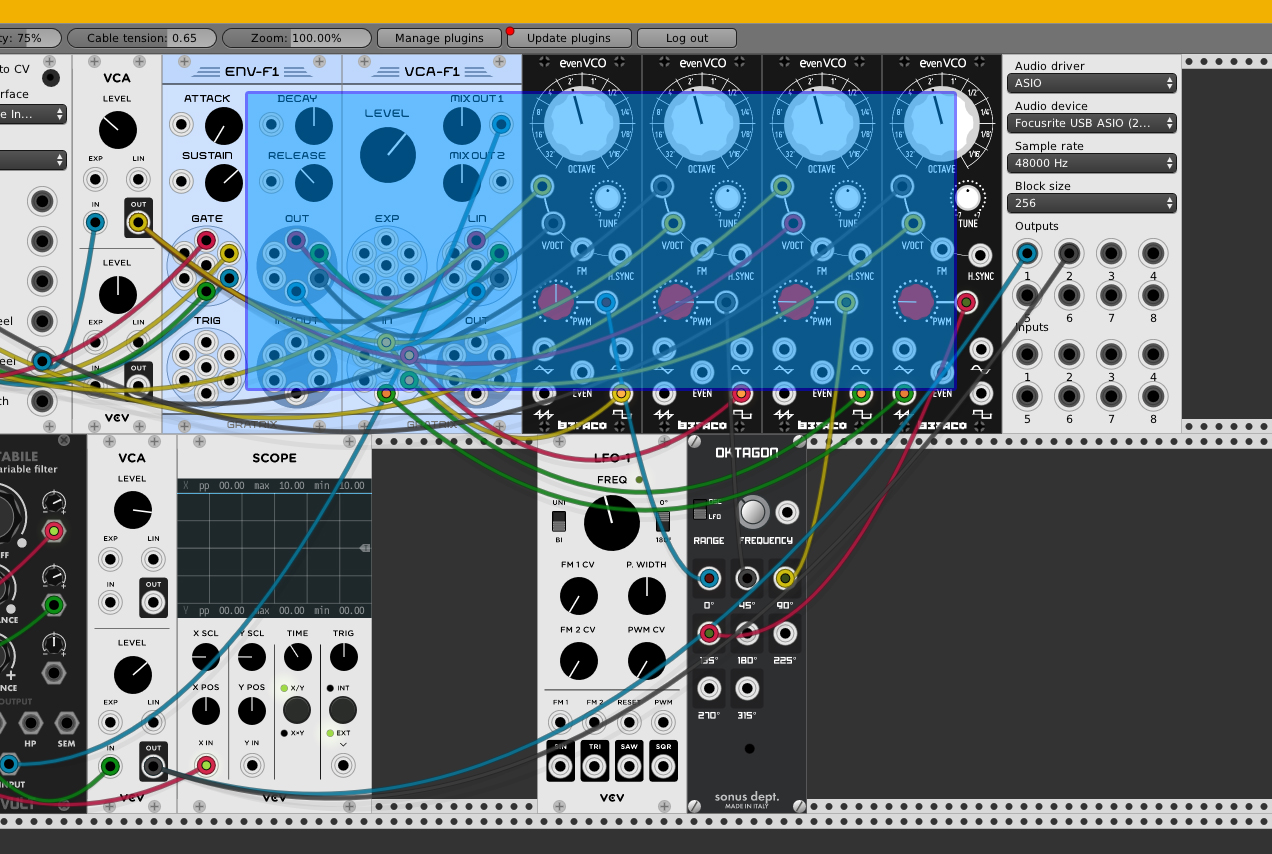
Are you talking about something like this? But instead of needing to click and drag, you press and hold on Ctrl+Shift+D/M and move your cursor around to select and then let go of the keys?
Uriel-A
on 28 Dec 2017
Almost. The sequence I was proposing is
- Press and release key command (Ctrl+Shift+M)
- Cursor turns into rectangle selector
- Click, drag, and release to set the two corners
- At this point it's sketchy: Move mouse (which is currently released) and modules will move along with it.
AndrewBelt
on 28 Dec 2017
Well, what if I want to select (in my example pic) the Env-F1, VCA-F1, the 4 evenVCOs, AND the Oktagon but NOT the Scope and LFO-1?
Besides, you still got to deal with how to remove specific modules from the existing selection with this method.
Uriel-A
on 28 Dec 2017
Your image suggests a better idea: Multiselect mode. In this mode, no interactivity with modules are cables is allowed. To enter multiselect mode, click a button on the toolbar (which we are migrating to icons with tooltips). In multiselect mode:
- Click and release (with a near-zero mouse delta) to select a single module, or unselect if already selected
- Click, drag, and release on a "blue" region to move the entire selected group
- Click, drag, and release on an unselected region to begin a rectangular selection
- Ctrl+D (or click a toolbar icon) to duplicate the selection, unselect the existing modules, and select the duplicated modules.
As a side effect, this allows for touch support, since no keys or right click are required.
AndrewBelt
on 28 Dec 2017
In this mode, no interactivity with modules are cables is allowed.
I believe the whole purpose of moving/duplicating a group of modules is to keep the existing cable connections between them. 😞 Or do you mean no cable connection operations are available when in this mode?
Uriel-A
on 28 Dec 2017
the whole purpose
That's an exaggeration. You know that isn't the only reason.
However, that would be a possible additional feature:
- Cables between modules both in the selection group would be duplicated.
- Cables with their inputs connected to the duplicated group would be duplicated, since output stacking is allowed.
AndrewBelt
on 28 Dec 2017
hi, i was just going to suggest shove move to simulate sliding rails.
it could be a global menu flag to switch the rack format between threaded
strips and sliding rails, then no modifiers are needed.
not sure from the above discussion if shove move has been rejected already?
 gbrandt1
on 26 Jan 2018
gbrandt1
on 26 Jan 2018
UX Designer here.
As @Uriel-A mentioned, multi-selection is prevalent in many applications, and the user will expect it to be treated in a similar manner.
With that said, we have a few options.
Hold Shift and Left-Mouse Buttonto draw a selection rectangleShift + Left-Clickon individual modules to select more than oneLeft Clickon individual module, thenShift-Clickto select more than one across the rowClick-and-dragoutside of any module to begin drawing a selection rectangleShift+Clickto select through like#3, hold CMD/CTRL to deselect single modules between or outside of the original selection.
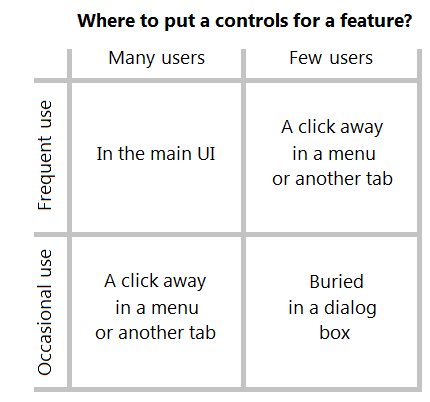
Those are the two most common patterns found in most software products with some minor variations depending on the tool (Sketch, Photoshop, Illustrator, MacOS, Windows, Excel, Word, Ableton, Reaktor, and more).
Best to avoid modal errors. Errors created when a user enters a specific "mode." e.g. "Press Cmd" or "Press a Menu Icon" to enter "Multi-Selection Mode"
Designing from Both Sides of The Screen
I would like to throw in a suggestion. It would be nice to have a drag handle or a point on the module where a user can click to reposition, so that users don't accidentally move modules when in fact they simply wanted to adjust a param or draw a patch cable.
 JWhiteUX
on 4 Jun 2018
JWhiteUX
on 4 Jun 2018
@JWhiteUX There is no concept of a selection in Rack, unless you say that the module which is hovered by the mouse is a "selection". Your proposal doesn't address this and therefore can't be applied to Rack.
so that users don't accidentally move modules when in fact they simply wanted to adjust a param or draw a patch cable.
Duplicate of #492
AndrewBelt
on 4 Jun 2018
Can we have a virtual screwdriver experience as an easter egg :P
I'd definitely like to have a better way of moving modules around so i can optimise the layout on the rack. Another potential application for creating "selections" of modules, is being able to duplicate a cluster of modules to speed up the creation of larger patches (think of it as duplicating a synth voice block with all the inter-cabling).
 z-plane
on 21 Nov 2018
z-plane
on 21 Nov 2018
Closing because "force move" solves most of this.
AndrewBelt
on 3 Jun 2019
Related issues
 ShofB
·
4Comments
ShofB
·
4Comments
 synthi
·
4Comments
synthi
·
4Comments
 gogobanziibaby
·
4Comments
gogobanziibaby
·
4Comments
 oblivionratula
·
7Comments
AndrewBelt
·
4Comments
oblivionratula
·
7Comments
AndrewBelt
·
4Comments
Most helpful comment
That's an exaggeration. You know that isn't the only reason.
However, that would be a possible additional feature: