The range can be [0, 1], [-1, 1], or even [-2, 2] or more. I'll play around with the UI. The audio engine would be easy to change and cost negligible CPU.
 AndrewBelt
All 17 comments
That would be a useful addition. -2 to 2 range would be good so you can either boost or cut the level of a signal coming in or going out by a decent amount.
 Strum
on 21 Oct 2017
Strum
on 21 Oct 2017
I can't think of a good way to support setting the default gain (1). I think I'll just do [0, 1].
Pinging @milholen if he has any ideas about the design. I remember he sent me a mockup via email months ago. I like rings around the port which only appears if the port is being attenuated, but there might be better ways to do it.
AndrewBelt
on 3 Nov 2017
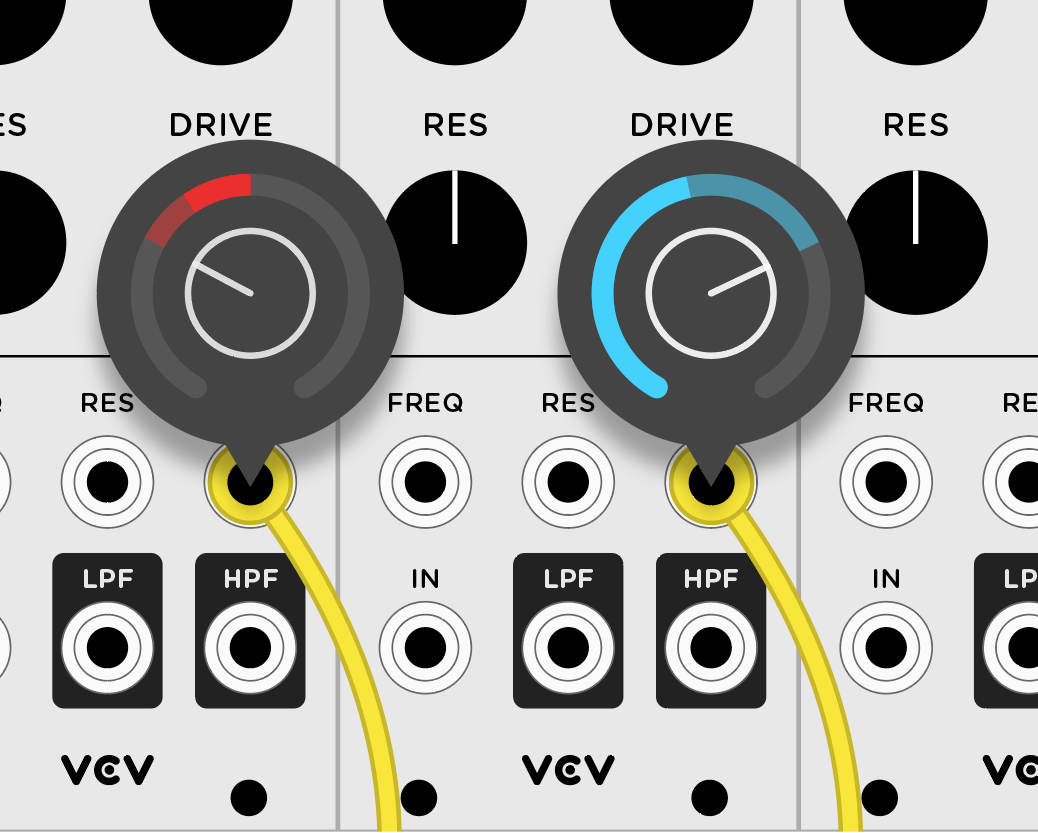
I still like the mockups from a while back, where you could set unipolar or bipolar values for a given input using a small "speech bubble" display. Each input jack would need to identify what type of modulation it accepts.
Having a persistent visual indication of the attenuation values might be overwhelming (kind of like having the plug lights feature switched on all the time). And having a ring around each jack is complex because there are different types of jacks (not all are round either). Maybe, like the plug lights, there would be a toolbar button to hide/show which jacks are using this feature.
Ctrl/Cmd+click a jack to open the display, click outside of the "speech bubble" to close it. To prevent adjacent displays from overlapping, I would expect that only one can be active at any given time.
In this mockup, the more intense color (red for negative, blue for positive) is the current voltage level, the dimmer color is the modulation min/max as set by the knob.
 milholen
on 18 Nov 2017
milholen
on 18 Nov 2017
Hmm, your comment "And having a ring around each jack is complex because there are different types of jacks" is true, but the cable plugs are all standard, which is what I'd draw the attenuator rings around.
If the attenuator is not visible 100% of the time when enabled, that would cause lots of frustration when your patch is not behaving correctly, or you have low or inverted audio level.
I'm not sure if it makes sense to customize the range of each port. If a port accepts only [0, 5], I'd want to still be able to invert a [-5, 0] signal to be within that range, so I think all port attenuators should either apply [0, 1], or [-1, 1] if we figure out a reasonable way to "get close to zero" with that.
Maybe a really subtle indicator, like a hairline partial circle which increases in thickness when hovering the port, which only shows the attenuation level, not the signal level after/before attenuation.
AndrewBelt
on 19 Nov 2017
I'd love to see attenuverters! I keep trying to use them and realize it's not implemented :) I like the hairline suggestion and I think one way to "debug" the patch would be to have two views, (tab to switch between them for example), the current one (maybe with hairline) and another one where you have much more information about the port including attenuverters and signal. It could be when you hover only to get the highest detail possible. Then you change to normal layout and don't worry so much about it.
 bafonso
on 7 Feb 2018
bafonso
on 7 Feb 2018
Looking back on this, this would be pretty easy to implement for Rack 0.6, so I'll add it as a task. It should only attenuate, so [0, 1] will be its gain range.
I can take @milholen's blue ring design and put it around the port itself.
If gain is 1, the ring will not be shown. If 0, it will be a gray ring.
To modify the value, you will hold shift while dragging the port up or down.
AndrewBelt
on 7 Feb 2018
When you say "around the port itself" would it be around the gray outer edge of the jack, or around the black hole in the center?
milholen
on 7 Feb 2018
It would be around, not touching, the port. Roughly the same size as your blue ring, except it shares its bounding box point with the port.
I just realized that draw order is an issue. It should be behind the cable I think
AndrewBelt
on 7 Feb 2018
Would it not cover up the text labels on most modules?
You could change the cable plug color as well, if it's easily distinguishable from the plug light.
milholen
on 7 Feb 2018
Yeah, good point. I guess the only option is to draw a ring on the colored part of the port itself. Except perhaps of the ring is thin enough.
AndrewBelt
on 7 Feb 2018
Yeah, and that's a small spatial area to work with, considering that attenuation is often about fine-tuning things to be just so. That's why I was floating the idea of a popup UI.
Perhaps we could indicate that attenuation is enabled somehow (the cable plug changes color, the jack gets some kind of ring or other indicator, the color palette of the plug light changes from green/red to cyan/magenta). Click on the jack with a modifier key to display the attenuation UI, click on some other area (and/or tap the same modifier key) to close the attenuation UI. I'd propose the "A" key (for attenuate).
milholen
on 7 Feb 2018
Requiring two clicks is a lot worse than a ring covering up text IMO. And even if I make it a single drag action, where the popup is displayed on drag, I'd still like to be able to see the value without clicking it. Maybe a translucent ring, which could have a radius and thickness as large as we want? Although, that might overlap with other ports. I'll play with a ring-on-port idea.
AndrewBelt
on 7 Feb 2018
2 cents:
Koma Attenuator Cable etc. have the attenuator as a slider in the middle of the cable.
I think there should be constant visibility when changed from one.
 gbrandt1
on 10 Feb 2018
gbrandt1
on 10 Feb 2018
Rough mockup of the attenuator ring around the port. @milholen's design shows blue, which I like better, but just needed to get the point across. Perhaps a non-hovered state could be translucent.

The appearance doesn't matter to me, but I need two things:
- attenuated ports need to be permanently visible. A popup can't be hidden when they lose focus if the attenuation is still <1. They can of course be hidden if there is no attenuation.
- Mouse interaction needs to be simple. Ctrl/cmd click and drag is an option, but then I'd need to move the
create new input cablegesture to something else. I usually discourage moving gestures around like that. Another option is to use right-click drag and just remove thequick unpluggesture. That would require lots of refactoring of the event engine, but it would be worth it for other applications.
Can we all agree on the right-click drag gesture? Note that this would only support gains of [0, 1], where the endpoints can be achieved exactly by hitting a limit while dragging.
AndrewBelt
on 4 Jul 2018
I still think there are too many obstacles to making such a ring permanently visible:
- A ring around the jack would cover up text labels on many modules (including most VCV-branded modules). Having the opacity change on hover doesn't really solve this IMO because the attenuation value still needs to be visible enough in the non-hover state that it has enough visual contrast to be legible (which will cover up graphics).
- On certain modules (various NYSTHI modules come to mind i.e. NYECHO) the jacks are so close together that permanent LED rings (even small ones) would overlap with each other. Third-party devs would have to update their module layouts to make this feature usable.
- There are three different jack sizes in the main component library, and a range of custom jack graphics on third-party modules. Round nuts and hex nuts. Some people use the original component library graphics but change their scale (even on a single module, see NYECHO above, jacks can be different sizes).
What's changed since our earlier discussions about this feature is the addition of the LEDs inside of each jack to indicate signal levels. One unobtrusive way to indicate inline attenuation would be to change the LED colors of the jack lights: use blue for positive, magenta for negative (as opposed to green/red in the current schema). This would not interfere with labels, jack spacing, the wide range of jack graphics, or require any change to existing modules. It would however be difficult for colorblind users to differentiate from red/green.
Even if that were an acceptable solution, there are still some more general challenges to consider separately from the visualization itself:
- When I unpatch a cable does the inline attenuator maintain its value?
- When I duplicate a module, are the inline attenuations duplicated as well? This would be desirable in some cases, undesirable in others. If undesirable, resetting all the attenuators to zero would be tedious.
- When I copy/paste values between multiple instances of the same module (the new feature you recently announced) are the attenuation settings also copied?
- What about saving module presets? If I unknowingly save a preset with inline attenuation enabled, and the value is saved as part of a preset, loading that preset could make it seem as if something isn't working properly.
IMO there is no easier way to visualize attenuation than to use a dedicated attenuator module and trace out the signal flow. Follow the routing, check the knob values. This maintains the 1:1 hardware metaphor without hidden functions. It also doesn't make built-in attenuators throughout the ecosystem of modules suddenly seem like a redundant waste of panel space.
milholen
on 5 Jul 2018
The small port spacing could be solved with drawing a ring on the cable head itself instead of around it. Really small, but probably still large enough to see its value. Jack sizes make no difference because it's the cable head that it would be drawn around.

Your four points regarding the interaction are strong though, but I'll try to propose some answers.
- IMO the attenuation should be reset as soon as the last cable is patched. However, all cable heads on a port share the same attenuation. The attenuation value is "owned" by the port.
- No, because duplicated modules have no cables patched, so they would effectively be reset.
- Probably? Could go either way.
- Same as above
Agreed that the best way is to use a dedicated attenuator. People will start asking "I can MIDI Learn knobs, why not port attenuators??"
AndrewBelt
on 5 Jul 2018
Decided to drop this feature request. A better alternative is to use modules dedicated to attenuating signals.
AndrewBelt
on 9 Jul 2018
Related issues
 jonheal
·
4Comments
jonheal
·
4Comments
 oblivionratula
·
7Comments
oblivionratula
·
7Comments
 LazyPike
·
6Comments
LazyPike
·
6Comments
 ryan-allen
·
5Comments
ryan-allen
·
5Comments
 Eoin-ONeill-Yokai
·
4Comments
Eoin-ONeill-Yokai
·
4Comments