Rack: VCV Bridge + VST/AU/AAX?/LV2? Bridge plugins
Just a question but is there plans for the VST bridge to be open source as well or is that commercial?
Great project BTW, massive thanks for open sourcing the code.
 teotigraphix
All 156 comments
Yes, VCV Bridge will be open source and included in Core, and the corresponding VST and AU plugins will be added to a new repo. This will be a fun one :)
 AndrewBelt
on 12 Sep 2017
AndrewBelt
on 12 Sep 2017
Wow, that is great! This project seems like it's about to lift off. With VST integration, that is great and having the ability to write our own modules. :)
Thanks again.
teotigraphix
on 12 Sep 2017
Are you planning to make a VST2 or VST3 plugin? Note that the VST3 SDK is licensed under the GPL3 unless you get a proprietary license from Steinberg, so you'd have to license the plugin under the GPL3 if you make it a VST3 plugin. If you plan to make the plugin separate from the standalone program, I'm not sure whether you'd be required to relicense the standalone program.
 Be-ing
on 12 Sep 2017
Be-ing
on 12 Sep 2017
The easy way to detach the GPL is to make a custom COM object, and make two projects which talk to it. This could be a general bridge, with no "linking" and hence no technical join of licence.
 jackokring
on 12 Sep 2017
jackokring
on 12 Sep 2017
Any advantage of VST3 over VST2? I plan on supporting stereo input and output with a VST FX plugin and MIDI input and stereo output on a VST instrument, and VST2 supports this well. VST3 includes VST2 as a subset of the standard if I recall, and Ableton Live only supports VST2.
AndrewBelt
on 12 Sep 2017
VST3 does not have the awkward legal situation for GPL hosts. But if LV2 is supported, I think that is a moot point.
Be-ing
on 13 Sep 2017
Either license option of VST3 is valid by the way. Since the bridge VST plugin would be separate from the Rack codebase, I can license it GPL if needed, or proprietary by writing to Steinberg. The LV2 headers are ISC, which is a permissive license. But I still need to be convinced that VST3 is preferred over VST2, since I won't need any features other than a "channel" parameter that ranges from 1-64 or so.
AndrewBelt
on 13 Sep 2017
Just a note that Ableton Live 9.x does not support VST3, only VST2.
 steveangstrom
on 29 Sep 2017
steveangstrom
on 29 Sep 2017
Yup, I'm aware. That's why I was asking above why I should make a VST3 plugin, because from what I can see, there is no benefit over VST2 for making a lightweight network client plugin.
AndrewBelt
on 29 Sep 2017
I really hope you can fit this in before 1.0
 ottworks
on 8 Oct 2017
ottworks
on 8 Oct 2017
VST3 is becoming standard but as a popular DAW as ableton only support VST2 and as the technical needs for Rack Bridge will certainly be widely covered by VST2, the latter seems the more reasonable choice.
I don't think VCV Rack will be able to benefit from the smart signal management of VST3 (stopping the VST when no signal to process) because this will act only on the bridge not on VCV Rack itself. So one of the best feature of VST3 seems to have no interest for the VCV and its bidge.
 odahan
on 29 Oct 2017
odahan
on 29 Oct 2017
Haha, I just learned that Live 10 will still not have VST3. Another reason to use (the much simpler API) VST2.
AndrewBelt
on 21 Nov 2017
Hi Andrew, i was wondering
How is work on the VST/ Bridge coming along?
Is the release still scheduled for December?
Thanx!
 JoeSleaze
on 22 Dec 2017
JoeSleaze
on 22 Dec 2017
VST3 is far from becoming "standard", even after all these years after it was introduced. Developers are not adopting it as fast as Steinberg hoped.
Go with VST2, there's no real benefits in VST3 for instruments compared to the work involved.
 mkruselj
on 29 Dec 2017
mkruselj
on 29 Dec 2017
@JoeSleaze No, it's scheduled for v0.6, which I'm aiming for late January, or at least a beta release for "v0.5.2" if that exists.
@mkruselj Yup, already decided (and currently implemented) on VST2. However, #145 will support VST3 and VST2.
AndrewBelt
on 29 Dec 2017
it's scheduled for v0.6, which I'm aiming for late January, or at least a beta release for "v0.5.2" if that exists.
Looking forward to testing it.
 Uriel-A
on 1 Jan 2018
Uriel-A
on 1 Jan 2018
Slight update: There will be no "v0.5.2". Instead, VCV Bridge will be on the Rack master branch only, so when it releases for testing, testers will need compile it from source. Binaries will be provided for the beta versions of the VST/AU plugins themselves.
AndrewBelt
on 1 Jan 2018
Would you be making an announcement when it's ready for testing? Just need to git checkout master right?
Uriel-A
on 1 Jan 2018
I'll just post on here, that's all.
AndrewBelt
on 1 Jan 2018
I'm going to turn this issue into a VCV Bridge news thread. I'll start off with a list of tentative features.
- stereo audio
- 8 automation parameters
- transport: start, reset, stop, 1/16 clock
- up to 16 separate Bridge channels (Bridge-VST/AU pairs)
This will be implemented through the existing audio and MIDI interfaces using the audio and MIDI widgets in #375.
AndrewBelt
on 2 Jan 2018
Wow, this is really exciting. I can't wait to start helping to test this when you're ready :)
 danballance
on 2 Jan 2018
danballance
on 2 Jan 2018
Awesome! I agree that would be great Andrew, thanks in advance.
On Tuesday, 2 January 2018, 23:22:46 CET, Dan Ballance notifications@github.com wrote:
Wow, this is really exciting. I can't wait to start helping to test this when you're ready :)
—
You are receiving this because you were mentioned.
Reply to this email directly, view it on GitHubhttps://github.com/VCVRack/Rack/issues/31#issuecomment-354891098, or mute the threadhttps://github.com/notifications/unsubscribe-auth/AeZBz2BRFVfyUzOVIY-MnlttryMvKHL4ks5tGqw0gaJpZM4PT4_1.
JoeSleaze
on 3 Jan 2018
Here's the UI for the Audio Interface so far with the Bridge driver selected.
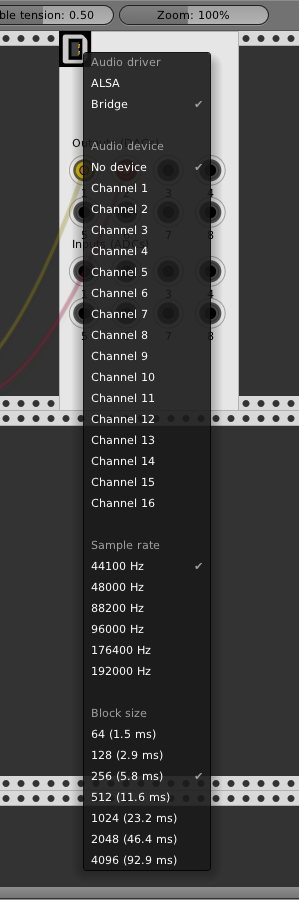
I decided that instead of having a separate module for Bridge, it would be implemented for use with audio.hpp and midi.hpp and therefore AudioWidget and MidiWidget so all of their features are also automatically available for Bridge. The AudioInterface will expand/contract depending on the number of channels in the device, so in the case of Bridge, that would always be 2 in + 2 out. For VSTi/AU Instruments, the two outs (from the perspective of Rack) would always be silent.
AndrewBelt
on 19 Jan 2018
Wondering how the bridge would work in Reason 9.5+ for midi cc + cv
All VST's in Reason have 8 cv inputs (out to the VST for modulation) they link parameters on the VST's. You can get cv from Reason to VCV right now with EMI in reason and LoopMIDI or similar, you need to use loopmidi or select the midi on your interface for EMI to get it into VCV. Will the bridge just do this also with Reason in mind? If you want the more than 8 cv from Reason you still use EMI. If you could select Bridge as MIDI CC to CV device and it create that midi device on your system that be fairly handy, (as is now you have to create multiply device for each EMI in Reason) possibly not much need if there is already a way though with EMI and LoopMIDI.
There is also an extra 7 ins 15 outs for the VST placeholder in Reason.
Excited about this bridge!
 Coirt
on 19 Jan 2018
Coirt
on 19 Jan 2018
There will be 8 automation parameters (what a coincidence) in the VST/AU Bridge plugin. See https://twitter.com/vcvrack/status/927270486249213953 for a screenshot.
When a parameter value changes (by hand, by automation keyframes, or by Reason CV for example), a MIDI CC message is generated by the plugin and communicated to the Bridge TCP server running in Rack. Then whatever module opens the Bridge device on channel 1, say the MIDI CC-to-CV interface, it will interpret the MIDI message and convert to CV in Rack. Currently only 7-bit MIDI CC is supported, but once we add 14-bit MIDI CC, I'll update the Bridge to generate that instead of 7-bit.
For the other way, Rack CV to Reason CV, I have no idea because I don't remember how Reason CV works.
AndrewBelt
on 19 Jan 2018
Reason is 7 bit also iirc. Thing that makes Reasons cv work with VCV is the MIDI message all cv inputs just translate midi cc to ±1v but knobs are still 0-127 and bipolar lfo's 0-255.
Coirt
on 19 Jan 2018
@LKHSogpit The internal resolution for CV and properties (i e device parameters) in Reason is actually 32 bit float. It's only the MIDI CC's that are limited to 7 bit. The update rate for properties, CV signals and automation are limited to 1/64 of the sample rate.
 buddard
on 23 Jan 2018
buddard
on 23 Jan 2018
Just for fun, here's a build for the Mac VST. https://andrewbelt.name/files/VCV-Bridge-master-mac-vst.zip Only works with commit 917e6da
Still a WIP.
AndrewBelt
on 18 Mar 2018
Great Andrew, loads fine here ( Usine Hollyhock 3):
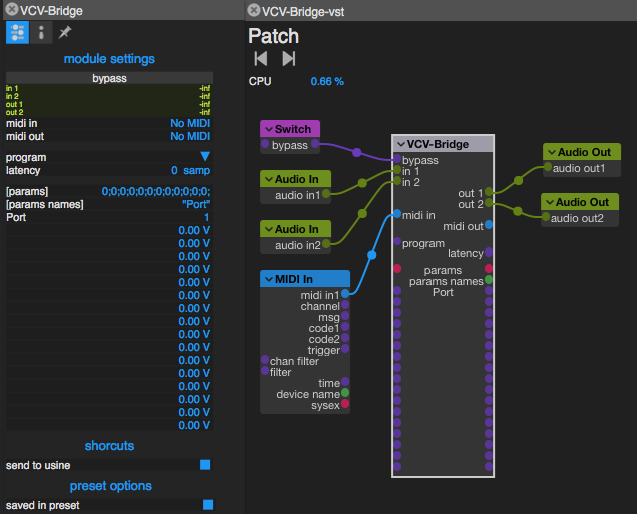
 nay-seven
on 18 Mar 2018
nay-seven
on 18 Mar 2018
e.t.a. on the windows build?
 phdsg
on 18 Mar 2018
phdsg
on 18 Mar 2018
- expanded to 8/8 channels per VST
AndrewBelt
on 18 Mar 2018
Nice! Can't wait to give this a try in Ableton 10.
 cschol
on 18 Mar 2018
cschol
on 18 Mar 2018
I will try in Bitwig, but I have Win10.
teotigraphix
on 18 Mar 2018
I tried in in Reason 10.0.2 on macOS 10.12.6, and the plugin seems to load without errors, and I can create an instance of it in the rack.
However, I can't open the editor: If I click on the "Open" button on the plugin device in Reason, nothing happens.
I compiled the latest version of Rack, and I also tried opening Rack before opening Reason.
I also just noticed that Rack keeps spitting out the following in the terminal :
[info] Bridge client connected
[warning] Bridge client: bad command 128 detected, closing
[info] Bridge client closed
And while changing ports on the audio module, Rack crashed with the following output:
[debug] Channels changed 0 0
[debug] make: *** [run] Floating point exception: 8
I'm on windows, so I will have to wait for a win release, thanks for the effort though Andrew.
Verzonden via Yahoo Mail op Androidhttps://overview.mail.yahoo.com/mobile/?.src=Android
Op zo, mrt. 18, 2018 om 17:42 schreef buddard
notifications@github.com:
And while changing ports on the audio module, Rack crashed with the following output:
[debug] Channels changed 0 0
[debug] make: * [run] Floating point exception: 8
—
You are receiving this because you were mentioned.
Reply to this email directly, view it on GitHubhttps://github.com/VCVRack/Rack/issues/31#issuecomment-374014601, or mute the threadhttps://github.com/notifications/unsubscribe-auth/AeZBz4kLho_eOqSp_-YuN1gfzZwXT857ks5tfo6QgaJpZM4PT4_1.
JoeSleaze
on 19 Mar 2018
I get the same crash, must have been one of the last changes made on the master branch...
Thread 4 Crashed:
0 libspeexdsp.1.dylib 0x000000010747f816 update_filter + 54 (resample.c:603)
1 com.vcvrack.rack 0x0000000107235f17 AudioInterface::onSampleRateChange() + 151 (samplerate.hpp:35)
2 com.vcvrack.rack 0x000000010723558b AudioInterface::step() + 59 (AudioInterface.cpp:158)
3 com.vcvrack.rack 0x00000001072118cb rack::engineRun() + 363 (vector:1463)
4 com.vcvrack.rack 0x0000000107211368 void* std::__1::__thread_proxy
5 libsystem_pthread.dylib 0x00007fff7474a661 _pthread_body + 340
6 libsystem_pthread.dylib 0x00007fff7474a50d _pthread_start + 377
7 libsystem_pthread.dylib 0x00007fff74749bf9 thread_start + 13
I add the module 10 seconds later it crashes each time.
 sanderbaan
on 19 Mar 2018
sanderbaan
on 19 Mar 2018
Here's a Windows VST 64-bit build. https://andrewbelt.name/files/VCV-Bridge-master-win-vst.zip Only works with Rack 6b00b5183ad123cf968bc8cbe016c7aaf32f82eb
- stability: better network error handling, failsafe buffering, graceful shutdown of both client and server
- audio activates/deactivates automatically when DAW is not processing audio (i.e. when plugin is disabled, transport is stopped, etc.)
AndrewBelt
on 19 Mar 2018
I will try it out later today, thanks Andrew.
teotigraphix
on 19 Mar 2018
@buddard There is no OS-native "editor" (known as AEffEditor in VST language). The VST/AU has 17 parameters: one for selecting the Bridge Port, and 16 for automating voltage outputs of the MIDI-CC module. What's under the "CV Programmer" dropdown?
Does Reason offer its own "editor" for VSTs with no custom editor? For example: Ableton Live and REAPER look like this https://twitter.com/vcvrack/status/927270486249213953
If you can find it, could you take a screenshot and post it? In fact, could you post a screenshot of anything you can find regarding VSTs in Reason? I have no idea how it works, so I'm interested in screenshots of the virtual rack devices containing the VST, how 8 ins/8 outs is handled, the GUI for selecting a VST, how you select a VST search folder from the preferences, and how you launch the editor window for VSTs that support it.
AndrewBelt
on 19 Mar 2018
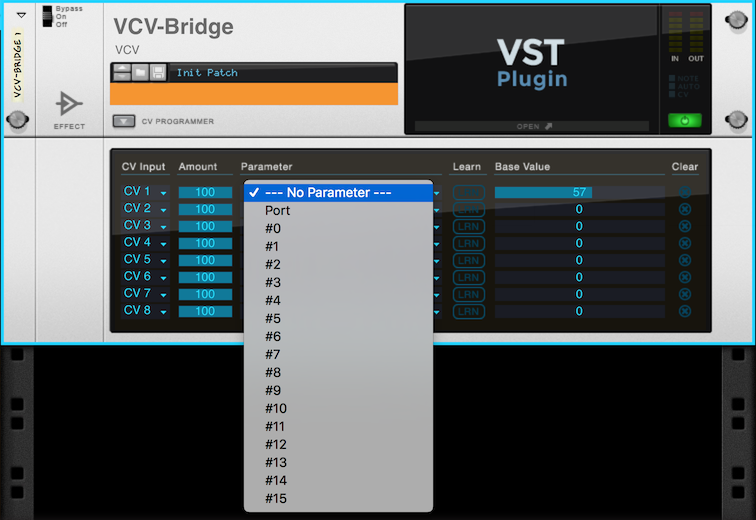
@AndrewBelt Well, no, not per se, it expects each VST to come with its own editor. However, the "plugin device" (which is the VST's placeholder in the Reason rack) does have a fold-out panel with an 8-slot modulation matrix to route the CV inputs to parameters in the VST. And in that matrix you can set a "Base value" which changes the actual VST parameter.
But I definitely wouldn't call this method elegant nor obvious from a Reason user's point of view:
buddard
on 19 Mar 2018
Could you select Port as the parameter and take a screenshot?
AndrewBelt
on 19 Mar 2018
It will normalize all parameter ranges to 0-100:

buddard
on 19 Mar 2018
Gross.
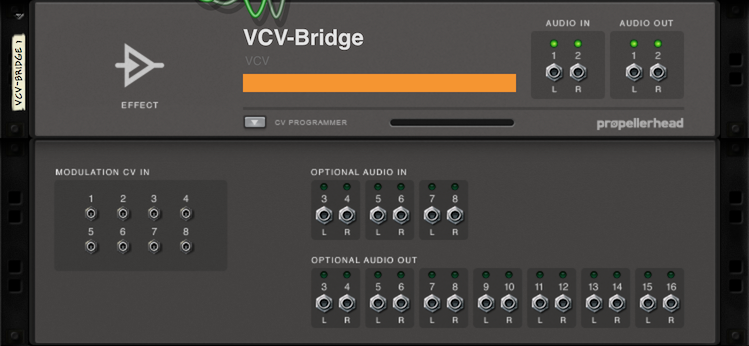
What does the back panel look like, with the CV Programmer expanded?
AndrewBelt
on 19 Mar 2018
buddard
on 19 Mar 2018
That looks pretty nice actually since the 8/8 ins/outs are covered, and you can manipulate Rack CV with Reason CV. The only bad things are the Port selection which takes a slot from the CV input, and it requires you to select each parameter manually to assign them to CV inputs.
Anyone have any more non-mainstream DAWs? I only have REAPER, Ableton Live, and GarageBand to test.
AndrewBelt
on 19 Mar 2018
I have Bitwig but do you consider that mainstream? (I guess I would)
teotigraphix
on 19 Mar 2018
Bitwig, Tracktion, LMMS
 WIZARDISHUNGRY
on 19 Mar 2018
WIZARDISHUNGRY
on 19 Mar 2018
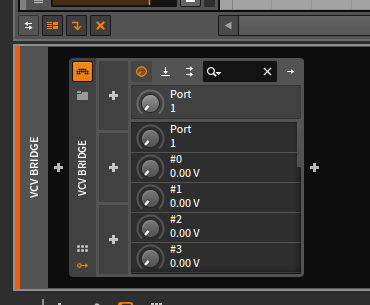
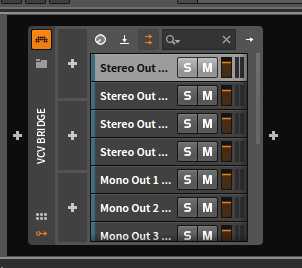
Could you post screenshots of each when you're free? Just want to see what the DAW's built-in editor looks like for changing the Port and 16 automation parameters.
AndrewBelt
on 19 Mar 2018
Ins and Outs
teotigraphix
on 19 Mar 2018
Audio to Ableton 10 works, as does CV from Ableton to Rack via MIDI-CC. Every once in a while I get audio dropouts. Console output says "Audio Interface IO underflow". Will play more with it later tonight. Thanks Andrew! This looks awesome.
cschol
on 19 Mar 2018
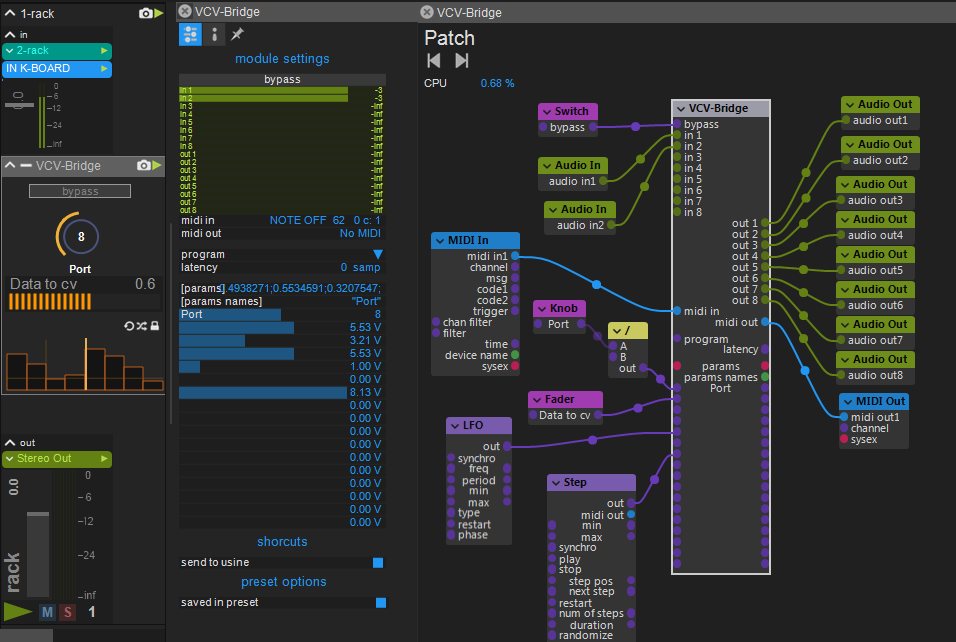
Andrew, here a more complete patch in Usine Hollyhock, ( i'm a part of the Usine team) with some objects connected to the bridge. If someone can send me a compiled version of the last 0.6 i will test audio and more if needed.
nay-seven
on 19 Mar 2018
Any change for a updated Mac VST since the current one keeps on crashing:
[info] Bridge client closed
[info] Bridge client connected
[warning] Bridge client: bad command 7 detected, closing
[info] Bridge client closed
[warning] Bridge server bind() failed
[warning] Bridge server bind() failed
Those warnings are in the console
Crash is different with latest state of master branch:
Thread 4 Crashed:
0 libspeexdsp.1.dylib 0x000000010abc1816 update_filter + 54 (resample.c:603)
1 libspeexdsp.1.dylib 0x000000010abc165f speex_resampler_init_frac + 303 (resample.c:835)
2 libspeexdsp.1.dylib 0x000000010abc151b speex_resampler_init + 27 (resample.c:785)
3 com.vcvrack.rack 0x000000010a97016a rack::SampleRateConverter<8>::refreshState() + 58 (samplerate.hpp:61)
4 com.vcvrack.rack 0x000000010a96ee5c AudioInterface::step() + 252 (AudioInterface.cpp:160)
5 com.vcvrack.rack 0x000000010a94b09b rack::engineRun() + 363 (vector:1463)
6 com.vcvrack.rack 0x000000010a94ab38 void* std::__1::__thread_proxy
7 libsystem_pthread.dylib 0x00007fff7474a661 _pthread_body + 340
8 libsystem_pthread.dylib 0x00007fff7474a50d _pthread_start + 377
9 libsystem_pthread.dylib 0x00007fff74749bf9 thread_start + 13
sanderbaan
on 20 Mar 2018
Full crash report. Happens as soon as you load the vst plugin in any host including ableton and have the audio module set to Bridge, after 10 seconds rack crashes.
sanderbaan
on 20 Mar 2018
I need a port number for the Bridge server. Ideas?
I've been using 5000 temporarily. It can change in a future version with no friction.
Should probably return no results in https://www.iana.org/assignments/service-names-port-numbers/service-names-port-numbers.xhtml
AndrewBelt
on 23 Mar 2018
Something with a "7x7" in it to represent "VCV" like "33727".
WIZARDISHUNGRY
on 23 Mar 2018
51005 or 5105 for bad representations of Roman numerals perhaps?
 cunabula27
on 23 Mar 2018
cunabula27
on 23 Mar 2018
12512 for voltage standards of Eurorack?
AndrewBelt
on 23 Mar 2018
Here's a Mac Audio Unit build. https://andrewbelt.name/files/VCV-Bridge-master-mac-au.zip
Only works with Rack 1878e96232a96987b8a7335842ab94d7100e9b47
Regardless of whether you have Rack compiled, could someone screenshot and test this in all DAWs you have that support AU? Here's what I have so far.
- Garbage Band: 100% working
- Ableton Live 9: Doesn't appear in plugins list. Not sure why because the Live terminal gives no debug information, unlike VSTs. Not a huge issue since VST is supported and will always be more advanced feature-and-stability-wise.
AndrewBelt
on 25 Mar 2018
on it
 tedatsavages
on 25 Mar 2018
tedatsavages
on 25 Mar 2018
Will there be a built-in GUI in the final version for the benefit of hosts that don't generate them automatically (i e Reason)?
buddard
on 25 Mar 2018
No. It's not worth the effort and will detract the usability on DAWs that support it.
AndrewBelt
on 25 Mar 2018
it's 64 bits only ?
nay-seven
on 25 Mar 2018
@nay-seven it = ?
The Windows VST will come in 32-bit and 64-bit. The Mac VST and AU are bundled 32- and 64-bit builds.
AndrewBelt
on 25 Mar 2018
it= the AU bridge
this Au version don't appear in plug-in list in Usine Hollyhock 3 Mac .
nay-seven
on 25 Mar 2018
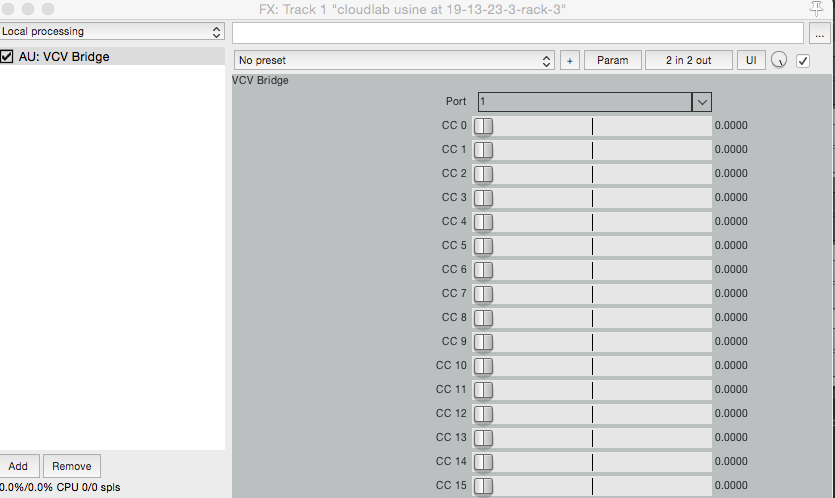
works in reaper
nay-seven
on 25 Mar 2018
I'm not seeing it in Bitwig 2.3.1, checking Pro Tools next...
tedatsavages
on 25 Mar 2018
@nay-seven Might be the same reason that it doesn't appear with Live, or BitWig apparently. If you work with the developers of Hollyhock, could you ask them why it doesn't appear? Is there debug information in a console somewhere?
@tedpallas Pro Tools doesn't support VST or AU, right? Or do you have a wrapper plugin?
AndrewBelt
on 25 Mar 2018
https://www.dropbox.com/s/yts4feq7wrqd5k9/Screenshot%202018-03-25%2013.31.42.png?dl=0
So I checked Pro Tools because I use Blue Cat to get to AU and VST, I'm getting an error that there's no 64 bit plugin - this would probably be why I'm not seeing the plug in Bitwig or Ableton, either. Those both ignore 32 bit plug-ins. I saw somewhere that this build has both flavors in it, maybe that just needs a little tweaking?
Blue Cat is useful because it'll get right in to the system browser to choose the plug-in, so it knocks out goofy library stuff as a potential issue.
tedatsavages
on 25 Mar 2018
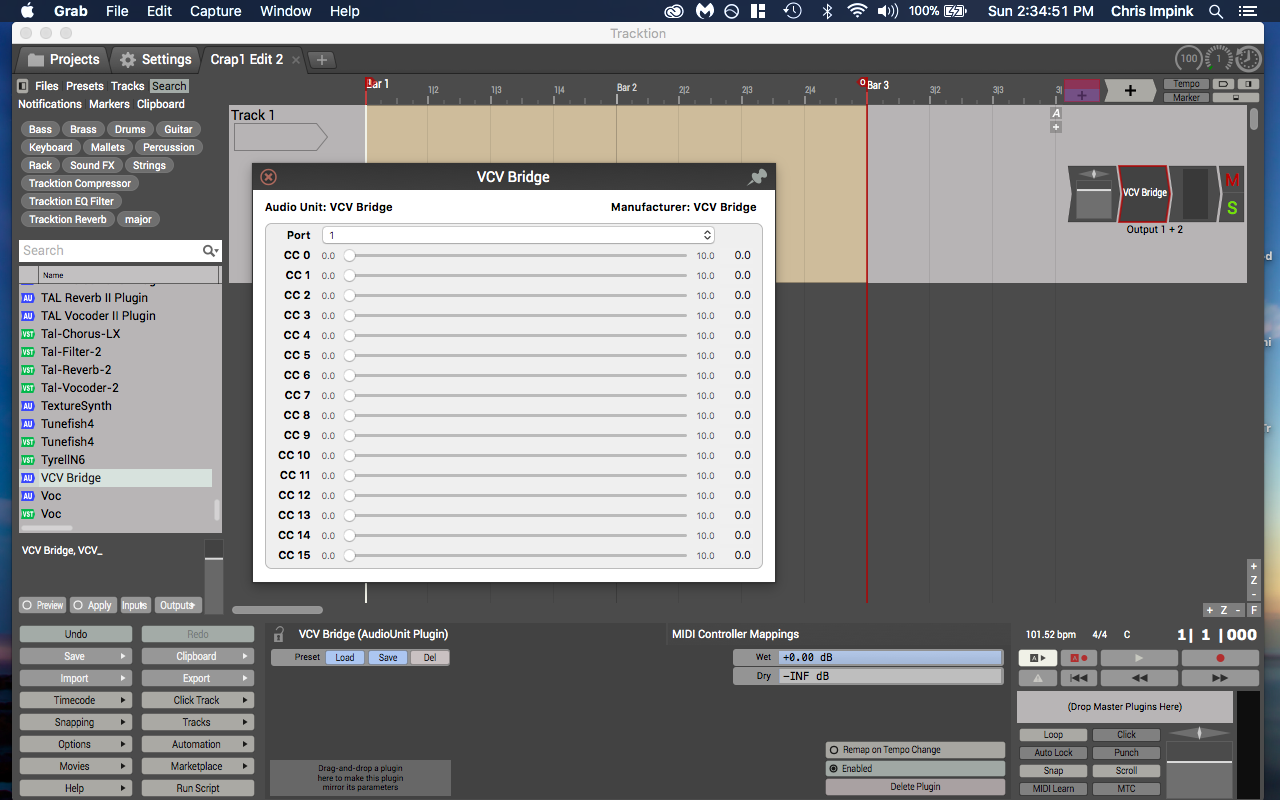
Tracktion T6 (64-bit)
 bitterstoat
on 25 Mar 2018
bitterstoat
on 25 Mar 2018
I could be wrong, but if memory serves Tracktion runs in two flavors (32 and 64 bit) - I believe the 64 bit flavor will also load a 32 bit plugin.
tedatsavages
on 25 Mar 2018
Okay, updated the AU zip file above. Try all the failing DAWs now.
The 32-bit version was not making it into the final binary. It should be included now. I still don't see Bridge in Live 9.
AndrewBelt
on 25 Mar 2018
I checked Studio One v2 on Mac. It doesnt show up while AU plugins are supported.
 Phal-anx
on 25 Mar 2018
Phal-anx
on 25 Mar 2018
Working well for me on OS X 10.13 with Reaper64 (5.78).
Audio works both directions.
 martin-lueders
on 25 Mar 2018
martin-lueders
on 25 Mar 2018
@Phal-anx Are you using the version from 3 minutes ago?
AndrewBelt
on 25 Mar 2018
@AndrewBelt I tested both.
Phal-anx
on 25 Mar 2018
the new version don't extract as a .component ?
nay-seven
on 25 Mar 2018
@nay-seven It should. The SHA256 of the ZIP should be 2e66c9216958033bcf298993165cecb964187bae4d2142f4f80e9f178fec35e1.
AndrewBelt
on 25 Mar 2018
Same issues with the new AU zip
tedatsavages
on 25 Mar 2018
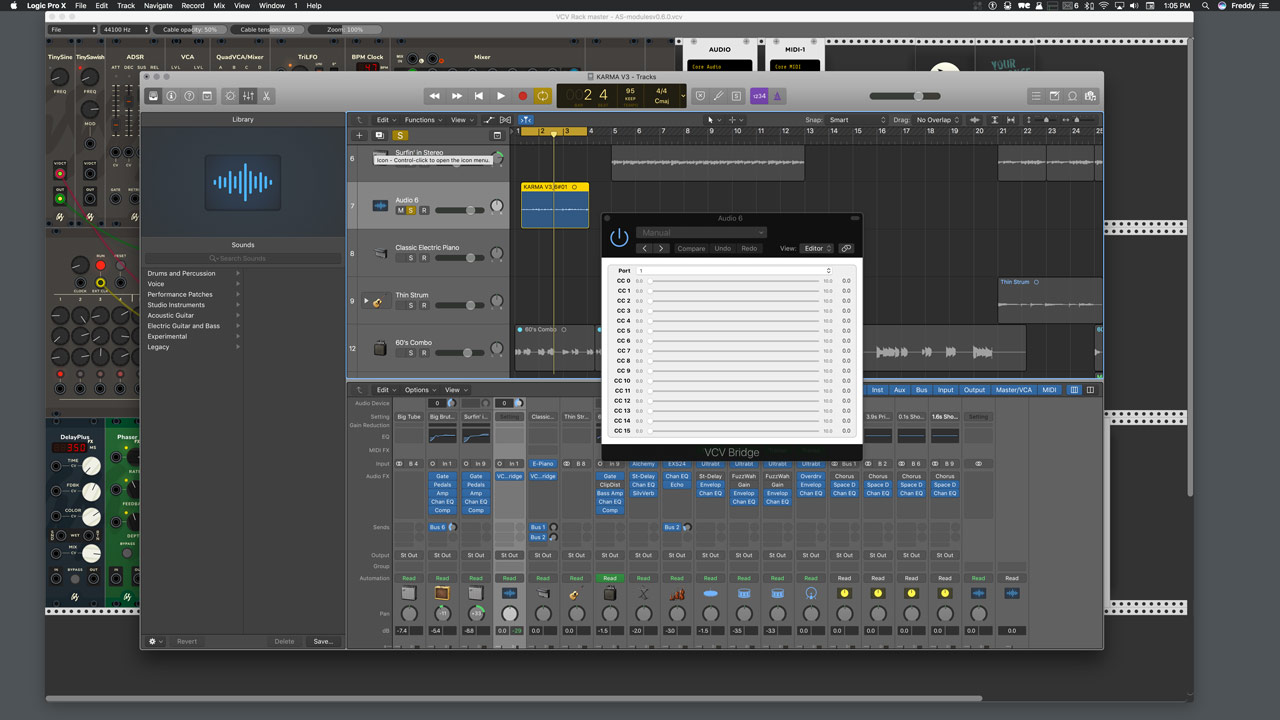
Made a quick test, Os X 10.12.6 + Logic Pro X 10.4.1, it works (the selected audio region on the screenshot is a recording from stuff running on VCV rack)
 AScustomWorks
on 25 Mar 2018
AScustomWorks
on 25 Mar 2018
Source code for VST and AU plugins made public at https://github.com/VCVRack/Bridge
AndrewBelt
on 25 Mar 2018
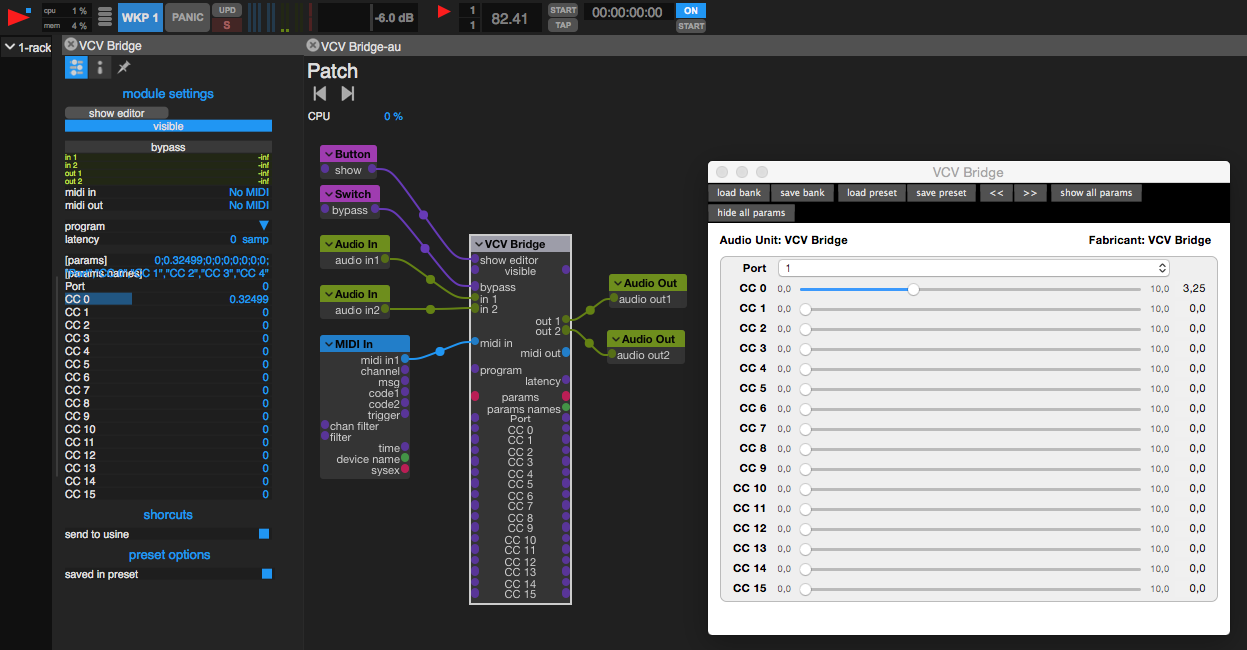
works ok in Usine now
nay-seven
on 25 Mar 2018
I cannot tell if the Windows VST plugin is working correctly for me. Is the Plugin supposed to have a MIDI input? Here is the thing:
So far I have tried with Ardour and Ableton 10 Trial (haven't decided on a DAW yet). Ardour only shows CC inputs and crashes Rack when I manually adjust a CC value (haven't tried to debug that one). In Ableton I see no CC inputs at all. For comparison, I tried running DEXED as VST in both and it worked flawlessly.
I'd love to send MIDI notes from a DAW track to VCV Rack. I'm horrible with these sequencers and quantizers.
 gmueckl
on 25 Mar 2018
gmueckl
on 25 Mar 2018
@gmueckl No, I won't be releasing the VST Instrument plugin until after Rack 0.6.
So it seems the only known issues so far are
- AU plugin not being recognized on half of tested DAWs
- Rack crashes on MIDI CC change
- I believe this has been fixed. I might supply a Windows VST build today.
AndrewBelt
on 25 Mar 2018
VST on Windows 7, running in Studio One v2 as effect plugin works. It allows me to send Audio from Rack to the DAW to record it while sending automations from my DAW to Rack through the Bridge effect vst plugin. But this way I cant send midi data (notes) to Rack through the plugin, because of beeing an effect plugin.
Phal-anx
on 25 Mar 2018
@Phal-anx
I won't be releasing the VST Instrument plugin until after Rack 0.6.
AndrewBelt
on 25 Mar 2018
@AndrewBelt - no worries. I read it after I wrote the comment ;)
Phal-anx
on 25 Mar 2018
Has the "Bad Command 128" and FPE issue in Rack with the Mac VST been solved?
buddard
on 25 Mar 2018
@buddard I believe that's the same issue as "Rack crashes on MIDI CC change" which was fixed by moving all network updates to the thread that processes the audio.
AndrewBelt
on 25 Mar 2018
I build the Mac VST from source, builds fine, loads fine but no audio coming thru. When I connect something to the audio inputs the leds stay yellow, also the output of the module which its connected to.
sanderbaan
on 25 Mar 2018
@sanderbaan So... audio is coming through? Define "coming through".
AndrewBelt
on 25 Mar 2018
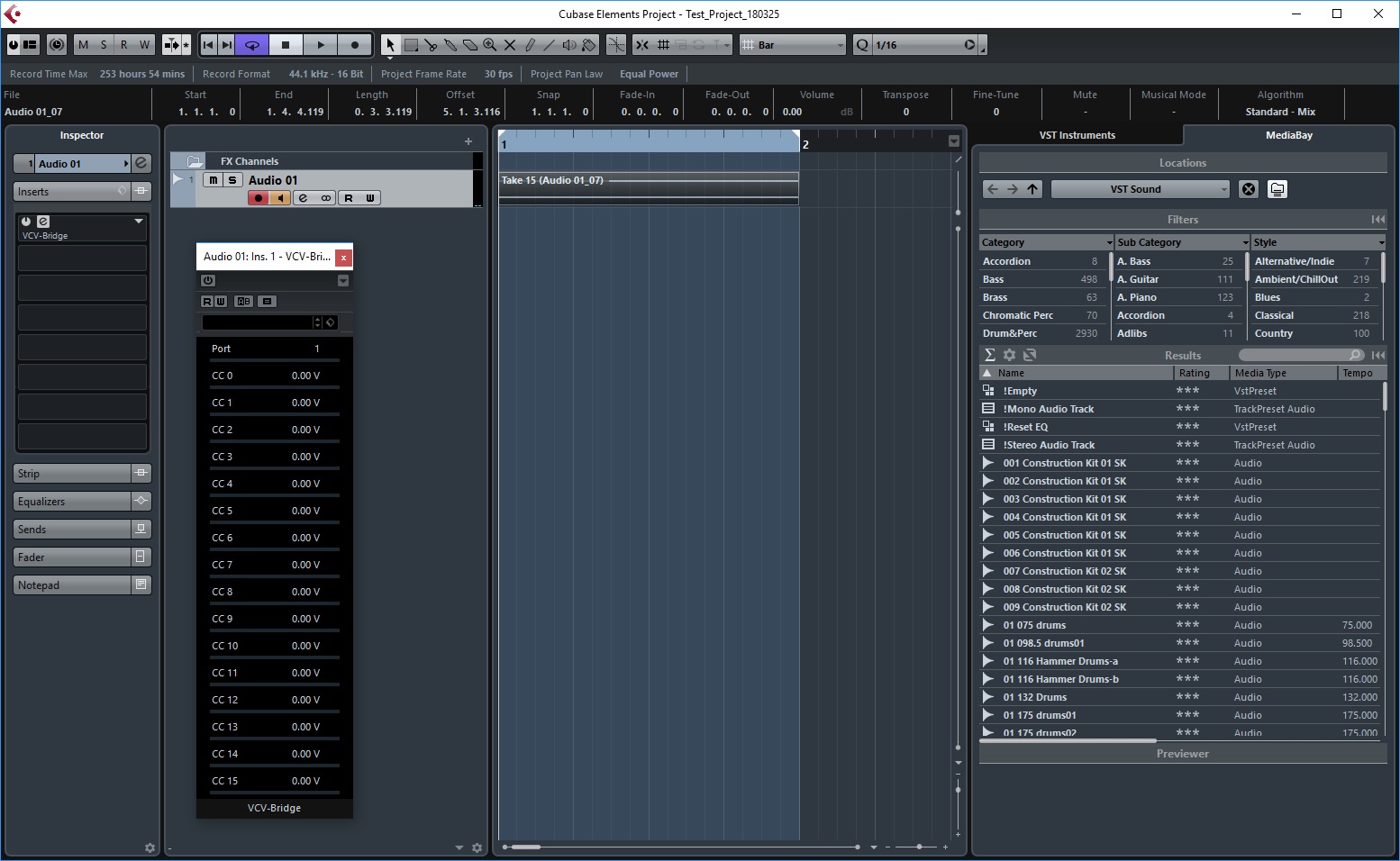
Simple test of VCO + VCA to Bridge #1 with Cubase 8 on Windows 10. I can hear VCV Rack, and Solo and Mute both work. But I must be doing something wrong that I am not recording any audio. I don't do that much with Cubase, obviously. (My Rack was downloaded today BTW and I built the Bridge locally.)
 djpeterso23662
on 26 Mar 2018
djpeterso23662
on 26 Mar 2018
@djpeterso23662 You're recording audio pre-Bridge. Route the output of the Audio 01 channel to another channel to record its output.
AndrewBelt
on 26 Mar 2018
@AndrewBelt no audio coming thru = in ableton i do not get audio out of the vcv bridge plugin and in the audio module it does not show the green led indicating a signal is coming thru..
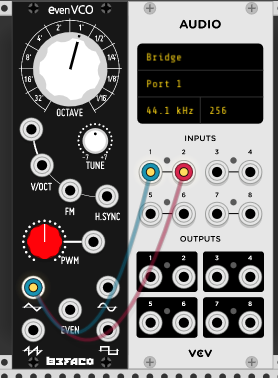
sanderbaan
on 26 Mar 2018
You should see terminal output about the bridge in both Rack and the DAW when launched from the command line. What does each say? Note that the DAW needs to be activated (non-offline) for audio to be generated.
AndrewBelt
on 26 Mar 2018
Rack:
[0.000 info] Rack master
[0.000 info] Current working directory: /Users/sander.baan/Rack
[0.000 info] Global directory: ./
[0.000 info] Local directory: ./
[0.003 info] Loaded plugin ./plugins/Befaco/plugin.dylib
[0.106 info] Bridge server started
[0.383 info] Loaded font ./res/fonts/DejaVuSans.ttf
[0.383 info] Loading settings ./settings.json
[0.383 info] Saving settings ./settings.json
[0.383 info] Loading patch ./autosave.vcv
[0.385 info] Loaded SVG ./plugins/Befaco/res/EvenVCO.svg
[0.386 info] Loaded SVG ./plugins/Befaco/res/Knurlie.svg
[0.386 info] Loaded SVG ./res/ComponentLibrary/BefacoBigKnob.svg
[0.386 info] Loaded SVG ./res/ComponentLibrary/BefacoTinyKnob.svg
[0.386 info] Loaded SVG ./res/ComponentLibrary/Davies1900hRed.svg
[0.387 info] Loaded SVG ./res/ComponentLibrary/PJ301M.svg
[0.401 info] Loaded SVG ./res/Core/AudioInterface.svg
[0.401 info] Loaded SVG ./res/ComponentLibrary/ScrewSilver.svg
[0.401 info] Loaded font ./res/fonts/ShareTechMono-Regular.ttf
[19.608 info] Saving patch ./autosave.vcv
[19.609 info] Saving settings ./settings.json
[41.400 info] Saving patch ./autosave.vcv
[41.401 info] Saving settings ./settings.json
Ableton, I get no logging when I start ableton from the commandline. Maybe I am missing a very obvious step. This is what I do:
- I start Ableton, drag the VCV Bridge vst to a new track where it get added as a Audio Effect.
- Then I start Rack, I add a Befaco EvenOSC and a Audio module
- I select Bridge as audio driver and set the port to Port 1
- I connect one of the OSCs out to the Input 1 and Input 2
After this I would expect that the audio is outputted in Ableton but it does not.
sanderbaan
on 26 Mar 2018
There should be terminal output when you launch Live with .../Contents/MacOS/Live. According to Rack, it's not even trying to connect.
AndrewBelt
on 26 Mar 2018
2018-03-26 14:55:07.376 Live[21629:575572] max_startmaxserver
2018-03-26 14:55:07.650 Live[21629:575572] clang using Sandy Bridge workaround
2018-03-26 14:55:07.730 Live[21629:575572] sqlite version 3.8.5
2018-03-26 14:55:07.830 Live[21629:575572] code: en-DE, name English
2018-03-26 14:55:07.830 Live[21629:575572] Live Version "10.0.1" with interface version: 4.7
[VCV Bridge] Bridge client initialized
thats all i see
sanderbaan
on 26 Mar 2018
@AndrewBelt am i doing something wrong? or is there a prob in the vst ?
sanderbaan
on 26 Mar 2018
Not sure. It's just not connecting here. https://github.com/VCVRack/Bridge/blob/master/common/client.cpp#L69
AndrewBelt
on 26 Mar 2018
I had firewall on and turned it off to be sure but still the same..tried it today on different macbooks also..
sanderbaan
on 26 Mar 2018
The port was changed recently, so have you pulled the latest Bridge and Rack code?
AndrewBelt
on 26 Mar 2018
Yes
sanderbaan
on 26 Mar 2018
If you run telnet localhost 12512 while Rack is running, does Rack respond in the terminal?
AndrewBelt
on 26 Mar 2018
Yes it says
[24.074 info] Bridge client connected
sanderbaan
on 26 Mar 2018
Now test the other direction. Run nc -l 12512 | xxd and see if creating a Bridge plugin causes activity in your fake server.
AndrewBelt
on 26 Mar 2018
Nothing shows up when adding the vst plugin in ableton
sanderbaan
on 26 Mar 2018
btw i noticed the au unit has _ in its name maybe thats why it dont show up in ableton?
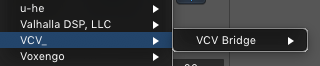
sanderbaan
on 26 Mar 2018
When I load the AU VCV plugin it shows something:
betas-mbp:~ beta$ nc -l 12512 | xxd
00000000: fdfe 00ff 0200 03b0 0000 03b0 0100 03b0 ................
00000010: 0200 03b0 0300 03b0 0400 03b0 0500 03b0 ................
00000020: 0600 03b0 0700 03b0 0800 03b0 0900 03b0 ................
00000030: 0a00 03b0 0b00 03b0 0c00 03b0 0d00 03b0 ................
sanderbaan
on 26 Mar 2018
My guess is that Ableton Live is sandboxed in some way on your computer, which is blocking outbound localhost socket connections.
What DAW is that? Logic Pro X?
The AU plugin in Logic is working for you, correct?
AndrewBelt
on 26 Mar 2018
I am not able to get any audio out of it though w logic but thats probably my rusty knowledge of logic itself...but loading the plugin in a fx slot does nothing... Logic Pro X yes. I am just using a regular Ableton 10 Live Suite
sanderbaan
on 26 Mar 2018
I got audio w AU on Logic now ;)
sanderbaan
on 26 Mar 2018
How did you install Ableton Live? Through the App Store?
AndrewBelt
on 26 Mar 2018
Downloaded the installer from my account page on the ableton website
sanderbaan
on 26 Mar 2018
Ableton is not in the appstore
sanderbaan
on 26 Mar 2018
Also it used to work in the first VST you send around..
sanderbaan
on 26 Mar 2018
Okay, so I assume no App Store sandboxing is happening. What commit hash is your Bridge source tree?
AndrewBelt
on 26 Mar 2018
How do I see that?
sanderbaan
on 26 Mar 2018
git rev-parse HEAD in the Bridge directory
AndrewBelt
on 26 Mar 2018
93e7c896d04c3f7f3a2fc3f351591af22f89d33b
sanderbaan
on 26 Mar 2018
Tried Ableton 9, same.
sanderbaan
on 26 Mar 2018
Same here in Logic Pro X - plugin appears as audio plugin but no sound.
Tried as audio plugin on audio and aux channels.
Terminal: "[18.275 info] Bridge client connected"
(using the AU on a Rack build from yesterday)
 Yuxtehol
on 26 Mar 2018
Yuxtehol
on 26 Mar 2018
I get sound in Logic, you have enable direct monitoring.
sanderbaan
on 26 Mar 2018
@sanderbaan - Thanks - that works (in Logic) :)
Yuxtehol
on 26 Mar 2018
VST also do not work in Maschine...AU works fine there.
sanderbaan
on 26 Mar 2018
@sanderbaan Pull the source now. I've added more verbose debugging. Run a DAW with a terminal and post the output.
AndrewBelt
on 26 Mar 2018
VCV
[97.326 debug] Audio Interface IO underflow
[97.534 debug] Audio Interface IO underflow
Ableton:
[VCV Bridge] client initialized
[VCV Bridge] client connected
And the plugin works now in Ableton!
sanderbaan
on 26 Mar 2018
Uh, that wasn't supposed to change anything, but good for you.
My guess is that one of the targets wasn't being built, or you were using an old version of something somehow.
AndrewBelt
on 26 Mar 2018
How is the clock supposed to work in combination with the bridge plugin and Midi1?
sanderbaan
on 26 Mar 2018
That didn't make it into this version. I'll add it later.
AndrewBelt
on 26 Mar 2018
OK
sanderbaan
on 26 Mar 2018
I get a crash on closing in the bridge module. Crashlog attached.
Rack_2018-03-26-222307_betas-MacBook-Pro.crash.zip
sanderbaan
on 26 Mar 2018
Plugin appears instantly using the latest Bitwig 2.3.2
All channel appear. But I'm unable at the moment to receive signals from Rack.
Maybe I make something wrong?
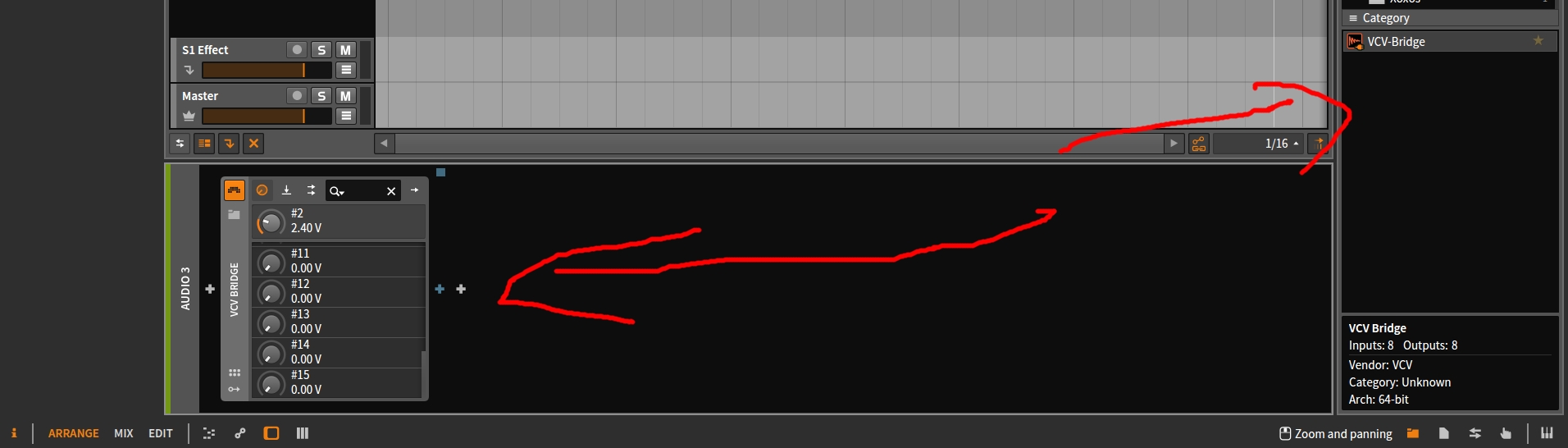
 nkkky
on 28 Mar 2018
nkkky
on 28 Mar 2018
I am attempting to use the bridge with Reason 10 (v10.0.3d21 to be precise) along with the lastest build of 0.6. So far the plugin 'works' but the audio coming in from Rack is horrible (laggy and glitchy and full of artifacts, not simply low quality), and the DSP meter in Reason keeps bouncing around. I am posting this here as I have not seen any feedback from anyone using Reason yet, and figured that my situation could help with development.
 gtmattz
on 29 Mar 2018
gtmattz
on 29 Mar 2018
VCV Bridge AU plugin working fine for me in Logic Pro X until I try to use track automation to send CC messages via the plugin. Using the plugin CC sliders works - or mapping them to 'smart controls' -works fine, though.
Simple steps to demonstrate the problem:
Rack 0.6.0
Logic Pro 10.4.1
MacOS 10.12.6
- New Logic project - create Audio track (don't bother with a MIDI track - doesn't make a difference)
- Add VCV Bridge FX plugin
- Really simple Rack patch - just an oscillator feeding to input 1 if the Audio module, set to Bridge Port 1.
- Add Midi CC module and patch CC 0 to oscillator FM
- In logic, pop up the plugin window and twiddle CC0 - modulates the oscillator fine.
- Now add track automation curve to modulate CC0 & play...
- Blam: stuttering output, blocksize readout on Audio module fluctuating, green input LEDs flickering, log says:
[1261.618 debug] Audio Interface IO underflow
[1261.733 debug] Audio Interface IO underflow
[1261.908 debug] Audio Interface IO underflow
[1262.025 debug] Audio Interface IO underflow
[1262.152 debug] Audio Interface IO underflow
[1262.268 debug] Audio Interface IO underflow
[1262.443 debug] Audio Interface IO underflow
[1262.776 debug] Audio Interface IO underflow
[1262.892 debug] Audio Interface IO underflow
...
Takes several seconds after stopping logic to clear.
All you actually need in Rack to see the underflow messages is an Audio interface set to Bridge Port 1, not connected to anything.
In Logic, I've tweaked the Environment "Port and Clks" page so that the only MIDI input is from my MIDI keyboard, not the "Sum" input (otherwise you get a MIDI feedback loop when trying to use "external" instruments on the IAC bus - been there before) so its not that - and it happens even without creating a MIDI track.
(I'm also getting the occasional Rack crash when using the Bridge - but I think that's been well reported)
Great to see the progress being made on this feature though!
*EDIT - Explanation/workround - checked with 0.6.1 *
This seems to be down to "Sample Accurate Automation" in Logic - i.e. when playing an automation curve Logic is sending parameter changes to the plugin at (I presume) audio data rates, so the VCV bridge plugin is generating absurd numbers of MIDI CC messages.
Workaround in Logic Pro X is:
- Go to Preferences -> Advanced Tools and turn on "Advanced Editing"
- Go to Preferences -> Audio -> General -> Sample Accurate Automation (if the option isn't shown, see step 1) and if its set to "Volume, Pan, Sends, Plug-in Parameters" choose one of the other options.
(you'd think it would be under Preferences -> Automation, but no...)
Unfortunately, this is a global setting and will affect the accuracy of automation to all plugins - including those that can cope with higher automation rates.
Long term solution would be for the plugin to downsample parameter change messages to a manageable rate (unless there's a way to flag this when registering a handler? I know nothing about AU programming).
 dapead
on 31 Mar 2018
dapead
on 31 Mar 2018
VCV-Bridge-master-mac-vst.zip
Here's a VSTi build of https://github.com/VCVRack/Bridge/commit/d38b66837cb1042e159188b684c32ec43ad68278 which passes MIDI messages and DAW transport in the form of MIDI to Rack.
AndrewBelt
on 30 May 2018
VCV-Bridge-master-win-vst.zip
Windows 64-bit build of the above.
AndrewBelt
on 31 May 2018
Hey Andrew,
It crashes on Mac when you try to either exit the app or when you try to delete the Midi1(probably also the other midi modules) when its set to Bridge. Crashlog attached.
sanderbaan
on 31 May 2018
It would be nice if we could offset the midi clock signal either in the bridge plugin or in the midi modules...its pretty hard to get things in sync ;) Its not possible to have a low level transport sync(not midi)?
sanderbaan
on 31 May 2018
@sanderbaan Why would you want to offset the MIDI clock signal?
I don't understand your proposal for a low level transport sync. Why would MIDI not be sufficient?
AndrewBelt
on 31 May 2018
There is a delay when the start signal is coming in the Midi module, each time you start playback in the host it starts at a different timing. Try this:
- Connect CLK1 to any sequencer Clock Input
- Connect START to any sequencer RESET Input
- Output the Sequencer to some drum module and create a 4 on the floor beat
- In the host create a 4 on floor beat on a channel
Press Play in Host.
You will hear that its never in sync and always gets the starts signal at a different timing.
If there would be lowlevel transport sync it would be sample accurate.
sanderbaan
on 31 May 2018
The problem isn't MIDI, it's just in the details of when events happen in my code to generate MIDI transport.
AndrewBelt
on 31 May 2018
Oke..I think there always will be latency though.I will wait and see for a next version to see if its improved.
sanderbaan
on 31 May 2018
VCV-Bridge-0.6.1dev-mac-vst.zip 47c1051635546474dadab9ab6bf1fc09da6303cf
Okay, in this commit I've removed the VST effect plugin entirely in favor of the VST instrument upon realizing that most DAWs can send audio to VST instruments.
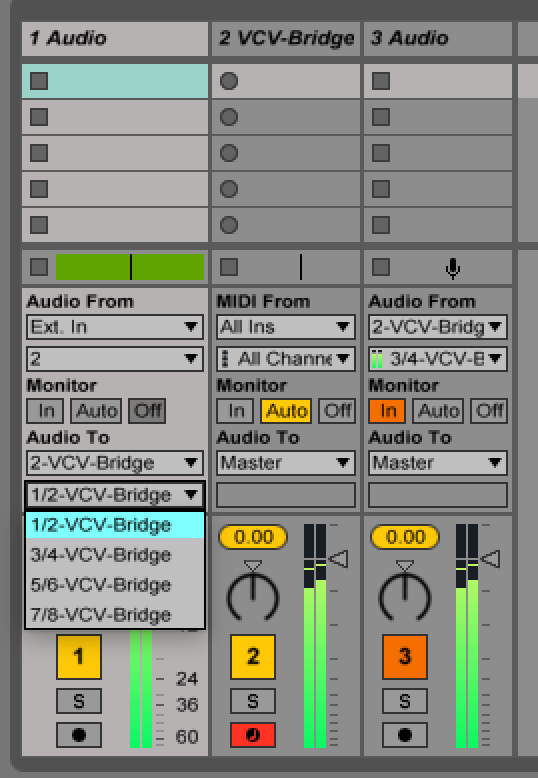
You can route audio into the plugin using the Output IO section of other channels.
The VST-Bridge instrument channel itself will emit Outputs 1+2.
You can use other channels to grab Outputs 3+4, 5+6, and 7+8, as I show in this screenshot.
I've also fixed the MIDI transport/clock timing issue @sanderbaan found above.
AndrewBelt
on 3 Jun 2018
Cool will check it out.
sanderbaan
on 3 Jun 2018
I need to run this with the current dev version or is the release version 0.6.0 also ok?
sanderbaan
on 3 Jun 2018
I tried it out w the 0.6.0 release version and yes it does start correctly now though there is still latency....so I do think some sort of offset control would be needed to get a perfect sync.
Made a audio recording of clave sound coming from vcv on left side and from ableton thru a sampler on the right side
latency [2018-06-03 172222].aif.zip
sanderbaan
on 3 Jun 2018
Ah, that's much shorter than I was imagining, only about 360 samples.
The reason is because the MIDI clock is sent at the beginning of the block if the previous block passes a 24PPQ mark. I suppose I could do it earlier by forecasting when it will pass the marker, but you'd probably have the same problem in reverse. I'm not sending MIDI sample information because I'm lazy, but maybe someday I'll add that.
AndrewBelt
on 3 Jun 2018
Maybe someone could do the same measurement and see if we get a stable amount of samples?
sanderbaan
on 3 Jun 2018
VCV-Bridge-0.6.1dev-mac-vst.zip 417b00d
Implemented the above feature.
I realized that the clock divider build into MIDI-1 in Rack is not reset when a MIDI Stop command is received. I've fixed this error in https://github.com/VCVRack/Rack/commit/8d72d318b3dd4fa90e00c91928ee021d6be20034, so you'll need to run that to get that fix.
AndrewBelt
on 3 Jun 2018
I am not able to build the latest develop now but I tried the new vst and its better but there is still latency and also over time its not stable the clock fluctuates up and down as I was expecting ;) see another recording :
sanderbaan
on 3 Jun 2018
With that release, I'm expecting clocks to be sent to Rack between 0 and BLOCK_SIZE-1 samples too early. Your sample shows that Rack is generating samples later, not earlier, and I have no idea why that is.
AndrewBelt
on 4 Jun 2018
I unfortunately might have to discontinue the Bridge AU plugin unless someone can "save it".
Because the Audio Unit API is pointlessly abstract yet completely non-generalizable, what is simple with the VST2 API using not much more than processReplacing() for audio, processEvents() for MIDI, and getParameter() for automation requires dozens of methods of scaffolding for AU, and I can't figure out how to produce a compliant AU plugin. On top of that, the documentation is nonexistent, and it pushes the developer to use Apple's crappy IDE and other closed gardens.
So I've created an issue on the Bridge repo requesting help for Audio Unit, AAX, LV2, and any format you can think of to help me kick off development of a Bridge plugin for that format. https://github.com/VCVRack/Bridge/issues/3
AndrewBelt
on 4 Jun 2018
Hi Andrew
Am I correct in assuming that the AU instrument plugin didn't make it into 0.6.1 somehow? Because after having installed Rack 0.6.1 the situation is unchanged from 0.6.0, meaning - in both "Hosting AU" and Garageband (on MacOS 10.12.6) only the AU effect plugin is present, and there's no AU instrument plugin.
 rubyglow
on 22 Jun 2018
rubyglow
on 22 Jun 2018
In 0.6.0 it was an "AU Effect". Now it's an "AU Music Effect", so it should work as an instruments or an effect plugin. Tested in Logic and Garageband.
AndrewBelt
on 22 Jun 2018
I just installed RACK 0.6.2b. Using the osx AU plugin on Garageband 10.3.1, I'm only seeing "VCV Bridge" under Audio FX not as an instrument. This works as expected to process audio from Garageband! Do you have any advice on how I can route Garageband midi to VCV Rack?
 zacharylawrence
on 23 Sep 2018
zacharylawrence
on 23 Sep 2018
Related issues
 PixelBulb
·
4Comments
Coirt
·
7Comments
PixelBulb
·
4Comments
Coirt
·
7Comments
 DomiKamu
·
6Comments
DomiKamu
·
6Comments
 antoniotuzzi
·
5Comments
AndrewBelt
·
4Comments
antoniotuzzi
·
5Comments
AndrewBelt
·
4Comments
Most helpful comment
Yes, VCV Bridge will be open source and included in Core, and the corresponding VST and AU plugins will be added to a new repo. This will be a fun one :)