R.swift: ⚠️ R.swift and Xcode 10 / Swift 4.2
The currently latest alpha release of R.swift (5.0.0.alpha.2) supports Swift 4.2 and Xcode 10.
However, there is a known build system issue. We want to fix this issue _before_ releasing the official 5.0 version of R.swift.
If you can work around the build system issue, feel free to use the alpha version of 5.0, it works pretty much like R.swift 4.0, but for Swift 4.2. (See complete list of differences)
Issue: R.swift build step and the New Build System
When the new build system is used, with a standard R.swift build step, this build step is not run _before_ the Compile Sources build step.
Because of this, the initial compilation will fail, because there's no R.generated.swift file, and references to the R struct in the rest of the source code are invalid.
While it's easy to "build twice" during development in Xcode, this is particularly a problem on CI servers, where the build will simply fail because of the missing R.generated.swift file.
Partial solution: Adding R.generated.swift as an output file
As a fix for the above issue, you can add R.generated.swift as an output file:

This will make sure the R.swift step has finished, before the Compile Sources step starts.
However, with this output file, the step will only run once:
Issue: Build step with output file only runs once
When R.generated.swift is configured as the output file (and there are no input files), the R.swift build step will only run once. On subsequent incremental builds, the step is skipped. Because of this, new resources won't show up in the R struct.
It is sometimes possible to list the resource files used als input files for the build step, but not always.
For example, when adding a new image to the asset catalog, the new filename isn't known beforehand.
Workarounds
These are possible workarounds:
- Use the Legacy Build System. This behaves like before, and the R.swift build step will always run.
- Commit the R.generated.swift file. This means during development, you can "build twice" and commit the resulting up-to-date file to git.
- Clean build when resources change. Configure the output file for the build step, and manually do a clean build whenever one of the resources are changed.
None of these workarounds are ideal, so we're still looking for a proper solution.
 tomlokhorst
All 30 comments
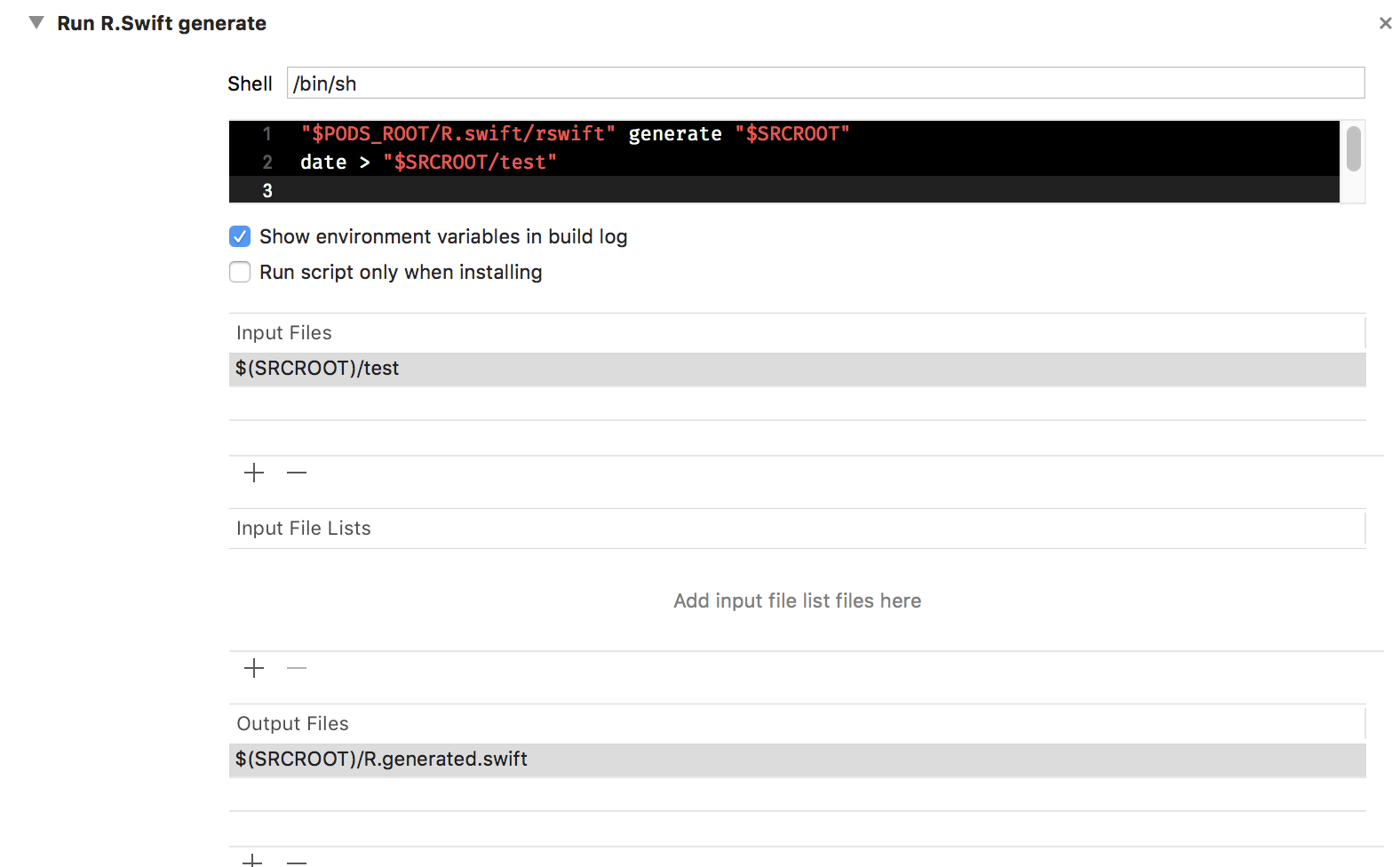
I think I might have a solution.
If R.swift generated/touched a second non-empty file that is then used as an input file, it makes the script step run in the correct order and on every build.
Example:
 robinkunde
on 2 Oct 2018
robinkunde
on 2 Oct 2018
@tomlokhorst
robinkunde
on 2 Oct 2018
Confirming that @robinkunde 's hack worked for me. I named the filed Rswift.helper and added it to my .gitignore. I also tried to get cute and use R.generated.swift in place of the test file but it caused Xcode to give a warning that there is a cyclic dependency.
I changed an image asset and rebuilt and the change was reflected in R.generated.swift.
 jondwillis
on 4 Oct 2018
jondwillis
on 4 Oct 2018
What do you think about generating proper input file list in scheme's Build pre-actions? As i understand, it is executed before the actual build, and it is legal to mutate .xcfilelist outside of build step.
 mpsnp
on 10 Oct 2018
mpsnp
on 10 Oct 2018
Having no luck getting this to work with our project unfortunately. Here is what our configuration looks like....
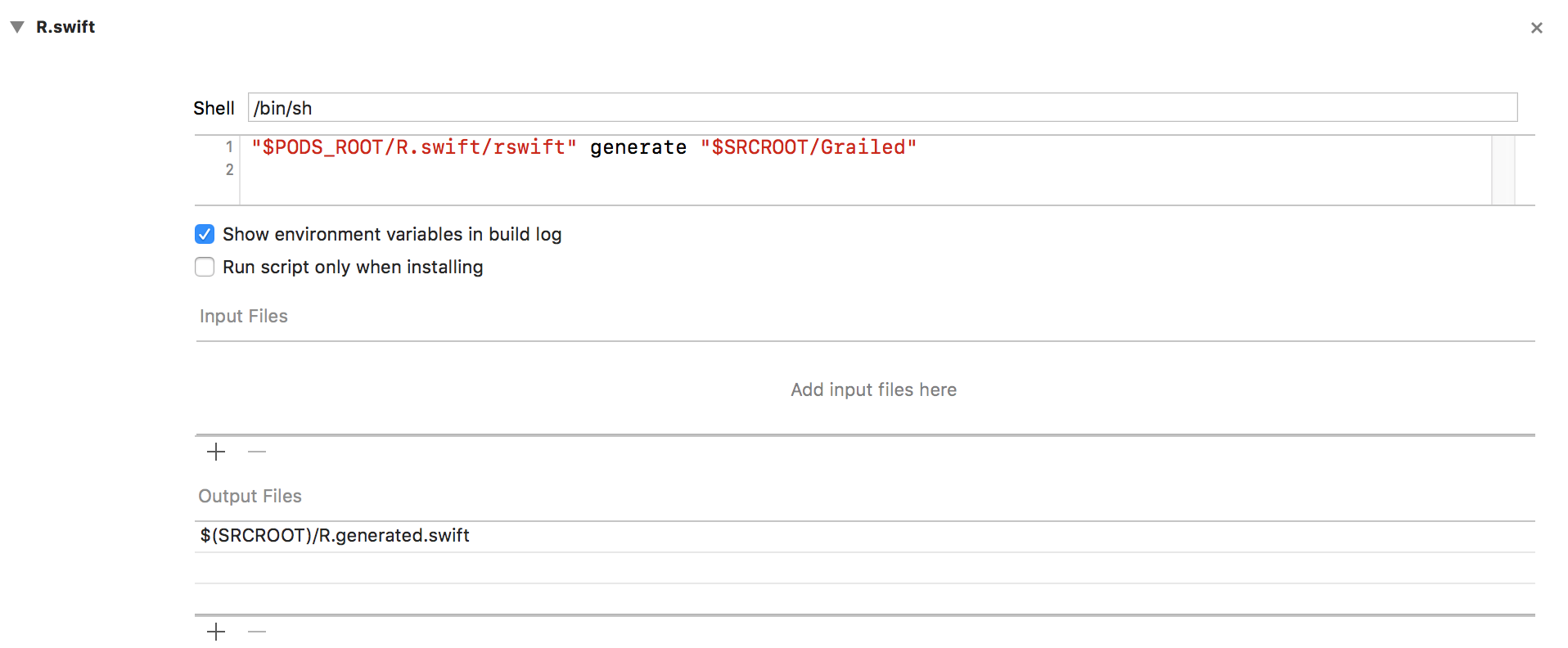
Any insights @tomlokhorst ?
 anthonygeranio
on 11 Oct 2018
anthonygeranio
on 11 Oct 2018
@anthonygeranio The output file points to the wrong place. You're generating the R file at $SRCROOT/Grailed/R.generated.swift but the output file points to $SRCROOT/R.generated.swift.
Aside from that, this solution only ensures that the generate script runs before the build step. It will not cause the script to run every time you build.
robinkunde
on 11 Oct 2018
@robinkunde Cool! Smart idea with the second file.
Hmm... perhaps it works if we modify R.swift to always touch the R.generated.swift file, whenever it's run (instead of the current behaviour where it only touches the file when something changes). Then we could use the R.generated.swift file as both an input and an output file. That way it wouldn't need a second file. I haven't tried this yet, so I don't know if this works.
@mpsnp Yes, a proper input file list would be nice, but I don't know how to generate it at the correct point in time. The only way I can think of is to have R.swift generate it, the previous time it ran. But then the file list wouldn't include any new image assets. So it would be a partial solution only.
tomlokhorst
on 11 Oct 2018
@tomlokhorst take a look how they do that: https://github.com/e-sites/Natrium
mpsnp
on 11 Oct 2018
I couldn't get any of the suggested workarounds to work with my project, but I was able to get the run script running on every build by leaving Output Files empty and adding R.generated.swift to Input Files. If this solution works for everyone, it has the added benefit of not having to touch a second file.
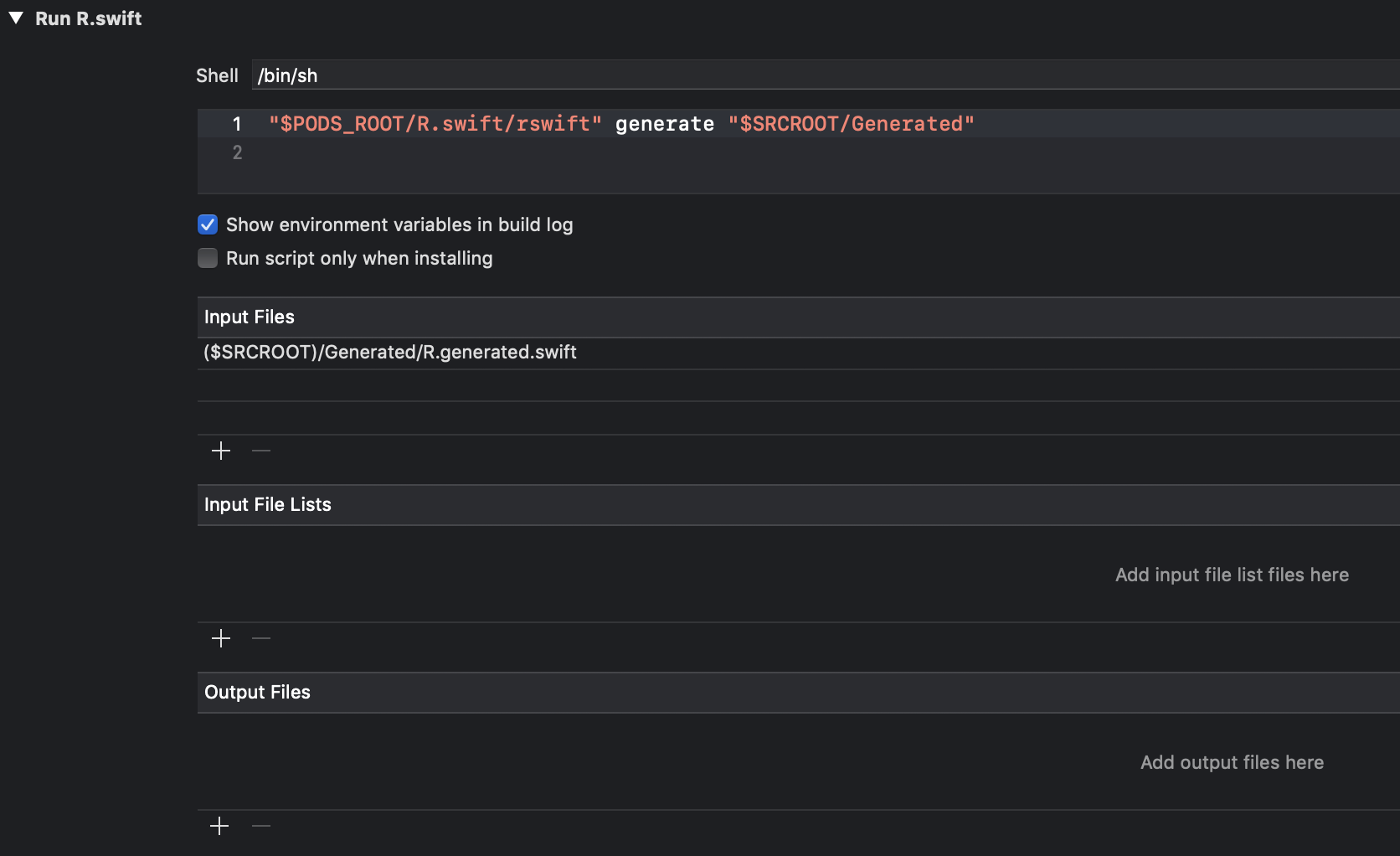
 renrawnalon
on 12 Oct 2018
renrawnalon
on 12 Oct 2018
@renrawnalon Do you commit the R file? When I tried using it as the input file, it wouldn’t run the step when the file was missing (like after the first checkout).
In my testing, the step also always runs without any input and output files.
robinkunde
on 12 Oct 2018
@robinkunde No, I don't commit the R file, and yes, you are correct that when the file doesn't exist, it fails to compiles the project, so this is indeed a problem. I wonder why my script wasn't running after the first time when I specified an output file. I guess I'll take a look again and try to figure out what is going on in my environment...
renrawnalon
on 12 Oct 2018
@robinkunde I'm using touch instead of date >, but your approach works. However, what I find weird is that it doesn't work if you put the touch before the R.swift generation, but it does work when you do it after. No idea what that's about…
@tomlokhorst I tried touching R.generated.swift beforehand, but I get a neat 'cycle inside
 SpacyRicochet
on 22 Oct 2018
SpacyRicochet
on 22 Oct 2018
@robinkunde I'm using
touchinstead ofdate >, but your approach works. However, what I find weird is that it doesn't work if you put thetouchbefore the R.swift generation, but it does work when you do it after. No idea what that's about…
Likely it's because it means that the modified time on the input file is before the mtime of the output file. Since we want the script to run every time, it needs to look like the input file changed after the output file was generated.
robinkunde
on 22 Oct 2018
Okay, that's weird. Now it's not working.
What I do notice is that it doesn't consistently run the R.swift script at all (in contrast to what's stated in the issue, that it's run too late). Instead, does this:
Using build description from memory.
Which probably means that they somehow decide nothing's changed and they just skip to actual building.
UPDATE: I had some tries here, but found out I was doing something horribly wrong. Now it's back to near-precisely @robinkunde's approach and it's a-okay again.
Maybe worth it to just make this a specific installation instruction?
SpacyRicochet
on 23 Oct 2018
Based on my understanding of the new build system's input/output file lists, you can guarantee a script runs every time by specifying an addition output file that will never exist.
My project uses $(PROJECT_DIR)/ThisFileShouldNeverExist.jpg, and we've had no problems with it.
You still need to specify your R.generated.swift output file in the list as well. Xcode seems to think
I require R.generated.swift as a source file, and this script creates it. However, the same script creates this other file which I don't see. I better run the script again
 bclymer
on 2 Nov 2018
bclymer
on 2 Nov 2018
Hey @SpacyRicochet, what were you doing horribly wrong? Because I might be doing the same thing...
I've tried everything you guys posted here, the closest approach I got was @robinkunde's, but I still end up into a non regenerated/generated R.swift.generated file. I've tried changing assets, and even deleting the old R.swift.generated file.
My configs ended up like this:

Really don't know what's actually wrong. The build errors I'm getting are just because of an old or non-existent R.swift.generated file.
 joserafaelrocha
on 13 Nov 2018
joserafaelrocha
on 13 Nov 2018
@joserafaelrocha Just so you can double-check, here is my setup;
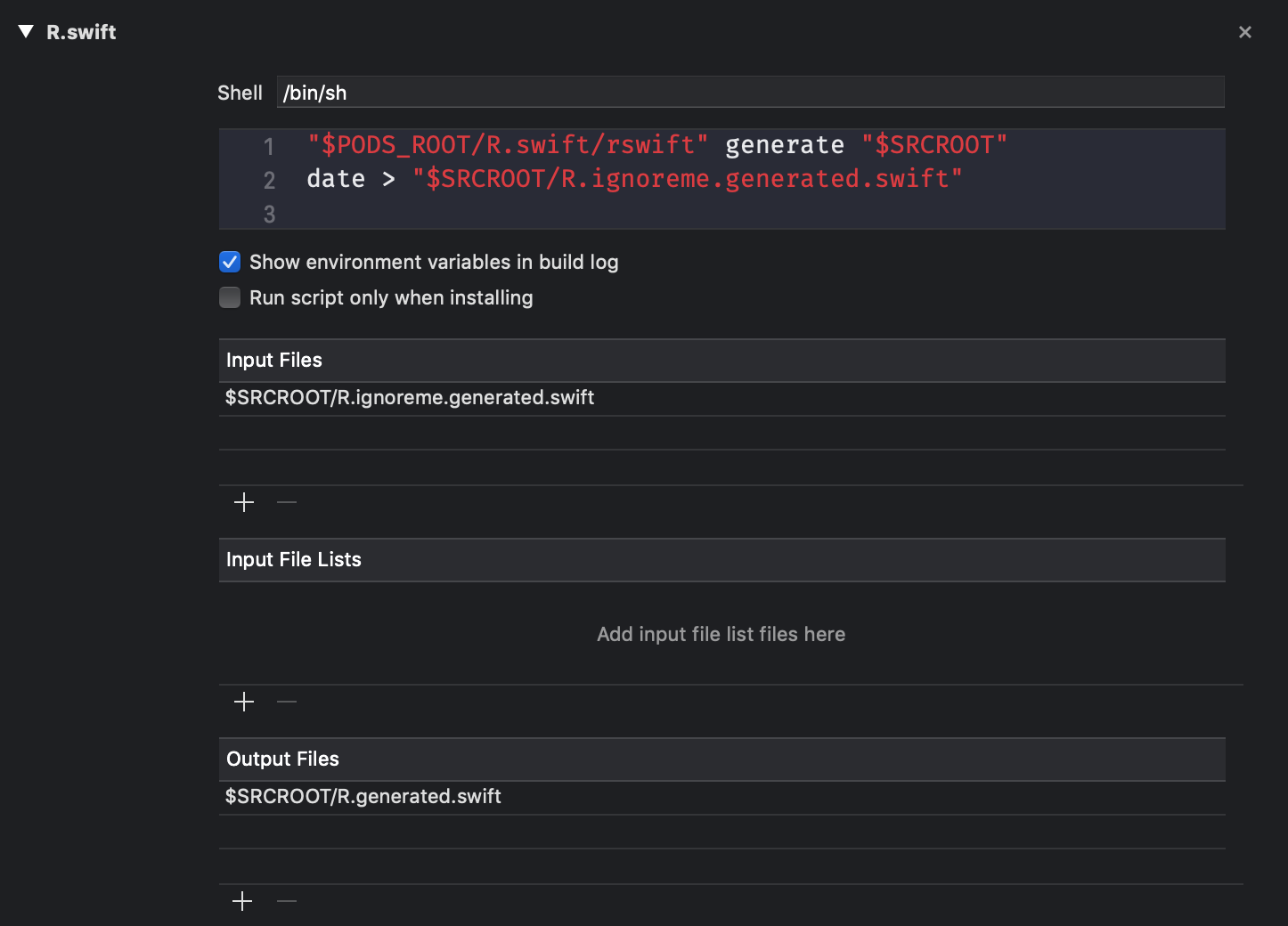
Not sure if it helps, because I can't find anything that's really different in your version. Maybe someone else can help?
SpacyRicochet
on 13 Nov 2018
Thanks @SpacyRicochet, I've justed started tweaking everywhere and reading about the New Build System, apparently my issue was actually with CocoaPods, the R.swift pod pointing to the alpha tag was somehow broken, my $PODS_ROOT/R.swift/rswift was not there, so I've changed to the manual installation, and now it is working fine.
joserafaelrocha
on 13 Nov 2018
I've asked Apple Developer Technical Support about this issue.
From their reply:
The real issue here is the initial build, where there is a source file missing. The build system does not have a way to take output from a script build phase and have that affect other build phases like Compile Sources. The source file list is read at the start of the build as part of the planning the build, so if the source file isn’t there but listed in Compile Sources, the build will fail.
...
One way to work around this limitation is to run the script before the actual build starts by using a Pre-Build action on the scheme.
I just tried this out in my project, and it works fine:
To make sure the R.generated.swift files (for all my projects and targets) exist before the build start, I've added a Build Pre-action that "touches" each file.

A downside of this approach is that the "touch script" needs to be in every schema that is used, and the schemes need to be shared when working with other developers.
tomlokhorst
on 14 Nov 2018
That looks good. I like the build phase way as well, since that's shared in the project file.
SpacyRicochet
on 15 Nov 2018
I am also using this approach, but i am actually running the generation script there and it works fine also
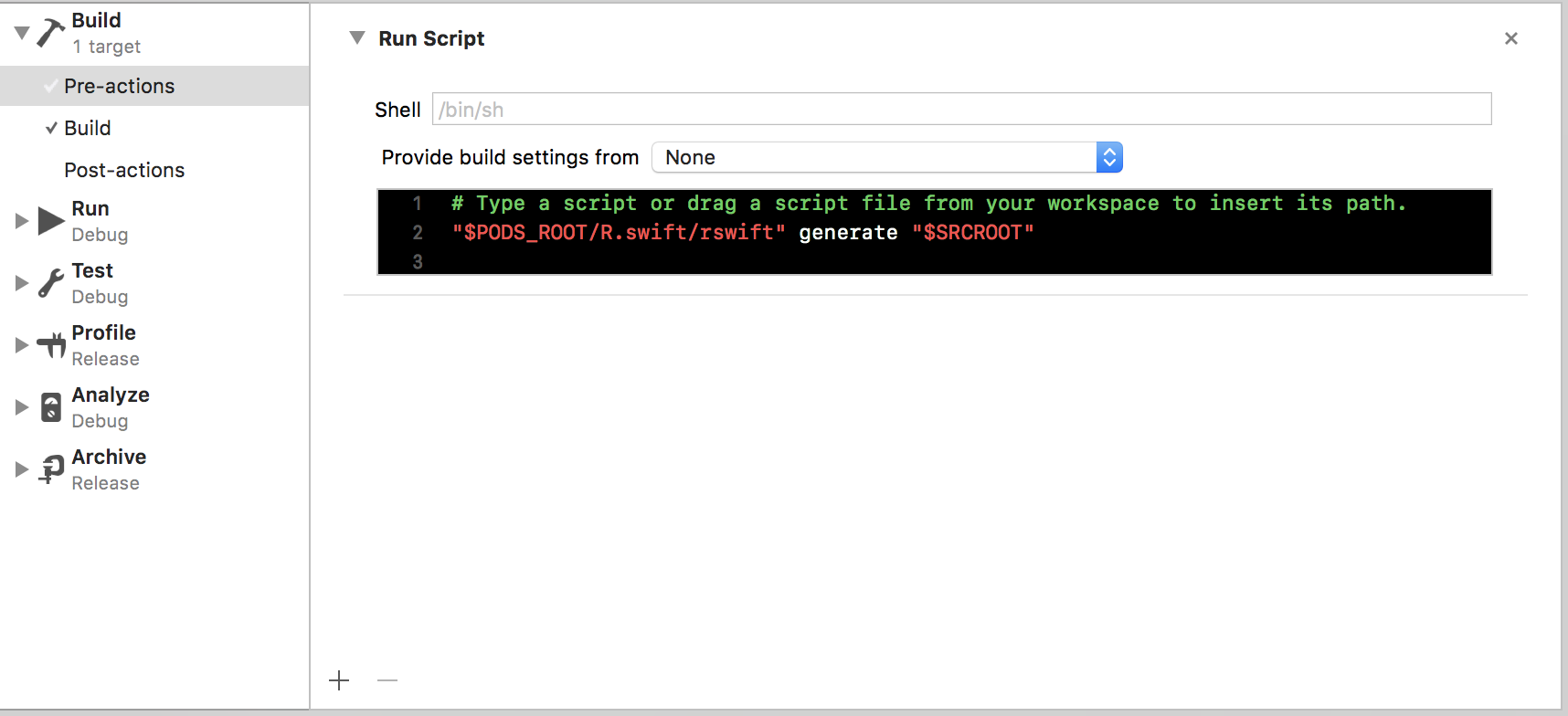
 marclefrancois
on 15 Nov 2018
marclefrancois
on 15 Nov 2018
Are you guys still looking for a solution to this?
Because currently, it looks like the above two options are very feasible as proper installation instructions, and could be written up as such. That would resolve the issue, paving the way for an actual release, with perhaps more features (I see watchOS being held up by this as well.)
If having installation instructions for this is sufficient, I can write them up and add a PR. If you're still looking for some other way, I'll hold off for now.
SpacyRicochet
on 19 Nov 2018
I personally think that corrected installation instruction would be the only needed fix.
marclefrancois
on 19 Nov 2018
@tomlokhorst and I have set some time apart coming Wednesday to solve the issues blocking the 5.0 release. So I expect this to be solved then. I wanted to solve this way earlier, but we’ve both been extremely busy with projects so it’s only now that we’re able to take some adequate action.
I’m sorry that you have to wait so long for a proper release and fix on this open source project, thanks for your patience.
 mac-cain13
on 19 Nov 2018
mac-cain13
on 19 Nov 2018
@mac-cain13 were you able to fix this issue and is it available in the beta3?
 rist
on 6 Dec 2018
rist
on 6 Dec 2018
It will be fixed in the next release after beta 4, will test it with Tom asap and create a new release. Just opened a PR with the fix.
mac-cain13
on 10 Dec 2018
I have updated to R.swift 5 and followed new setup but incremental building using new build system still doesn't work well. It simply runs during every build and because of large project with over 3000 lines in Localizable it takes around 20 seconds :(

 marekpridal
on 19 Dec 2018
marekpridal
on 19 Dec 2018
@marekpridal R.swift (including version 5) is designed to run every time, so it is behaving as intended.
In our testing, we've never seen it run slow, that's why we haven't yet added support for incremental building.
But we've also never tested it with a Localizable.strings file with over 3000 lines, so this is an interesting case.
We have an open issue https://github.com/mac-cain13/R.swift/issues/415 for generating an input file list. This would add support for incremental building.
You could also create a new issue describing your 3000 line file, perhaps we could somehow improve performance for that, unrelated to incremental building.
tomlokhorst
on 19 Dec 2018
@tomlokhorst Thanks for quick response! I solved it by downgrading to R Swift 4 and providing Localizable.strings as Input files and it works great. But I understand it's not universal solution because lots of people use R Swift for xibs and ets not just for strings as I do.
marekpridal
on 19 Dec 2018
I just want to +1 to the issue described here -
https://github.com/mac-cain13/R.swift/issues/456#issuecomment-448684170
While our strings file isn't 3k lines long (it's just over 1.6k), the project itself is very large with lots of source files and the end result is that R.Swift (both 4.x and 5.0.0) take over 30 seconds to run.
Because we were only using R.Swift for localisable strings and image assets, we simply had two input files (one to detect strings changes the other to detect asset catalog modifications). It wasn't a perfect way of detecting changes but it was good enough because we could simply just clean and build if any other modifications were made.
I haven't looked too much into this project but will try and spend a bit of time getting my head around things and see if I can debug any specific performance issues. If you have any tips @tomlokhorst, it would be great 🙇.
 liamnichols
on 4 Jan 2019
liamnichols
on 4 Jan 2019
Related issues
 Horse888
·
5Comments
Horse888
·
5Comments
 andreadelfante
·
6Comments
andreadelfante
·
6Comments
 darecki
·
4Comments
darecki
·
4Comments
 alexpersian
·
6Comments
tomlokhorst
·
5Comments
alexpersian
·
6Comments
tomlokhorst
·
5Comments
Most helpful comment
@tomlokhorst and I have set some time apart coming Wednesday to solve the issues blocking the 5.0 release. So I expect this to be solved then. I wanted to solve this way earlier, but we’ve both been extremely busy with projects so it’s only now that we’re able to take some adequate action.
I’m sorry that you have to wait so long for a proper release and fix on this open source project, thanks for your patience.