R.swift: First build always fails using the new build system with Xcode 10 Beta 6
Hi,
Using the new build system (the default setting) with Xcode 10 Beta 6 results in the first build failing. Subsequent builds pass.
Configuration
- Xcode 10 Beta 6
- R.swift added via cocoapods
- R.swift build script as follows
$PODS_ROOT/R.swift/rswift" "generate" "$SRCROOT
Result
error: Build input file cannot be found: '/Project/R.generated.swift'
On a local machine, this is not a problem, as we can build again. However, on a CI environment such as Buddybuild, the build continuously fails as it performs a clean build every time.
 superpeteblaze
All 17 comments
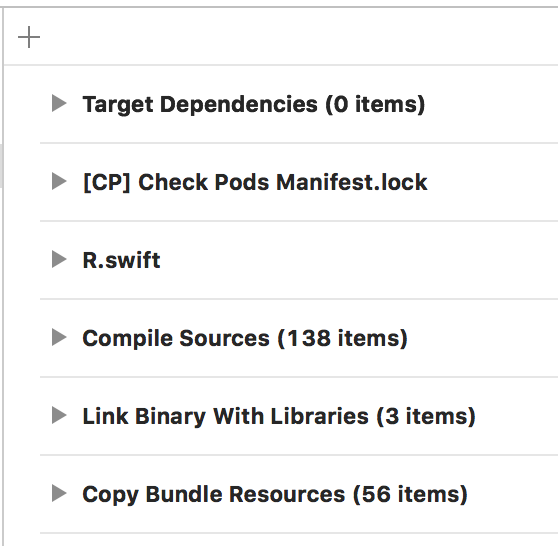
Is your "Run Script" build phase _before_ the "Compile Sources" phase?
 tomlokhorst
on 20 Aug 2018
tomlokhorst
on 20 Aug 2018
Hi @tomlokhorst. Yes, our run script phase is before the compile sources phase.
superpeteblaze
on 20 Aug 2018
Just to confirm: I can reproduce this behaviour (with the example ResourceApp project in this repository)
I haven't looked into why this happens. It appears the "Compile Sources" step doesn't wait for the "R.swift" to finish.
tomlokhorst
on 22 Aug 2018
Thanks for the update @tomlokhorst
superpeteblaze
on 22 Aug 2018
I'm also running into this.
Workaround for Bitrise: if you run the build twice, setting Do a clean Xcode build before the archive? to no in one workflow, the second build will succeed.
 sveltema
on 24 Aug 2018
sveltema
on 24 Aug 2018
I'm also having this issue. It seems that Xcode 10 has changed something here with Compile Sources.
 fassko
on 29 Aug 2018
fassko
on 29 Aug 2018
Wondering if it helps if we define R.generated.swift as an output file of the R.swift step. Maybe that hints Xcode that it should wait for the R.swift step to finish.
Also; it sounds like a Xcode bug to me, because I think that the default should keep working as is.
 mac-cain13
on 29 Aug 2018
mac-cain13
on 29 Aug 2018
@mac-cain13 Nope, that doesn't help. I actually have my own step to auto generate some code and it fails as well. Or even with Sourcery.
I think there is something going on with new build system as it's being used in new Xcode 10.
fassko
on 29 Aug 2018
We have solved this by defining R.generated.swift as an output file, as follows:

superpeteblaze
on 29 Aug 2018
Thanks @superpeteblaze That worked! ;)
fassko
on 29 Aug 2018
For others who may come across this issue - this solution (defining an output file) worked for us as well. Defining the final output seems to have given the new build system enough of a hint to ensure it has that file in place before attempting a compilation.
 ski081
on 30 Aug 2018
ski081
on 30 Aug 2018
@tomlokhorst I think this issue can be closed, as it seems to just be caused by Xcode 10's build system changes.
superpeteblaze
on 31 Aug 2018
Lets leave it open for now.
At the minimum we should update the documentation to detail how to set the output file.
Also worth investigating; Should the project.pbxproj file (and other files) be listed in the input files?
tomlokhorst
on 31 Aug 2018
I've found that having an Output file listed but no input files seems to make Xcode skip over the step pretty consistently which means it doesn't get updated even when needed.
 mdubs
on 24 Sep 2018
mdubs
on 24 Sep 2018
I've found the same thing; R.swift only runs once when there's only an output file listed.
I tried adding a (manually created) list of input files (.xcfilelist), that seems to work.
But if we have R.swift generate that file, it won't be updated when (for example) a new images is added to an Assets Catalog.
I haven't yet investigated further, but we need to find a solution for this.
tomlokhorst
on 24 Sep 2018
I was thinking that it might need to be a multi-step process. My thoughts were:
- Input file: xcproject
Output file: RswiftDependencies.xcfilelist
In this it would need to determine the relevant files that R.swift cares about. This would allow R.swift to know as storyboards, xib etc are added, though I am not sure how this could deal with your example of images in asset catalogs. (Somewhat related https://github.com/SwiftGen/SwiftGen/issues/441)
- Input file list: RswiftDependencies.xcfilelist
Output file: R.generated.swift
This would be the current step
mdubs
on 25 Sep 2018
Please continue this discussion here: https://github.com/mac-cain13/R.swift/issues/456
tomlokhorst
on 1 Oct 2018
Related issues
 appcelerate
·
6Comments
tomlokhorst
·
3Comments
appcelerate
·
6Comments
tomlokhorst
·
3Comments
 alexpersian
·
6Comments
alexpersian
·
6Comments
 romk1n
·
6Comments
romk1n
·
6Comments
 andreadelfante
·
6Comments
andreadelfante
·
6Comments
Most helpful comment
We have solved this by defining R.generated.swift as an output file, as follows: