R.swift: Use of undeclared type 'GRKStoryboardProxyViewController'
I am using R.swift in my project. I some of my view controllers are of instances of GRKStoryboardProxyViewController.
I have upgraded to R.swift version 3.1.0 and now the R.generated.swift file doesn't import GRKStoryboardProxyViewController
I am getting "use of undeclared type" errors in
/// Optionally returns a typed version of segue `showCustomer`.
/// Returns nil if either the segue identifier, the source, destination, or segue types don't match.
/// For use inside `prepareForSegue(segue: UIStoryboardSegue, sender: AnyObject?)`.
static func showCustomer(segue: UIKit.UIStoryboardSegue) -> Rswift.TypedStoryboardSegueInfo<UIKit.UIStoryboardSegue, BookingViewController, GRKStoryboardProxyViewController>? {
    return Rswift.TypedStoryboardSegueInfo(segueIdentifier: R.segue.bookingViewController.showCustomer, segue: segue)
}
and other parts of the file where GRKStoryboardProxyViewController is referenced
I am sorry in I have done some thing wrong and this is not an issue, but any help would be greatly appreciated
 markGilchristBookingBug
All 18 comments
Thanks for using R.swift and reporting your issue here!
I'm wondering if the module of the GRKStoryboardProxyViewController in the storyboard is set. Maybe the module isn't specified in there and therefore R.swift will not import it for you.
You can specify the module GRKStoryboardProxyViewController is part of in the storyboard here:
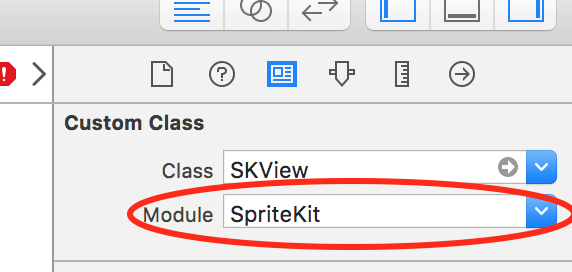
Please let me know if this resolves your issue! If not I'll look into R.swift and check if this is a bug in the new release.
 mac-cain13
on 11 Oct 2016
mac-cain13
on 11 Oct 2016
@mac-cain13
Firstly thank you for your brilliant lib and more so for you fast response!
I have implemented the above and it has remove the error in all cases bar one.
I have a rootViewController that is of the form
    class RootViewController: UIViewController {
        fileprivate weak var container: GRKContainerViewController!
       ... /* more code*/
    }
Implementing the above solution produces the following out put in my R.generated.swift
 struct gRKContainerViewControllerRootViewController {
      /// Segue identifier `doLogin`.
      static let doLogin: Rswift.StoryboardSegueIdentifier<UIKit.UIStoryboardSegue, GRKContainerViewController.RootViewController, UIKit.UINavigationController> = Rswift.StoryboardSegueIdentifier(identifier: "doLogin")
with the following error 'RootViewController' is not a member type of 'GRKContainerViewController'
Have I misinterpreted your solution or is this situation not catered for by R.swift?
Many thanks for your help on this
markGilchristBookingBug
on 11 Oct 2016
You've not configured this segue so that RootViewController is in the framework/module GRKContainerViewController, but that is incorrect. GRKContainerViewController is just a class and RootViewController is probably just in your apps module.
So clear the "Module" field for RootViewController in your storyboard and you show be good to go.
mac-cain13
on 11 Oct 2016
I am still getting the same error after clearing the module field
markGilchristBookingBug
on 12 Oct 2016
Okay that is quite weird you if the module field is empty the generated code should change from GRKContainerViewController.RootViewController to RootViewController.
Could you dubbelcheck the module isn't there on the target view controller for the segue doLogin that is initiated by the view controller with the identifier GRKContainerViewControllerRootViewController?
If you're certain everything is set up okay then I'll need some more info, maybe a screenshot of the storyboard with the target controller selected and the inspector open at the subclass it is set to. A bit larger snippet of the generated code and the exact compile error.
mac-cain13
on 14 Oct 2016
@mac-cain13
I have double checked and the module field is empty, however it does have a greyed out placeholder text of "Current - iOSApp". Is this the cause of the problem?
markGilchristBookingBug
on 14 Oct 2016
So "Current - iOSApp" would be correct, since that means the class is declared in your main bundle. The generated code should have changed now from GRKContainerViewController.RootViewController to RootViewController.
Just checking; are you sure the R.swift build phase is _before_ the Compile sources build phase?
mac-cain13
on 18 Oct 2016
Hi, I got the same error on version 3.1.0.

R.generated.swift didn't import 'JSQMessagesViewController'. The version 3.0.0 works fine.
 laurivers
on 3 Nov 2016
laurivers
on 3 Nov 2016
After some testing and it seems that with ObjC frameworks you can't use the fully qualified name, for Swift frameworks you can. Probably because ObjC modules are no real module, but modulemaps, the types probably still live in the global namespace and not in the module namespace.
I've to think a little bit about how to solve this, since not using the FQN is a problem when you have a type with the same name in a module and in your project. Using the FQN seems to give problems with ObjC dependencies. And R.swift doesn't know what kind of dependency you are using... So that sucks. :)
mac-cain13
on 4 Dec 2016
Thinking a bit about this I would propose a solution where you can specify the objc modules as commandline argument, R.swift will then make sure no FQNs are used for those modules.
mac-cain13
on 9 Dec 2016
Okay, some more trail and error shows that a FQN is allowed also for ObjC modules. Only when the ObjC module also has a class named the same as the module then the FQN may never be used.
So it turns out to be related to this Swift issue after all: https://bugs.swift.org/browse/SR-898
I can create a workaround where you can disable FQNs for certain modules to work around this.
mac-cain13
on 12 Dec 2016
There is a workaround in master;
- Remove the explicit import by emptying the module field in the xib/storyboard for the problematic module
- Make sure the module is imported by adding the new
--import SomeModuleargument to the R.swift build phase
That should make this work. The new flag is added in the upcoming R.swift release.
mac-cain13
on 12 Dec 2016
@mac-cain13 could you and example of the build phase script that should be used? I am using "$PODS_ROOT/R.swift/rswift --import Spring" "$SRCROOT" and it gives me compile error. Also tried "$PODS_ROOT/R.swift/rswift" "$SRCROOT" --import Spring
 RishabhTayal
on 3 May 2017
RishabhTayal
on 3 May 2017
@RishabhTayal Of course, this should work:
"$PODS_ROOT/R.swift/rswift" "--import" "Spring" "$SRCROOT"
mac-cain13
on 4 May 2017
Doesn't seem to be working. I keep getting the following error.
dyld: BIND_OPCODE_SET_SEGMENT_AND_OFFSET_ULEB has segment 0 which is not writable in /Users/rtayal/Desktop/_project_/../Pods/R.swift/rswift
/Users/rtayal/Library/Developer/Xcode/DerivedData/_project_-cbqwixlgbxkbpdbvqmutsicjsrtj/Build/Intermediates/Common.build/Debug-iphonesimulator/Common.build/Script-69DB8C241E82ABCE006D399C.sh: line 2: 28697 Abort trap: 6           "$PODS_ROOT/R.swift/rswift" "--import" "Spring" "$SRCROOT"
Command /bin/sh failed with exit code 134
Tried deleting Derived Data. Doesn't work either.
RishabhTayal
on 5 May 2017
@mac-cain13 I would like to reopen this issue. It compiles now but I get run time crash with key-value coding compliant since the custom class is not tied to it's target now.
RishabhTayal
on 9 May 2017
I am still having this issue. When I remove the module field from xib, I get a run time crash when trying to access that module's properties.
RishabhTayal
on 22 May 2017
@RishabhTayal Could you paste the is the generated code from R.generated.swift for your xib?
And how do you currently have your xib setup?
 tomlokhorst
on 22 May 2017
tomlokhorst
on 22 May 2017
Related issues
 apascual
·
6Comments
tomlokhorst
·
6Comments
apascual
·
6Comments
tomlokhorst
·
6Comments
 darecki
·
4Comments
darecki
·
4Comments
 Horse888
·
5Comments
Horse888
·
5Comments
 alexpersian
·
6Comments
alexpersian
·
6Comments
Most helpful comment
There is a workaround in master;
--import SomeModuleargument to the R.swift build phaseThat should make this work. The new flag is added in the upcoming R.swift release.