Hello guys;
I tried to use custom DNS server while I connected to a proxy, but I failed! The software, tunnels the whole traffic, So it seems I can't set my own DNS server for DNS queries!
I tried from Preferences > DNS Settings and add my DNS there. also I tried from Groups > DNS Settings. but no one overwrite DNS Setting and use my own LOCAL DNS SERVER runs at 127.0.0.1:53 at the same computer I ran Qv2ray.
 robin98
All 7 comments
 DuckSoft
on 19 Dec 2020
DuckSoft
on 19 Dec 2020
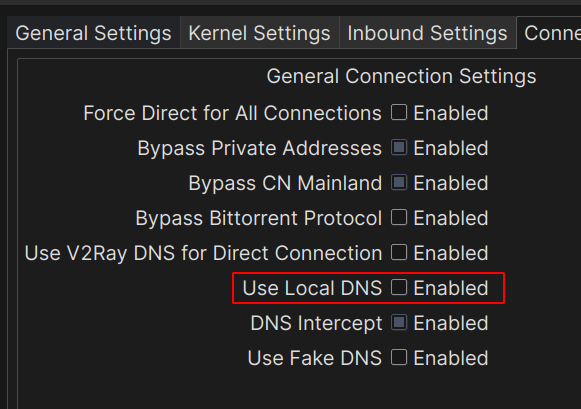
It Unchecked by default! But I enable it and check for any changes. but nothing at all!
robin98
on 19 Dec 2020
Show us the evidence. Why do you think this "is not working"?
At least show us the log, or please offer the Wireshark capture screenshot.
Also, I am more than happy to receive a downvote for that.
    This program is distributed in the hope that it will be useful,
    but WITHOUT ANY WARRANTY; without even the implied warranty of
    MERCHANTABILITY or FITNESS FOR A PARTICULAR PURPOSE.  See the
    GNU General Public License for more details.
@robin98 Go to the V2Ray documentation
https://www.v2fly.org/en_US
 MarksonHon
on 19 Dec 2020
MarksonHon
on 19 Dec 2020
Read the fancy docs before blaming anyone: https://www.v2fly.org/config/dns.html#dnsobject

What should I say? It worked perfectly on my computer. Here are the steps:
- Clear all your DNS entries in Preference and write
127.0.0.1there. - DO NOT CHECK that "Use Local DNS" checkbox. It will use systemd DNS and the DNS is controlled by your system, not 127.0.0.1. I noticed there's a customized DNS in your GitHub homepage, so you want DNS go through literally 127.0.0.1 but no the system.
- It worked.
May Allah bless you.
DuckSoft
on 19 Dec 2020
@robin98 Check the comment above.
DuckSoft
on 19 Dec 2020
@DuckSoft Ok buddy 😑 don't kick me for that, I just ask because I don't familiar with change options in advanced. Here is my steps until now:
- Running my desired DNS Service on the
127.0.0.1:53. - I went to
Preferences > DNS Settings. Clear all DNS entries and just add127.0.0.1. - Check
Connections Settingstab. theUse Local DNSoption was Unchecked by default, so I do nothing here. - I opened the Firefox, go to
Network Settingsand add127.0.0.1:1089as the SOCKS host. Also I checkedProxy DNS when using SOCKS v5option. - going to dnsleaktest.com, and click on the
Standard test. - The results will show me the DNS Address for Proxy server(same location and same IP as proxy server), not that one I hosted on
127.0.0.1.
robin98
on 19 Dec 2020
Related issues
 Passwww
·
5Comments
Passwww
·
5Comments
 U-v-U
·
3Comments
U-v-U
·
3Comments
 studentmain
·
3Comments
studentmain
·
3Comments
 sixg0000d
·
4Comments
sixg0000d
·
4Comments
 Logic530
·
3Comments
Logic530
·
3Comments
Most helpful comment
Read the fancy docs before blaming anyone: https://www.v2fly.org/config/dns.html#dnsobject

What should I say? It worked perfectly on my computer. Here are the steps:
127.0.0.1there.May Allah bless you.