找不到 OpenSSL 库
这可能是由于系统中缺少 openssl 包造成的,或者是 AppImage 问题。
如果您正在使用 AppImage,请反馈一个 Bug
 tyrant1024
All 44 comments
收到
 ghost
on 22 Sep 2019
ghost
on 22 Sep 2019
@1136707199 你可以提供一下 AppImage 在控制台里面的输出吗?
和你的 Kali 版本号
ghost
on 22 Sep 2019
请确定 OpenSSL 在Kali上面安装了嘛?
ghost
on 23 Sep 2019
找不到 OpenSSL 库
这可能是由于系统中缺少openssl包造成的,或者是 AppImage 问题。
如果您正在使用 AppImage,请反馈一个 Bug
apt install libssl1.0-dev
即可解决
 cnlnn
on 24 Sep 2019
cnlnn
on 24 Sep 2019

manjaro 18.1也是这样,本地版本为OpenSSL 1.1.1c,是不是版本不一致导致的?
 zhangxs-go
on 24 Sep 2019
zhangxs-go
on 24 Sep 2019
manjaro 18.1也是这样,本地版本为OpenSSL 1.1.1c,是不是版本不一致导致的?
对,你的版本需要安装 openssl 1.0 的相关包,而不是 1.1
ghost
on 25 Sep 2019
manjaro 18.1也是这样,本地版本为OpenSSL 1.1.1c,是不是版本不一致导致的?对,你的版本需要安装 openssl 1.0 的相关包,而不是 1.1
ok
zhangxs-go
on 25 Sep 2019
找不到 OpenSSL 库
这可能是由于系统中缺少openssl包造成的,或者是 AppImage 问题。
如果您正在使用 AppImage,请反馈一个 Bugapt install libssl1.0-dev
即可解决
用此方法解决了。
 wsjtangy
on 28 Sep 2019
wsjtangy
on 28 Sep 2019
我也遇到了同样的问题,我的操作系统是ubuntu19.04,openssl版本是1.0.2g
openssl version
OpenSSL 1.0.2g 1 Mar 2016
另外,我还尝试了通过apt install openssl -y安装最新版本的openssl ,以及本地编译安装1.0.2l版本的openssl,同样还是没有解决问题
 jianrry
on 2 Oct 2019
jianrry
on 2 Oct 2019
所需要的包不叫openssl,叫openssl1.0,装这个试试
 aliyuchang33
on 3 Oct 2019
aliyuchang33
on 3 Oct 2019
https://packages.ubuntu.com/cosmic/amd64/libssl1.0.0/download
https://packages.ubuntu.com/xenial-updates/amd64/openssl/download
These two downgrade packages make Qv2ray work after a clean install on Ubuntu 19.03, however, it may break some dependencies.
ghost
on 3 Oct 2019
@lhy0403 Thanks a lot ,it has solved my problem.
wget http://security.ubuntu.com/ubuntu/pool/main/o/openssl1.0/libssl1.0.0_1.0.2n-1ubuntu6.2_amd64.deb && sudo dpkg -i libssl1.0.0_1.0.2n-1ubuntu6.2_amd64.deb
好的
ghost
on 3 Oct 2019
你研究下这个openssl让它调用普通的openssl库呗
aliyuchang33
on 3 Oct 2019
https://github.com/openssl/openssl/issues/5042
https://bugreports.qt.io/browse/QTBUG-68971
https://gitlab.com/probono/platformissues#openssl
https://github.com/probonopd/linuxdeployqt/issues/209
https://wiki.debian.org/OpenSSL-1.1
https://lists.qt-project.org/pipermail/interest/2017-October/028512.html
ghost
on 4 Oct 2019
We choose not to fix this error since it's extremely complicated.
我们打算不修复这个问题,因为其过于繁琐。并且包含无法在 Linux 平台统一的 OpenSSL 路径。
ghost
on 4 Oct 2019
给未来看到这条 Issue 的所有人:
当前 Qv2ray 的 AppImage 版本需要的是 OpenSSL 1.0 ,需要进行手动安装
部分系统安装方法请参考:
- @jianrry 提供的脚本:
wget http://security.ubuntu.com/ubuntu/pool/main/o/openssl1.0/libssl1.0.0_1.0.2n-1ubuntu6.2_amd64.deb && sudo dpkg -i libssl1.0.0_1.0.2n-1ubuntu6.2_amd64.deb
- 在 Ubuntu 19.03 经过测试的 OpenSSL 降级包
https://packages.ubuntu.com/cosmic/amd64/libssl1.0.0/download
https://packages.ubuntu.com/xenial-updates/amd64/openssl/download
- Debian 或 Kali 系统的部分测试可用的
dev包apt install libssl1.0-dev - ArchLinux 在
core软件库中的openssl和openssl-1.0包
ghost
on 4 Oct 2019
我补充一下编译安装openssl-1.0.2g的方法:
wget --no-check-certificate https://www.openssl.org/source/openssl-1.0.2g.tar.gz

tar -xzvf openssl-1.0.2g.tar.gz

cd openssl-1.0.2g

./config --prefix=/usr/local

 sudo make install
安装成功后,输入openssl version就会出现版本信息
如果你是ubuntu19.04,建议采用我上面回复的方法,不推荐编译安装。
jianrry
on 4 Oct 2019
请问非 Ubuntu 的用户如何解决,我的系统是 Centos 8.
 Smith-Cruise
on 5 Oct 2019
Smith-Cruise
on 5 Oct 2019
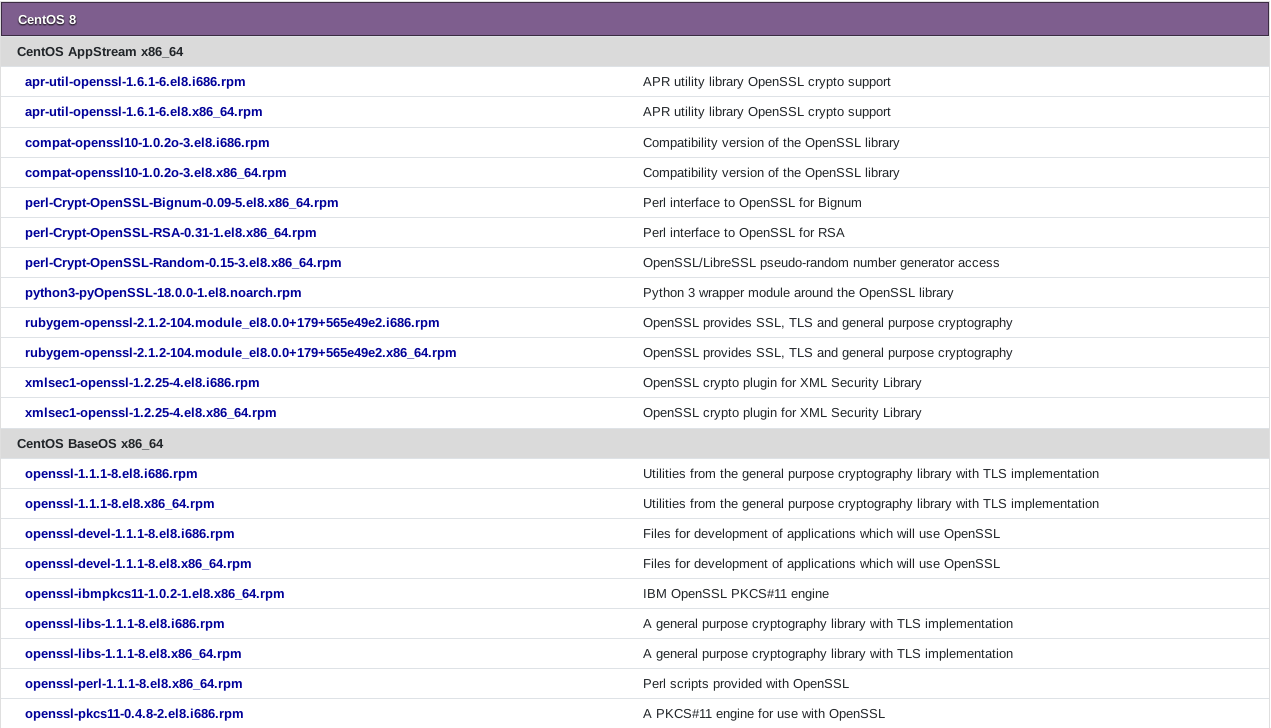
请问非 Ubuntu 的用户如何解决,我的系统是 Centos
https://pkgs.org/download/openssl
Pkgs.com 可以搜索到对应的 openssl 包
ghost
on 5 Oct 2019
请问非 Ubuntu 的用户如何解决,我的系统是 Centos 8.
@Smith-Cruise 或者尝试一下最新一版编译出来的 AppImage 这个版本内置了 libssl.so 和 libcrypto.so
https://jenkins.lhy0403.top/blue/organizations/jenkins/Qv2ray-AppImage-Version1/detail/Qv2ray-AppImage-Version1/26/artifacts
ghost
on 5 Oct 2019
@lhy0403
On Debian Buster:
找不到 OpenSSL 库
This could be caused by a missing of `openssl` package in your system.
Please refer to Github Issue #65 to check for solutions.
Github Issue Link: https://github.com/lhy0403/Qv2ray/issues/65

Technical Details
OSsl.Rq.V=OpenSSL 1.0.2g  1 Mar 2016
OSsl.Cr.V=OpenSSL 1.0.2g  1 Mar 2016
 SiqingYu
on 6 Oct 2019
SiqingYu
on 6 Oct 2019
Are you using the AppImage in the release or... Here: https://jenkins.lhy0403.top/blue/organizations/jenkins/Qv2ray-AppImage-Version1/detail/Qv2ray-AppImage-Version1/26/artifacts
ghost
on 6 Oct 2019
On my Debian Buster machine, I need to install these two old packages:
- Debian -- Package Download Selection -- libssl1.0-dev_1.0.2t-1~deb9u1_amd64.deb
https://packages.debian.org/stretch/amd64/libssl1.0-dev/download - Debian -- Package Download Selection -- libssl1.0.2_1.0.2t-1~deb9u1_amd64.deb
https://packages.debian.org/stretch/amd64/libssl1.0.2/download
SiqingYu
on 6 Oct 2019
~Yes, that's super annoying and I'm trying to find a solution.~
Hold on...... It is a typo in the if condition!
ghost
on 6 Oct 2019
OSsl.Rq.V=OpenSSL 1.0.2g  1 Mar 2016
OSsl.Cr.V=OpenSSL 1.0.2g  1 Mar 2016
It's not an OpenSSL issue anymore, it was my fault that I missed a ! in the if statement.
Seems your OpenSSL version is OK, installing the old version may make it broken.
ghost
on 6 Oct 2019
@lhy0403 It's okay to make a mistake. People in the community is meant to help each other, afterall. :smiley: Kudos to you for finding the typo so quickly. :+1:
After fixing the if statement, is libssl-dev 1.1 supposed to work?
SiqingYu
on 6 Oct 2019
The latest release (Which will be released a few days soon) will bundle the libssl.so and libcrypto.so inside the AppImage
Which will (theoretically) need nothing to be done on your system.
If you want to have a test, please uninstall the old packages (to make sure the sos are loaded from within the AppImage) and try our latest build here (it's also the place where released versions are built):
https://jenkins.lhy0403.top/blue/organizations/jenkins/Qv2ray-AppImage-Version1/activity
- Open the link and click on the latest build from the list.
- Then there'll be a artifact on the northeast (top-right) corner
ghost
on 6 Oct 2019
@lhy0403 I just tried https://jenkins.lhy0403.top/job/Qv2ray-AppImage-Version1/27/artifact/build/AppDir/Qv2ray-e3cce01-x86_64.AppImage
It worked with libssl 1.1. :clap:
SiqingYu
on 6 Oct 2019
Well it's a thing that many people think it's working with libssl 1.1.
However, you should read the output by running the Appimage inside a terminal to see if it's loading a 1.1 system installed version or the Appimage-Bundled version 1.0.
I personally think this AppImage (which was built against v1.0) is not compactble with the system-wide installed 1.1 packages.
ghost
on 6 Oct 2019
Anyway, glad that you made it work!
ghost
on 6 Oct 2019
It'll be marked as solved if there're more people able to use the Appimage here without having any modifications to the system packages.
ghost
on 6 Oct 2019
Also tested Qv2ray-AppImage-Release #69 [Jenkins]
https://jenkins.lhy0403.top/job/Qv2ray-AppImage-Release/69/ on Ubuntu 19.04. Works as intended.
SiqingYu
on 7 Oct 2019
Also tested Qv2ray-AppImage-Release #69 [Jenkins]
https://jenkins.lhy0403.top/job/Qv2ray-AppImage-Release/69/ on Ubuntu 19.04. Works as intended.
Thanks for your contribution!
ghost
on 7 Oct 2019
这个问题应该在 v1.3.8 中解决了
https://github.com/lhy0403/Qv2ray/releases/tag/v1.3.8.0
ghost
on 8 Oct 2019
Ubuntu 16.04 不能工作
这个软件:
https://jenkins.lhy0403.top/blue/organizations/jenkins/Qv2ray-AppImage-Version1/detail/Qv2ray-AppImage-Version1/26/artifacts/
报这个错:
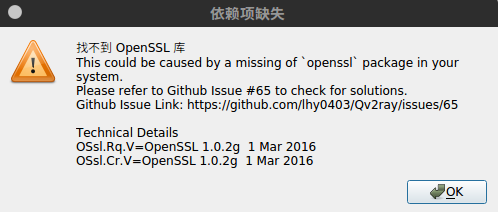
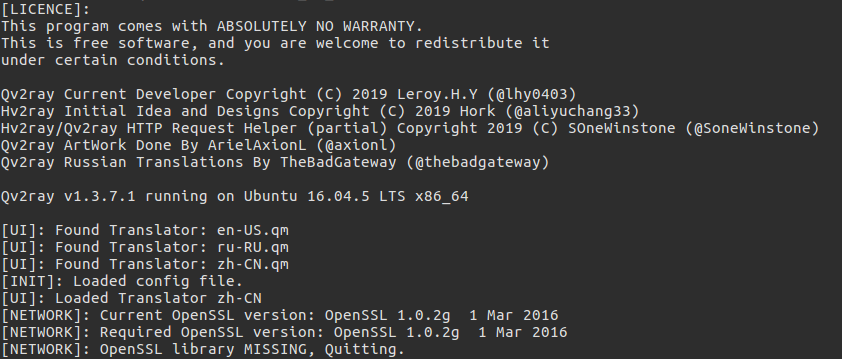
安装openssl 1.0.2g还是有这个问题。
使用最新的 v1.3.8.0 也有类似问题,openssl版本提示


 xlicz
on 10 Oct 2019
xlicz
on 10 Oct 2019
你好,请不要使用 Jenkins v26 的旧版本,相反您可以尝试 https://jenkins.lhy0403.top/blue/organizations/jenkins/Qv2ray-AppImage-Release/detail/Qv2ray-AppImage-Release/104/artifacts
如果这个版本还有问题,请再下面继续回复,谢谢
ghost
on 10 Oct 2019
这个版本是OK的,1.3.8.0 不OK,建议更新下。
xlicz
on 10 Oct 2019
已经解决上面的问题 但似乎有了新的问题
tyrant1024
on 14 Oct 2019
已经解决上面的问题 但似乎有了新的问题
@tyrant1024 是什么问题?
ghost
on 15 Oct 2019
你好,请不要使用 Jenkins v26 的旧版本,相反您可以尝试 https://jenkins.lhy0403.top/blue/organizations/jenkins/Qv2ray-AppImage-Release/detail/Qv2ray-AppImage-Release/104/artifacts
这资源不存在了嘛?
 zhiai007
on 18 Oct 2019
zhiai007
on 18 Oct 2019
你好,请不要使用 Jenkins v26 的旧版本,相反您可以尝试 https://jenkins.lhy0403.top/blue/organizations/jenkins/Qv2ray-AppImage-Release/detail/Qv2ray-AppImage-Release/104/artifacts
这资源不存在了嘛?
@zhiai007 https://jenkins.lhy0403.top/job/Qv2ray-AppImage-Release/104/artifact/build/AppDir/
ghost
on 18 Oct 2019
这个烦人的问题终于在 https://github.com/lhy0403/Qv2ray/commit/2fcd32e31e1a4865bb3eea940cd20fc0df2c18e1 被修复,将于 2.0 版本正式应用修改
感谢大家的支持,issue 将被关闭
如果还有相关 openssl 的问题,请到 #69 讨论
ghost
on 26 Oct 2019
v1 后续版本(如果有)将使用这里的 AppImage
https://jenkins.lhy0403.top/job/Qv2ray-AppImage-Release/lastSuccessfulBuild/artifact/
ghost
on 26 Oct 2019
Related issues
 leoxxx
·
7Comments
leoxxx
·
7Comments
 LuXts
·
5Comments
LuXts
·
5Comments
 Passwww
·
5Comments
Passwww
·
5Comments
 DuckSoft
·
3Comments
DuckSoft
·
3Comments
 studentmain
·
3Comments
studentmain
·
3Comments
Most helpful comment
我补充一下编译安装openssl-1.0.2g的方法:
安装成功后,输入
openssl version就会出现版本信息如果你是ubuntu19.04,建议采用我上面回复的方法,不推荐编译安装。