Qutebrowser: Feature: restore pinned tabs when reopening
Currently, the behavior of the pinned tabs is to make the spacing for the tabs smaller and also prevent closing the tab.
However, when closing and reopning qutebrowser, the pinned tabs is nowhere to be seen (unless using :wq which would also restore all tabs, not just pinned ones), so they are only partly persisted currently. I suggest implementing similar behavior to Firefox, where pinned tabs are restored when you open up the browser.
 victorb
All 4 comments
cc @jgkamat
 The-Compiler
on 13 Oct 2017
The-Compiler
on 13 Oct 2017
Hmm, I didn't know that this was a feature in firefox. Just for reference, here are the tab settings in firefox.
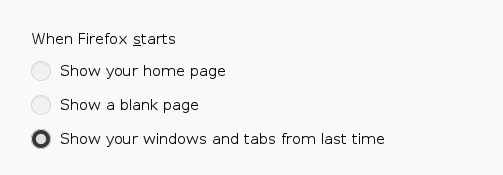
I tend to use the last option everywhere, to save/restore all my tabs on every platform. IMO, firefox is a bit confusing here, since "Show a blank page" and "Show your home page" don't imply that pinned tabs are saved at all, it implies that only a blank/home page shows up (which is not what happens).
Qutebrowser pinned tabs are more powerful in that they can be positioned anywhere in the tabbar, unlike in firefox. Here's my tabbar right now for example:

If I was to close non-pinned tabs, only (to emulate this behavior on startup, I would get this):

Which looses the implicit information that I had with some of the pinned tabs being on the left, and others being on the right.
If you would like to mirror firefox's "show windows from last time" option:
:set auto_save.session true
Because this behavior is present in firefox (and people are used to it), maybe we should add a setting such as auto_save.session.filter which could be set to pinned to only save pinned tabs (during auto-save). I don't think it's a good idea to have it on by default due to loosing information (perhaps this won't be a problem if #2898 is implemented well).
 jgkamat
on 13 Oct 2017
jgkamat
on 13 Oct 2017
^ that's exactly what I was looking for. Thanks @jgkamat
 ahraber
on 6 Jul 2018
ahraber
on 6 Jul 2018
I just learned that :session-save exists, with which I can save all the pins.
I don't want to auto-restore windows, just the pinned tabs.
Is there a way to automatically execute something like :session-load pins at startup., where pins is the name of the session only containing the pinned tabs I want?
Also +1 for the auto_save.session.filter to be implemented for only saving pinned tabs.
 erazemk
on 8 Apr 2020
erazemk
on 8 Apr 2020
Related issues
 ghost
·
3Comments
ghost
·
3Comments
 Darren-Haynes
·
3Comments
Darren-Haynes
·
3Comments
 jhultman
·
3Comments
jhultman
·
3Comments
 jmburgos
·
4Comments
The-Compiler
·
4Comments
jmburgos
·
4Comments
The-Compiler
·
4Comments
Most helpful comment
Hmm, I didn't know that this was a feature in firefox. Just for reference, here are the tab settings in firefox.
I tend to use the last option everywhere, to save/restore all my tabs on every platform. IMO, firefox is a bit confusing here, since "Show a blank page" and "Show your home page" don't imply that pinned tabs are saved at all, it implies that only a blank/home page shows up (which is not what happens).
Qutebrowser pinned tabs are more powerful in that they can be positioned anywhere in the tabbar, unlike in firefox. Here's my tabbar right now for example:
If I was to close non-pinned tabs, only (to emulate this behavior on startup, I would get this):
Which looses the implicit information that I had with some of the pinned tabs being on the left, and others being on the right.
If you would like to mirror firefox's "show windows from last time" option:
:set auto_save.session trueBecause this behavior is present in firefox (and people are used to it), maybe we should add a setting such as
auto_save.session.filterwhich could be set topinnedto only save pinned tabs (during auto-save). I don't think it's a good idea to have it on by default due to loosing information (perhaps this won't be a problem if #2898 is implemented well).