Quodlibet: Improve visibility of 'Stop After This Song' state
As far I can tell, the only way to view the state of 'Stop After This Song' is to click the 'Control' drop down menu and view the checkbox:
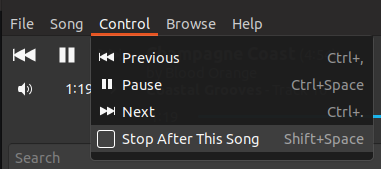
As it is, the setting is quickly toggled with 'shift + space', but you can't tell if you're toggling it on or off.
It'd be good if, when enabled, the status was visible on the main UI, without having to go into a menu.
'Stop After This Song: enabled' or a toggle icon that visibly conveyed the state would be great. The bottom bar could be a good place to put.

Apologies if this is has already been addressed, I did search.
 alanpaulprice
All 4 comments
Have you tried the _One Song_ repeat mode, from that area?
 declension
on 19 May 2019
declension
on 19 May 2019
I hadn't. It achieves my desire of 'Stop After This Song' with a visible status. Thanks for pointing it out!
A few thoughts on the UX:
- 'One Song' repeat mode and 'Stop After This Song' basically perform the same function.
- It feels a bit counter-intuitive to group 'One Song' as a repeat mode (you enable repeat to prevent further playback). When I first saw it listed, I was a bit puzzled about the difference between 'repeat this track' and 'one song'.
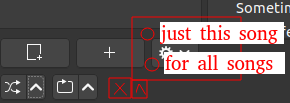
I feel like it could be more intuitive to remove the 'One Song' repeat mode and have an icon (adjacent to the shuffle and repeat), dedicated to 'Stop After This Song'. Maybe have the drop-down ^ icon toggle whether it is persistent (like the 'One Song' repeat mode) or have it last for only the current song (like 'Stop After This Song').
What it could look like:
alanpaulprice
on 19 May 2019
In QL version 3.7.1 (the version packaged in Debian 9), the UI in the bottom-left was a little different: the shuffle button had a submenu with the choices "In Order" and "One Song", and the repeat button did not have a submenu. And although the "In Order" and "One Song" options were connected to the shuffle button, they worked even with shuffle mode turned off.
At some point the shuffle button's submenu was changed to hold items actually related to shuffling ("Prefer higher rated" and "Random"), and "One Song" was moved into a new submenu attached to the repeat button. It was also changed to depend on repeat mode actually being enabled. There's no longer an "In Order" option like there used to be; it's just what you get when repeat mode is turned off.
I agree that the current UI (as of 4.2.1) is confusing — especially as someone coming from version 3.7.1 (when I upgraded from Debian 9 to 10). Until I found this page, I thought "One Song" was simply broken in the current QL, because I didn't realize I have to turn on repeat mode now. I'd expect repeat mode with "one song" sub-mode to play the same song again and again, not to play it once and then stop.
I rarely want to repeat songs, but I often want to switch between stopping after one song, and playing the whole list. That's now accomplished by toggling the repeat button on and off, which seems weird.
The bottom bar has plenty of space, so there isn't really a need to cram these options into a pop-up submenu. I'd suggest replacing the repeat button and its arrow submenu button with a horizontal array of four buttons:
- Play one song and then stop
- Play all songs in the list, then stop
- Repeat one song
- Repeat all songs
(These would work like radio buttons, where exactly one is selected at a time. Think of the left/center/right/justify alignment buttons in a word processor's toolbar.)
 Wyzard256
on 12 Oct 2019
Wyzard256
on 12 Oct 2019
'Stop After This Song' could also benefit from animation when toggled, preferably a distinct, short feedback for enabling and disabling.
 07416
on 28 May 2020
07416
on 28 May 2020
Related issues
 torotil
·
6Comments
torotil
·
6Comments
 Valeryan24
·
6Comments
Valeryan24
·
6Comments
 jeronimojoe
·
5Comments
jeronimojoe
·
5Comments
 smammy
·
3Comments
smammy
·
3Comments
 oxplot
·
5Comments
oxplot
·
5Comments
Most helpful comment
Have you tried the _One Song_ repeat mode, from that area?