We use the CDN on our site to reference QuillJS, but just this morning we started getting a 403 Forbidden on the following CDN URL:
 SqweeeRyan
All 29 comments
This is still happening.
 dodb
on 6 Sep 2020
dodb
on 6 Sep 2020
Same for me, can't access the CDN anymore
 Gameghostify
on 6 Sep 2020
Gameghostify
on 6 Sep 2020
Same issue here.
 zstra7
on 7 Sep 2020
zstra7
on 7 Sep 2020
same issue here.
 saralamuralikrishna
on 7 Sep 2020
saralamuralikrishna
on 7 Sep 2020
Was about to report this... Same here https://cdn.quilljs.com/1.3.6/quill.snow.css. I think is is TLS issue. On fifrefox i have 1.0 enabled and chrome, edge just 1.2. ON ff it works on others not
 misiektg86
on 7 Sep 2020
misiektg86
on 7 Sep 2020
Even the quilljs official site doesn't have access

 softspoiler
on 7 Sep 2020
softspoiler
on 7 Sep 2020
I have this problem only with the older version https://cdn.quilljs.com/1.2.0/quill.js
 prarimi
on 7 Sep 2020
prarimi
on 7 Sep 2020
same issue here.
i have this problem any version.
 yootaebong
on 8 Sep 2020
yootaebong
on 8 Sep 2020
I have spend lot of time from morning on this, finally found this issue, why is this happening, how will it be solved, any idea guys?
 HimanshuChugh2
on 8 Sep 2020
HimanshuChugh2
on 8 Sep 2020
This project seems to be abandoned. For now, I downloaded the js and css files and hosted on our own servers. Did a quick hot-fix over the weekend to change the links in production.
Long term, without further development and support, will be looking for something else I guess...
dodb
on 8 Sep 2020
So quilljs is dead?
HimanshuChugh2
on 8 Sep 2020
I solved this problem.
I hope it helps other people.
- Download Quill Project : https://github.com/quilljs/quill/releases
- Proceed with npm install in the project.
- Similarly npm run build
- Then you will be able to find it. The quill.js file inside the dist folder
- Use it
yootaebong
on 8 Sep 2020
I attached link as above but get an error for quill.js not found.
GET http://localhost:8100/node_modules/quill/dist/quill.js net::ERR_ABORTED 404 (Not Found)
 zenangrl
on 8 Sep 2020
zenangrl
on 8 Sep 2020
@zenangrl Did you build?
yootaebong
on 8 Sep 2020
@yootaebong yes. I did build.
zenangrl
on 8 Sep 2020
@zenangrl
The best way to do this is to open the folder path yourself and check it out.
First, check if there is a dist folder
Check if the file exists in it
yootaebong
on 8 Sep 2020
May be not the best solution, but I didn't have time, so I used an archived version https://web.archive.org/web/20200729093210/https://cdn.quilljs.com/1.3.7/quill.snow.css.
I manually downloaded it and linked to my project.
 kateboyko
on 8 Sep 2020
kateboyko
on 8 Sep 2020
Can anyone tell me how can i link Quilljs manually in my java spring boot project in eclipse, do i have to add a maven dependency or anything else?
please help
HimanshuChugh2
on 8 Sep 2020
The jsdeliver version: https://www.jsdelivr.com/package/npm/quill
 codeallthethingz
on 9 Sep 2020
codeallthethingz
on 9 Sep 2020
CDN is working well now
zenangrl
on 9 Sep 2020
Its still not working.
HimanshuChugh2
on 9 Sep 2020
It's working for me now (https://cdn.quilljs.com/1.3.6/quill.min.js) - however I have already moved the file to be hosted within my own CDN, so I'm no longer using this one.
SqweeeRyan
on 9 Sep 2020
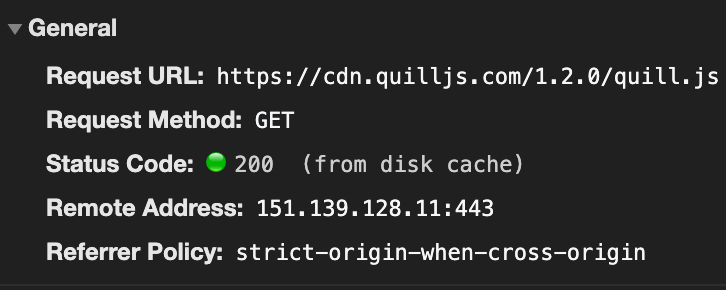
 Amit-Dagar
on 9 Sep 2020
Amit-Dagar
on 9 Sep 2020
The problem lies in the version 1.3.6( <script src="https://cdn.quilljs.com/1.3.6/quill.min.js"></script> ) after changing it to <script src="https://cdn.quilljs.com/1.3.5/quill.min.js"></script>
it works.
not sure as to why this is happening, if anyone knows please let us know
HimanshuChugh2
on 9 Sep 2020
There's other CDNs available, we're moving over to cloudflare's
https://cdnjs.com/libraries/quill/1.3.6
<script src="https://cdnjs.cloudflare.com/ajax/libs/quill/1.3.6/quill.min.js" integrity="sha512-3OiXhM6bvRST0JlpR++aDMUh4n9QETHJdKEZ4U2gpDtyS8ZZF3h0072MaPDbjg/Q9W8Ki7G36Ay8I3xoUosPFg==" crossorigin="anonymous"></script>
 ibarrajo
on 9 Sep 2020
ibarrajo
on 9 Sep 2020
There's other CDNs available, we're moving over to cloudflare's
https://cdnjs.com/libraries/quill/1.3.6
<script src="https://cdnjs.cloudflare.com/ajax/libs/quill/1.3.6/quill.min.js" integrity="sha512-3OiXhM6bvRST0JlpR++aDMUh4n9QETHJdKEZ4U2gpDtyS8ZZF3h0072MaPDbjg/Q9W8Ki7G36Ay8I3xoUosPFg==" crossorigin="anonymous"></script>
is there a way to get updates from QuillJs about QuillJs via mail or other ?
HimanshuChugh2
on 9 Sep 2020
Guys, I was experiencing the same issue. I found that when I used my browser in incognito mode or as a guest, the issue went away.
I suspect what is happening is that the server with QuillJS is flagging your account because Google may have flagged it as having some security issue which is causing the Forbidden 403.
I'm resetting all my Google passwords to see if putting things in good standing will resolve the issue.
UPDATE: Fixing all of my Google passwords fixed the issue! Make sure your google account doesn't have any security issues.
 leehaber
on 9 Sep 2020
leehaber
on 9 Sep 2020
No, google isn't going to give a 403 error due to your passwords. The problem was already fixed, so likely your chrome had just cached the 403 error and using incognito bypassed the cache.
 groupboard
on 11 Sep 2020
groupboard
on 11 Sep 2020
the cdn is available. https://www.bootcdn.cn/quill/
for example
<link href="https://cdn.bootcdn.net/ajax/libs/quill/1.3.6/quill.snow.css" rel="stylesheet">
 leilinen
on 1 Oct 2020
leilinen
on 1 Oct 2020
Related issues
 Kivylius
·
3Comments
Kivylius
·
3Comments
 scottfr
·
3Comments
scottfr
·
3Comments
 aletorrado
·
3Comments
aletorrado
·
3Comments
 eamodio
·
3Comments
eamodio
·
3Comments
 splacentino
·
3Comments
splacentino
·
3Comments