Quill: Quill 2.0.0-dev.3 is broken on iOS with Chinese IME
Steps for Reproduction
- Visit https://codepen.io/intptr/full/yQPdxW
- Switch to Chinese IME
- Input something
Expected behavior:
Everything works fine
Actual behavior:
Editor is broken
Platforms:
Safari on iOS 11 / 12
Version:
2.0.0-dev.3
 lixiaoyan
All 9 comments
Actual behavior supplement:
Can't delete character after input, quill.getContents get empty content.
I think it cause by safari's insert behavior, here is how I found the problem:
First, add some logs in quill constructor:
this.root.addEventListener('compositionstart', () => {
  console.log('compositionstart')
})

this.root.addEventListener('compositionend', () => {
  console.log('compositionend')
})

let logObserver = new MutationObserver((mutations) => {
  console.log(mutations)
})

logObserver.observe(this.root, {
  attributes: true,
  characterData: true,
  characterDataOldValue: true,
  childList: true,
  subtree: true,
})
Then input one Chinese character in editor.
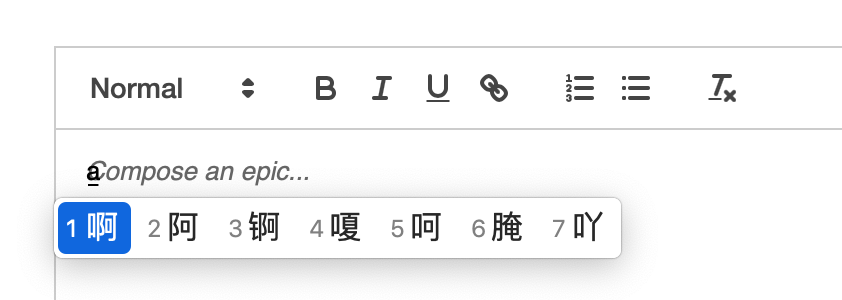
Chrome
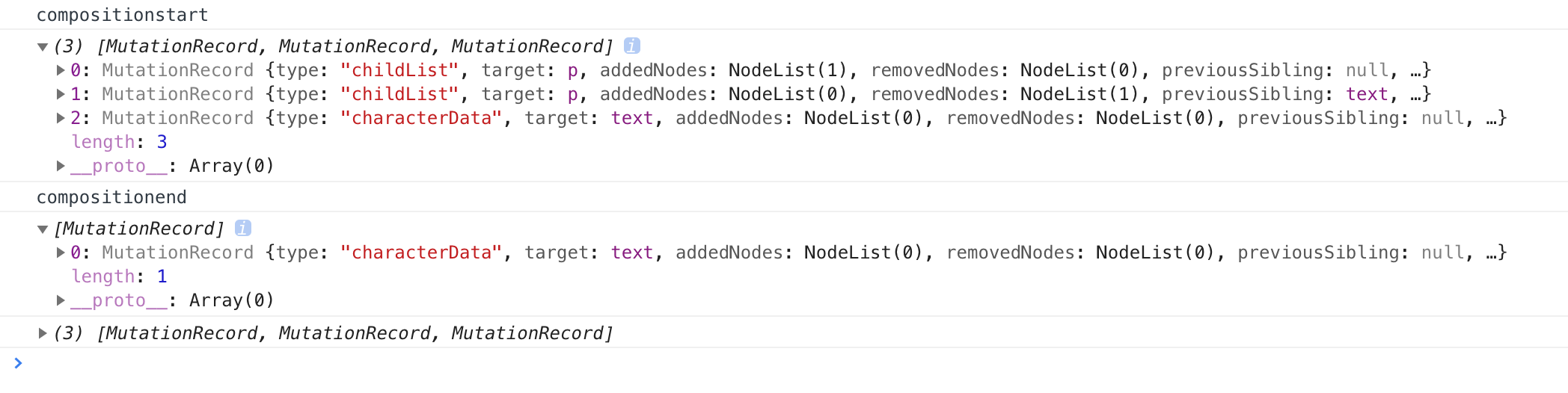
It's what we expect, when compositionend trigger, changes content will store in mutations.
Safari
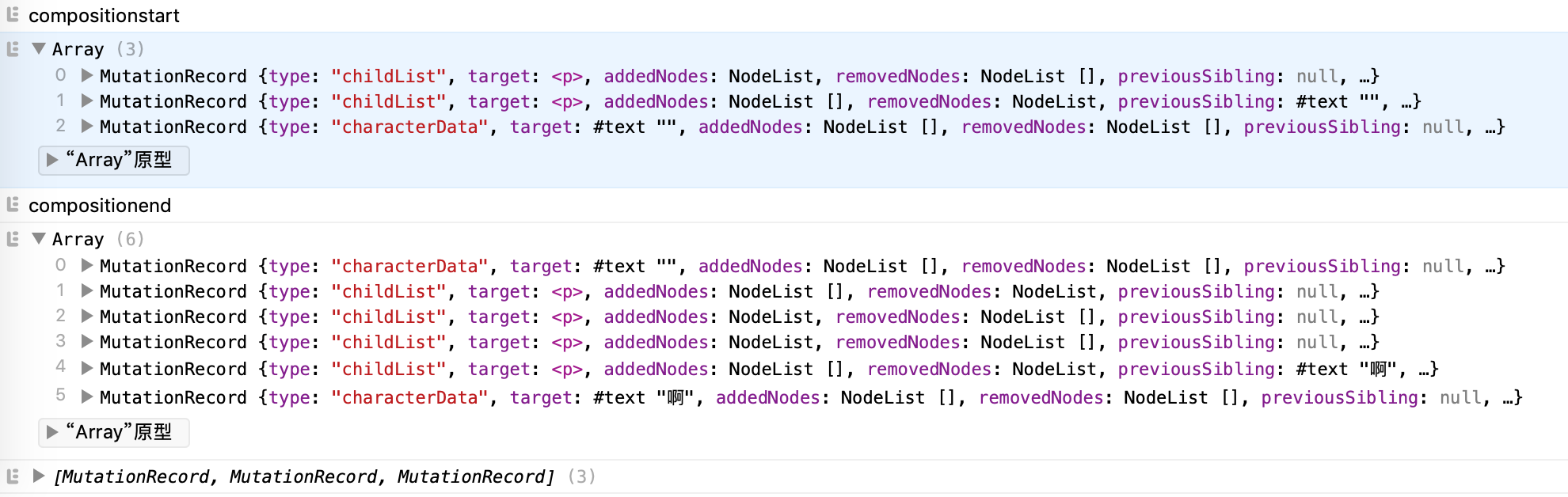
There are two different:
- In mutations before
compositionend,characterDatatarget's content is empty. - In mutations after
compositionend, safari do few things: 1) remove text content in step 1. 2) add a<br>tag. 3) insert user input before<br>. 4) remove<br>tag.
So when compositionend trigger, quill can not get correct inputs. I don't know why safari works like that, and could not found any documents after search.
I add a patch in core/selection.js:
  handleComposition() {
    this.root.addEventListener('compositionstart', () => {
      this.composing = true;
      this.scroll.batchStart();
    });
    this.root.addEventListener('compositionend', () => {
      setTimeout(() => { // <- add this line
        this.scroll.batchEnd();
        this.composing = false;
        if (this.cursor.parent) {
          const range = this.cursor.restore();
          if (!range) return;
          setTimeout(() => {
            this.setNativeRange(
              range.startNode,
              range.startOffset,
              range.endNode,
              range.endOffset,
            );
          }, 1);
        }
      }, 0) // <- and this
    });
  }
This patch delay this.scroll.batchEnd() execution after the second time observe callback execute, then quill will get the correct inputs.
I don't know if it will break something, and is it the right way to fix? @jhchen
 chloerei
on 5 Dec 2018
chloerei
on 5 Dec 2018
@chloerei Thanks, your solution helps me a lot.
When I typing with Chinese IME in a empty line, and press delete key to delete all composing, a new unexpected line will appear under current line.
After I merge your solution, it was fixed.
But another problem still alive, if there's a line above the typing empty line, when I press delete key durring composing, the current line with composing chars will be inserted into the start of above line.
Screen shot for Steps
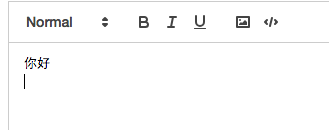
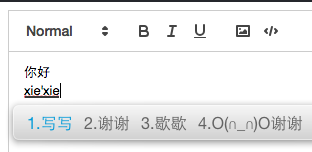
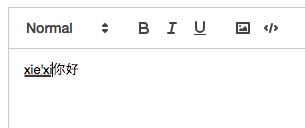
Could you have any ideas ?
THX~
 soccerloway
on 8 Dec 2018
soccerloway
on 8 Dec 2018
@soccerloway Yes it's broken, but I'm going to ProseMirror witch does not have IME problem...
chloerei
on 28 Dec 2018
@chloerei Thanks, your solution helps me a lot.
When I typing with Chinese IME in a empty line, and pressdeletekey to delete all composing, a new unexpected line will appear under current line.
After I merge your solution, it was fixed.
But another problem still alive, if there's a line above the typing empty line, when I pressdeletekey durring composing, the current line with composing chars will be inserted into the start of above line.
Screen shot for Steps
Could you have any ideas ?
THX~
I have the same issue, very annoying
 lyuehh
on 15 Feb 2019
lyuehh
on 15 Feb 2019
@chloerei Thanks, your solution helps me a lot.
When I typing with Chinese IME in a empty line, and pressdeletekey to delete all composing, a new unexpected line will appear under current line.
After I merge your solution, it was fixed.
But another problem still alive, if there's a line above the typing empty line, when I pressdeletekey durring composing, the current line with composing chars will be inserted into the start of above line.
Screen shot for Steps
Could you have any ideas ?
THX~
I found a solution, add
      // change bindings from const to let
      if (evt.key === 'Backspace' && evt.which === 229) {
        bindings = [];
      }
to modules/keyboard.js listen() around line 105, will fix this issue.
lyuehh
on 15 Feb 2019
I investigate this issue, find in v1.3.6, the logic in keyboard.js was
      let bindings = (this.bindings[which] || []).filter(function(binding) {
        return Keyboard.match(evt, binding);
      });
but in v2.0.0-dev3, the code change to
      const bindings = (this.bindings[evt.key] || []).concat(
        this.bindings[evt.which] || [],
      );
When in cjk mode, if the input method pop up exists, the evt.key was original key, but evt.which was 229, which will hand by inpout method, not by the editor, so change back to
const bindings = this.bindings[evt.which] || [];
will fix this problem, hope this will help who trouble with this problem.
lyuehh
on 17 Feb 2019
@lyuehh
Hello, I also have a problem.
When I format a line by using quill.format('indent', 1) --- just like below
<p class="ql-indent-1"><br></p>
And, I input a Chinese e. g. "你好", I get a right result in Chrome
<p class="ql-indent-1">你好</p>
But I get a wrong result in Safari
<p>你好</p>
It lost the class 'ql-indent-1' format. I also find the MutationObserver print diffrently, but I have no solution.
Do you have any idea?
 boring2
on 15 May 2019
boring2
on 15 May 2019
@lyuehh
Hello, I also have a problem.
When I format a line by using quill.format('indent', 1) --- just like below
<p class="ql-indent-1"><br></p>And, I input a Chinese e. g. "你好", I get a right result in Chrome
<p class="ql-indent-1">你好</p>But I get a wrong result in Safari
<p>你好</p>It lost the class 'ql-indent-1' format. I also find the MutationObserver print diffrently, but I have no solution.
Do you have any idea?
No idea, quill 2.0.0 is not finished, don't use this version.
lyuehh
on 15 May 2019
I think it is not quill 2.0.0 problem. Maybe it’s Safari’s problem.
BTW, 谢谢~
在 2019年5月15日,17:28,lyuehh <[email protected] notifications@github.com> 写道:
@lyuehh https://github.com/lyuehh
Hello, I also have a problem.When I format a line by using quill.format('indent', 1) --- just like below
And, I input a Chinese e. g. "你好", I get a right result in Chrome
你好
But I get a wrong result in Safari
你好
It lost the class 'ql-indent-1' format. I also find the MutationObserver print diffrently, but I have no solution.
Do you have any idea?
No idea, quill 2.0.0 is not finished, don't use this version.
—
You are receiving this because you commented.
Reply to this email directly, view it on GitHub https://github.com/quilljs/quill/issues/2405?email_source=notifications&email_token=ACAZPWAHDHURW4OY2L2WMBTPVPJULA5CNFSM4GFMICWKYY3PNVWWK3TUL52HS4DFVREXG43VMVBW63LNMVXHJKTDN5WW2ZLOORPWSZGODVOCQZA#issuecomment-492578916, or mute the thread https://github.com/notifications/unsubscribe-auth/ACAZPWB276MGC2N3L4INV73PVPJULANCNFSM4GFMICWA.
boring2
on 15 May 2019
Related issues
 sferoze
·
3Comments
sferoze
·
3Comments
 lustoykov
·
3Comments
lustoykov
·
3Comments
 lastmjs
·
3Comments
lastmjs
·
3Comments
 ouhman
·
3Comments
ouhman
·
3Comments
 aletorrado
·
3Comments
aletorrado
·
3Comments
Most helpful comment
Actual behavior supplement:
Can't delete character after input,
quill.getContentsget empty content.I think it cause by safari's insert behavior, here is how I found the problem:
First, add some logs in quill constructor:
Then input one Chinese character in editor.
Chrome
It's what we expect, when
compositionendtrigger, changes content will store in mutations.Safari
There are two different:
compositionend,characterDatatarget's content is empty.compositionend, safari do few things: 1) remove text content in step 1. 2) add a<br>tag. 3) insert user input before<br>. 4) remove<br>tag.So when
compositionendtrigger, quill can not get correct inputs. I don't know why safari works like that, and could not found any documents after search.I add a patch in
core/selection.js:This patch delay
this.scroll.batchEnd()execution after the second time observe callback execute, then quill will get the correct inputs.I don't know if it will break something, and is it the right way to fix? @jhchen