Quill: align left button does not appear on toolbar
Steps for Reproduction
writing custom editorOption such as below:
editorOption: {
modules: {
toolbar: [
[{ 'align': 'left'}, {'align': 'center'}, {'align': 'right'}, {'align': 'justify'}]
],
Expected behavior:
all four align icons available
Actual behavior:
only align: center, right and justify available
align left option missing
 gileneusz
All 8 comments
Please take a look at the font size example in https://quilljs.com/docs/modules/toolbar/#container
 jhchen
on 26 Feb 2018
jhchen
on 26 Feb 2018
I'm sorry but I want to have all buttons to choose on editor toolbar, not as a menu to choose. I tried:
[{ 'align': false}, {'align': 'center'}, {'align': 'right'}, {'align': 'justify'}]
with no luck again
gileneusz
on 26 Feb 2018
In that case [{ 'align': null}, {'align': 'center'}, {'align': 'right'}, {'align': 'justify'}] should work. Ex. https://codepen.io/anon/pen/JpeKbL
jhchen
on 27 Feb 2018
That's it! Thank you for help. My small suggestion - your documentation is great, but I was unable to find this configuration on toolbar section. Maybe it will be good idea to add this example to documentation
gileneusz
on 27 Feb 2018
What you tried false should have worked but I didn't have time then to dig in why null does but false did not till now. I'll reopen this as a small change to make in 2.0.
jhchen
on 12 Mar 2018
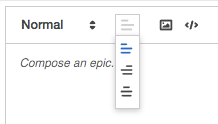
In case any people need to have the dropdown for alignment, an empty string is for left alignment:
[{ 'align': ['', 'right', 'center']}],
 AugustusZ
on 17 May 2018
AugustusZ
on 17 May 2018
with respect....why is left represented by null?
What if I want to explicitly align left (in an interface that is RTL)
The problem is that if the editor is RTL, picking left align doesn't do anything, since it's interpreting left as "no alignment", trusting that left is a default. Is there not a way to specify align left, and have it actually do an explicit text-align:left ?
 mikepictor
on 8 Jan 2019
mikepictor
on 8 Jan 2019
with respect....why is left represented by null?
What if I want to explicitly align left (in an interface that is RTL)The problem is that if the editor is RTL, picking left align doesn't do anything, since it's interpreting left as "no alignment", trusting that left is a default. Is there not a way to specify align left, and have it actually do an explicit text-align:left ?
Worked for me:
In configuration:
var Align = Quill.import('attributors/style/align');
var Icons = Quill.import('ui/icons');
Icons.align['left'] = Icons.align['']; // set icon for 'left' option, otherwise it's replaced with 'undefined' text
Align.whitelist = ['left', 'center', 'right', 'justify']; // add explicit 'left' option
Quill.register(Align, true);
In toolbar:
[{'align': ['left', 'center', 'right', 'justify']}]
 haoksam
on 23 May 2019
haoksam
on 23 May 2019
Related issues
 visore
·
3Comments
visore
·
3Comments
 DaniilVeriga
·
3Comments
DaniilVeriga
·
3Comments
 kheraud
·
3Comments
kheraud
·
3Comments
 splacentino
·
3Comments
splacentino
·
3Comments
 eamodio
·
3Comments
eamodio
·
3Comments
Most helpful comment
with respect....why is left represented by null?
What if I want to explicitly align left (in an interface that is RTL)
The problem is that if the editor is RTL, picking left align doesn't do anything, since it's interpreting left as "no alignment", trusting that left is a default. Is there not a way to specify align left, and have it actually do an explicit text-align:left ?