Quill: Error: The given range isn't in document
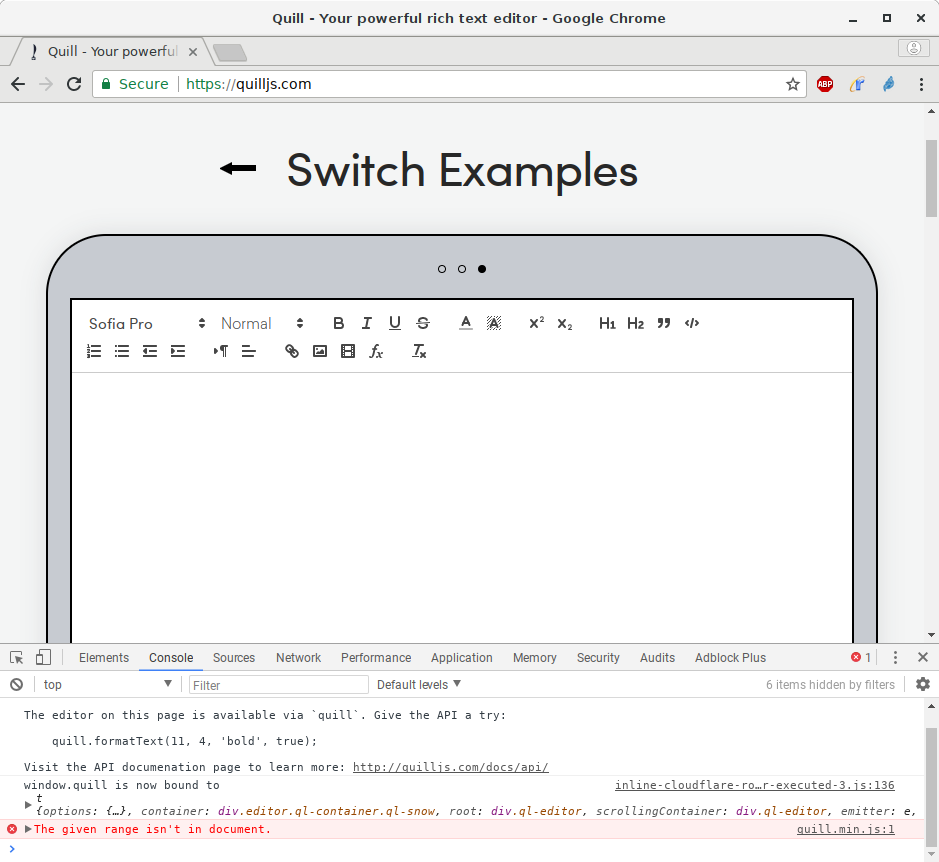
I noticed an annoying The given range isn't in document error during text editing in Chrome. I found one way to reproduce the problem in the Quill demo on your website so I guess this means this is a problem in Quill and not in my code.
Steps for Reproduction
- Visit quilljs.com and switch to the third demo (The one where you can set a text color).
- Click into the text area to focus the editor.
- Select all text with
Ctrl-A. - Remove selected text with
Del. The document must be completely empty now. - Select a text color with the color picker in the toolbar.
- Type multiple lines of text (Can't be reproduced with just one line).
- Select all content again with
Ctrl-A. - Type new text.
Expected behavior:
The new text must replace the selected text.
Actual behavior:
The selected text is removed, the error message The given range isn't in document is thrown and the editor looses the focus.
Platforms: Chrome 63.0.3239.132 on Debian Linux 9.3
Version: 1.3.5
 kayahr
All 42 comments
Thank you for the detailed report -- I was able to reproduce on Mac + Chrome as well
 jhchen
on 4 Feb 2018
jhchen
on 4 Feb 2018
I'm getting the same error under different circumstances. Quill's setSelection method seems to no be acting properly. Not sure if my case falls within the same umbrella as this issue but since the thrown error is identical I thought I'd share it here. More details on Stack Overflow.
 nadavrt
on 8 Feb 2018
nadavrt
on 8 Feb 2018
I'm having the same issue using Quill via react-quill. As soon as I wrap the onChange in a local callback I'm getting the error when I select all using Ctrl+A and cutting it. Everything works fine if I delete the selected text using Del or Backspace.
Here's my setup:
// RichTextEditor.ts
import {trim} from 'lodash';
import * as Quill from 'quill';
import {StringMap} from 'quill';
import * as React from 'react';
import ReactQuill from 'react-quill';
import {UnprivilegedEditor} from 'react-quill';
import 'react-quill/dist/quill.snow.css';
export default class RichTextEditor extends React.Component<IRichTextEditorProps, {}> {
private handleContentChange = (
content: string,
delta: Quill.Delta,
source: Quill.Sources,
editor: UnprivilegedEditor
): void => {
const {onChange} = this.props;
// don't trigger updates if the source of changes is not the user
if (!onChange || source !== 'user') {
return;
}
// check if the editor has any valid content
const text = trim(editor.getText());
if (!text) {
content = '';
}
onChange(content);
};
/**
* Render current component
*
* @return {JSX.Element}
*/
public render(): JSX.Element {
const {placeholder, value} = this.props;
return (
<ReactQuill
placeholder={placeholder}
value={value}
onChange={this.handleContentChange}
/>
);
}
}
Types are imported from a file that looks like this:
import {ComponentProps} from 'react-quill';
type RichTextEditorChangeHandler = (value: string) => void;
interface IRichTextEditorProps extends Pick<ComponentProps, 'placeholder' | 'value'> {
onChange?: RichTextEditorChangeHandler;
}
Everything works if I don't wrap the onChange handling in a local method and simply pass it in as onChange={onChange}.
The error is being thrown from the Selection class:

 codeaid
on 13 Feb 2018
codeaid
on 13 Feb 2018
I'm getting the same error when using mobx to observe the entire delta object returned by the editor.
````
@observer
export class FormPage extends React.Component {
@observable comment;
render(){
return <ReactQuill value={comment} onChange={this._onChange}/>
}
_onChange = (content, delta, source editor)=> {
this.comment = editor.getContent()
}
}
````
 laukaichung
on 4 Mar 2018
laukaichung
on 4 Mar 2018
I experienced the same issue when text starts with Embed blot and Select all (Ctrl+A) then start typing
http://recordit.co/l4KSmQppoM
 volser
on 5 Mar 2018
volser
on 5 Mar 2018
Any updates or fix for this? I'm also having the same problem using ReactQuill with custom toolbar handlers. It appears to be working fine if I only use the mention custom toolbar together with combination of generic toolbar buttons, but when I click the markImportant (which only updates the observable) it throws an error same with what others experienced above:
quill.js:3145 The given range isn't in document.
setNativeRange @ quill.js:3145
setRange @ quill.js:3166
focus @ quill.js:2879
focus @ quill.js:1189
Here's my code:
render(): {
return (
<ReactQuill ref={this.onEditorRendered}
theme="snow"
defaultValue={defaultValue}
onChange={this.onHandleChange}
modules={this.editorModules()}
placeholder={placeholder}/>
);
}
private editorModules = (): any => {
return {
toolbar: {
container: "#" + this.id,
handlers: {
markImportant: this.markImportant,
insertMention: this.insertMention
}
},
keyboard: {
bindings: this.keyboardBindings
}
}
};
private insertMention = (): void => {
const data = {
name: 'John Doe',
id: '1'
};
const range = this.quillEditor.selection.savedRange;
if (!range || range.length != 0) return;
const position = range.index;
this.quillEditor.insertEmbed(position, 'mention', data, Quill.sources.API);
this.quillEditor.insertText(position + 1, ' ', Quill.sources.API);
this.quillEditor.setSelection(position + 2, Quill.sources.API);
};
private markImportant = (): void => {
this.markedPriority = !this.markedPriority;
this.props.markPriority(this.markedPriority);
};
 abelski21
on 7 Mar 2018
abelski21
on 7 Mar 2018
Okay, so I was able to fix it by saving the editor ref to a private variable within componentWillMount(), then it should only render once that private variable is not null. So I guess that solves the issue on re-rendering the editor when pressing mention or important button in the toolbar. But I hope we can still address this issue, it's a bit annoying every time we want to update an observable prop and quill needs to re-render.
abelski21
on 26 Mar 2018
I solve this issue by caching the modules props, instead of keep creating a new instance during each render.
Before:
<ReactQuill
        modules={{...}}
        ...
      />
After:
<ReactQuill
        modules={this.modules}
        ...
      />
 HeGanjie
on 8 Apr 2018
HeGanjie
on 8 Apr 2018
@jhchen any updates?
volser
on 19 Apr 2018
@jhchen @kayahr
I found the bug always occurring when text is null.
I rewrite the paste function to fix it.
// 修复粘贴时编辑器跳动的bug
Clipboard.prototype.onPaste = function(e) {
  if (e.defaultPrevented || !this.quill.isEnabled()) return;
  // fix quill's bug on chrome: given range isn't in document
  if (!this.quill.getText().trim()) {this.quill.setText(' ', Quill.sources.API);}
  try {
    let range = this.quill.getSelection();
    let delta = new Delta().retain(range.index);
    let scrollTop = this.quill.scrollingContainer.scrollTop;
    // this.container.focus();  // 源代码中此句会导致粘贴时页面跳动或闪动的bug,很hack的解决方案->原型覆盖
    this.quill.selection.update(Quill.sources.SILENT);
    setTimeout(() => {
      delta = delta.concat(this.convert()).delete(range.length);
      this.quill.updateContents(delta, Quill.sources.USER);
      this.quill.focus();
    }, 1);
  } catch (e) {
    console.log(e);
  }
}
 MidaAiZ
on 27 Apr 2018
MidaAiZ
on 27 Apr 2018
You can't assign a prop to value directly. You must assign it to state first. If you dont do this, the value of content will be always the prop value.
class RichEditor extends Component {
    static propTypes = {
        content: PropTypes.string,
    }

    componentDidMount() {
        this.setState({
            text: this.props.content,
        })
    }

    state = {
        text: '',


    handleChange = (value) => {
        this.setState({ text: value })
    }

    render() {
        return (
            <ReactQuill
                value={this.state.text}
                onChange={this.handleChange}
            />
        )
    }
}

RichEditor.defaultProps = {
    content: '',
}

export default RichEditor
 antoniologa
on 7 May 2018
antoniologa
on 7 May 2018
I've stumbled upon this problem as well, or at least very similar.
I managed to track the down the problem and workaround it. On my case I created a custom embed and applied some style to it.
When you select the embed and type over it, there seems to be a change on quill to adjust styling or something like that.
What I did was to apply the styling to the underlying tag instead of the main one. This may not work for this case since my embed is immutable and has an editable wrapper to handle changes attempts (default Quill construction for this kind of blots).
Here's my use case:
https://codepen.io/ivanalejandro0/pen/GdOBjQ
To solve this problem I just had to change:
.quill-mention {
to
.quill-mention > span {
 ivanalejandro0
on 9 May 2018
ivanalejandro0
on 9 May 2018
PING
 m19c
on 20 Jun 2018
m19c
on 20 Jun 2018
@jhchen when are you planning to release this fix?
abelski21
on 19 Jul 2018
@abelski21 I was able to fix this issue the same way, with this dirty hack(I'm using react-quill, but I think, something similar is possible for main library, cause it uses internal Quill objects via react ref):
<ReactQuill {...{
  ref: (node) => {
    if (!node) return
    const originalSetRange = node.editor.selection.__proto__.setNativeRange.bind(node.editor.selection)
    node.editor.selection.__proto__.setNativeRange = (startNode, startNodeOffset, endNode, endNodeOffset) => {
      if (
        node.editor.root.contains(startNode) &&
        node.editor.root.contains(endNode)
        ) {
          originalSetRange(startNode, startNodeOffset, endNode, endNodeOffset)
        }
      }
    },
...
Ofcourse, this is only a temporarily solution.
 DeyLak
on 24 Jul 2018
DeyLak
on 24 Jul 2018
@DeyLak I've tried your solution and I don't see the error anymore although when the component was re-rendered the range position is always at the start. Might need to add something at the componentWillUnmount()?

abelski21
on 25 Jul 2018
@abelski21 I think, this is another problem, that won't be fixed by @jhchen commit. He just added some check for updating cursor position, so if the condition is not met, it skips the update. I haven't solved this yet, but I ended up making the quill component uncontrolled, it helped for unnecessary re-renders.
DeyLak
on 25 Jul 2018
FYI, I was able to fix this by using setState and not a local this.handleChange method like I was using before. Had to add new state for content and manually set the content onto my other state element when something else on the form was updated.
// ON THE COMPONENT
<ReactQuill
value={this.state.content}
onChange={value => {
   this.setState({ content: value }, () => {
    this.handleChange();
  });
}}
/>
// AND THEN IN MY LOCAL HANDLECHANGE FUNCTION
if (e === undefined && this.state.content) {
      // Also have to set content cause of quill library bug
      let emailTemplate = this.state.emailTemplate;
      emailTemplate['content'] = this.state.content;
      this.setState({ emailTemplate });
      return;
 hlyford
on 31 Jul 2018
hlyford
on 31 Jul 2018
Also have the same message using pasteHTML with a large text containing a embed image:
The given range isn't in document.
setNativeRange @ app-features-admin-_core-error-admin-error-module~app-features-admin-admin-activity-admin-activity-a~b97c2df6.js:3149
setRange @ app-features-admin-_core-error-admin-error-module~app-features-admin-admin-activity-admin-activity-a~b97c2df6.js:3170
setSelection @ app-features-admin-_core-error-admin-error-module~app-features-admin-admin-activity-admin-activity-a~b97c2df6.js:1487
dangerouslyPasteHTML @ app-features-admin-_core-error-admin-error-module~app-features-admin-admin-activity-admin-activity-a~b97c2df6.js:8906
pasteHTML @ app-features-admin-_core-error-admin-error-module~app-features-admin-admin-
@jhchen should we re-open this one?
 Toub
on 2 Aug 2018
Toub
on 2 Aug 2018

me too
 ycjcl868
on 10 Aug 2018
ycjcl868
on 10 Aug 2018
I have the same problem when using Angular and PrimeNG UI library. The error is occurring however only when Quill editor is being used in a modal dialog. The error is occurring in this function of the PrimeNG wrapper for Quill editor.
    Editor.prototype.writeValue = function (value) {
        this.value = value;
        if (this.quill) {
            if (value)
                this.quill.pasteHTML(value);
            else
                this.quill.setText('');
        }
    };
 evonox
on 12 Sep 2018
evonox
on 12 Sep 2018
In my case, I was able to solve this issue (at least in Chrome 69) by performing the update asynchronously:
const selection = quill.getSelection();
setImmediate(() => {
  quill.setContents(delta);
  quill.setSelection(selection);
});
I don't know if this causes issues in other browsers or environments, and literally just now figured this out. In my case, I have a custom React wrapper around Quill which may periodically (but not too frequently) receive an updated value of the editor.
 JoshuaToenyes
on 26 Sep 2018
JoshuaToenyes
on 26 Sep 2018
@evonox I'm having the same issue. Did you find a solution? NOTE: oddly, i don't get the message the first time, but all subsequent times. I'm also using a NgPrime modal window and editor. importing through Angular-cli
 fhinchey
on 30 Oct 2018
fhinchey
on 30 Oct 2018
using this library via react-quill, i ended up switching to uncontrolled component which helped
 goofballLogic
on 5 Nov 2018
goofballLogic
on 5 Nov 2018
Also have the same message using pasteHTML with a large text containing a embed image:
The given range isn't in document.
setNativeRange @ app-features-admin-_core-error-admin-error-module~app-features-admin-admin-activity-admin-activity-a~b97c2df6.js:3149
setRange @ app-features-admin-_core-error-admin-error-module~app-features-admin-admin-activity-admin-activity-a~b97c2df6.js:3170
setSelection @ app-features-admin-_core-error-admin-error-module~app-features-admin-admin-activity-admin-activity-a~b97c2df6.js:1487
dangerouslyPasteHTML @ app-features-admin-_core-error-admin-error-module~app-features-admin-admin-activity-admin-activity-a~b97c2df6.js:8906
pasteHTML @ app-features-admin-_core-error-admin-error-module~app-features-admin-admin-
@jhchen should we re-open this one?
I'm having this problem, too.
 ddzy
on 20 Nov 2018
ddzy
on 20 Nov 2018
Had the same problem and fixed it by not using the 'value' prop on the editor, but rather the 'defaultValue', which is apparently unmanaged to some extent. Using 'react-quill', fyi. Hope it helps.
 <ReactQuill
            theme={'snow'}
            onChange={this.props.onChange}
            defaultValue={this.state.text}
            modules={ReactQuillEditor.modules}
            formats={ReactQuillEditor.formats}
            placeholder={'Write something...'}
        />
 rw3iss
on 19 Dec 2018
rw3iss
on 19 Dec 2018
using this library via react-quill, i ended up switching to uncontrolled component which helped
Hi,
i am using react- quill but i am encountering this issue . how did you resolve it?
 paigeflourin
on 13 Jan 2019
paigeflourin
on 13 Jan 2019
me, too i have that problem.
how can i solve this problem?
Please help me
 vajin1125
on 13 Jan 2019
vajin1125
on 13 Jan 2019
zenoamaro/react-quill#309 - my solutions to Quill problems are at the bottom.
 MateuszKrazek
on 20 Mar 2019
MateuszKrazek
on 20 Mar 2019
Ping to this please. It's really annoying.
 semoal
on 5 May 2019
semoal
on 5 May 2019
Fixed it in Angular 7 by adding below code.
@ViewChild('editor') editor: Editor;
setTimeout(() => {
this.editor.writeValue(data);
this.editor.quill.setSelection(null, data.length, null);
}, 100);
 nithisathish
on 14 May 2019
nithisathish
on 14 May 2019
@jhchen why is this issue closed if it was merged in develop (the unstable version of Quill as far as I understand)? Can you please offer a solution for the 1.3.6 stable version? Or do an intermediate release?
IMHO the fix you have committed doesn't seem to be a breaking change and it can easily be a minor bump.
 andrei-cacio
on 17 May 2019
andrei-cacio
on 17 May 2019
I wrapped the <ReacQuill/> component within a <div> container, and it worked
<div name="desciption-container">
   <ReactQuill
          defaultValue={this.state.description}
          onChange={this.handleDescriptionChange}
   />
</div>
 andresbuenob
on 25 Jun 2019
andresbuenob
on 25 Jun 2019
Fixed it in Angular 7 by adding below code.
@ViewChild('editor') editor: Editor;
setTimeout(() => {
this.editor.writeValue(data);
this.editor.quill.setSelection(null, data.length, null);
}, 100);
Where do you get the Editor class from?
 nfgallimore
on 14 Oct 2019
nfgallimore
on 14 Oct 2019
I had the same error and none of the given solutions worked for me.
I was using a controlled editor using antd's form component.
Here is the way we use our Wysiwyg component:
<Wysiwyg
    ref={WysiwygRef}
    platform={platform}
    fieldId="campaign_description"
    label={t('description')}
    form={form}
    initialValue={description}
    counterWithTag={true}
    required={false}
    disabled={isCampaignInactive}
    accentColors={accentColors}
    allowSizes={false}
    onChange={this.checkForChange}
 />
Here is the checkForChange func:
checkForChange = value => {
    const description = this.getDescription(this.state.contentLang);
    if(!this.state.changeHasHappened && value != description){
      this.setState({ changeHasHappened: true )}
    }
  };
Removing setState from the checkForChange function fixed the error, not sure why, but now everything works fine.
 collinpage
on 27 Nov 2019
collinpage
on 27 Nov 2019
There are probably many ways to get to this error, but in my case I was initiating the Quill editor with value null until the state has the value. Rendering Quill only when I have a non-null value solves my case.
 harrisonlo
on 13 Dec 2019
harrisonlo
on 13 Dec 2019
I'm refactoring a code base where Quill is used, and I found out the previous engineer who worked on it encountered the same issue and fixed it with the below code:
let valueProps = { value };
if (Ramda.equals(value, quill.getContents()) {
  valueProps = {};
}

<Quill {...valueProps} />
I don't know why it works, but it does. Probably it's switching from controlled to uncontrolled text fields, avoiding to set the problematic value.
 FezVrasta
on 17 Mar 2020
FezVrasta
on 17 Mar 2020
Using DefaultValue instead of value should have this issue fixed. But defaultValue would make some thing complicated in my case. Since the error only happens when the delta is null or empty, I use a minimal delta object if the initial value is null:
const Editor = (props)=>{
  return <Quill value={props.delta || {ops: []}}/>
}
It hasn't had any issues so far.
laukaichung
on 22 Jun 2020
Friends, the error that occurs is when you have a styles in the format. The solution I found is that if you select the text and write a new one, it is to eliminate the format of the current selection. To do this, I validated with the following code:
` mounted(){
window.addEventListener("keypress", e => {
var selection = this.$refs.myQuillEditor.quill.getSelection();
if(selection.index === 0 && selection.length>0){
this.$refs.myQuillEditor.quill.removeFormat(selection.index,selection.length);
}
});
},`
 evious
on 9 Jul 2020
evious
on 9 Jul 2020
I am using ngx-quill. After implement quill in a modal, the first everything went well.
After I closed the modal and reopen it, I can only type one letter then the quill lost focus for no reason.
The only thing I knew about right now is :
onContentChanged has been trigged 2 times
Does anyone have any issue when using ngx-quill in a modal?
 caok2709
on 9 Sep 2020
caok2709
on 9 Sep 2020
Error: The given range isn't in document is the error I saw.
Tried the solution above but didn't work
caok2709
on 9 Sep 2020
Friends, the error that occurs is when you have a styles in the format. The solution I found is that if you select the text and write a new one, it is to eliminate the format of the current selection. To do this, I validated with the following code:
I had the same problem and it occurred when formatting text as a link.
how i solved it:
this.quill.insertText((range) ? range.index : 0, input.value, 'user');
        this.quill.insertText((range) ? range.index + input.value.length : input.value.length, ' ', 'user');
        this.quill.setSelection((range) ? range.index : 0, input.value.length);
        this.quill.format('linkInsert', input.value);
Basically, before formatting, I added an extra space after the text that I was going to format. I then selected the inserted text without the extra space, formatted it and then set the cursor at the end of the text:
        setTimeout(() => {
          this.quill.setSelection(this.quill.getLength(), 0, 'silent');
        }, 0);
 roymilder
on 26 Oct 2020
roymilder
on 26 Oct 2020
Related issues
 sferoze
·
3Comments
sferoze
·
3Comments
 Softvision-MariusComan
·
3Comments
Softvision-MariusComan
·
3Comments
 lustoykov
·
3Comments
lustoykov
·
3Comments
 aletorrado
·
3Comments
aletorrado
·
3Comments
 emanuelbsilva
·
3Comments
emanuelbsilva
·
3Comments
Most helpful comment
I solve this issue by caching the
modulesprops, instead of keep creating a new instance during each render.Before:
After: