Quill: How to add a custom dropdown aka picker to the quill toolbar?
Okay so I spent quite some time researching this question and trying various solutions - without success.
How can I add my custom dropdown menu (aka "picker") to the quill toolbar?
Here are some - all non-working - approaches I tried so far:
1. Using HTML
<div id="toolbar">
    <select class="ql-myDropdown">
        <option value="1">Option 1</option>
        <option value="2">Option 2</option>
        <option value="3">Option 3</option>
        <option value="4">Option 4</option>
        <option value="5">Option 5</option>
    </select>
</div>
<div id="editor">
</div>
2. Using JavScript in a new Quill instance
var quill = new Quill('#editor', {
    modules: {
        toolbar:
        [
          [{ 'header': [1, 2, 3, 4, 5, 6, false] }],
          [{ 'size': ['small', false, 'large', 'huge'] }],
          ['bold', 'italic', 'underline', 'strike',],
          [{ 'myDropdown': ['Option 1', 'Option 2', 'Option 3', 'Option 4', 'Option 5'] }],
          ['clean']
        ]
    },
    theme: 'snow'
});
3. Using a quill import
var myDropdown = quill.import('ui/picker');
myDropdown = ['Option 1', 'Option 2', 'Option 3', 'Option 4', 'Option 5'];
quill.register(myDropdown, true);
While 2. is the most promising solution - as it does add a picker at the right place and inside Quill; but the heck - it's just an empty dropdown list?
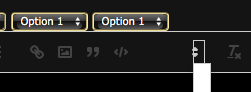
So honestly I think it would be great, if adding custom dropdowns to Quill would also be explicitely covered in the quill docs. Same as for regular click-buttons.
Thanks for any help!
Oliver
P.s. a related question has been closed without any insights #1543
 oliveratgithub
All 11 comments
So a good soul @quannt over here provided me a jsfiddle demonstrating, what one needs in order to add a custom dropdown picker in Quill: https://jsfiddle.net/q7jferw3/
Basically quilljs can create the dropdown list for you but you need to manually supply the HTML content (which is not the clearest thing in the world)
Thanks again!!
oliveratgithub
on 13 Nov 2017
Quill uses CSS pseudo class to specify content for each toolbar dropdown menu, so do the menu label.
For example:
/* static label */
.ql-picker.ql-customoption .ql-picker-label:before {
    content: "Select Language";     /* never changes its content as this menu's label changes */
}
/* dynamic label */
.ql-picker.ql-customoption .ql-picker-label:before[data-value="en"]:before {
    content: "English";
}
/* options */
.ql-picker.ql-customoption .ql-picker-item[data-value="en"]:before {
    content: "English";
}
.ql-picker.ql-customoption .ql-picker-item[data-value="zh"]:before {
    content: "中文";
}
/* you need to specify rules as many as your options */
then for the easy part, define the handler:
new Quill(selector, {
  modules: {
    toolbar: {
      /* ... */
      handlers: {
        'customoption': function(lang: string) {
          /* do something with lang */
        }
      }
    }
  }
}
addition: maybe you need to manually specify a padding for the picker label, otherwise it will overlap the pseudo class content.
.ql-picker.ql-customoption .ql-picker-label {
    padding-right: 18px;
}
I traced through the source code to derive this solution.
 RockStanley
on 7 Jun 2018
RockStanley
on 7 Jun 2018
Sweet, thanks a lot for your efforts @RockStanley !
oliveratgithub
on 7 Jun 2018
Thank you @RockStanley , good job!
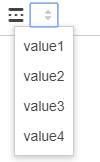
I've found a way to avoid creating a rule for each option, in my case HTML looks like this
<select class="ql-custom tooltip" [title]="'values'">
        <option value="1">value1</option>
        <option value="2">value2</option>
        <option value="3">value3</option>
        <option value="4">value4</option>
</select>
and the CSS rule is
.ql-custom .ql-picker-item:before {
  content: attr(data-label);
}
The final result looks like this
 fncamm
on 30 Aug 2018
fncamm
on 30 Aug 2018
Just in case if someone comes now and wants a shorter jQuery version for the toolbar styling part given by @oliveratgithub
$.each($('.ql-customoption .ql-picker-item'), function(_, node) {
        node.textContent = node.dataset.value;
});
$('.ql-customoption .ql-picker-label').html('Custom Option' + $('.ql-customoption .ql-picker-label').html());
Also for the toolbar to look more perfect and aligned from top I would extend on the styling suggested by @RockStanley
// Little more styling for perfect alignment
$('.ql-customoption .ql-picker-label').css({'padding-right': '18px', 'padding-top': '3px'});
 shashwat-vik
on 1 May 2019
shashwat-vik
on 1 May 2019
@oliveratgithub i am sorry for the link https://jsfiddle.net/q7jferw3/ is not working now. Would you please renew one, i do need your help, thanks very much.
 allenlongbaobao
on 4 Aug 2019
allenlongbaobao
on 4 Aug 2019
You guys rule! Helped quite a bit!
 gbxl
on 16 Aug 2019
gbxl
on 16 Aug 2019
Hi Guys,
I want to implement my own search functionality on the toolbar button click . Actually what I mean is on button click I want to show a dropdown kind of popup box, inside that I want to give search functionality. So anyone of you know how to proceed for this . please let me know.
Thanks in advance for your time and help
 KiranVH
on 23 Oct 2019
KiranVH
on 23 Oct 2019
Is anyone interested in a way to dynamically add a dropdown to the toolbar (i.e. without having to provide additional config values during quill instantiation)?
If there is demand I could provide the code for that.
 T-vK
on 14 Nov 2019
T-vK
on 14 Nov 2019
So I created a library which can do the job: DynamicQuillTools
You can use it like this:
const dropDownItems = {
    'Mike Smith': '[email protected]',
    'Jonathan Dyke': '[email protected]',
    'Max Anderson': '[email protected]'
}

const myDropDown = new QuillToolbarDropDown({
    label: "Email Addresses",
    rememberSelection: false
})

myDropDown.setItems(dropDownItems)

myDropDown.onSelect = function(label, value, quill) {
    // Do whatever you want with the new dropdown selection here

    // For example, insert the value of the dropdown selection:
    const { index, length } = quill.selection.savedRange
    quill.deleteText(index, length)
    quill.insertText(index, value)
    quill.setSelection(index + value.length)
}

myDropDown.attach(quill)
As you can see, you don't have to mess with the toolbar HTML or the toolbar configuration during the quill instantiation. You can simply add the drop down menu during runtime and even change the values whenever you want, for example you could load them via ajax.
You can also add a button to the toolbar this way. For more examples, a live demo and other information follow the link at the top of this post.
I hope this is useful to someone.
@KiranVH My library can't really cover your use case yet, but the basis is there and it could be extended to support more complex elements such as the one you're proposing.
T-vK
on 19 Nov 2019
@T-vK Just wanted to say a great big THANK YOU for your nice little library. I had been dreading the idea of hacking quilljs to work with a custom dropdown and had given up. I tried one last time to find some better examples and I landed on your work. It was trivial to implement and works great !
 bgiromini
on 29 Jan 2020
bgiromini
on 29 Jan 2020
Related issues
 lastmjs
·
3Comments
lastmjs
·
3Comments
 rsdrsd
·
3Comments
rsdrsd
·
3Comments
 emanuelbsilva
·
3Comments
emanuelbsilva
·
3Comments
 GildedHonour
·
3Comments
GildedHonour
·
3Comments
 Softvision-MariusComan
·
3Comments
Softvision-MariusComan
·
3Comments
Most helpful comment
So a good soul @quannt over here provided me a jsfiddle demonstrating, what one needs in order to add a custom dropdown picker in Quill: https://jsfiddle.net/q7jferw3/
Thanks again!!