Quill: When I set the toolbar to a fixed position, the editor gets the focus to scroll to the top
I need to do full screen processing for the editor, so the editor is highly automatic and the toolbar is fixed;But there's a problem with the fixed positioning toolbar, and every time you set the format editor to go back to the top, how do you solve this problem?
I checked the information, this is the editable div issue, but the editable div will automatically return to the top after the focus, but I still haven't solved it by restoring the cursor position.
examples:
html:*
<div class="quill-editor">
  <div id="editor-container"></div>
</div>
css:
.quill-editor{
    margin: 0 auto;
    width: 880px;
    min-height: 500px;
    margin-top: 100px;
  }
  .quill-editor .ql-editor{
    /*max-height: 400px;*/
  }
  .quill-editor .ql-toolbar.ql-snow,
  .quill-editor .ql-container.ql-snow{
    border: none;
  }
  .quill-editor .ql-toolbar{
    position: fixed;
    z-index: 100;
    background: #ccc;
    top: 0;
  }
js:
var quill = new Quill('#editor-container', {
    debug: 'warn',
    modules: {
      formula: true,
      syntax: true,
        'history': {          // Enable with custom configurations
        'delay': 2500,
        'userOnly': true
      },
      toolbar: toolbarOptions,
    },
    placeholder: 'write here...',
    // bounds: '#editor-container',
    theme: 'snow' //bubble / snow
  });
 mengdu
All 15 comments
I had the same issue...
 LinusMelb
on 7 Sep 2017
LinusMelb
on 7 Sep 2017
When I paste the code into the Quill playground (except toolbarOptions is replaced with a ['bold', 'italic'] I cannot reproduce the issue. Can you provide steps for reproduction and specify the browser and OS you are using?
 jhchen
on 8 Sep 2017
jhchen
on 8 Sep 2017
sorry , I forgot to give the configuration.
this is toolbarOptions:
var toolbarOptions = [
// [{ 'font': fonts }],
// [{ 'header': 1 }, { 'header': 2 }],
[{ 'header': [1, 2, 3, 4, 5, 6, false] }],
[{ 'size': ['small', false, 'large', 'huge'] }],
['bold', 'italic', 'underline', 'strike'], // toggled buttons
['blockquote', 'code-block'],
[{ 'list': 'ordered'}, { 'list': 'bullet' }],
// [{ 'script': 'sub'}, { 'script': 'super' }],
// [{ 'indent': '-1'}, { 'indent': '+1' }],
// [{ 'direction': 'rtl' }],
[{ 'color': [] }, { 'background': [] }],
// [{align: []}],
// [{ 'align': [false, 'right', 'center', 'justify'] }],
[{align: ''}, {align: 'right'}, {align: 'center'}, {align: 'justify'}],
['image', 'video'],
['clean'], // remove formatting button
['fullscreen']
];
Problems occurred in size, color and background drop-down box.
mengdu
on 8 Sep 2017
I'll repeat: Can you provide steps for reproduction and specify the browser and OS you are using?
jhchen
on 12 Sep 2017
Sorry, it's my oversight.
I created an example: example
Screenshots:
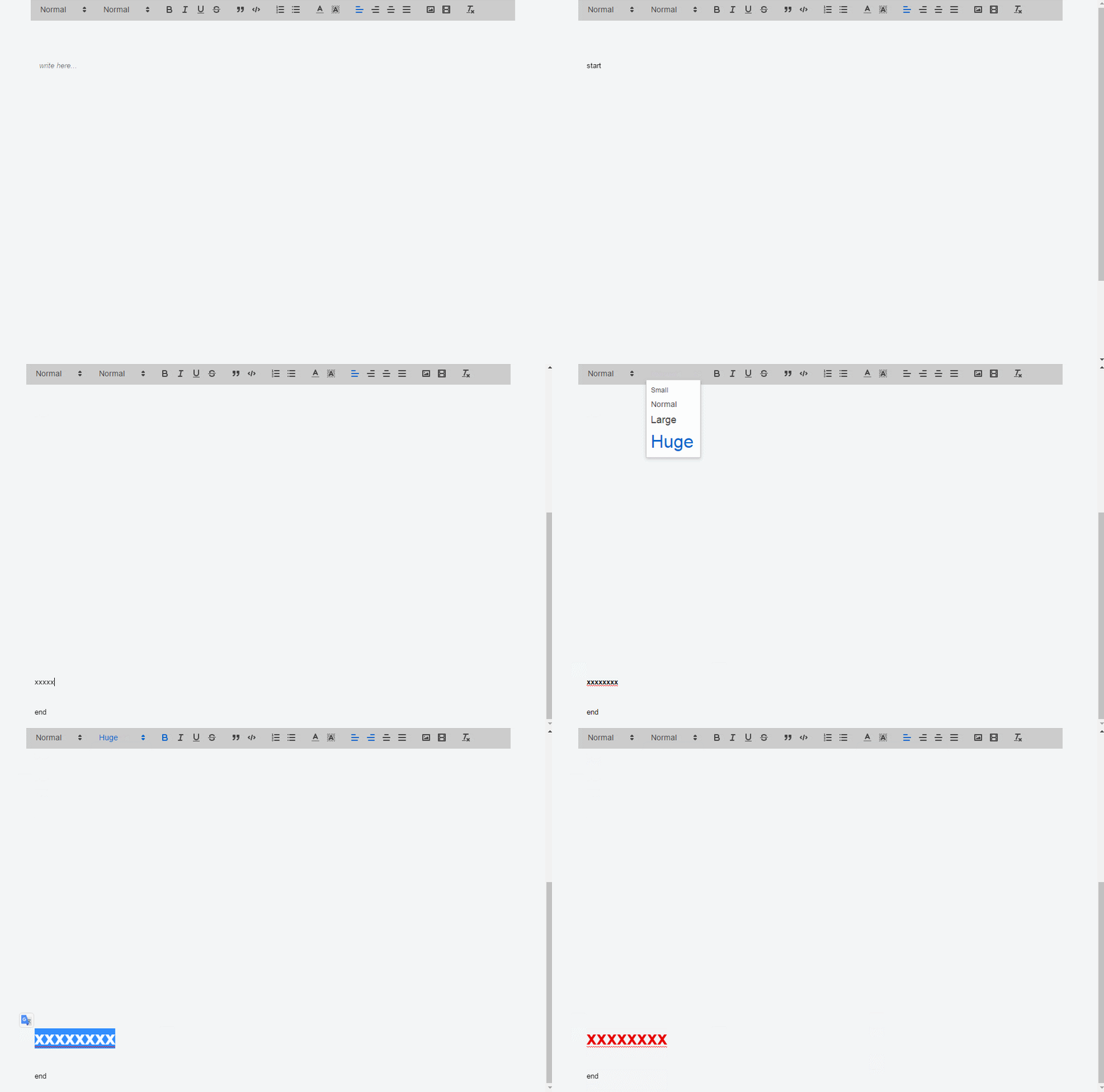
The problem is that when the content is more than one page, when I set the format, I automatically scroll to the top;
I have the same problem in ie11 and chrome 56.
My system is win7.
mengdu
on 12 Sep 2017
+1
@jhchen when i set align to selected line, the editor scroll back to top automatically. I found that once i click the select of align, the editor will lost its focus, and when i click one of options, the editor get focus again, and scrolling happens. What makes me curious is when i do the same thing on the official website of quill, it works well. Would you like to explain that how it works and how can i avoid this?
 gztchan
on 13 Sep 2017
gztchan
on 13 Sep 2017
I experienced the same issue with an inline toolbar. As @gztchan said, the editor on official page is working well. Is it something wrong with the container element? Because in the previous example, the editor appended to body directly, and in official page, the editor appended to a child element of body
 MarkoCen
on 14 Sep 2017
MarkoCen
on 14 Sep 2017
@MarkoCen
After some experiments and debugging, i found that the root of this issue is about the height. The example on quilljs.com is configured with scrollingContainer which let quill instance figure out how tall the editor container is. By the way, height: 100% and overflow-y: auto are the key styles.
I think scrolling in quill is too couple to be comprehended and changed, which makes quill really hard to be customized. It also means that developers have to encounter a lot of pitfalls. :(
gztchan
on 15 Sep 2017
@gztchan @jhchen
I think this is a question of editable div, on chrome, editable div loses focus to get focus will automatically scroll to the top again, I did experiments, div gains focus after reduction problem can be solved by the cursor position, but in qull editor, may be Block Formats do to Range object processing, so there will be a problem.
mengdu
on 15 Sep 2017
@gztchan is correct you need to set the scrollingContainer. This is also demonstrated in the Autogrow Height example in the playground. Adding scrollingContainer in the provided Fiddle solves this issue.
jhchen
on 5 Oct 2017
Hi All @gztchan @mengdu @jhchen @MarkoCen
This still seems to be an issue for me. I am using the exact same way of fixing the toolbar on the top of the page and using auto grow in the editor.
Here's my HTML
```
</div>
and CSS
scrolling-container {
height: 100%;
min-height: 100%;
overflow-y: auto;
}
Lastly the JS
var options = {
//debug: 'info',
modules: {
toolbar: toolbarOptions
},
scrollingContainer: '#scrolling-container',
placeholder: 'Write something....',
readOnly: false,
theme: 'snow'
};
```
Now when I use a CSS to fix the position of the editor as in the fiddle above, I am still having the same issue, despite setting up everything based on the documentation.
Any help?
Cheers!
 sharadkap
on 5 Feb 2018
sharadkap
on 5 Feb 2018
@jhchen same here, check video please. Same behaviour with link insertion.
 morfmorf
on 4 Jul 2018
morfmorf
on 4 Jul 2018
Had the same issue and solved it with this quick fix
$('.ql-picker').bind('mousedown',function(e){
        e.preventDefault();
});
 stargurl16
on 10 Jul 2018
stargurl16
on 10 Jul 2018
same question
caused by this.root.focus(); in quill/core/selection.js
also Clipboard onPaste has the same question
 ycjcl868
on 29 Jan 2019
ycjcl868
on 29 Jan 2019
Had the same issue and solved it with this quick fix
$('.ql-picker').bind('mousedown',function(e){
        e.preventDefault();
});
awesome fix @stargurl16 ! Thanks!
just a note: You may have to also add this code to componentDidUpdate()
my personal implementation, if you don't want to use jQuery:
document.querySelectorAll(".ql-picker").forEach(tool => {
      tool.addEventListener("mousedown", function(event) {
        event.preventDefault();
        event.stopPropagation();
      });
    });
 natan-morar
on 8 Jan 2020
natan-morar
on 8 Jan 2020
Related issues
 Softvision-MariusComan
·
3Comments
Softvision-MariusComan
·
3Comments
 markstewie
·
3Comments
markstewie
·
3Comments
 GildedHonour
·
3Comments
GildedHonour
·
3Comments
 ouhman
·
3Comments
ouhman
·
3Comments
 kheraud
·
3Comments
kheraud
·
3Comments
Most helpful comment
Had the same issue and solved it with this quick fix