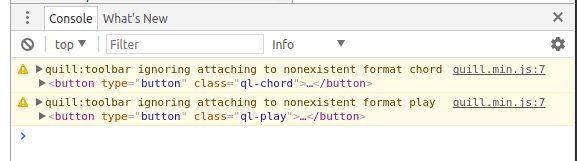
quill:toolbar ignoring attaching to nonexistent format :: and font
[Describe the issue] added two buttons to toolbar but getting the above message
Steps for Reproduction
///index.html*********************
///ce.css*********************
editor {
height: 375px;
}
.ql-chord:after {
content: "VII";
color: blue;
}
.ql-play:after {
content: '\25B6';
}
///index.js********************
var toolbarOptions = [
['bold', 'italic', 'underline', 'strike'], // toggled buttons
['blockquote', 'code-block'],
[{ 'header': 1 }, { 'header': 2 }], // custom button values
[{ 'list': 'ordered'}, { 'list': 'bullet' }],
[{ 'script': 'sub'}, { 'script': 'super' }], // superscript/subscript
[{ 'indent': '-1'}, { 'indent': '+1' }], // outdent/indent
[{ 'direction': 'rtl' }], // text direction
[{ 'size': ['small', false, 'large', 'huge'] }], // custom dropdown
[{ 'header': [1, 2, 3, 4, 5, 6, false] }],
[{ 'color': [] }, { 'background': [] }], // dropdown with defaults from theme
[{ 'font': [] }],
[{ 'align': [] }],
['clean'], // remove formatting button
['chord'],
['play']
];
var quill = new Quill('#editor', {
modules: {
toolbar: toolbarOptions
},
theme: 'snow'
});
var toolbar = quill.getModule('toolbar');
toolbar.addHandler('chord', function() {
console.log('chord')
});
toolbar.addHandler('play', function() {
console.log('play')
})
var chordButton = document.querySelector('.ql-chord');
chordButton.addEventListener('click', function() {
var range = quill.getSelection();
if (range) {
var col = quill.getFormat(range.index,0).color
if (!col) col = 'black'
quill.insertText(range.index, 'VIII')
quill.formatText(range.index,4,{'color':'blue', 'font':'Monospace', 'italic': true, 'bold': true})
quill.insertText(range.index+4, ' ')
quill.formatText(range.index+4,1,{'color':col})
}
});
var playButton = document.querySelector('.ql-play')
playButton.addEventListener('click', function() {
var range = quill.getSelection()
if (range) {
quill.insertText(range.index, '\u25B6',{'format':'utf-16'})
//quill.insertText(range.index,'\25B6')
}
})
- Visit [quilljs.com, jsfiddle.net, codepen.io]
- Step Two
- Step Three
Expected behavior:
no error messages,
quill.insertText(range.index, 'VIII')
quill.formatText(range.index,4,{'color':'blue', 'font':'Monospace', 'italic': true, 'bold': true}) should set font
of VIII to Monospace
Actual behavior:
quill errors - ignoring attaching (per below)
no font change
Platforms:
Ubuntu17, Chrome 59.0.3071.115
Include browser, operating system and respective versions
Version: 1.2.6
// quill Editor with two additional buttons - 'chords' and 'play'

// quill error messages
quill.min.js:7 quill:toolbar ignoring attaching to nonexistent format chord
quill.min.js:7 quill:toolbar ignoring attaching to nonexistent format play
 QuinDennis
All 6 comments
At the time of initialization (when new Quill... is called) chord and play look like buttons but have no handlers, hence the warning. Quill does not know that in the future you will attached handlers. To avoid this you can add handlers to the toolbar config like in the example 'formula': customFormulaHandler.
 jhchen
on 3 Jul 2017
jhchen
on 3 Jul 2017
How do you declare a custom handler at initialization without using a completely custom toolbar? I'd like to use the built-in UI, as in toolbar: [['bold', 'italic'], ['customControl']] and also use the handlers property if possible.
 isaaclyman
on 3 Nov 2017
isaaclyman
on 3 Nov 2017
Never mind, I looked at the module and figured it out. For anyone else who wants to know:
new Quill(element, {
  ...
  modules: {
    toolbar: {
      container: [['bold', 'italic'], ['customControl']],
      handlers: {
        'customControl': () => { console.log('customControl was clicked') }
      }
    }
  }
})
Thank you! The docs are not clear on this.
 pdcmoreira
on 29 Nov 2018
pdcmoreira
on 29 Nov 2018
Awesome, thank you!
 Hatteron
on 15 Mar 2019
Hatteron
on 15 Mar 2019
I had the same warning on a Quill component built with the react-quill library and presenting a customised toolbar. @isaaclyman's solution wasn't working for me, so I set the value property in the button tag and it worked fine.
onCustomControlClick = () => {
    console.log('customControl was clicked');
}

...
modules: {
    toolbar: {
      container: this.renderContainer(),
      handlers: {
        customControl: this.onCustomControlClick,
      }
    }
  }
In renderContainer's returned jsx:
<button className="custom-control" value="customControl" />
 apgsn
on 6 Jun 2019
apgsn
on 6 Jun 2019
Related issues
 aletorrado
·
3Comments
aletorrado
·
3Comments
 Softvision-MariusComan
·
3Comments
Softvision-MariusComan
·
3Comments
 splacentino
·
3Comments
splacentino
·
3Comments
 lastmjs
·
3Comments
lastmjs
·
3Comments
 rsdrsd
·
3Comments
rsdrsd
·
3Comments
Most helpful comment
Never mind, I looked at the module and figured it out. For anyone else who wants to know: