Quill: How to Override tooltip of active theme (snow) ?
How do i override tooltip on the active theme (snow) ?, i want to replace the default html element and hooks a particular javascript function, but all I know is calling
Var tooltip = Quill.import ('ui / tooltip');
Even after trying to understand the source code, it remains difficult for me if there is no sample
 ghost
ghost
All 9 comments
Can you elaborate on what you are trying to do and what you mean by override?
 jhchen
on 19 Jun 2017
jhchen
on 19 Jun 2017
Hy @jhchen
i want to change the tooltip
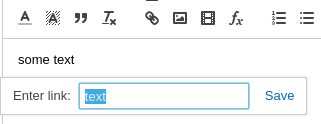
into something like

and hook javascript function (ex. event click).
ghost
on 19 Jun 2017
I would have suggested to create your own theme, that extends the snow default, but I'm currently trying to do the same with bubble and facing a weird problem I posted on StackOverflow so I cannot help you much more.
 guillaumepotier
on 19 Jun 2017
guillaumepotier
on 19 Jun 2017
@guillaumepotier I just created my own theme (after days of trying and still fail)
ghost
on 19 Jun 2017
@triawarman yould you care sharing here your code? I'm having hard time to do extend bubble one.
guillaumepotier
on 19 Jun 2017
@guillaumepotier i dont do something like import or extend any class, just modify quill.js file, copy function module 63 and paste as function module 109, then add lines code in module 62
var _owntheme = __webpack_require__(109);
var _owntheme2 = _interopRequireDefault(_owntheme);

_core2.default.register({
...
'themes/owntheme': _owntheme.default,
...
}, true);
its hard for me if there's no guide, or sample code.
ghost
on 19 Jun 2017
Can we re-open this issue? It is not at all clear how one create's their own theme.
 boldwade
on 28 Apr 2018
boldwade
on 28 Apr 2018
Please re-open!
 philippkuehn
on 28 Apr 2018
philippkuehn
on 28 Apr 2018
Hi @boldwade & @philippkuehn
I had issues too to import and override default bubble theme. Documentation is perfect to create a new theme from scratch (no need to re-open issue for that IMO).
_However_, if you want to extend snow or bubble, you'll have to play a bit with your project configuration in order to call Quill src files and not dist ones since it does not export enough :(
Here is my really useful stackoveflow issue.
Hope that helps
guillaumepotier
on 29 Apr 2018
Related issues
 DaniilVeriga
·
3Comments
DaniilVeriga
·
3Comments
 scottfr
·
3Comments
scottfr
·
3Comments
 splacentino
·
3Comments
splacentino
·
3Comments
 lustoykov
·
3Comments
lustoykov
·
3Comments
 eamodio
·
3Comments
eamodio
·
3Comments
Most helpful comment
Can we re-open this issue? It is not at all clear how one create's their own theme.