Quill: Not able to add custom font sizes
Is there a way to add font sizes apart from small, normal, large, and huge?
I have tried to add
in html:
in lib:
.ql-editor .ql-size-small {
font-size: 0.4em;
}
Thanks for your help!
 Tca1107
All 18 comments
Custom font size example.
 benbro
on 21 Dec 2016
benbro
on 21 Dec 2016
The custom font family example might also be useful.
 jhchen
on 22 Dec 2016
jhchen
on 22 Dec 2016
@jhchen this is really hard to add custom font size!!!
 DualWield
on 19 May 2017
DualWield
on 19 May 2017
for example:
var Size = Quill.import('attributors/style/size');
Size.whitelist = ['12px', '16px', '18px'];
Quill.register(Size, true);
this.editor = new Quill('#editor', {
theme: 'snow',
placeholder: '请输入内容',
modules: {
toolbar: [
[{ 'size': ['12px', '16px', '18px'] }]
]
}
});
but it doesn't work. I've searching for google,stackoverflow, and finded no right solution.
DualWield
on 19 May 2017
We are using Quill for one of our projects and struggled with this same thing for a full day, here the solution:
JS:
var fontSizeStyle = Quill.import('attributors/style/size');
fontSizeStyle.whitelist = ['24px', '48px', '100px', '200px'];
Quill.register(fontSizeStyle, true);
announcementEditor = new Quill('#announcementEditor', {
                    modules: {
                        toolbar: '#announcementEditorToolbar'
                    },
                    placeholder: '...',
                    theme: 'snow'
                });
HTML:
        <div id="announcementEditorToolbar">
            <span class="ql-formats">
                <select class="ql-size">
                    <option selected>Default</option>
                    <option value="24px">Small</option>
                    <option value="48px">Medium</option>
                    <option value="100px">Large</option>
                    <option value="200px">Huge</option>
                </select>
            </span>
        </div>
        <div name="announcementEditor" id="announcementEditor" ></div>
 2guti2
on 24 May 2017
2guti2
on 24 May 2017
@2guti2 how are you referencing Quill in react? I am attempting to define some custom font sizes in my react component and it is not working.
componentWillMount() {
const SizeStyle = ReactQuill.import('attributors/style/size');
ReactQuill.register(SizeStyle, true);
}
 nikohosn
on 31 May 2017
nikohosn
on 31 May 2017
@nikohosn import Quill from react-quill like this:
import ReactQuill, {Quill} from 'react-quill'
 matthewfbenjamin
on 22 Jun 2017
matthewfbenjamin
on 22 Jun 2017
@jhchen I see I can change the font size by using this.editor.format('size', '16px');. But if I want to use '17px' instead of '16px', is there a workaround where I don't have to fontSizeStyle.whitelist? I want that size to be user defined.
 DJShump08
on 17 Jul 2018
DJShump08
on 17 Jul 2018
Same thing here! I don't want to set a whitelist because I need my user to enter any font size he wants.
 valentinbdv
on 30 Aug 2018
valentinbdv
on 30 Aug 2018
for example:
var Size = Quill.import('attributors/style/size');
Size.whitelist = ['12px', '16px', '18px'];
Quill.register(Size, true);
this.editor = new Quill('#editor', {
                theme: 'snow',
                placeholder: '请输入内容',
                modules: {
                    toolbar: [
                        [{ 'size':  ['12px', '16px', '18px'] }]
                    ]
                }
            });
but it doesn't work. I've searching for google,stackoverflow, and finded no right solution.
modules = {
toolbar: [
[{ 'size': Size.whitelist }],
]}
 codergkd
on 8 May 2019
codergkd
on 8 May 2019
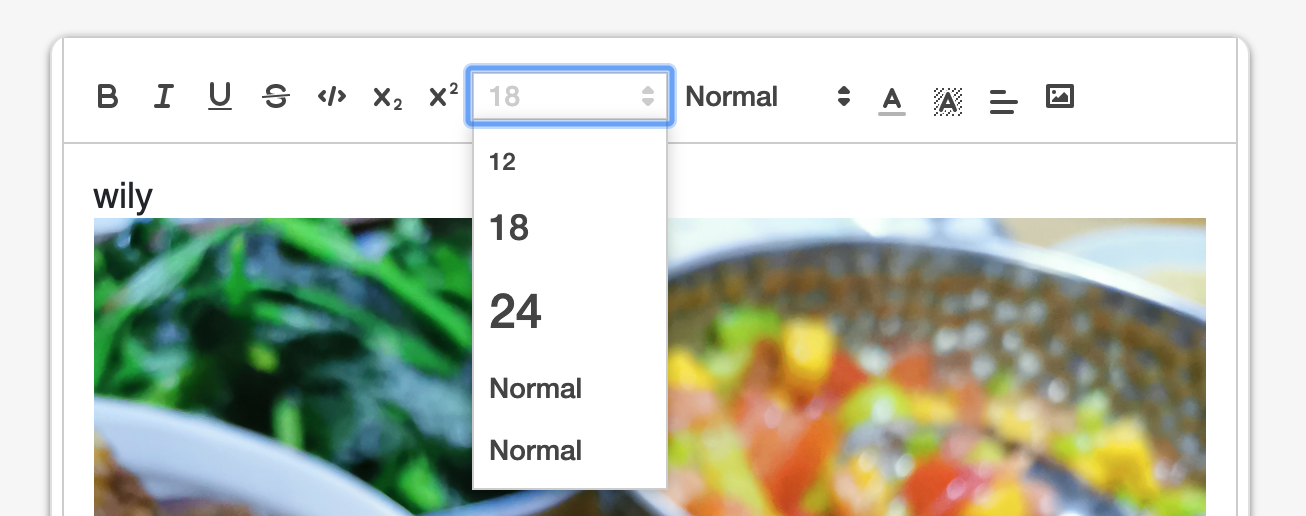
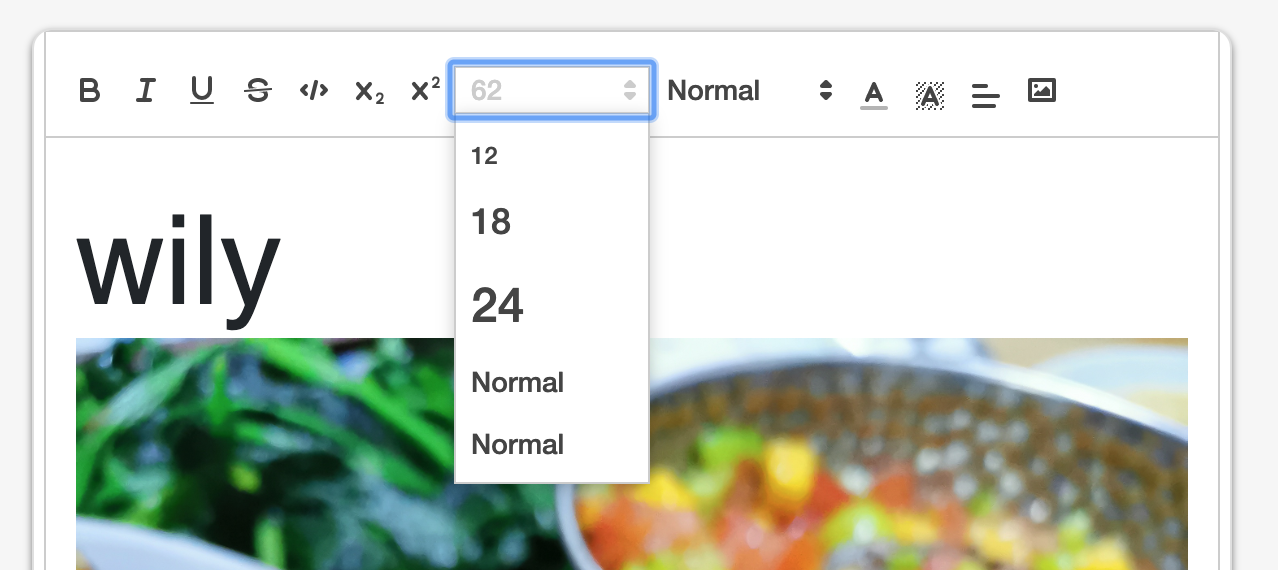
same issue. I can get it to work with this solution, but can only have 3 custom sizes no matter how many i add to whitelist.
 Jewcub
on 7 Feb 2020
Jewcub
on 7 Feb 2020
@Jewcub
maybe u can set some css like this
.ql-snow .ql-picker.ql-size .ql-picker-label::before,
.ql-snow .ql-picker.ql-size .ql-picker-item::before {
content: attr(data-value);
}
 Sankartw
on 21 Feb 2020
Sankartw
on 21 Feb 2020
for example:
var Size = Quill.import('attributors/style/size'); Size.whitelist = ['12px', '16px', '18px']; Quill.register(Size, true); this.editor = new Quill('#editor', { theme: 'snow', placeholder: '请输入内容', modules: { toolbar: [ [{ 'size': ['12px', '16px', '18px'] }] ] } });but it doesn't work. I've searching for google,stackoverflow, and finded no right solution.
@DualWield
You missed to add a 'false' item in toolbarOptions of size and the style of your customed item
try [{ 'size': [false, '12px', '16px', '18px'] }]
and css:
.ql-snow .ql-picker.ql-size .ql-picker-item[data-value="12px"]::before {
content: '12px';
font-size: 12px !important;
}
 WellGin
on 18 Apr 2020
WellGin
on 18 Apr 2020
``const [QuillImport] = await this.getQuill();
var Size = Quill.import('attributors/style/size');
Size.whitelist = ['28px', '30px', '32px'];
Quill.register(Size, true);
const colorList = ['#001f3f', '#0074D9', '#7FDBFF', '#39CCCC', '#3D9970', '#2ECC40', '#01FF70', '#FFDC00', '#FF851B', '#FF4136', '#85144b', '#F012BE', '#B10DC9', '#111111', '#AAAAAA', '#DDDDDD', '#FFFFFF'];
this.quillEditor = new QuillImport(#${this.editorUniqueId}`, {
modules: {
toolbar: [
['bold', 'italic', 'underline'],
['link'],
[{ 'color': [...colorList] }, { 'background': [...colorList] }],
[{ 'size': Size.whitelist }, false],
]
},
theme: 'bubble'```
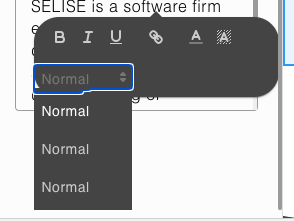
i couldn't show my custom fonts in dropdown.
 chimiwangchuk
on 24 Jun 2020
chimiwangchuk
on 24 Jun 2020
But how do you make the default value of the size to be for example 14px or 28px? I don't want to put "normal"
 eBitzu
on 26 Jun 2020
eBitzu
on 26 Jun 2020
We are using Quill for one of our projects and struggled with this same thing for a full day, here the solution:
JS:var fontSizeStyle = Quill.import('attributors/style/size'); fontSizeStyle.whitelist = ['24px', '48px', '100px', '200px']; Quill.register(fontSizeStyle, true); announcementEditor = new Quill('#announcementEditor', { modules: { toolbar: '#announcementEditorToolbar' }, placeholder: '...', theme: 'snow' });HTML:
        <div id="announcementEditorToolbar">
            <span class="ql-formats">
                <select class="ql-size">
                    <option selected>Default</option>
                    <option value="24px">Small</option>
                    <option value="48px">Medium</option>
                    <option value="100px">Large</option>
                    <option value="200px">Huge</option>
                </select>
            </span>
        </div>
        <div name="announcementEditor" id="announcementEditor" ></div>
thank you! that's help me a lot!
 jc-wow
on 22 Sep 2020
jc-wow
on 22 Sep 2020
    var Size = Quill.import('attributors/style/size');
    Size.whitelist = ['28px', '30px', '32px'];
    Quill.register(Size, true);
    const colorList = ['#001f3f', '#0074D9', '#7FDBFF', '#39CCCC', '#3D9970', '#2ECC40', '#01FF70', '#FFDC00', '#FF851B', '#FF4136', '#85144b', '#F012BE', '#B10DC9', '#111111', '#AAAAAA', '#DDDDDD', '#FFFFFF'];
    this.quillEditor = new QuillImport(`#${this.editorUniqueId}`, {
      modules: {
        toolbar: [
          ['bold', 'italic', 'underline'],
          ['link'],
          [{ 'color': [...colorList] }, { 'background': [...colorList] }],
          [{ 'size': Size.whitelist }, false],


        ]
      },
      theme: 'bubble'```

i couldn't show my custom fonts in dropdown.
Same Here
 KhaledAbdelfattah
on 2 Oct 2020
KhaledAbdelfattah
on 2 Oct 2020
Your CSS
.ql-snow{
  .ql-picker{
      &.ql-size{
          .ql-picker-label,
          .ql-picker-item{
              &::before{
                  content: attr(data-value) !important;
              }
          }
      }
  }
}
Your TS file
Size = Quill.import('attributors/style/size');
Size.whitelist = ['12px', '14px', '16px', '18px','20px'];
Quill.register(this.Size, true);
    this.editorOptions = {
      toolbar: [
        [{ size: ['12px','14px', '16px','18px','20px'] }],
      ]
    }
This will work
 niketdave-codal
on 21 Oct 2020
niketdave-codal
on 21 Oct 2020
Related issues
benbro
·
3Comments
 aletorrado
·
3Comments
aletorrado
·
3Comments
 ouhman
·
3Comments
ouhman
·
3Comments
 lustoykov
·
3Comments
lustoykov
·
3Comments
 Softvision-MariusComan
·
3Comments
Softvision-MariusComan
·
3Comments
Most helpful comment
We are using Quill for one of our projects and struggled with this same thing for a full day, here the solution:
JS:
HTML: