Quickstart-unity: Unity and Gradle build fails, after upgrading Firebase Analytics and Crashlytics to 6.16.0 (Program type already present: com.google.firebase.unity.BuildConfig )
[REQUIRED] Please fill in the following fields:
- Unity editor version: 2018.4.22f1
- Firebase Unity SDK version: 6.16.0
- Source you installed the SDK: .unitypackage (.unitypackage or Unity Package Manager)
- Problematic Firebase Component: build for android fails (Auth, Database, etc.)
- Other Firebase Components in use: Analytics, Crashlytics, Dynamic Links (Auth, Database, etc.)
- Additional SDKs you are using: Admob, Facebook, Onesignal (Facebook, AdMob, etc.)
- Platform you are using the Unity editor on: Mac (Mac, Windows, or Linux)
- Platform you are targeting: Android (iOS, Android, and/or desktop)
- Scripting Runtime: IL2CPP (Mono, and/or IL2CPP)
[REQUIRED] Please describe the issue here:
I tried upgrading old crashlytics from 6.13 to 6.16, then android build started to fail, with this message: Program type already present: com.google.firebase.unity.BuildConfig on something related to multidex
Solution:
I changed AndroidManifest.xml files for FirebaseApp.androidlib and FirebaseCrashlytics.androidlib
they both had package="com.google.firebase.unity"
I changed one to package="com.google.firebaseapp.unity" and the other to package="com.google.firebasecrashlytics.unity"
This solved the problem for me.
I shared it here so that maybe it helps somebody, or the developers to prevent this bug, and also to be sure this solution is not having a side effect.
Thanks.
 roointan
All 33 comments
We had the same issue on Unity 2019.4.10f1 right after upgrading Firebase Components to 6.16.0 from 6.15.2. Solution given has solved the problem.
Differently from the @roointan, we've installed and upgraded the SDK from Package Manager.
 melih-veloxia
on 5 Oct 2020
melih-veloxia
on 5 Oct 2020
@melih-veloxia Happy this solved your problem, and happy it solved someone's problem so fast. I just posted this yesterday ;)
roointan
on 5 Oct 2020
thanks for fix, same, installed via packagemanager, multi-dex...trying the workaround otherwise we have to revert back
 simontgs
on 5 Oct 2020
simontgs
on 5 Oct 2020
Thanks for raising this issue, along side the workaround. We will look into it on our end, and see if we can get a proper fix in.
 a-maurice
on 5 Oct 2020
a-maurice
on 5 Oct 2020
Thanks for the fix, happened to me in 2019.3.0f3 when I upgraded Firebase from 6.8 to 6.16. Previous version was installed with .unitypackage, and I had migrated it to the Package Manager version
 unadamlar
on 6 Oct 2020
unadamlar
on 6 Oct 2020
Thanks for reporting this. And truly sorry this slipped through our release test.
This seems to plague any Unity version from 2019 and below, if you turn on Minify.
I have fixed this issue internally and will update this post when the release is available.
 chkuang-g
on 6 Oct 2020
chkuang-g
on 6 Oct 2020
Thanks for reporting this. And truly sorry this slipped through our release test.
This seems to plague any Unity version from 2019 and below, if you turn on Minify.
I have fixed this issue internally and will update this post when the release is available.
I have Unity 2020 without Minify turned ON and also running into this issue, although not sure if entirely the same issue. My error is this:
     Type com.google.firebase.unity.BuildConfig is defined multiple times: /Users/jan/Projects/Unity/Nodeshifter/Temp/gradleOut/unityLibrary/FirebaseApp.androidlib/build/intermediates/runtime_library_classes/debug/classes.jar:com/google/firebase/unity/BuildConfig.class, /Users/jan/Projects/Unity/Nodeshifter/Temp/gradleOut/unityLibrary/FirebaseCrashlytics.androidlib/build/intermediates/runtime_library_classes/debug/classes.jar:com/google/firebase/unity/BuildConfig.class

 #0 GetStacktrace(int)
 #1 DebugStringToFile(DebugStringToFileData const&)
 #2 DebugLogHandler::Internal_Log(LogType, LogOption, core::basic_string<char, core::StringStorageDefault<char> >, Object*)
 #3 DebugLogHandler_CUSTOM_Internal_Log(LogType, LogOption, ScriptingBackendNativeStringPtrOpaque*, ScriptingBackendNativeObjectPtrOpaque*)
 #4  (Mono JIT Code) (wrapper managed-to-native) UnityEngine.DebugLogHandler:Internal_Log (UnityEngine.LogType,UnityEngine.LogOption,string,UnityEngine.Object)
 jlubeck
on 6 Oct 2020
jlubeck
on 6 Oct 2020
2020.2 and same as above reply
 Thaina
on 7 Oct 2020
Thaina
on 7 Oct 2020
We had the same issue on Unity 2019.4.10f1 right after upgrading Firebase Components to 6.16.0 from 6.15.2. Solution given has solved the problem.
Differently from the @roointan, we've installed and upgraded the SDK from Package Manager.
Exact same here for 2019.4.11f1. Was already desperate (as Android dependency resolution is kind of a miracle to me and I just knock on wood that it simply works ;-) ). Solution made my day!!
 habitoti
on 7 Oct 2020
habitoti
on 7 Oct 2020
Can confirm the problem and the solution fix it. Thank you!
 hlongvu
on 9 Oct 2020
hlongvu
on 9 Oct 2020
We were also using the .unitypackage versions when updating and did encounter this issue. As a solution attempt we updated to the package manager versions after deleting the other versions. But we can't find a Google Play Games Plugin version (that includes the namespace " PlayGamesPlatform") for the package manager so it still comes from Git we just disabled its Resolver when importing. (in case this somehow interfers)
How ever the error persists.
76: [Unity] ERROR: Picked up JAVA_TOOL_OPTIONS: -Dfile.encoding=UTF-8
77: [Unity] ERROR: D8: Program type already present: com.google.firebase.unity.BuildConfig
78: [Unity] ERROR:
79: [Unity] ERROR: FAILURE: Build failed with an exception.
80: [Unity] ERROR:
81: [Unity] ERROR: * What went wrong:
82: [Unity] ERROR: Execution failed for task ':launcher:transformClassesWithMultidexlistForRelease'.
Unity 2019.4.12f1
Firebase App Core -> via the unity package manager
External Dependency Manager -> via the unity package manager
Firebase Crashlytics -> via the unity package manager
Google Analytics for Firebase -> via the unity package manager
Google Play Games Plugin for unity via GIT
https://github.com/playgameservices/play-games-plugin-for-unity
Solution for now:
We downgraded Firebase again to 6.15.2 from the package manager and it worked.
 DavidZobrist
on 12 Oct 2020
DavidZobrist
on 12 Oct 2020
We were also using the .unitypackage versions when updating and did encounter this issue. As a solution attempt we updated to the package manager versions after deleting the other versions. But we can't find a Google Play Games Plugin version (that includes the namespace " PlayGamesPlatform") for the package manager so it still comes from Git we just disabled its Resolver when importing. (in case this somehow interfers)
How ever the error persists.
76: [Unity] ERROR: Picked up JAVA_TOOL_OPTIONS: -Dfile.encoding=UTF-8 77: [Unity] ERROR: D8: Program type already present: com.google.firebase.unity.BuildConfig 78: [Unity] ERROR: 79: [Unity] ERROR: FAILURE: Build failed with an exception. 80: [Unity] ERROR: 81: [Unity] ERROR: * What went wrong: 82: [Unity] ERROR: Execution failed for task ':launcher:transformClassesWithMultidexlistForRelease'.Unity 2019.4.12f1
Firebase App Core -> via the unity package manager
External Dependency Manager -> via the unity package manager
Firebase Crashlytics -> via the unity package manager
Google Analytics for Firebase -> via the unity package managerGoogle Play Games Plugin for unity via GIT
https://github.com/playgameservices/play-games-plugin-for-unitySolution for now:
We downgraded Firebase again to 6.15.2 from the package manager and it worked.
Hi @DavidZobrist
Did you try the workaround solution in the first post?
roointan
on 12 Oct 2020
I tried the solution but nothing changed and I search dependencies and I realized there are two different analytics dependencies one is firebase:17.0.0 the other is firebase-unity:6.16.0. So I delete the first one and I can build the project. I know that the first one comes from manual integration. But I didn not integrate it manually. I used external dependency manager. I examined dependecies xmls for each firebase services. In the xmls I see that these two packages are there. So I think something wrong with dependency xmls.
 ynsmrkrkmz
on 14 Oct 2020
ynsmrkrkmz
on 14 Oct 2020
@DavidZobrist Modifying AndroidManifest.xml as @roointan mentioned should resolve your issue with 6.16.0.
@ynsmrkrkmz It seems like the AnalyticsDependencies.xml from older SDK was not removed. I would recommend you to remove the entire Assets/Firebase, Assets/ExternalDependencyManager and Assets/PlayServicesResolver folder and reimport Firebase SDK again. Make sure you import all Firebase component in the same version.
A quick update about this issue: we have put a patch for this and should be released pretty soon. Will keep this post updated.
chkuang-g
on 14 Oct 2020
Thanks for fix @roointan, the solution worked for me! 😇
 WhoSV
on 14 Oct 2020
WhoSV
on 14 Oct 2020
@WhoSV Glad it helped you 👍
roointan
on 14 Oct 2020
@DavidZobrist Modifying AndroidManifest.xml as @roointan mentioned should resolve your issue with 6.16.0.
@ynsmrkrkmz It seems like the AnalyticsDependencies.xml from older SDK was not removed. I would recommend you to remove the entire
Assets/Firebase,Assets/ExternalDependencyManagerandAssets/PlayServicesResolverfolder and reimport Firebase SDK again. Make sure you import all Firebase component in the same version.A quick update about this issue: we have put a patch for this and should be released pretty soon. Will keep this post updated.

I deleted these old sdk package dependency lines from xmls but somehow they are in the xmls again. So whenever I resolve dependencies .aar files duplicates old and new ones.
ynsmrkrkmz
on 14 Oct 2020
@ynsmrkrkmz Based on the picture, your dependency lines looks perfectly fine to me. FYI, firebase-analytics and firebase-analytics-unity are different libraries. The former one is the Android API while the latter one is an interface between C++ and Android API.
chkuang-g
on 15 Oct 2020
Moving to Package Manager helped me to solve mentioned problem although only in Development Build. Production build still gives me "Program type already present: com.google.firebase.unity.BuildConfig" issue.
Anyone encountered that problem?
Unity 2018.4.28f1, Unity SDK 6.16.0 with Crashlytics patched to 17.1.1 due to #798
// Edit:
Turns out that package manager workaround doesn't help for release builds, those requires package name changes.
 lukz
on 16 Oct 2020
lukz
on 16 Oct 2020
Hello @chkuang-g ,
Do you have an approximate ETA for the patch? I updated to 6.16.0 to fix this(https://github.com/firebase/quickstart-unity/issues/659) issue on iOS, but now Android builds crash. I would like to release a new version as soon as possible to fix an unrelated crash on iOS versions < 12.2 and I don't really want to release builds with workarounds as they always fail in some corner cases.
An ETA would help to decide if I wait or revert to an older version.
Thank you,
Radu
 Radu6
on 19 Oct 2020
Radu6
on 19 Oct 2020
@Radu6
Do you have the log when it crashed on Android?
This may be related to https://github.com/firebase/quickstart-unity/issues/758#issuecomment-708676774 where Crashlytics is using 17.2.2 instead of 17.0.0.
We are brewing 6.16.1 release and will keep you updated.
Shawn
chkuang-g
on 19 Oct 2020
Hello
@roointan i have tried this and sent crashes but i can't see the crashes on forebase.
 BledyEdge
on 21 Oct 2020
BledyEdge
on 21 Oct 2020
Hello
@roointan i have tried this and sent crashes but i can't see the crashes on forebase.
Hello
Did you restart after first run? reports are sent after a restart on app start.
Also did you wait enough time?
roointan
on 21 Oct 2020
Hello
@roointan i have tried this and sent crashes but i can't see the crashes on forebase.Hello
Did you restart after first run? reports are sent after a restart on app start.
Also did you wait enough time?
Yes i have tried that many times, but could not see any crash report on dashboard.
BledyEdge
on 21 Oct 2020
Hello
@roointan i have tried this and sent crashes but i can't see the crashes on forebase.Hello
Did you restart after first run? reports are sent after a restart on app start.
Also did you wait enough time?
Firebase.FirebaseApp.CheckAndFixDependenciesAsync().ContinueWith(task => {
            var dependencyStatus = task.Result;
            if (dependencyStatus == Firebase.DependencyStatus.Available)
            {
                // Create and hold a reference to your FirebaseApp,
                // where app is a Firebase.FirebaseApp property of your application class.
                // Crashlytics will use the DefaultInstance, as well;
                // this ensures that Crashlytics is initialized.
                Firebase.FirebaseApp app = Firebase.FirebaseApp.DefaultInstance;
                print("Firebase Initialized");
                // Set a flag here for indicating that your project is ready to use Firebase.
            }
            else
            {
                UnityEngine.Debug.LogError(System.String.Format(
                  "Could not resolve all Firebase dependencies: {0}", dependencyStatus));
                // Firebase Unity SDK is not safe to use here.
            }
        });
Here is the piece of code i have in Start Function.
i have imported json file as well already, but still not working :(
BledyEdge
on 21 Oct 2020
@roointan
I would love to try the solution you kindly shared but I cannot find out where you edited those Android manifests.
I checked the entire Unity project, I tried to export in Android Studio, but I cannot any entry that looks like the one you mentioned.
Could you kindly add some information about the file locations or the procedure to generate them?
Environment:
Unity: 2019.4.8
Firebase: 6.16
Thanks!
 pot2mayo
on 21 Oct 2020
pot2mayo
on 21 Oct 2020
@roointan
I would love to try the solution you kindly shared but I cannot find out where you edited those Android manifests.
I checked the entire Unity project, I tried to export in Android Studio, but I cannot any entry that looks like the one you mentioned.
Could you kindly add some information about the file locations or the procedure to generate them?Environment:
Unity: 2019.4.8
Firebase: 6.16Thanks!
Assets/Plugins/Android/FirebaseCrashlytics.androidlib/AndroidManifest.xml
and
Assets/Plugins/Android/FirebaseApp.androidlib/AndroidManifest.xml
roointan
on 21 Oct 2020
I used the workaround of renaming the packages in those AndroidManifest.xml files and it worked to get a successful build. We are using Unity 2019.4.11f1 without minify.
However, yesterday our production release got stuck with development (default) values because of a problem updating xml from google services json. What fixed that was deleting the Assets/Plugins/Android/Firebase/ folder, which had the old google-services.xml which was being used instead of the one in the Assets/Plugins/Android/FirebaseApp.androidlib/ folder.
Thanks, roointan. And maybe this addendum will be helpful to someone in their firebase update experience.
 pgordon
on 21 Oct 2020
pgordon
on 21 Oct 2020
We just released 6.16.1 and this should be fixed. Please let us know if you are still running into this.
 vimanyu
on 21 Oct 2020
vimanyu
on 21 Oct 2020
Hey folks,
in 6.16.1, we changed package name for each resource folder into different ones, ex. com.google.firebase.app.unity and com.google.firebase.crashlytics.unity.
If you are experiencing this issue before upgrade, I would recommend you to delete Assets/Plugins/Android/FirebaseCrashlytics.androidlib/ and Assets/Plugins/Android/FirebasesApp.androidlib/ after upgrade and let Firebase editor plugin to regenerate them again.
Note that Assets/Plugins/Android/FirebaseCrashlytics.androidlib/ is generated before build.
I'll close this issue for now. If you still experience the issue, please open a new ticket and reference to this one.
Shawn
chkuang-g
on 22 Oct 2020
We are getting the following error when trying to build with Firebase 6.16.1 (Unity 2020.1.10f1):
FAILURE: Build failed with an exception.
* What went wrong:
Execution failed for task ':launcher:minifyDebugWithR8'.
> com.android.tools.r8.CompilationFailedException: Compilation failed to complete

-----
E:\Plot-E\gouda-git-2\src\gouda-unity\Temp\gradleOut\unityLibrary\FirebaseApp.androidlib\build\intermediates\runtime_library_classes\debug\classes.jar: R8: Type com.google.firebase.unity.BuildConfig is defined multiple times: E:\Plot-E\gouda-git-2\src\gouda-unity\Temp\gradleOut\unityLibrary\FirebaseApp.androidlib\build\intermediates\runtime_library_classes\debug\classes.jar:com/google/firebase/unity/BuildConfig.class, E:\Plot-E\gouda-git-2\src\gouda-unity\Temp\gradleOut\unityLibrary\FirebaseCrashlytics.androidlib\build\intermediates\runtime_library_classes\debug\classes.jar:com/google/firebase/unity/BuildConfig.class
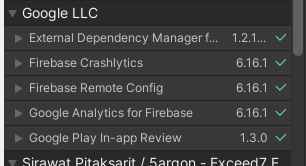
A few images that might help:


 bilck
on 22 Oct 2020
bilck
on 22 Oct 2020
@bilck
It looks like the same problem to this post. Did you try to remove Assets/Plugins/Android/FirebaseCrashlytics.androidlib/ and Assets/Plugins/Android/FirebasesApp.androidlib/ and build again?
chkuang-g
on 22 Oct 2020
@chkuang-g Yes, I resolved it but forgot to post it here.
I deleted all Firebase directories in Assets/Plugins/Android and let Firebase generate those directories again.
Thanks!
bilck
on 23 Oct 2020
Related issues
 exzizt
·
4Comments
exzizt
·
4Comments
 SeanLangre
·
3Comments
SeanLangre
·
3Comments
 Whyser
·
3Comments
Whyser
·
3Comments
 NilokiloxD
·
4Comments
NilokiloxD
·
4Comments
 highpockets
·
5Comments
highpockets
·
5Comments
Most helpful comment
@melih-veloxia Happy this solved your problem, and happy it solved someone's problem so fast. I just posted this yesterday ;)