Quickstart-unity: Crashlytics not sending any crash reports, getting "failed to retrieve settings" error on logcat.
[REQUIRED] Please fill in the following fields:
- Unity editor version: 2019.3.15f1
- Firebase Unity SDK version: firebase_unity_sdk_6.15.2
- Source you installed the SDK: .unitypackage
- Problematic Firebase Component: Crashlytics
- Other Firebase Components in use: Analytics
- Additional SDKs you are using: Unity IAP, Gamesparks, Ironsource, Facebook, Appsflyer, GameAnalytics
- Platform you are using the Unity editor on: Windows
- Platform you are targeting: Android
- Scripting Runtime: IL2CPP
[REQUIRED] Please describe the issue here:
I am getting some data on analytics, but I cannot get crashlytics to report anything. Im stuck on this...

Steps to reproduce:
Add the firebase analytics and crashlytics sdks.
Add the google-services.json GoogleService-Info.plist files somewhere in assets folder
Add this code to initialise the firebase
`// Use this for initialization
void Start ()
{
// Initialize Firebase
Firebase.FirebaseApp.CheckAndFixDependenciesAsync().ContinueWith(task => {
var dependencyStatus = task.Result;
if (dependencyStatus == Firebase.DependencyStatus.Available)
{
// Create and hold a reference to your FirebaseApp,
// where app is a Firebase.FirebaseApp property of your application class.
// Crashlytics will use the DefaultInstance, as well;
// this ensures that Crashlytics is initialized.
Firebase.FirebaseApp app = Firebase.FirebaseApp.DefaultInstance;
            // Set a flag here for indicating that your project is ready to use Firebase.
            VisualDebugger.SetText("crashlytics initialised");
        }
        else
        {
            UnityEngine.Debug.LogError(System.String.Format(
              "Could not resolve all Firebase dependencies: {0}",dependencyStatus));

            VisualDebugger.SetText("crashlytics NOT initialised: " + dependencyStatus);
            // Firebase Unity SDK is not safe to use here.
        }
    });

    Invoke("IsCrashEnabled", 5f);
}

void IsCrashEnabled()
{
    VisualDebugger.AddLine("IsCrashlyticsCollectionEnabled: "+Firebase.Crashlytics.Crashlytics.IsCrashlyticsCollectionEnabled);
}`
When I run the app, firebase is initialised successfully. Also Firebase.Crashlytics.Crashlytics.IsCrashlyticsCollectionEnabled returns true.
I crash the app in a number of different ways, then open it again without reinstalling. But no crash reports are sent.
When I watch logcat when starting the app I see this error from firebase each time the app is opened

Relevant Code:
 Brian-McElroy
All 45 comments
Could you enable debug mode (https://firebase.google.com/docs/crashlytics/test-implementation?platform=unity#enable_debug_logging) and post the full debug logs?
 Olegkodysh
on 28 Sep 2020
Olegkodysh
on 28 Sep 2020
@Olegkodysh I enabled full logging before intialising firebase.. Theres all the logs https://pastebin.com/CqKpT0mT
There is an error at the very bottom
com.SandwichGeneration.MakeASquare E/FirebaseCrashlytics: Settings request failed.
java.io.IOException: Canceled
also 40 seconds later if I leave the app running there are a few more logs...
2020-09-28 21:21:53.687 6482-6531/? I/FirebaseCrashApiImpl: FirebaseCrashApiImpl created by ClassLoader az[DexPathList[[zip file "/data/user_de/0/com.google.android.gms/app_chimera/m/000001d6/DynamiteModulesC.apk"],nativeLibraryDirectories=[/data/user_de/0/com.google.android.gms/app_chimera/m/000001d6/n/arm64-v8a, /system/lib64, /system/vendor/lib64]]]
2020-09-28 21:21:53.955 6482-6532/? I/FirebaseCrashApiImpl: FirebaseCrash reporting API initialized
2020-09-28 21:21:53.956 6482-6532/? W/FirebaseCrashAnalytics: Unable to log event, missing Google Analytics for Firebase library
2020-09-28 21:22:03.431 6482-6610/? I/FirebaseCrash: Sending crashes
2020-09-28 21:23:32.429 6664-6664/? D/FirebaseApp: com.google.firebase.auth.FirebaseAuth is not linked. Skipping initialization.
2020-09-28 21:23:32.432 6664-6664/? D/FirebaseApp: com.google.firebase.crash.FirebaseCrash is not linked. Skipping initialization.
2020-09-28 21:23:32.434 6664-6664/? I/FirebaseInitProvider: FirebaseApp initialization successful
2020-09-28 21:23:32.562 6664-6684/? I/FA: To enable faster debug mode event logging run:
adb shell setprop debug.firebase.analytics.app com.samsung.android.mobileservice
Brian-McElroy
on 28 Sep 2020
Hi @Brian-McElroy ,
I'd like to ask a few questions.
- Is this a new created app? Has the app been deleted and recreated?
Is the app created directly for Crashlytics, or migrate from Fabric?
If migrate from Fabric, can you double check the following:Make sure no Fabric related file/folders in your app setup, eg Fabric related code in MainActivity.java
Make sure your google-services.json is pointing to the correct Firebase project
Make sure your Manifest file doesn't contain Fabric API key.
If you don't mind sharing your project setup files (google-services.json, gradle, manifest etc), we can investigate together of the above checks
 cynthiajoan
on 2 Oct 2020
cynthiajoan
on 2 Oct 2020
@cynthiajoan
- It is a new app. But during the process of setting up firebase in the web-app, I think at least once I deleted it and made a new one so I could start over.
- Directly for Crashlytics, I dont even know what Fabric is.
- ok But I cant post the google-services.json here otherwise anyone could connect their app to my firebase. Whats ure email?
Brian-McElroy
on 2 Oct 2020
Hi @Brian-McElroy, good to know this is a project directly created in Crashlytics, that makes things easy and you don't have to share the configuration files. The "Fail to retrieve settings" error usually happens once an app is deleted, and not restored properly. If you can take some time double check with this doc to see if there is any step missing.
If everything looks correct to you but you are still suffering with the issue, it worth to submit a ticket here so our support team can get access to your project and see if anything not look correct.
cynthiajoan
on 3 Oct 2020
Same here
 ikitae
on 7 Oct 2020
ikitae
on 7 Oct 2020
I am having the same issue and it's most likely related with the way Unity exports the android project starting from 2019.3.
In 2019.2 things work fine, but since 2019.3 (my case I'm on 2019.4) it stoped working.
 sp-duarte-roso
on 7 Oct 2020
sp-duarte-roso
on 7 Oct 2020
@cynthiajoan, I'm experiencing this as well:
my setup:
- mac OS Catalina 10.15.4 (19E287)
- in Unity 2019.4.11f1
- Firebase packages in use are Crashlytics, Analytics, Cloud Messaging, all v 6.15.2.
One thing to note is my org has 2 Firebase projects setup - I am only experiencing this issue when working with Crashlytics for android in 1 of 2 Firebase projects from my organization.
So building from the same Unity project:
- if i set up the project, resolve dependencies, and run w/ the config info for the 'working' Firebase project's android app registration, i start getting non-fatal exception reports in Firebase from my test exception.
- If I update my project with the config info from the 'not working' Firebase project android app registratoin, I dont see any more non-fatal reports arrive (I have waited 24+ hrs to be sure they are not delayed).
- if i then replace the Firebase config info with the values for the 'working' Firebase project android app, my test non-fatal reports start showing up in the console again.
The above makes this makes me think the issue is not related to the Unity version. I suspect it must be related specifically to the contents of the 'firebase settings' json the Android app unable to retrieve.
I have already tried deleting and re-creating the Android app that is not working_ from the Firebase project, as suggested previously, twice. Both times, the 'new' android Firebase app configuration still resulted in the same 'cannot retrieve settings' error as before when run (confirmed i was seeing different appId values in the URL to ensure the config values did get passed in when resolving dependencies)
other details of setup:
- neither of my org's Firebase projects were migrated from Fabric: these are new native Firebase projects.
- in both Firebase projects, the app is registered with the same "com.MyCompany.XXX" bundle id
- I am triggering test crashes w/ a 'CrashlyticsTester' script as suggested in the guide.
- I also have Firebase Analytics setup and events from both iOS and Android are fully working as expected in both Firebase projects.
Other potentially useful details i noticed while investigating:
I noticed when I called the settings URL from the error but swapped in the Firebase ID for the Firebase app w/ a 'working' Crashlytics setup, I got this response:
- Settings JSON:
{"settings_version":3,"cache_duration":86400,"features":{"collect_logged_exceptions":true,"collect_reports":true,"collect_analytics":false,"prompt_enabled":false,"push_enabled":false,"firebase_crashlytics_enabled":false},"app":{"status":"activated","update_required":false,"report_upload_variant":2},"fabric":{"org_id":"xyzyx","bundle_id":"com.MyCompany.xyz"}}
Meanwhile the settings link for the Firebase app where Android Crashlytics is broken returns only an empty dictionary:
- json:
{}
My theory is that the fact there are no settings at that endpoint is the reason why Crashlytics events are not being sent (my theory is because the app believes Crashlytics is not enabled if there are no settings available)
 nchodelski
on 7 Oct 2020
nchodelski
on 7 Oct 2020
I wonder if there is a limit for free accounts, a limit in how many projects one can have, and so on.
After Natalia's hint I created another project and it gets the same error in 2019.2 🤷♂️
@nchodelski Did you also create "a lot" of projects in a short time like?
sp-duarte-roso
on 8 Oct 2020
@sp-duarte-roso - No - my org is using a paid Firebase account and both of our Firebase projects are about a year old.
nchodelski
on 9 Oct 2020
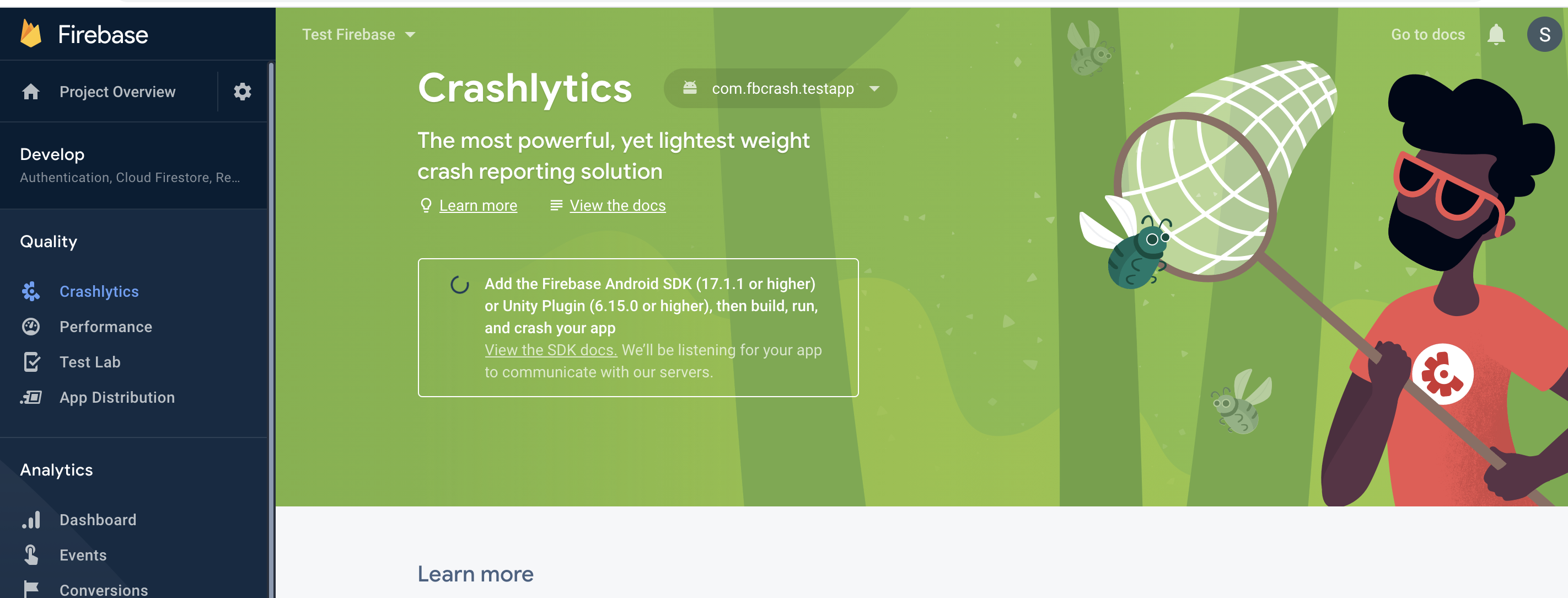
Turns out the message in Firebase console was pointing to the error.
Add the Firebase Android SDK (17.1.1 or higher) or Unity Plugin (6.15.0 or higher), then build, run, and crash your app
We are using Plugin 6.15.2 but the dependency being added is 17.0.0.
I've contacted support which shed some light into the problem:
The error you are seeing "Failed to retrieve settings" is related to the SDK version being used. If you go to "Assets > Firebase > Editor> CrashlyticsDependencies" you can manually update the SDK to point to the latest Crashlytics SDK version 17.2.2. Please give it a try and if you continue having issues, let me know.
Updating the dependency in our mainTemplate.gradle fixed it for us.
sp-duarte-roso
on 9 Oct 2020
I can confirm using firebase-crashlytics:17.1.1 ~firebase-crashlytics:17.2.2~ fixed the issue.
An easy way using the latest package (6.16.0) is to create a dependency file ending with ...Dependencies.xml under an Editor folder anywhere in Assets
<dependencies>
  <androidPackages>
    <androidPackage spec="com.google.firebase:firebase-crashlytics:17.1.1">
    </androidPackage>
  </androidPackages>
</dependencies>
Edit: Changed to 1.1 as mentioned below
 starburst997
on 10 Oct 2020
starburst997
on 10 Oct 2020
Tried these two solutions with 6.15.2 and 6.16.0. I just get more errors when I set crashlytics lib to 17.2.2. I get the following in logcat:
E/firebase: method_ids[i] || (method.optional == kMethodOptional)
E/Unity: method_ids[i] || (method.optional == kMethodOptional)
(Filename: ./Runtime/Export/Debug.bindings.h Line: 45)
E/firebase: Unable to find Method com/google/firebase/crashlytics/internal/common/DataCollectionArbiter.setCrashlyticsDataCollectionEnabled (signature '(Z)V', instance). Please verify the AAR which contains the com/google/firebase/crashlytics/internal/common/DataCollectionArbiter class is included in your app.
From Unity when I call Crashlytics.Log():
E/Unity: NullReferenceException: A null value was found where an object instance was required.
at Firebase.Crashlytics.Crashlytics.Log (System.String message) [0x00000] in
at System.Reflection.MonoMethod.Invoke (System.Object obj, BindingFlags invokeAttr, System.Reflection.Binder binder, System.Object[] parameters, System.Globalization.CultureInfo culture) [0x00000] in
 Splitkill
on 12 Oct 2020
Splitkill
on 12 Oct 2020
@Splitkill - I had the same issue as you did after setting my Unity project to use a custom mainTemplate.gradle file, then manually setting the Crashlytics-Dependencies.xml to say "com.google.firebase:firebase-crashlytics:17.2.2"
(btw, my Crashlytics Dependencies file was not in Assets, I had to search by file for it. I found it at: my_project_root/Library/PackageCache/[email protected]/Firebase/Editor/Crashlytics-Dependencies.xml.
I found this other unity-quckstart issue where it was explained why you and I are seeing this error about the DataCollectionArbiter class when using 17.2.2 with Unity:
It is caused by the latest version of 'com.google.firebase.firebase-crashlytics-17.2.1' where they change the method name while the Unity wrapper 'com.google.firebase.firebase-crashlytics-unity-6.15.2' is not updated yet. Ref: (https://firebase.google.com/support/release-notes/android#crashlytics_v17-2-1)
I was able to resolve the Unable to find Method error by instead specifying "com.google.firebase:firebase-crashlytics:17.1.1" in the Crashlytics-Dependencies.xml file.
Finally, I no longer see the settings error and I see from the logs the android app initializes version 17.1.1.
nchodelski
on 13 Oct 2020
@nchodelski - Thanks for The recommendation. However, I tried this with both versions(6.15.2,6.16.0) of the unity SDK. The errors seem resolved but we still don't receive any crash reports.
Splitkill
on 13 Oct 2020
@sp-duarte-roso, thanks for contacting support - the info you shared about 17.0.0 causing the 'firebase-settings' error was key for me, switching to a newer version of that library worked!
It took me 3 days to get all my ducks lined up, I was able to resolve my "can't retrieve settings" issue
some of the specific things I changed in my problem setup to fix this issue:
- In Unity, I modified the build process to use a custom
mainTemplate.gradlefile to specify dependencies, rather than using the External Dependency Resolver to manage and embed unity packages (option in Build Settings > PlayerSettings > Android) - this seemed like the only way to specify the version for the android librarycom.google.firebase:firebase-crashlytics
- I updated the Unity Crashlytics package's dependency version ref in file
Crashlytics-Dependencies.xml- search by file in your text editor - I found mine inmy_project/Library/PackageCache/[email protected]/Firebase/Editor/. The original value in this file was the 17.0.0 version, so I updated it to specify "com.google.firebase:firebase-crashlytics:17.1.1". - I also made a
MyProject-Dependencies.xmlfile as and placed it in Assets > Config > Editor w/ same contents as @starburst997 shared, except i changed the version to specify"com.google.firebase:firebase-crashlytics:17.1.1"- (Assets/Configis where I put thegoogle-services.jsonand.plistconfig files for Firebase, so seemed like a good place to put the dependency file)
- I updated the Unity Crashlytics package's dependency version ref in file
- I then ran External Dependency Resolver > Android > Force Resolve, which embeds a list of the dependencies for the Android build into the
mainTemplate.gradlefile - make sure to check this file and confirm you see version 17.1.1 after resolving. (see below what was this looks like for my project). - I also noticed that ProjectSettings > AndroidResolverDependencies.xml was also updated to include
firebase-crashlytics:17.1.1after resolving dependencies.
I found this article about managing Unity Firebase dependencies by one of the Firebase developer advocates really valuable when trying to wrap my head around the Android gradle build process and how this affects Firebase dependencies.
Dependencies section of my mainTemplate.gradle after doing Android dependency force resolve then Android local build (I'm using Crashlytics, Analytics, and Firebase Messaging)
dependencies {
    implementation fileTree(dir: 'libs', include: ['*.jar'])
// Android Resolver Dependencies Start
    implementation 'com.google.android.gms:play-services-base:17.4.0' // Packages/com.google.firebase.app/Firebase/Editor/AppDependencies.xml:17
    implementation 'com.google.firebase:firebase-analytics:17.5.0' // Packages/com.google.firebase.analytics/Firebase/Editor/AnalyticsDependencies.xml:13
    implementation 'com.google.firebase:firebase-analytics-unity:6.16.0' // Packages/com.google.firebase.analytics/Firebase/Editor/AnalyticsDependencies.xml:18
    implementation 'com.google.firebase:firebase-app-unity:6.16.0' // Packages/com.google.firebase.app/Firebase/Editor/AppDependencies.xml:22
    implementation 'com.google.firebase:firebase-common:19.3.1' // Packages/com.google.firebase.app/Firebase/Editor/AppDependencies.xml:13
    implementation 'com.google.firebase:firebase-crashlytics:17.0.0' // Packages/com.google.firebase.crashlytics/Firebase/Editor/CrashlyticsDependencies.xml:13
    implementation 'com.google.firebase:firebase-crashlytics:17.1.1' // Assets/Config/Editor/Dependencies.xml:4
    implementation 'com.google.firebase:firebase-crashlytics-unity:6.16.0' // Packages/com.google.firebase.crashlytics/Firebase/Editor/CrashlyticsDependencies.xml:20
    implementation 'com.google.firebase:firebase-messaging:20.2.4' // Packages/com.google.firebase.messaging/Firebase/Editor/MessagingDependencies.xml:13
    implementation 'com.google.firebase:firebase-messaging-unity:6.16.0' // Packages/com.google.firebase.messaging/Firebase/Editor/MessagingDependencies.xml:20
// Android Resolver Dependencies End
**DEPS**}
Weirdly, I noticed after running a local Android build , both firebase-crashlytics:17.0.0 and firebase-crashlytics:17.1.1 were listed in my project's mainTemplate.gradle file and in AndroidResolverDependencies.xml.
Why is this happening? My theory is that Unity Firebase Crashlytics somehow still specifies 17.0.0 as a dependency, but one or more of my *Dependency.xml files seems to be ensuring v17.1.1 is also compiled.
Regardless, when I run the app I now see in the logs I/FirebaseCrashlytics: Initializing Crashlytics 17.1.1, so it confirms that version is actually running on the device..
nchodelski
on 13 Oct 2020
@Splitkill, one other thing i noticed is that when I upgraded from Firebase Crashlytics package 6.15.2 to 6.16.0, and tried the solution, I found there was an extra google-services.xml file w/ the values for an older Firebase project & older Android app Id that were initially getting loaded (when i ran the app, i was seeing in the logs that crashlytics v 17.1.1 was running, but also saw the settings error again. But I noticed the config values in the url was wrong - i'd deleted a previous Firebase project & the the config values were still getting fed into firebase. b/c it was deleted the url was returning a 404, luckily).
to diagnose, try searching for your Firebase project ID # and/or for the strings "google_app_id" and "mobilesdk_app_id" - see if there are any values that don't match up w/ what you seen in the current Firebase settings for the project # and App Id for your Android project.
What i did was I deleted the whole Assets/Plugins/Android folder, thenrealized i didn't know how to recreate missing plugin files, so I uninstalled and then re-installed Firebase Crashlytics 6.16.0 in the Unity Package manager. That recreated my Plugins/Android folder w/ the existing subfolders from before, even though i only uninstalled and reinstalled 1 of 4 firebase packages. I was able to confirm at this point that all the google-services.xml files now had the correct config values.
My explanation for this is that Firebase Crashlytics version 6.15.2 keeps it's xlm files in a different place to version 6.16.0, so the old file hanging around was possibly screwing up what Firebase project Crashlytics was getting config info for.
It seems like a long shot, but maybe you have this situation too when you use Firebase Crashlytics 6.16.0.
If it helps, this is the structure of my Assets/Plugins/Android folder now after doing the above deletion and uninstall/reinstall of Unity Crashlytics package:

nchodelski
on 13 Oct 2020
@nchodelski Thanks, your info helped. I did have to clear out the older version of Crashlytics completely and clean install from the 6.16.0 unity package. However, I still found my self without any crash reports. 6.16.0 Unity Package Doesn't work with Unity 2018.4.6f1. The app would build and Chrashlytics 17.1.1 would initialize but crashes would not be reported. I had to update my unity editor to the latest of 2018.4 LTS.
Splitkill
on 14 Oct 2020
Hi folks, there may be a few different issues going on at once here. We recently discovered a backend issue that was preventing some new Android Unity apps from being properly registered with Crashlytics. That was fixed on Friday, so if you were still having trouble last week, please give it another attempt and let us know if you are still having trouble.
The next release of the Crashlytics Unity Plugin will include a fix for the NoSuchMethodException, and will ship with the newest Crashlytics for Android SDK. Until that release, manually updating to version 17.2.x of the Android will not work, as @nchodelski described.
 mrichards
on 19 Oct 2020
mrichards
on 19 Oct 2020
Hi, I m seeing this message at the moment.
CrashlyticsInitProvider: CrashlyticsInitProvider skipping initialization:
crashlytics app initializer Disabling:
PS:
Unity 2019.4.12f1 LTS
Firebase Unity SDK 6.16.0
 ZaheerFaisal
on 20 Oct 2020
ZaheerFaisal
on 20 Oct 2020
Hi,
I am getting this error while trying to run Crashlytics for a test app.
Disable module 'crashlytics' for 'Firebase.Crashlytics.FirebaseCrashlytics, Firebase.Crashlytics' Disable module 'crashlytics' for 'Firebase.Crashlytics.FirebaseCrashlytics, Firebase.Crashlytics'
After which I see this
Failed to read Firebase options from the app's resources. Either make sure google-services.json is included in your build or specify options explicitly.
Unity 2019.2.21f1
Firebase Unity SDK 6.16.0
 swap-mpl
on 20 Oct 2020
swap-mpl
on 20 Oct 2020
@swap-mpl
As mentioned in https://github.com/firebase/quickstart-unity/issues/824#issuecomment-713072851, Disable module 'crashlytics' log is harmless.
I think the main issue is Failed to read Firebase options from the app's resources.. Could you check if Assets/Plugins/Android/FirebaseApp.androidlib/res/value/google-services.xml exists?
 chkuang-g
on 22 Oct 2020
chkuang-g
on 22 Oct 2020
@swap-mpl
As mentioned in #824 (comment),
Disable module 'crashlytics'log is harmless.I think the main issue is
Failed to read Firebase options from the app's resources.. Could you check ifAssets/Plugins/Android/FirebaseApp.androidlib/res/value/google-services.xmlexists?
I have same problem and I can confirmed that file is exist
 laminhtruong
on 22 Oct 2020
laminhtruong
on 22 Oct 2020
@chkuang-g Updated to SDK 6.16.1, now I dont get the above error. SDK is initialized but I dont see any errors logged in the dashboard. I am using a test script to generate non fatals. Attached is a screenshot for your reference.
swap-mpl
on 22 Oct 2020
@swap-mpl
As mentioned in #824 (comment),
Disable module 'crashlytics'log is harmless.I think the main issue is
Failed to read Firebase options from the app's resources.. Could you check ifAssets/Plugins/Android/FirebaseApp.androidlib/res/value/google-services.xmlexists?
What about this one ?
CrashlyticsInitProvider: CrashlyticsInitProvider skipping initialization:
ZaheerFaisal
on 22 Oct 2020
@swap-mpl
Could you try your Firebase project with Crashlytics quickstart?
https://github.com/firebase/quickstart-unity/tree/master/crashlytics/testapp
Crashlytics would only start working after at least one instance of FirebaseApp is created, like this
https://github.com/firebase/quickstart-unity/blob/master/crashlytics/testapp/Assets/Firebase/Sample/Crashlytics/UIHandler.cs#L59
@FaisalAbtach
I am not sure what that message is. As long as it is followed by crashlytics .... initialize ....successful, you should be good.
Are you not seeing any statistics on your dashboard either?
chkuang-g
on 24 Oct 2020
No I m not seeing any statistics in the dashboard, nor crashlytics .... initialize ....successful message in the logs.
ZaheerFaisal
on 26 Oct 2020
No I m not seeing any statistics in the dashboard, nor
crashlytics .... initialize ....successfulmessage in the logs.
I've added "Crashlytics.IsCrashlyticsCollectionEnabled = true;" to get it working... maybe we just need to add something related to Crashlytics on the project to Unity add the dependencies.
 AllanRW
on 27 Oct 2020
AllanRW
on 27 Oct 2020
No I m not seeing any statistics in the dashboard, nor
crashlytics .... initialize ....successfulmessage in the logs.I've added "Crashlytics.IsCrashlyticsCollectionEnabled = true;" to get it working... maybe we just need to add something related to Crashlytics on the project to Unity add the dependencies.
I will try this.
ZaheerFaisal
on 27 Oct 2020
Now I m seeing these logs in logcat, and still no stats on dashboard.
Disable module 'crashlytics' for 'Firebase.Crashlytics.FirebaseCrashlytics, Firebase.Crashlytics'
crashlytics app initializer Disabling
No I m not seeing any statistics in the dashboard, nor
crashlytics .... initialize ....successfulmessage in the logs.I've added "Crashlytics.IsCrashlyticsCollectionEnabled = true;" to get it working... maybe we just need to add something related to Crashlytics on the project to Unity add the dependencies.
@AllanRW Where you have added this code ? I have added after checking dependencies but still no luck.
ZaheerFaisal
on 30 Oct 2020
@ZaheerFaisal I've added at Start method of my Firebase Manager script, before the Firebase init code, make sure to also add "Firebase.FirebaseApp.LogLevel = Firebase.LogLevel.Debug;" to show debug messages.
AllanRW
on 30 Oct 2020
Hello, I have the same problem.
I am use Unity 2019.4.13f1
My app was already connected to firebase and working (Android). I decided to add crashlitics and update the library to 6.16.1.

In the console, I get a message that "FirebaseCrashlytics successfully initialized"

BUT, in console.firebase.google.com not connected FirebaseCrashlytics

p.s. i add "Crashlytics.IsCrashlyticsCollectionEnabled = true;" and nothing has changed the connection on the site has not happened
 Vasilisk7
on 31 Oct 2020
Vasilisk7
on 31 Oct 2020
@ZaheerFaisal I've added at Start method of my Firebase Manager script, before the Firebase init code, make sure to also add "Firebase.FirebaseApp.LogLevel = Firebase.LogLevel.Debug;" to show debug messages.
Ok now I m seeing test crashes in the dashboard, it worked.
ZaheerFaisal
on 2 Nov 2020
@ZaheerFaisal I've added at Start method of my Firebase Manager script, before the Firebase init code, make sure to also add "Firebase.FirebaseApp.LogLevel = Firebase.LogLevel.Debug;" to show debug messages.
Ok now I m seeing test crashes in the dashboard, it worked.
did not help :(
Vasilisk7
on 2 Nov 2020
@Vasilisk7 Did you followed these steps ?
https://firebase.google.com/docs/crashlytics/get-started?platform=unity
https://firebase.google.com/docs/crashlytics/test-implementation?platform=unity
ZaheerFaisal
on 3 Nov 2020
@Vasilisk7 Did you followed these steps ?
https://firebase.google.com/docs/crashlytics/get-started?platform=unity
https://firebase.google.com/docs/crashlytics/test-implementation?platform=unity
@ZaheerFaisal
Yes and yes, did everything as written.
Vasilisk7
on 3 Nov 2020
Hey @Brian-McElroy. We need more information to resolve this issue but there hasn't been an update in 5 weekdays. I'm marking the issue as stale and if there are no new updates in the next 5 days I will close it automatically.
If you have more information that will help us get to the bottom of this, just add a comment!
 google-oss-bot
on 10 Nov 2020
google-oss-bot
on 10 Nov 2020
I am deleted folder _Assets/ExternalDependencyManager_. Downloading files started automatically, then I installed the application on my phone and everything worked.
Crashlytics is visible on the site.
Vasilisk7
on 12 Nov 2020
@Vasilisk7
According to your posts, I assume you install Firebase through Unity Package Manager. In that case, a copy of EDM4U will be installed through UPM as well and result in duplicated copy of EDM4U. See this issue
Removing Assets/ExternalDependencyManager is the right way to go. I would also recommend you to reinstall EDM4U through UPM just in case any file is missing because they shares the same GUID.
Shawn
chkuang-g
on 12 Nov 2020
Hey @Brian-McElroy. We need more information to resolve this issue but there hasn't been an update in 5 weekdays. I'm marking the issue as stale and if there are no new updates in the next 5 days I will close it automatically.
If you have more information that will help us get to the bottom of this, just add a comment!
google-oss-bot
on 19 Nov 2020
This issue is happening to us.
Unity 2019.4.14f1
Firebase Crashlytics v6.16.1
EDM4U v1.2.161
Log sample: (Full log here)
2020/11/22 23:17:43.791 23823 23951 Warn System ClassLoader referenced unknown path: system/framework/mediatek-cta.jar
2020/11/22 23:17:43.792 23823 23951 Info System.out [okhttp] e:java.lang.ClassNotFoundException: com.mediatek.cta.CtaUtils
2020/11/22 23:17:43.793 23823 23951 Info System.out [socket]:check permission begin!
2020/11/22 23:17:43.793 23823 23951 Warn System ClassLoader referenced unknown path: system/framework/mediatek-cta.jar
2020/11/22 23:17:43.794 23823 23951 Info System.out [socket] e:java.lang.ClassNotFoundException: com.mediatek.cta.CtaUtils
2020/11/22 23:17:43.953 23823 23948 Error FirebaseCrashlytics Settings request failed.
2020/11/22 23:17:43.953 23823 23948 Error FirebaseCrashlytics java.io.InterruptedIOException: timeout
2020/11/22 23:17:43.953 23823 23948 Error FirebaseCrashlytics   at okhttp3.y.a(Unknown Source:13)
2020/11/22 23:17:43.953 23823 23948 Error FirebaseCrashlytics   at okhttp3.y.a(Unknown Source:58)
2020/11/22 23:17:43.953 23823 23948 Error FirebaseCrashlytics   at com.google.firebase.crashlytics.internal.d.b.b(Unknown Source:10)
2020/11/22 23:17:43.953 23823 23948 Error FirebaseCrashlytics   at com.google.firebase.crashlytics.internal.settings.b.c.a(Unknown Source:62)
2020/11/22 23:17:43.953 23823 23948 Error FirebaseCrashlytics   at com.google.firebase.crashlytics.internal.settings.d$1.a(Unknown Source:13)
2020/11/22 23:17:43.953 23823 23948 Error FirebaseCrashlytics   at com.google.firebase.crashlytics.internal.settings.d$1.a(Unknown Source:2)
2020/11/22 23:17:43.953 23823 23948 Error FirebaseCrashlytics   at com.google.android.gms.tasks.q.run(Unknown Source:12)
2020/11/22 23:17:43.953 23823 23948 Error FirebaseCrashlytics   at java.util.concurrent.ThreadPoolExecutor.runWorker(ThreadPoolExecutor.java:1167)
2020/11/22 23:17:43.953 23823 23948 Error FirebaseCrashlytics   at java.util.concurrent.ThreadPoolExecutor$Worker.run(ThreadPoolExecutor.java:641)
2020/11/22 23:17:43.953 23823 23948 Error FirebaseCrashlytics   at com.google.firebase.crashlytics.internal.common.q$1$1.a(Unknown Source:2)
2020/11/22 23:17:43.953 23823 23948 Error FirebaseCrashlytics   at com.google.firebase.crashlytics.internal.common.d.run(Unknown Source:5)
2020/11/22 23:17:43.953 23823 23948 Error FirebaseCrashlytics   at java.lang.Thread.run(Thread.java:919)
2020/11/22 23:17:43.953 23823 23948 Error FirebaseCrashlytics Caused by: java.io.IOException: Canceled
2020/11/22 23:17:43.953 23823 23948 Error FirebaseCrashlytics   at okhttp3.internal.c.j.a(Unknown Source:288)
2020/11/22 23:17:43.953 23823 23948 Error FirebaseCrashlytics   at okhttp3.internal.c.g.a(Unknown Source:158)
2020/11/22 23:17:43.953 23823 23948 Error FirebaseCrashlytics   at okhttp3.internal.c.g.a(Unknown Source:6)
2020/11/22 23:17:43.953 23823 23948 Error FirebaseCrashlytics   at okhttp3.y.g(Unknown Source:115)
2020/11/22 23:17:43.953 23823 23948 Error FirebaseCrashlytics   at okhttp3.y.a(Unknown Source:31)
2020/11/22 23:17:43.953 23823 23948 Error FirebaseCrashlytics   ... 10 more
 bilck
on 23 Nov 2020
bilck
on 23 Nov 2020
@bilck
This is interesting log. Seems like the exception is thrown from this line of code.
I can imagine many reasons why an HTTP request is failed from timeout. For instance, spotty network or some issues in backend. Could you try it again and perhaps try with quick start so that we can isolate the issue a bit more.
chkuang-g
on 25 Nov 2020
Hey @Brian-McElroy. We need more information to resolve this issue but there hasn't been an update in 5 weekdays. I'm marking the issue as stale and if there are no new updates in the next 5 days I will close it automatically.
If you have more information that will help us get to the bottom of this, just add a comment!
google-oss-bot
on 2 Dec 2020
Since there haven't been any recent updates here, I am going to close this issue.
@Brian-McElroy if you're still experiencing this problem and want to continue the discussion just leave a comment here and we are happy to re-open this.
google-oss-bot
on 9 Dec 2020
Related issues
 Vah94
·
6Comments
Vah94
·
6Comments
 exzizt
·
4Comments
exzizt
·
4Comments
 andr-construction
·
4Comments
andr-construction
·
4Comments
 Crashthatch
·
5Comments
Crashthatch
·
5Comments
 Ankit-Jegames
·
3Comments
Ankit-Jegames
·
3Comments
Most helpful comment
@ZaheerFaisal I've added at Start method of my Firebase Manager script, before the Firebase init code, make sure to also add "Firebase.FirebaseApp.LogLevel = Firebase.LogLevel.Debug;" to show debug messages.