Quickstart-unity: Reopen #450: Error with Google-Services.json bundle id
Please fill in the following fields:
Unity editor version: 2018.4.3f1
Firebase Unity SDK version: v6.9.0
Source you installed the SDK (.unitypackage or Unity Package Manager):.unitypackage
Firebase plugins in use (Auth, Database, etc.):Analytics, Crashlytics
Additional SDKs you are using (Facebook, AdMob, etc.): Facebook
Platform you are using the Unity editor on (Mac, Windows, or Linux): Mac
Platform you are targeting (iOS, Android, and/or desktop): iOS, Android
Scripting Runtime (Mono, and/or IL2CPP):IL2CPP
Please describe the issue here:
(Please list the full steps to reproduce the issue. Include device logs, Unity logs, and stack traces if available.)
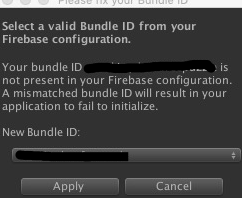
Suddenly happened! I have finished integrating Firebase yesterday, and everything worked well. But today, it suddenly force me to select a valid bundle ID. I don't know what is happenning!
Please answer the following, if applicable:
Have you been able to reproduce this issue with just the Firebase Unity quickstarts (this GitHub project)?
What's the issue repro rate? (eg 100%, 1/5 etc)
99.999999%
 CodeMasterYi
All 12 comments
CodeMasterYi
on 21 May 2020
CodeMasterYi
on 21 May 2020
I wonder how Firebase get the bundle id and match it!
CodeMasterYi
on 21 May 2020
Hi @CodeMasterYi,
I would say check this post about ensuring that the Package Name in project settings is the same of your Firebase project. But it does seem odd that bundle ID in the dialog box is the same as the one in the pull down menu. Does the app still work if you select Apply?
 DellaBitta
on 28 May 2020
DellaBitta
on 28 May 2020
Hi @CodeMasterYi,
I would say check this post about ensuring that the Package Name in project settings is the same of your Firebase project. But it does seem odd that bundle ID in the dialog box is the same as the one in the pull down menu. Does the app still work if you select Apply?
I do choose the right bundle ID and select Apply! BUT!!! If it appears, it will appear again and again until I restart Unity Editor!!!
CodeMasterYi
on 28 May 2020
@CodeMasterYi
Could you double check a couple of things?
- What does your Editor log says?
- Is the bundle Id under "Player Settings --> Bundle Identifier" matches the one in GoogleServices.plist?
- Did you import multiple GoogleServices.plist?
- What are other options in that dialog like?
Shawn
 chkuang-g
on 30 May 2020
chkuang-g
on 30 May 2020
@chkuang-g
Hi, thx for your attention!
I search the whole project just now. Here is the result:
There is only one google-services.json and only one GoogleService-Info.plist under folder Assets/PlayServicesConfigurations.
And there is also only one google-services-desktop.json under folder Assets/StreamingAssets.
And there is also only one google-services.xml under folder Assets/Plugins/Android/Firebase/res/values.
our bundle id for android and ios is different, and it is set correctly in the player setting!
and I also check the googleservice configurations downloaded from firebase page!
bundle id for android is right.
bundle id for ios is right too.
Emmm... I didn't check the Editor Log and I don't see the dialog now. I don't know why it appears sometimes.
I dont know what you mean by saying What are other options in that dialog like?.
Tell me to select another bundle id?
CodeMasterYi
on 30 May 2020
What I meant is: when "Please Fix Your Bundle ID" pop-up, from the drop-down menu, how many items are in it and are they the different to your current bundle id?
Since you said that the bundle id in player settings is correct, does that mean this dialog kept prompt to ask you to change to an incorrect bundle id?
Just like to understand the situation here since we cannot reproduce this issue from our side even with both google-services.json and GoogleServices.json presented in the project.
chkuang-g
on 2 Jun 2020
@chkuang-g
there is two options for the dropdown list
android bundle id(selected as default when it pop-up)
& ios bundle id
Unity project is switched to Android platform.
see this:
this is what the dialog is like when it pop-up, i do not change it.
the strings that i mask are the same. they are all the android bundle id~
How can I locate the code where the dialog pop-up?
CodeMasterYi
on 2 Jun 2020
Sorry to have let this bug grow so stale!
I have a few questions:
1) are you still experiencing the issue with the latest (6.15) SDK?
2) are you able to reproduce this in the Analytics or Crashlytics quickstarts?
3) In the thread linked above, a user reported solving this by pulling in the generate_xml_from_google_services_json.exe from the 5.3.1 Unity SDK. Can you tell us if that fixes your issue? If it does, I want to keep this open as a bug to investigate, but it could also give you a good temporary workaround.
 patm1987
on 19 Jun 2020
patm1987
on 19 Jun 2020
Hey @CodeMasterYi. We need more information to resolve this issue but there hasn't been an update in 5 weekdays. I'm marking the issue as stale and if there are no new updates in the next 5 days I will close it automatically.
If you have more information that will help us get to the bottom of this, just add a comment!
 google-oss-bot
on 26 Jun 2020
google-oss-bot
on 26 Jun 2020
Since there haven't been any recent updates here, I am going to close this issue.
@CodeMasterYi if you're still experiencing this problem and want to continue the discussion just leave a comment here and we are happy to re-open this.
google-oss-bot
on 3 Jul 2020
Related issues
 GeorgeFedoseev
·
3Comments
GeorgeFedoseev
·
3Comments
 Vicchang
·
4Comments
Vicchang
·
4Comments
 andr-construction
·
4Comments
andr-construction
·
4Comments
 hamidhomatash
·
3Comments
hamidhomatash
·
3Comments
 std-forward
·
4Comments
std-forward
·
4Comments
Most helpful comment
I do choose the right bundle ID and select Apply! BUT!!! If it appears, it will appear again and again until I restart Unity Editor!!!