Quickstart-unity: Sending FCM as 'Recipient Time Zone' does not work on iOS
Please fill in the following fields:
Unity editor version: 2019.3.2f1
Firebase Unity SDK version: 6.14.0
Source you installed the SDK (.unitypackage or Unity Package Manager): .unitypackage
Firebase plugins in use (Auth, Database, etc.): Cloud Messaging, Analytics
Additional SDKs you are using (Facebook, AdMob, etc.): GoogleMobileAds(AdMob, Mediation(FB)), BluetoothLE(UnityAssetStore), Unity Mobile Notification(Local Notification)
Platform you are using the Unity editor on (Mac, Windows, or Linux): Mac and Windows
Platform you are targeting (iOS, Android, and/or desktop): iOS and Android
Scripting Runtime (Mono, and/or IL2CPP): IL2CPP
Please describe the issue here:
(Please list the full steps to reproduce the issue. Include device logs, Unity logs, and stack traces if available.)
Sending FCM as 'Recipient Time Zone' does not work on iOS.
When Scheduling is set to 'Now' or 'Scheduled (GMT+9)', both iOS and Android work. However, when Scheduling is set to 'Scheduled (Recipient Time Zone)', only Android notifications appear, and iOS devices do not respond.
The devices involved in the test are:
[iOS]
- Apple iPhone 5 (iOS 10.3.3)
- Apple iPhone 8 (iOS 13.4.1)
[Android]
- Samsung Galaxy S7 (Android 8.0.0)
How can I fix this?
Please answer the following, if applicable:
Have you been able to reproduce this issue with just the Firebase Unity quickstarts (this GitHub project)?: Not tested. However, my project was a very simple sample project with only a test button.
What's the issue repro rate? (eg 100%, 1/5 etc): 100% on iOS
 jasons-codes
All 26 comments
Two days later, I tested again.
- iPhone 8: Install quickstart unity sample
- iPhone 5: Install the sample with only the default button implemented by itself
- Android Galaxy S7: Install the sample with only the default button implemented by itself.
In this way, a total of three devices are spaced at a certain time interval to sequentially push to the 'Recipient Time Zone'
Still the result is push only exposed on Android, no response on any iOS.
However, it always works unless it's the 'recipient time zone'.
Why is this?
Please answer the following, if applicable:
Have you been able to reproduce this issue with just the Firebase Unity quickstarts (this GitHub project)?: Yes
What's the issue repro rate? (eg 100%, 1/5 etc): 100% on iOS
jasons-codes
on 14 May 2020
@jasons-codes
Thank you for reporting this. I'll file a support ticket to FCM team.
 chkuang-g
on 29 May 2020
chkuang-g
on 29 May 2020
@JasonAHeron Have you enabled the remote notifications background mode? This feature needs background pulling notification to deliver local timezone. Currently it also requires the app is not forced-quit.
Can you test again with app in foreground/background but not killed?
 chliangGoogle
on 29 May 2020
chliangGoogle
on 29 May 2020
@chliangGoogle
I will reply because I think it is the comment that mentioned me.
First yes, I set the'Remote notifications background mode' correctly and tested the iOS build.
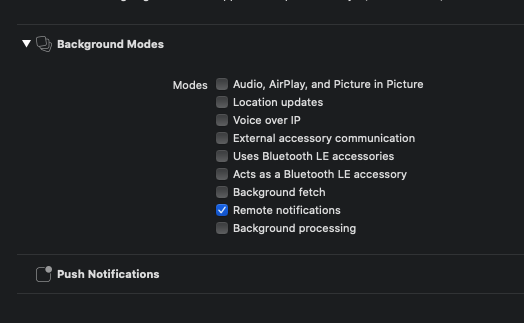
If I send the 'Scheduling' option of FCM to 'Scheduled' -->'Recipient Time Zone', there is no response, and the app does not crash anywhere in the foreground or background and just stays still.
I also tested after an +14 hour or the next day to see if the date and time settings were a problem. The result is still unresponsive.
On the other hand, when the 'Scheduling' option was sent in the 'Now' or 'Scheduled' -->'GMT+N' time zone, 'Remote notifications background mode' was set correctly, so reception was working correctly.
jasons-codes
on 17 Jul 2020
This feature is currently using Apple's background notification to schedule it ahead of time. However, due to the system limitation, if at the moment of background notification arrived, the app is killed. It will not receive notifications.Which is why it's not stable at the moment. But we are working on to improve it from our end.
In the meantime, can you test to ensure your app is not killed between your schedule and arriving time to see if it then works?
chliangGoogle
on 17 Jul 2020
@chliangGoogle
I am also encountering the same issue.
Recipient timezone setting is not working for cloud message.
Even if I do not kill the app, it is still not working.
"Regular scheduling" and "now" option work as normal, even the app is killed in the background.
Waiting for a solution ...
 crusaderay
on 20 Jul 2020
crusaderay
on 20 Jul 2020
@chliangGoogle
Here is what I discovered.
R1, R2 = Schedule to today (time after GMT 14) / Target iOS only
R3 = Schedule to the next day / Target both iOS and Android
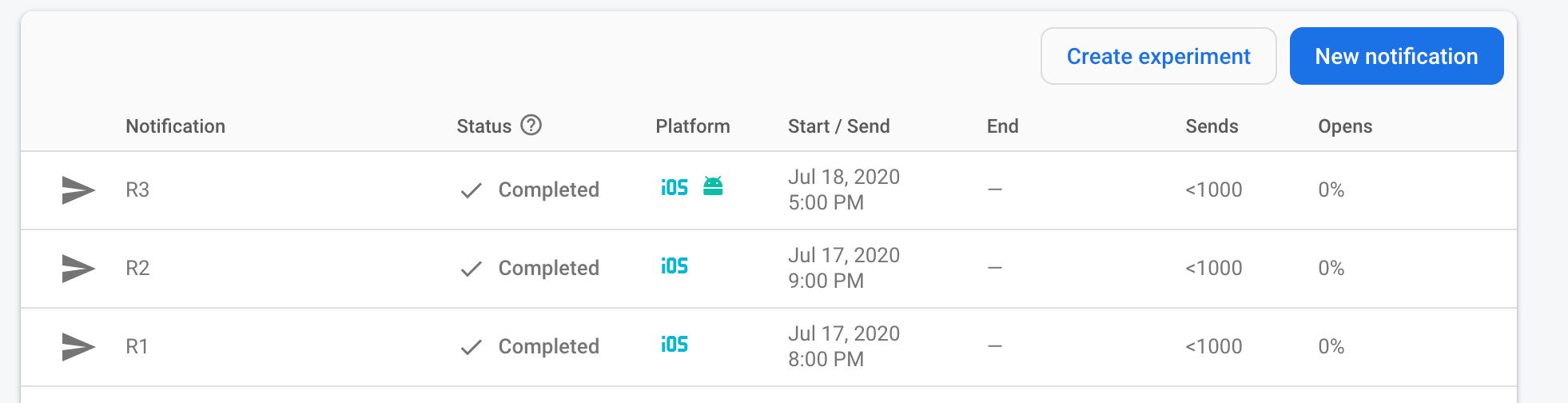
Clearly, this is the first time I've targeted an iOS target, and in this case it works.
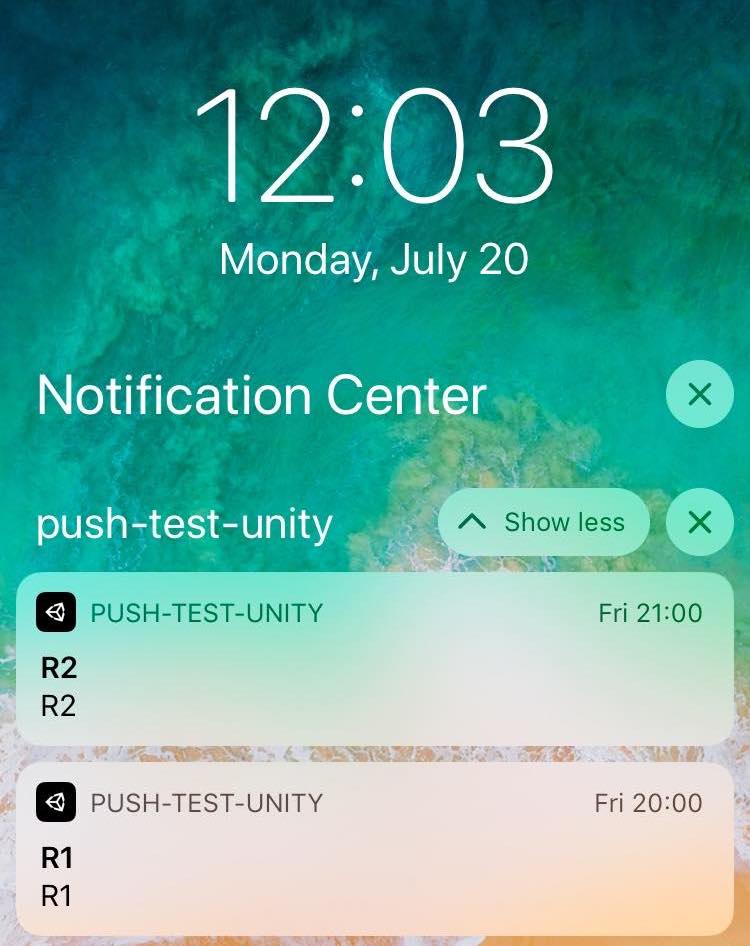
In order to make sure that it is not working properly on iOS due to other factors, we have scheduled an additional 9 FCMs today with the'Recipient Time Zone' option.
-Doubt 1: It is possible that the app did not receive a message due to a crash before receiving R3
-Doubt 2: Possibility to stop working after a day
-Doubt 3: Potentially not working unless targeting only iOS
We would appreciate it if you could share anything you would expect.
jasons-codes
on 20 Jul 2020
for 'recipient time zone' message, you need to wait at least a day to see if they show up in the next schedule cycle.
Can you wait for a day to see if the scheduled message are showing?
chliangGoogle
on 21 Jul 2020
@chliangGoogle
You mean if I set that today and schedule the notification for daily morning time at recipient timezone, it won't pop up tomorrow morning. But it will pop up the next morning?
crusaderay
on 21 Jul 2020
@chliangGoogle
The test was conducted again for 2 days.
As shown below, 9 messages were reserved and sent to the 'Recipient Time Zone'.
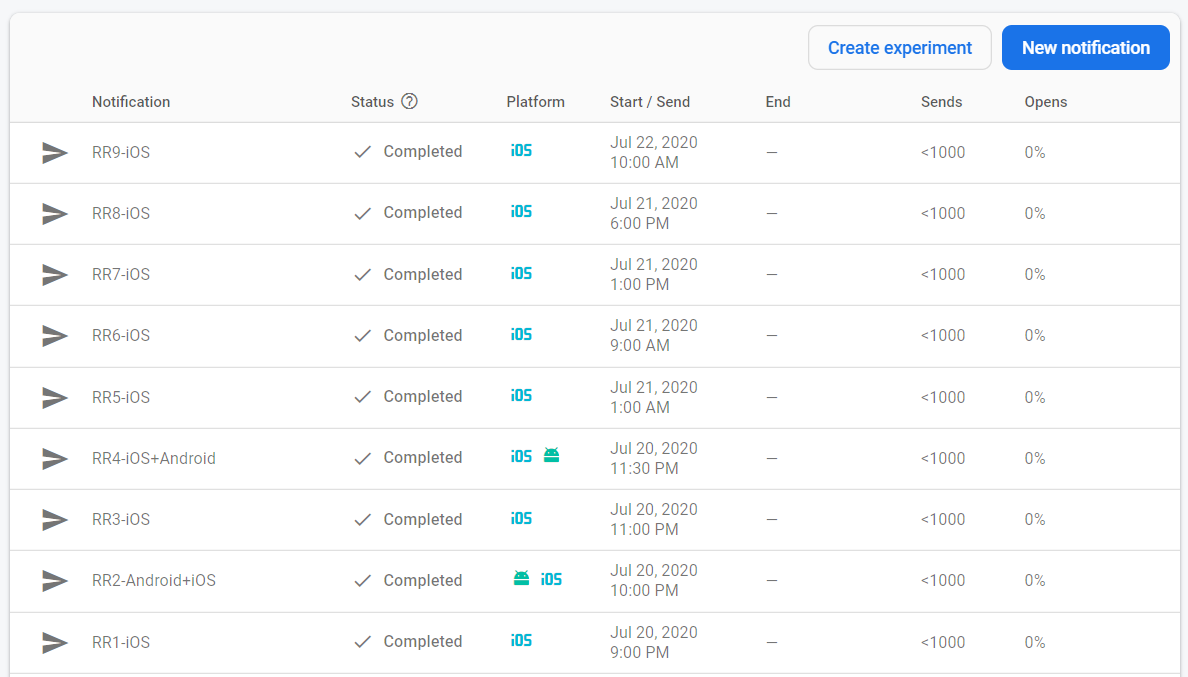
As a result, only 7 were received.
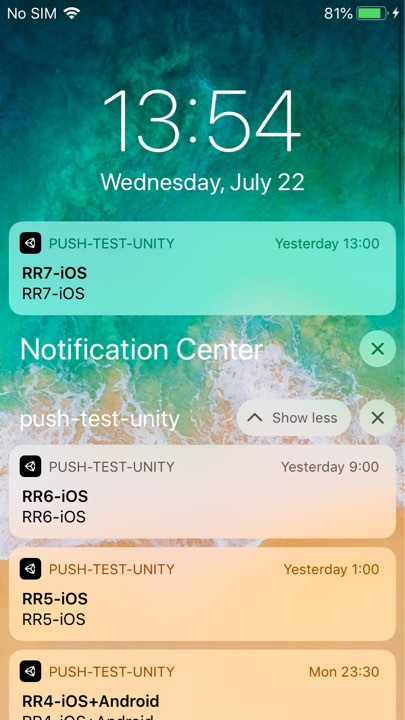
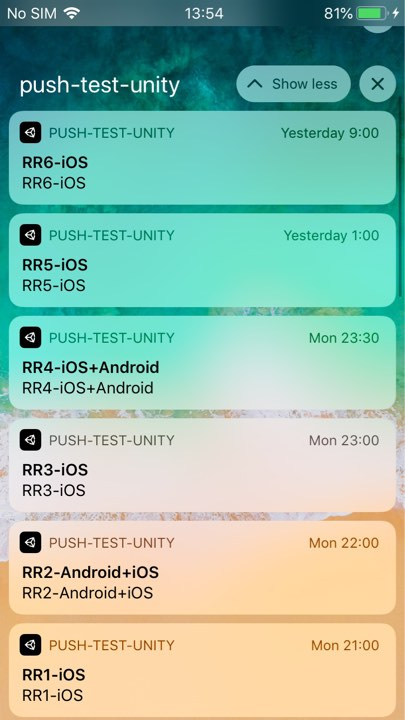
What we found here
- Received a scheduled message in the near future.
(After 5-6 hours: To send a message after Recipient Time Zone limit GMT+14. Since my location is GMT+9, I added 5-6 hours) - I haven't received any scheduled messages in the distant future.
(After about 24 hours)
I think there is a problem with background scheduling in the middle of execution.
The iOS device was tested in an environment where the Lightning cable was connected and hardly touched.
(Another suspect was event push messages from other apps)
Today when I run the test app again:
It's like an app that's been in the background for a long time and then restored.
The app started running as it faded in on the black screen.
(Usually, the screen is displayed immediately when returning to the home button.)
Since the Unity logo did not appear, it seems that the app was not restarted from the beginning.
jasons-codes
on 22 Jul 2020
make sure your app is not killed the whole time you were testing, which might cause the 2 messages missing.
Looks like 'Recipient Time Zone" does work on iOS, but the current solution does not guarantee accuracy due to the limitation of system.
I'm not sure the last issue is related to this.
chliangGoogle
on 22 Jul 2020
@chliangGoogle I think there is still a bug for the 'Recipient Time Zone" option. I tested the code for the last few days.
It seems like if you set a specific timezone, things will work from day 1, even the app is killed.
Then I only change the 'Recipient Time Zone" option, for 2 consecutive days, I have received nothing on my test device. I will wait for tomorrow morning for a third try. I have not changed my code/firebase CM settings for these days. I will share the result tomorrow morning.
I also think that the GCM should work even the app is killed. If the app must stay alive, I can just write a local notification to replace the push notification from remote servers. I am new to this iOS programming, correct me if I am wrong.
crusaderay
on 27 Jul 2020
You will still need your app to not be killed for it to work.
You are right, this is the limitation of sending background message to schedule local timezone message. We are working on improving the feature.
chliangGoogle
on 27 Jul 2020
@chliangGoogle Thanks for the comments!
A third try this morning for the same setting also did not work as expected.
I will try other options.
crusaderay
on 27 Jul 2020
Hey @jasons-codes. We need more information to resolve this issue but there hasn't been an update in 5 weekdays. I'm marking the issue as stale and if there are no new updates in the next 5 days I will close it automatically.
If you have more information that will help us get to the bottom of this, just add a comment!
 google-oss-bot
on 3 Aug 2020
google-oss-bot
on 3 Aug 2020
Since there haven't been any recent updates here, I am going to close this issue.
@jasons-codes if you're still experiencing this problem and want to continue the discussion just leave a comment here and we are happy to re-open this.
google-oss-bot
on 10 Aug 2020
@chliangGoogle, are there plans to move away from Apple's background notification scheduling and implement a more reliable method? Like server-running background task that executes once for every time zone and sends an immediate notification to all users that are in the specific time zone?
Based on the default statistics that are gathered, less than 1% of users opened the "user time zone" notification compared to approx. 20% when sent "now". This is a huge difference, which makes me think how many users are even receiving the "user time zone" notifications.
 o15a3d4l11s2
on 10 Aug 2020
o15a3d4l11s2
on 10 Aug 2020
@o15a3d4l11s2 Unfortunately we don't have anything like this right now but there's something like that our console is working on. If you prefer a PR request (feature request) will help us bring up the issue to our team.
chliangGoogle
on 10 Aug 2020
There is a tricky way to do that with iOS.
You can group the clients by using their timezone information. And send out notifications to each timezone group accordingly. That is the solution I am using at this stage.
Hope this helps!
crusaderay
on 10 Aug 2020
Thanks for sharing this, @crusaderay. This is similar to what I was hoping for Firebase team to do on the Console part, so we do not have to do it manually. Could you share some more information how are you automating the timezones creation of the notifications? It seems like a lot of work to create separate notification for each timezone manually. Or maybe you are using a cloud function or some custom logic on your server?
o15a3d4l11s2
on 11 Aug 2020
@chliangGoogle, unfortunately a PR would not solve the issue, as it needs the console to do the heavy lifting of scheduling a job per timezone and send an immediate notification per timezone. How can I send my suggestion to the console team and check their progress on this topic?
o15a3d4l11s2
on 11 Aug 2020
Hi @o15a3d4l11s2, you can raise a feature request through https://firebase.google.com/support and it'll reach the console team. Thanks!
 prakhar1989
on 11 Aug 2020
prakhar1989
on 11 Aug 2020
@o15a3d4l11s2 A not-that-smart solution.
I divided the world into a few new timezones. Like UTC to UTC+4 as timezone0, UTC-4 to UTC as timezone1, etc. Give each of a group name for the firebase notification group. Arrange notification on firebase to send out notifications for designed groups. For example, for UTC to UTC+4 as timezone0. You will send out a notification at UTC+2 at 10 in the morning. (My app does not require notifications to arrive that accurate, it's like a morning reminder. So no matter it's 8 or 9 or 10, it doesn't matter.)
On the user terminal side, just calculate the timezone locally and attach them to designed groups at the app start stage. If the user's timezone is changed, just clean the information and attach them to the new group according to the new timezone.
This is just a temp solution. I hope google can make the receipt timezone work sometime in the future.
crusaderay
on 11 Aug 2020
@crusaderay, a rather practical solution, thanks. At the moment we need more accurate timings, but maybe we can also group the timezones. I will reach the console team with a feature request and hopefully we can persuade them to look into it in the near future.
o15a3d4l11s2
on 13 Aug 2020
Hi @prakhar1989, thank you for joining the discussion and helping out. I have filed a feature request (case number is 00078535).
o15a3d4l11s2
on 13 Aug 2020
@o15a3d4l11s2 can you file a public feature request on this repository? So that external developers can see and upvote.
chliangGoogle
on 8 Sep 2020
Related issues
 std-forward
·
4Comments
std-forward
·
4Comments
 Vicchang
·
4Comments
Vicchang
·
4Comments
 ebeneventano
·
5Comments
ebeneventano
·
5Comments
 BenSteenson
·
4Comments
BenSteenson
·
4Comments
 Whyser
·
3Comments
Whyser
·
3Comments