Quickstart-unity: Dynamic Links not opening my app
Please fill in the following fields:
Unity editor version: 2018.4.12
Firebase Unity SDK version: 6.7.0
Firebase plugins in use (Auth, Database, etc.): Dynamic Links
Additional SDKs you are using (Facebook, AdMob, etc.): No
Platform you are using the Unity editor on (Mac, Windows, or Linux): Mac
Platform you are targeting (iOS, Android, and/or desktop): iOS
Scripting Runtime (Mono, and/or IL2CPP): IL2CPP
Followed up the tutorial of how to integrate dynamic links and applications is built correctly, firebase console is set up correctly, GoogleService-Info.plist is in the project and when a click a link always goes to the App Store instead of opening my App.
This was working for me, so I don't understand if is a Firebase bug, Apple bug or something has changed.
Have you been able to reproduce this issue with just the Firebase Unity quickstarts (this GitHub project)? Yes
- Downloaded dynamic links test app
- Imported Dynamic Links framework NET 4.5
- Imported GoogleService-Info.plist from Firebase Console that has Team Id, App Id set up. And change the bundle id just like firebase has it.
- Built it and configure xcode associate domains with applinks:mydomain.page.link
- Installed app in iPhone 11 Pro iOS 13.2.3
- Put on slack the short dynamic link from Firebase console link details and instead of opening the app open the store.
 MartinGonzalez
All 16 comments
I haven't been able to repro the issue locally. If you've followed the steps in the quickstart it ought to work.
Just to be clear when you say you assicoated the links with applinks:mydomain.page.link you did substitute your own url there, correct? I'll investigate a bit and see if I can find any other potential issues you might be running into.
 alexames
on 26 Nov 2019
alexames
on 26 Nov 2019
Hi @alexames!
Yes, I replaced applinks:mydomain.page.link with the domain firebase created for me in the dashboard. I don't know if it's a settings problem from Firebase dashboard, iOS or firebase itself.
I tested with a plain empty project and the link it's not opening my app.
MartinGonzalez
on 2 Dec 2019
@alexames
I have the same problem.
I'm developing Unity, and the platform is Android.
- I manage the app with two live and QA versions.
- In QA version, creating dynamic links and running apps and moving stores through those links will work normally.
- In the live version, if you create a dynamic link and run the link, the app will not run and will be moved to the store. (Apps are installed.)
- Only Version and Bundle Version Code values are different from QA versions.
(QA // Version - 1.2.0QATest231, Bundle Version Code - 4592830498
Live // Version - 1.2.0, Bundle Version Code - 13) - Put the live version Version and Bundle Version Code at any value, build it, create a dynamic link, and then check the behavior. Then, it works normally.
(ex: Version - 1.2.12304, Bundle Version Code - 34240958) - The Version of the app registered in GooglePlayStore is 1.2.0 and the Bundle Version Code is 13.
I'd appreciate it if you could tell me how to modify why it works like this.
 SecretTonto
on 5 Dec 2019
SecretTonto
on 5 Dec 2019
@alexames
I have the same problem.
I'm developing Unity, and the platform is Android.
- I manage the app with two live and QA versions.
- In QA version, creating dynamic links and running apps and moving stores through those links will work normally.
- In the live version, if you create a dynamic link and run the link, the app will not run and will be moved to the store. (Apps are installed.)
- Only Version and Bundle Version Code values are different from QA versions.
(QA // Version - 1.2.0QATest231, Bundle Version Code - 4592830498
Live // Version - 1.2.0, Bundle Version Code - 13)- Put the live version Version and Bundle Version Code at any value, build it, create a dynamic link, and then check the behavior. Then, it works normally.
(ex: Version - 1.2.12304, Bundle Version Code - 34240958)- The Version of the app registered in GooglePlayStore is 1.2.0 and the Bundle Version Code is 13.
I'd appreciate it if you could tell me how to modify why it works like this.
Amv of dynamic link parameters was set and resolved.
SecretTonto
on 5 Dec 2019
I'm still cannot open iOS app.
Android app works perfect but iOS is always going to the store.
Checklist
- [x] https://MYDOMAIN.page.link/apple-app-site-association is working and has team id and bundle id correctly
- [x]
applinks:mydomain.page.linkis in my associate domain - [x] Firebase postprocess created successfully URL scheme with my bundle id
- [x] Android works
- [x] iOS always going to the store despite having configured to open my bundle id
MartinGonzalez
on 4 Feb 2020
After testing the firebase dynamic link this is the output of the following page
https://search.developer.apple.com/appsearch-validation-tool
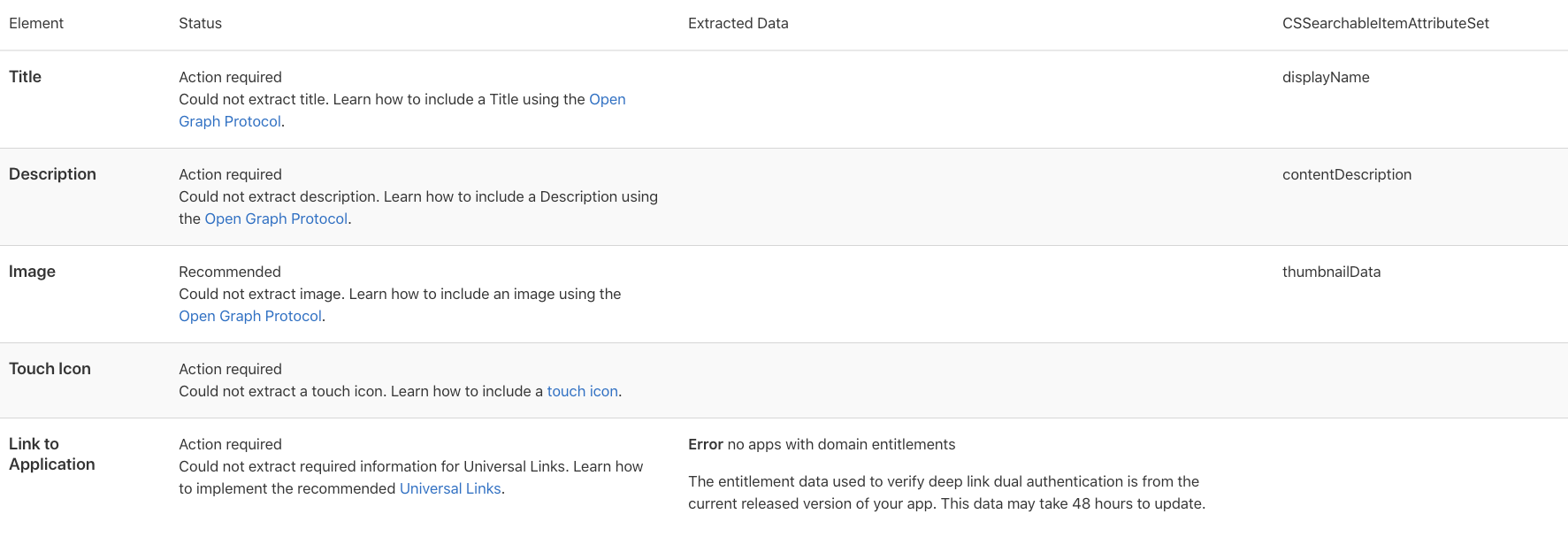
Is the fine? is not?
I've created a complete new project, empty, no extra deps, only dynamic link.
Created a new project only dynamic link
Set up correctly everything
Tested on iOS 13.3.1 Iphone 11 Pro
Always opening the store
MartinGonzalez
on 5 Feb 2020
Hi, I am having the exact same problem.
Android works, and iOS does not.
I configured everything the same as MartinGonzalez, with no luck.
Anyone got iOS links working?
Thanks
 mcolombo
on 26 Jun 2020
mcolombo
on 26 Jun 2020
In the company we had to update the entitlements that are uploaded to the server pointing to yourdomain/apple-app-site-association
Seems that firebase has an outdated entitlement format. The format we use is the following
{
    "applinks": {
        "apps": [],
        "details": [
            {
                "appID": "TEAMID.com.your.package",
                "paths": [
                    "NOT /_/*",
                    "/*"
                ]
            },
            {
                "appID": "TEAMID.com.your.package",
                "paths": [
                    "NOT /_/*",
                    "/*"
                ]
            }
        ]
    },
    "webcredentials": {
        "apps": [
            "TEAMID.com.your.package"
        ]
    }
}
Firebase has the following
{
  "applinks": {
    "apps": [

    ],
    "details": [
      {
        "appID": "TEAMID.com.your.package",
        "paths": [
          "NOT /_/*",
          "/*"
        ]
      },
      {
        "appID": "TEAMID.com.your.package",
        "paths": [
          "NOT /_/*",
          "/*"
        ]
      }
    ]
  }
}
It's missing the webcredentials object
MartinGonzalez
on 28 Jun 2020
Hi @MartinGonzalez
How/where do you correct the entitlements file? I am seeing precisely the same issue.
Thanks!
 DaveOak
on 29 Aug 2020
DaveOak
on 29 Aug 2020
@DaveOak we had to upload our own entitlements file in our domain because you cannot modify firebase entitlements.
It's really complicated because you have to create a host, link it to the firebase domain and have your own infra.
Doing this seems to open the app but firebase still not giving the details inside the link, the event OnDynamicLinkReceived is not being called.
I've been here and there, some post says this is an Apple bug, others that firebase is not configured correctly, we are really stuck with this issue and have no clue how to fix it.
One thing firebase support told me and it's not in documentations is that if you have more than one iOS application (we have the productive and the enterprise one) it does not guarantee that the app will open (because the order in the entitlements)
MartinGonzalez
on 29 Aug 2020
Thanks @MartinGonzalez that's very helpful. It looks like a rabbit hole I don't want to go down, for the sake of a fringe feature in my app.
DaveOak
on 29 Aug 2020
Hey folks,
This issue seems to the same to #574 and it seems to be fixed in May in the internal ticket.
Does this still happen to the latest Unity SDK, like 6.16.1 and 6.16.0?
Shawn
 chkuang-g
on 21 Oct 2020
chkuang-g
on 21 Oct 2020
Ah, NVM. In #574, the browser is opened instead of the store. It is different.
Internal ticket: b/171436380
chkuang-g
on 22 Oct 2020
Could you provide your dynamic link? This would help us to diagnose the issue.
chkuang-g
on 22 Oct 2020
This issue still appears to be happening in 6.16.1
Our test dynamic link created through the Firebase console:
https://workinman.page.link/test
 jdd4494
on 12 Nov 2020
jdd4494
on 12 Nov 2020
@DaveOak we had to upload our own entitlements file in our domain because you cannot modify firebase entitlements.
It's really complicated because you have to create a host, link it to the firebase domain and have your own infra.
Doing this seems to open the app but firebase still not giving the details inside the link, the event OnDynamicLinkReceived is not being called.
I've been here and there, some post says this is an Apple bug, others that firebase is not configured correctly, we are really stuck with this issue and have no clue how to fix it.One thing firebase support told me and it's not in documentations is that if you have more than one iOS application (we have the productive and the enterprise one) it does not guarantee that the app will open (because the order in the entitlements)
I also ran into this issue after switching to a custom domain.. I managed to receive the dynamic link by following this post #436 .
Basically you need to add an array with key FirebaseDynamicLinkCustomDomains to your Info.plist file, and inside that array your dynamic link URL prefix
jdd4494
on 19 Nov 2020
Related issues
 kantagara
·
5Comments
kantagara
·
5Comments
 Crashthatch
·
5Comments
Crashthatch
·
5Comments
 Thaina
·
4Comments
Thaina
·
4Comments
 highpockets
·
5Comments
highpockets
·
5Comments
 GeorgeFedoseev
·
3Comments
GeorgeFedoseev
·
3Comments