Quickstart-unity: DllNotFoundException: FirebaseCppApp-6_6_0, i seen that this issue was raised and closed before. i didn't got solution from there, also there is no positive comments. so i want to know that is it possible to resolve this issue or not?
Please fill in the following fields:
Unity editor version: 2019.2.8f1
Firebase Unity SDK version: 6.6.0
Firebase plugins in use (Auth, Database, etc.):Auth
Additional SDKs you are using (Facebook, AdMob, etc.): None
Platform you are using the Unity editor on (Mac, Windows, or Linux): Windows
Platform you are targeting (iOS, Android, and/or desktop): Android
Scripting Runtime (Mono, and/or IL2CPP):Mono
Please describe the issue here:
(Please list the full steps to reproduce the issue. Include device logs, Unity logs, and stack traces if available.)
step 1:
generate Unity app with Firebase Auth with unity 2019.2.8f1
step2:
export unity project to android with ETC2 and 'Export Project' checked.
step 3:
open exported file in android studio, then
generate .aar file by changing com.android.application to com.android.library.
step 4:
create or open another native android app and include .aar file as a new module, which generated in step 3.
And you have an issue :
DllNotFoundException: FirebaseCppApp-6_6_0
Here is Logs :
Unable to find FirebaseCppApp-6_6_0
10-31 18:51:09.081 22252-22427/com.pentasoft.socialad E/Unity: DllNotFoundException: FirebaseCppApp-6_6_0
        at (wrapper managed-to-native) Firebase.AppUtilPINVOKE+SWIGExceptionHelper.SWIGRegisterExceptionCallbacks_AppUtil(Firebase.AppUtilPINVOKE/SWIGExceptionHelper/ExceptionDelegate,Firebase.AppUtilPINVOKE/SWIGExceptionHelper/ExceptionDelegate,Firebase.AppUtilPINVOKE/SWIGExceptionHelper/ExceptionDelegate,Firebase.AppUtilPINVOKE/SWIGExceptionHelper/ExceptionDelegate,Firebase.AppUtilPINVOKE/SWIGExceptionHelper/ExceptionDelegate,Firebase.AppUtilPINVOKE/SWIGExceptionHelper/ExceptionDelegate,Firebase.AppUtilPINVOKE/SWIGExceptionHelper/ExceptionDelegate,Firebase.AppUtilPINVOKE/SWIGExceptionHelper/ExceptionDelegate,Firebase.AppUtilPINVOKE/SWIGExceptionHelper/ExceptionDelegate,Firebase.AppUtilPINVOKE/SWIGExceptionHelper/ExceptionDelegate,Firebase.AppUtilPINVOKE/SWIGExceptionHelper/ExceptionDelegate)
      at Firebase.AppUtilPINVOKE+SWIGExceptionHelper..cctor () [0x000ee] in <8c7b73be776844879184b3886ba9cec3>:0
    Rethrow as TypeInitializationException: The type initializer for 'SWIGE
Please answer the following, if applicable:
Have you been able to reproduce this issue with just the Firebase Unity quickstarts (this GitHub project)?
Yes
What's the issue repro rate? (eg 100%, 1/5 etc)
 supermanstudeo
All 7 comments
Hi @supermanstudeo,
Can you please make sure you invoke the Play Services Resolver "Force Resolve" function before building to download and install required libraries and see if that fixes the issue you are having.

 muflub
on 31 Oct 2019
muflub
on 31 Oct 2019
Hi @markchandler-google
Thanks for suggestion sir, but i tried it so many times before. I'm trying to resolve this error from days.
after exporting Unity game as a Android Project everything works perfectly.
but as i convert that unity Android project into .aar file and import it to my Native Android app, Firebase shows this error :
DllNotFoundException: FirebaseCppApp-6_6_0
supermanstudeo
on 31 Oct 2019
Hi @supermanstudeo,
I suspect that you may be running into an issue with how the Unity-specific Android dependencies are shipped. You'll find all the relevant files included in "Assets/Firebaser/m2repository" and referenced in your exported .gradle file as:
        maven {
            url "file:////Users/martinpatrick/Documents/git/sword-chucks/SwordChucks/Assets/Firebase/m2repository" // Assets/Firebase/Editor/AnalyticsDependencies.xml:20, Assets/Firebase/Editor/AppDependencies.xml:20, Assets/Firebase/Editor/AuthDependencies.xml:20, Assets/Firebase/Editor/CrashlyticsDependencies.xml:20, Assets/Firebase/Editor/DynamicLinksDependencies.xml:20, Assets/Firebase/Editor/StorageDependencies.xml:20
        }
I suspect that if you were to include this maven repository in the project where you also include your generated .aar file then you should be able to work around this issue. This is unfortunately hardcoded to the absolute path of where you checked out your Unity project, so you may want to either move this to a known location or edit the generated project to include the aar directly and include the dependencies giving you an issue as described here.
Let us know if this resolves you issue, and if it does definitely feel free to file a feature request if it's something you'd like to see automated (if you do this definitely include a link to this issue any any other relevant information about your use case).
--Patrick
 patm1987
on 31 Oct 2019
patm1987
on 31 Oct 2019
Thanks @patm1987
i did as you suggested and DllNotFoundException: FirebaseCppApp-6_6_0 error gone,
but as i run it in my Android Device it shows 'Setting up Firebase Auth', and not fetching any data.
here is the Screen Shot of my Mobile Device,
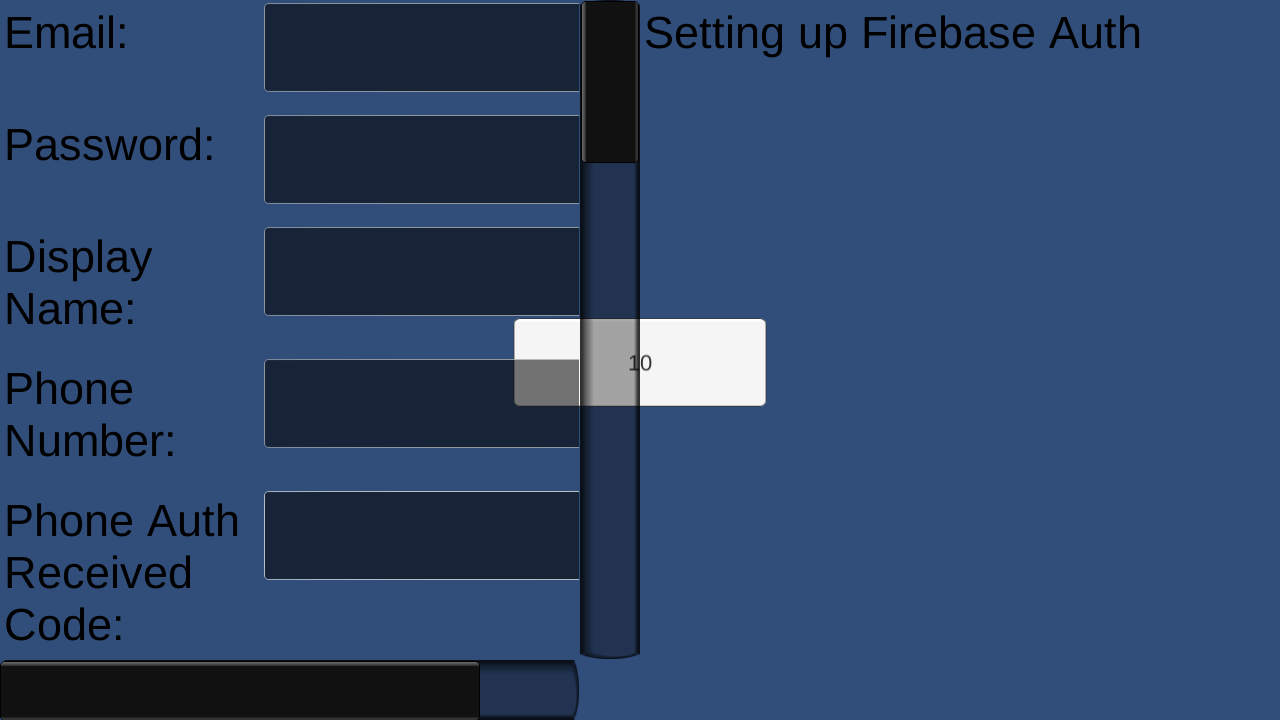
after i click on SignIn Anonymously it keep showing this,

here is the Logs i'm getting in Android Studio,
11-01 17:59:43.518 5314-5314/? E/Zygote: v2
11-01 17:59:43.518 5314-5314/? E/Zygote: accessInfo : 0
11-01 17:59:45.238 5314-5314/com.pentasoft.socialad E/ViewSystem: ViewRootImpl #2 Surface is not valid.
11-01 17:59:52.638 5314-5841/com.pentasoft.socialad E/firebase: method_ids[i] || (method.optional == kMethodOptional)
11-01 17:59:52.638 5314-5841/com.pentasoft.socialad E/firebase: Unable to find Method com/google/firebase/FirebaseApp.delete (signature '()V', instance).  Please verify the AAR which contains the com/google/firebase/FirebaseApp class is included in your app.
11-01 17:59:52.648 5314-5841/com.pentasoft.socialad E/firebase: g_initialized_count
11-01 17:59:52.728 5314-5485/com.pentasoft.socialad E/Unity: method_ids[i] || (method.optional == kMethodOptional)

    (Filename: ./Runtime/Export/Debug/Debug.bindings.h Line: 35)
11-01 17:59:53.168 5314-5485/com.pentasoft.socialad E/firebase: method_ids[i] || (method.optional == kMethodOptional)
11-01 17:59:53.168 5314-5485/com.pentasoft.socialad E/Unity: method_ids[i] || (method.optional == kMethodOptional)

    (Filename: ./Runtime/Export/Debug/Debug.bindings.h Line: 35)
11-01 17:59:53.168 5314-5485/com.pentasoft.socialad E/firebase: Unable to find Method com/google/firebase/FirebaseApp.delete (signature '()V', instance).  Please verify the AAR which contains the com/google/firebase/FirebaseApp class is included in your app.
11-01 17:59:53.168 5314-5485/com.pentasoft.socialad E/firebase: g_initialized_count
Hi @supermanstudeo,
Are you sure you are also including all the *.aar files that Firebase needs to work on android? You can find them under the Assets/Plugins/Android folder (selected ones are just an example. I think all of them are required):

muflub
on 1 Nov 2019
Hi,
@markchandler-google
i have Firebase in my native app V: 11.0.4 and In module its V19.1.0
so, if i'm adding this these 3 dependencies you suggested then, this error shown up:
Duplicate class com.google.firebase.FirebaseApp found in modules classes.jar (com.google.firebase.firebase-common-19.1.0.aar) and classes.jar (com.google.firebase:firebase-common:11.0.4)
Duplicate class com.google.firebase.FirebaseNetworkException found in modules classes.jar (com.google.firebase.firebase-common-19.1.0.aar) and classes.jar (com.google.firebase:firebase-common:11.0.4)
Duplicate class com.google.firebase.FirebaseOptions found in modules classes.jar (com.google.firebase.firebase-common-19.1.0.aar) and classes.jar (com.google.firebase:firebase-common:11.0.4)
Duplicate class com.google.firebase.FirebaseOptions$Builder found in modules classes.jar (com.google.firebase.firebase-common-19.1.0.aar) and classes.jar (com.google.firebase:firebase-common:11.0.4)
Duplicate class com.google.firebase.FirebaseTooManyRequestsException found in modules classes.jar (com.google.firebase.firebase-common-19.1.0.aar) and classes.jar (com.google.firebase:firebase-common:11.0.4)
Duplicate class com.google.firebase.provider.FirebaseInitProvider found in modules classes.jar (com.google.firebase.firebase-common-19.1.0.aar) and classes.jar (com.google.firebase:firebase-common:11.0.4)
supermanstudeo
on 1 Nov 2019
i Solved Everything.
Thanks both of you for support @markchandler-google and @patm1987 .
supermanstudeo
on 5 Nov 2019
Related issues
 v-sag
·
6Comments
v-sag
·
6Comments
 kantagara
·
5Comments
kantagara
·
5Comments
 andr-construction
·
4Comments
andr-construction
·
4Comments
 Vicchang
·
4Comments
Vicchang
·
4Comments
 SeanLangre
·
3Comments
SeanLangre
·
3Comments