Quickstart-unity: Realtime Database connection is flakey on desktop
I'm using unity 5.5.0f3 with Firebase version 4.1.0 and whenever I try to run the Main scene for realtime database using my URL in the app.SetEditorDatabaseUrl("XXX"); it fails I made sure to set these rules
{
  "rules": {
    ".read": "auth == null",
    ".write": "auth == null"
  }
}
Another note is this use to work fine before with an older version of the Firebase SDK but now both the new Firebase SDK and the old Firebase SDK version now give me this error when running in editor. I have a feeling there is something blocking it from connecting to my Firebase but i'm not sure what it is.
`8/25/2017 7:31:29 AM [Error] WebSocket: ws_0 - could not connect
System.Net.Sockets.SocketException: A socket operation was attempted to an unreachable network.

  at System.Net.Sockets.Socket.Connect (System.Net.EndPoint remoteEP, Boolean requireSocketPolicy) [0x00000] in <filename unknown>:0
  at System.Net.Sockets.Socket.Connect (System.Net.EndPoint remoteEP) [0x00000] in <filename unknown>:0
  at System.Net.Sockets.TcpClient.Connect (System.Net.IPEndPoint remote_end_point) [0x00000] in <filename unknown>:0
  at Firebase.Database.Internal.TubeSock.WebSocket.CreateSocket () [0x00000] in <filename unknown>:0
UnityEngine.Debug:LogError(Object)
Firebase.FirebaseHandler:LogMessage(LogLevel, String)
Firebase.Unity.UnityLoggingService:LogMessage(LogLevel, String)
Firebase.Database.Internal.Logging.DefaultLogger:Error(String, String)
Firebase.Database.Internal.Logging.DefaultLogger:OnLogMessage(Level, String, String, Int64)
Firebase.Database.Internal.Logging.LogWrapper:Error(String, Exception)
Firebase.Database.Internal.TubeSock.WebSocket:LogError(String, Exception)
Firebase.Database.Internal.TubeSock.WebSocket:CreateSocket()
Firebase.Database.Internal.TubeSock.WebSocket:RunReader()
Firebase.Database.Internal.TubeSock.Runnable101:Run()
Google.Sharpen.Thread:InternalRun()
`

`1/2/0001 5:46:04 PM [Error] WebSocket: ws_19 - WebSocketException during handshake
Firebase.Database.Internal.TubeSock.WebSocketException: unknown host: XXX ---> System.Net.Sockets.SocketException: A socket operation was attempted to an unreachable network.

  at System.Net.Sockets.Socket.Connect (System.Net.EndPoint remoteEP, Boolean requireSocketPolicy) [0x00000] in <filename unknown>:0
  at System.Net.Sockets.Socket.Connect (System.Net.EndPoint remoteEP) [0x00000] in <filename unknown>:0
  at System.Net.Sockets.TcpClient.Connect (System.Net.IPEndPoint remote_end_point) [0x00000] in <filename unknown>:0
  at Firebase.Database.Internal.TubeSock.WebSocket.CreateSocket () [0x00000] in <filename unknown>:0
  --- End of inner exception stack trace ---
  at Firebase.Database.Internal.TubeSock.WebSocket.CreateSocket () [0x00000] in <filename unknown>:0
  at Firebase.Database.Internal.TubeSock.WebSocket.RunReader () [0x00000] in <filename unknown>:0
UnityEngine.Debug:LogError(Object)
Firebase.FirebaseHandler:LogMessage(LogLevel, String)
Firebase.Unity.UnityLoggingService:LogMessage(LogLevel, String)
Firebase.Database.Internal.Logging.DefaultLogger:Error(String, String)
Firebase.Database.Internal.Logging.DefaultLogger:OnLogMessage(Level, String, String, Int64)
Firebase.Database.Internal.Logging.LogWrapper:Error(String, Exception)
Firebase.Database.Internal.TubeSock.WebSocket:LogError(String, Exception)
Firebase.Database.Internal.TubeSock.WebSocket:RunReader()
Firebase.Database.Internal.TubeSock.Runnable101:Run()
Google.Sharpen.Thread:InternalRun()
`
 mirzasohailbaig
All 107 comments
Hi,
I can't seem to reproduce the problem you are seeing, but one thing stands out to me in the rules you provided.
{ "rules": { ".read": "auth == null", ".write": "auth == null" } }
means that in order to read and write to the database you need to not be authenticated at all, which seems odd to me.
If you want to not require authentication, you can use { ".read": true, ".write": true }
If you do want to require authentication, you can use { ".read": "auth != null"... }
If that doesn't help, if I'm reading this correctly the problem is happening in the Firebase editor, and not in a build, correct? And also, what system are you running this on (Windows/Mac/Linux)? That might help us track down what you are seeing.
 a-maurice
on 26 Aug 2017
a-maurice
on 26 Aug 2017
I tried changing the rules to '{ ".read": true, ".write": true }' which is what i had before but it didn't help. My operating system is Windows and I'm just testing this in the unity editor and looking in the Firebase console to see the new data, and the errors occur in the unity editor console.
mirzasohailbaig
on 26 Aug 2017
Hmm, I'll keep looking on my end to see if I can find any problems.
And just to cover all cases, you are running this with an internet connection? Disabling my connection has been the only way I've been able to reproduce it yet, and a socket exception usually indicates a networking problem.
a-maurice
on 26 Aug 2017
Yes I'm connected to the internet I even tried building to android device to see if it could be a unity editor issue, but that didn't help either.
mirzasohailbaig
on 26 Aug 2017
Our best guess is that is has something to do with an internet connection problem, possibly a firewall that is blocking it?
One suggestion is to turn on more log debugging, as we print out through out the connection process. To do so, you can add:
  FirebaseApp.LogLevel = LogLevel.Verbose;
  FirebaseDatabase.DefaultInstance.LogLevel = LogLevel.Verbose;  // Or your database instance, if not using the default.
That should print out what ip address it's trying to use, the socket, etc. which might have some explanation of the problem.
Another thing to try would be connecting directly with the REST api, as that will confirm that you are able to connect to your project at all.
a-maurice
on 28 Aug 2017
I tried connecting to my phone's hotspot instead and everything works fine on it, so its simply my router that I think someone may have reset and is now blocking connection to Firebase, which explains why it stopped working. However I still can't figure out what settings I can try to get my router to work with Firebase as well, simply turning off firewall did not work. Any advice based on the settings I can mess with be helpful.


Editor Console log for details

Just for details I have Spectrum as my internet provider and I'm using the default router/modem they provided Ubee (model: DDW36C).
mirzasohailbaig
on 29 Aug 2017
Never mind it just took time for my settings to start working on the router and now everything appears to be working fine. Also I believe the three settings I enabled that made Firebase connections possible again were [Multicast Enable, DNS Relay, and UPnP Enable].
Thanks a-maurice your help was much appreciated.
mirzasohailbaig
on 29 Aug 2017
I can confirm that this issue is tied into network problems related with routers..
But this is happening way too much to be ignored. Of a team of 10 devs, 5 of them have experienced this problem on public and private networks that otherwise work fine for everything else!
Can we please repoen and try diagnose if there is a way to workaround this?
I feel a roll back to a previous version of firebase and installing .net 3.5 in unity will help mitigate these issues.
11/24/2017 5:05:19 AM [Error] WebSocket: ws_3 - WebSocketException during handshake
Firebase.Database.Internal.TubeSock.WebSocketException: unknown host: super-awesome-massiveproject.firebaseio.com ---> System.Net.Sockets.SocketException: A connection attempt failed because the connected party did not properly respond after a period of time, or established connection failed because connected host has failed to respond.

  at System.Net.Sockets.Socket.Connect (System.Net.EndPoint remoteEP, Boolean requireSocketPolicy) [0x00000] in <filename unknown>:0
  at System.Net.Sockets.Socket.Connect (System.Net.EndPoint remoteEP) [0x00000] in <filename unknown>:0
  at System.Net.Sockets.TcpClient.Connect (System.Net.IPEndPoint remote_end_point) [0x00000] in <filename unknown>:0
  at Firebase.Database.Internal.TubeSock.WebSocket.CreateSocket () [0x00000] in <filename unknown>:0
  --- End of inner exception stack trace ---
  at Firebase.Database.Internal.TubeSock.WebSocket.CreateSocket () [0x00000] in <filename unknown>:0
  at Firebase.Database.Internal.TubeSock.WebSocket.RunReader () [0x00000] in <filename unknown>:0
UnityEngine.Debug:LogError(Object)
Firebase.FirebaseHandler:LogMessage(LogLevel, String)
Firebase.Unity.UnityLoggingService:LogMessage(LogLevel, String)
Firebase.Database.Internal.Logging.DefaultLogger:Error(String, String)
Firebase.Database.Internal.Logging.DefaultLogger:OnLogMessage(Level, String, String, Int64)
Firebase.Database.Internal.Logging.LogWrapper:Error(String, Exception)
Firebase.Database.Internal.TubeSock.WebSocket:LogError(String, Exception)
Firebase.Database.Internal.TubeSock.WebSocket:RunReader()
Firebase.Database.Internal.TubeSock.Runnable101:Run()
Google.Sharpen.Thread:InternalRun()
 PathToLife
on 24 Nov 2017
PathToLife
on 24 Nov 2017
As requested I'm reopening the issue, since it seems like something that Firebase should actually resolve.
mirzasohailbaig
on 24 Nov 2017
@PathToLife is there anything you can share about your reproduction environment?
Also, any chance you could try out the iOS or Android samples
https://github.com/firebase/quickstart-ios/tree/master/database
https://github.com/firebase/quickstart-android/tree/master/database
in the same environment?
Since we have different network stacks between each environment it would be interesting to see whether the problem lies in there.
TBH The connection to the database is simply using WebSocket, I would assume that in an environment where RT DB connections are failing you would see other connections fail.
 stewartmiles
on 30 Nov 2017
stewartmiles
on 30 Nov 2017
Hello, im having the same issue. All was working fine and suddenly this started to appear. Internet is fine. Router is like always and Rules are like always.
 dbarla
on 6 Dec 2017
dbarla
on 6 Dec 2017
1/2/0001 6:01:00 PM [Error] WebSocket: ws_17 - WebSocketException during handshake
Firebase.Database.Internal.TubeSock.WebSocketException: unknown host: XXXX.XXXX.firebaseio.com ---> System.Net.Sockets.SocketException: A socket operation was attempted to an unreachable network.
at System.Net.Sockets.Socket.Connect (System.Net.EndPoint remoteEP, Boolean requireSocketPolicy) [0x00000] in
at System.Net.Sockets.Socket.Connect (System.Net.EndPoint remoteEP) [0x00000] in
at System.Net.Sockets.TcpClient.Connect (System.Net.IPEndPoint remote_end_point) [0x00000] in
at Firebase.Database.Internal.TubeSock.WebSocket.CreateSocket () [0x00000] in
--- End of inner exception stack trace ---
at Firebase.Database.Internal.TubeSock.WebSocket.CreateSocket () [0x00000] in
at Firebase.Database.Internal.TubeSock.WebSocket.RunReader () [0x00000] in
dbarla
on 6 Dec 2017
Im seeing this behaviour 2 times in same day after working a little with the Database. Same machine, same Router Config,....Log with Unreachable again...what to do? I need to put this in Production and im not sure what will happen. No idea how to manage this State either. Im trying to grab "e2.DatabaseError" with no luck too. It happens 1 time out of 100 interactions. But still is annoying because the App will crash except managing this e2.DatabaseError (if i manage to understand how).
dbarla
on 6 Dec 2017
Same for me. Accessing realtime database is working fine in most of tested networks, including mobile hotspot, except for one private network in the office, where I constantly get the following error. It doesn't matter if I try with unity editor or from a build on iOS or Android.
01/11/2018 10:08:10 [Error] WebSocket: ws_2 - WebSocketException during handshake
Firebase.Database.Internal.TubeSock.WebSocketException: unknown host: <firebase_URL> ---> System.Net.Sockets.SocketException: Connection timed out
  at System.Net.Sockets.Socket.Connect (System.Net.EndPoint remoteEP, Boolean requireSocketPolicy) [0x00000] in <filename unknown>:0
  at System.Net.Sockets.Socket.Connect (System.Net.EndPoint remoteEP) [0x00000] in <filename unknown>:0
  at System.Net.Sockets.TcpClient.Connect (System.Net.IPEndPoint remote_end_point) [0x00000] in <filename unknown>:0
  at Firebase.Database.Internal.TubeSock.WebSocket.CreateSocket () [0x00000] in <filename unknown>:0
  --- End of inner exception stack trace ---
  at Firebase.Database.Internal.TubeSock.WebSocket.CreateSocket () [0x00000] in <filename unknown>:0
  at Firebase.Database.Internal.TubeSock.WebSocket.RunReader () [0x00000] in <filename unknown>:0
UnityEngine.Debug:LogError(Object)
Firebase.Platform.FirebaseLogger:LogMessage(PlatformLogLevel, String)
Firebase.Unity.UnityLoggingService:LogMessage(PlatformLogLevel, String)
Firebase.Database.Internal.Logging.DefaultLogger:Error(String, String)
Firebase.Database.Internal.Logging.DefaultLogger:OnLogMessage(Level, String, String, Int64)
Firebase.Database.Internal.Logging.LogWrapper:Error(String, Exception)
Firebase.Database.Internal.TubeSock.WebSocket:LogError(String, Exception)
Firebase.Database.Internal.TubeSock.WebSocket:RunReader()
Firebase.Database.Internal.TubeSock.Runnable101:Run()
Google.Sharpen.Thread:InternalRun()
Accessing Firebase realtime database via CURL and pure REST API is working fine in that network.
Any ideas?
 piofrey
on 11 Jan 2018
piofrey
on 11 Jan 2018
I am getting the same issue with the router. Working fine with the mobile network and with a hotspot. Any suggestions? This might happen for users as well, making this an unreliable option...
Unity 2017.30f3 / Firebase SDK 4.4.0
 EyalBira
on 20 Jan 2018
EyalBira
on 20 Jan 2018
Having the same issue today as @EyalBira . Unity 2017.30f3 / Firebase SDK 4.4.0. Producing "WebSocketException during handshake" error. Works with my mobile Hotspot, not working through my Spectrum internet router.
 TeddyMathias
on 20 Jan 2018
TeddyMathias
on 20 Jan 2018
I have been encountering similar problem on multiple wi-fi networks from yesterday. Mobile hot spot works fine and I am able to connect to firebase. I get network error only for wifi connections which had been working fine till day before yesterday.
 NeelimaNair
on 31 Mar 2018
NeelimaNair
on 31 Mar 2018
Any updates about this issue? Temporary disabling anti-virus on my imac helped, but that is not a solution unfortunately.
 Matthewek
on 10 Apr 2018
Matthewek
on 10 Apr 2018
I also have same issue with Lan network but still ok with hotspot form mobilenetwork source. Anyone have solution for that, even temporary.
 LvM2D
on 16 Apr 2018
LvM2D
on 16 Apr 2018
In my case it was antivirus that was blocking it (Kaspersky internet security 2017) - disabling it or, disabling "Check secure connections HTTPS" in preferences temporary fixed this issue, here is response I had from firebase tech team:
Regarding the issue, you may try using other anti virus or whitelist Firebase as our SDK doesn't work well with proxies, firewalls or anti virus, sorry for this. Here's the whitelist domain for Realtime Database:
*.firebaseio.com
Unfortunately, if your antivirus is too restrictive and chooses to block Firebase, I don't believe there's anything we can do to mitigate this at the moment.
Rest assured that we are exploring potential solutions to work this around. However, I could not guarantee anything at this time, sorry for this.
Matthewek
on 16 Apr 2018
Exact same issue.
- Firebase 4.5.2
- Unity 2018.2.0b2
- macOS 10.13.4
- Netgear Nighthawk R7000 with latest firmware.
- Verizon Fios
_...but if I just tether off an iPhone, works just fine._
 clockworkdojo
on 27 Apr 2018
clockworkdojo
on 27 Apr 2018
As it has been mentioned before this is a real issue for end users more than developers. Since developers can use a workaround to get it to work eventually, but if the end users comes across the issue they will probably not spend the time to debug it.
I'd recommend that for the time being if you must use firebase with unity, it would be in your best interest to use their rest API to connect firebase database with unity, libraries like "RestSharp" or "RestClient for Unity" make this a fairly easy process. Keep in mind even if you don't come across the issue, it is possible one of your end users will come across this issue since it is due to wireless routers and their security settings.
mirzasohailbaig
on 27 Apr 2018
Well, the workaround that I just found is:
TunnelBear ...I just turned on a VPN.
Now it works for me... hopefully it's fixed before deployment? ...but yeah, I should just avoid the package entirely, I guess.
clockworkdojo
on 27 Apr 2018
mirzasohailbaig - would you please provide any examples how to connect to the firebase using unity and rest api ?
Matthewek
on 27 Apr 2018
Inexplicably, it works today. I changed nothing... has anybody had a similar experience?
clockworkdojo
on 28 Apr 2018
Sorry Mattewek, I don't use firebase anymore but the details on how to make rest requests for firebase can be found here https://firebase.google.com/docs/reference/rest/database/ .
If you're using unity 2017.2 or higher I recommend using this rest client library to make it easier to write the requests. https://github.com/proyecto26/RestClient
There's one problem to this though you lose the real-time aspect of firebase by doing it this way, as far as I know.
mirzasohailbaig
on 29 Apr 2018
Just change the following under Player Settings:
Scripting Reference Version - .Net 3.5 Equivalent
Scripting Backed - Mono
Api Compatibility Level - .Net 2.0
These changes helped me overcome the issue.
Make these changes and just check if your issue gets solved.
 naskardebadri
on 17 May 2018
naskardebadri
on 17 May 2018
It happen to me today, but I could just solve it with resetting router
Make me feel anxious how many of my customer would face this bug
 Thaina
on 25 May 2018
Thaina
on 25 May 2018
Same issue here, cannot connect sometimes, very strange. I am using 5.0.4
 douwevdijk
on 2 Jun 2018
douwevdijk
on 2 Jun 2018
Today it does not work again and having problem with only ADSL connected from LAN. Switch to mobile internet with tethering make it work
I am using unity 5.6.5p4 with firebase 4.1.0
Not sure this was fixed in later version
6/4/2018 6:13:36 AM [Error] WebSocket: ws_0 - WebSocketException during handshake
Firebase.Database.Internal.TubeSock.WebSocketException: unknown host: the-soccer-game-65020269.firebaseio.com ---> System.Net.Sockets.SocketException: A connection attempt failed because the connected party did not properly respond after a period of time, or established connection failed because connected host has failed to respond.

  at System.Net.Sockets.Socket.Connect (System.Net.EndPoint remoteEP, Boolean requireSocketPolicy) [0x00000] in <filename unknown>:0
  at System.Net.Sockets.Socket.Connect (System.Net.EndPoint remoteEP) [0x00000] in <filename unknown>:0
  at System.Net.Sockets.TcpClient.Connect (System.Net.IPEndPoint remote_end_point) [0x00000] in <filename unknown>:0
  at Firebase.Database.Internal.TubeSock.WebSocket.CreateSocket () [0x00000] in <filename unknown>:0
  --- End of inner exception stack trace ---
  at Firebase.Database.Internal.TubeSock.WebSocket.CreateSocket () [0x00000] in <filename unknown>:0
  at Firebase.Database.Internal.TubeSock.WebSocket.RunReader () [0x00000] in <filename unknown>:0
UnityEngine.Debug:LogError(Object)
Firebase.FirebaseHandler:LogMessage(LogLevel, String)
Firebase.Unity.UnityLoggingService:LogMessage(LogLevel, String)
Firebase.Database.Internal.Logging.DefaultLogger:Error(String, String)
Firebase.Database.Internal.Logging.DefaultLogger:OnLogMessage(Level, String, String, Int64)
Firebase.Database.Internal.Logging.LogWrapper:Error(String, Exception)
Firebase.Database.Internal.TubeSock.WebSocket:LogError(String, Exception)
Firebase.Database.Internal.TubeSock.WebSocket:RunReader()
Firebase.Database.Internal.TubeSock.Runnable101:Run()
Google.Sharpen.Thread:InternalRun()
Just wanted to add I am having the same issue:
Here are my scenarios:
- Sometimes in the editor data fails to load, after some time I am getting a Socket exception in the Unity Log. The only way to fix this is to restart my router. This happens on a wireless connection.
- On both iOS and Android devices, sometimes the data loads properly, sometimes it takes a very long time (2-5 minutes) until data starts loading, and other times data does not load at all. I did not find an obvious way when it happens and the fix I have is extremely unreliable: Switch to another network or data type (from WIFI to 4G or vice-versa).
This is extremely frustrating because my tester cannot access the content I have.
I also don't know how I could better debug this to provide more details.
 criistii
on 5 Jun 2018
criistii
on 5 Jun 2018
I switched my router recently and I'm having the same issue with you guys. If I use my LAN card or WiFi adapter with my new router, I get the WebSocketException. If I tether to my phone (which is in turn, connected to my router - so I'm basically using my phone as a WiFi adapter), it works fine.
 DoisKoh
on 6 Jun 2018
DoisKoh
on 6 Jun 2018
Test it again and see the same weirdness
Using LAN cord will error. Using tether with phone make it work even it connect to the same router
Testing with firebase sdk 4.4 also not solve the problem. Not sure it was internal problem of firebase or unity editor itself. But on the html/js it does work normally
Thaina
on 6 Jun 2018
Hello, I ran into the same issue with connection to realtimeDatabase.
Scripting backend version - .net 4.x
Scripting backend - Mono
Unity - 2018.1.2f1
Firebase Sdk - 5.0.0
samsung s6:
LTE/4g is working fine - I can enable/disable phone network in top panel Android settings and reconnect to database happens almost immediate.
Wifi :
- I'm connected to wifi network - all is good
- I drop wifi connection temporarliy
- I reconnect to wifi
- It's impossible to connect again to realtime database for 1-10minutes, tried going Offline/Online options, closing application, still same issue, log is below.
Xiaomi Redmi 3:
Lte/4g - does not work
Wifi - does not work
SAMSUNG GALAXY TAB4 7.0:
Wifi - does not work
06-07 10:18:44.853: E/Unity(1746): 06/07/2018 08:18:44 [Error] WebSocket: ws_21 - WebSocketException during handshake
06-07 10:18:44.853: E/Unity(1746): Firebase.Database.Internal.TubeSock.WebSocketException: unknown host: s-usc1c-nss-256.firebaseio.com ---> System.Net.Sockets.SocketException: Network is unreachable
 kicholen
on 11 Jun 2018
kicholen
on 11 Jun 2018
I have same issue with .Net 4.x scripting backend. It seems caused by .Net version.
But actually it is hard to change the version for my project. Is there anything better way to overvome this problem?
 kyasbal-1994
on 14 Jun 2018
kyasbal-1994
on 14 Jun 2018
I'm using the 5.0.0 sdk version and the error still happen.
Anyone here can give me some light?
 douglas-martins
on 14 Jun 2018
douglas-martins
on 14 Jun 2018
I think for now the best way to solve this issue is switch to Rest to connect to firebase RTDB and remove the Firebase package from Unity. It won't take much effort to switch to Rest and the read/write is not that slow. I recently switched my project to Rest for Firebase RTDB and removed the plugin. It works great now.
I used https://github.com/proyecto26/RestClient for rest client and followed the instructions on Firebase site to implement it
 BakshishSingh
on 15 Jun 2018
BakshishSingh
on 15 Jun 2018
Folks we're testing the native Android & iOS clients right now, hold tight and - assuming things go to plan - you'll have offline support along with native networking (we've ditch .NET networking) this week.
stewartmiles
on 19 Jun 2018
@stewartmiles Would this enable firestore unity too?
Thaina
on 20 Jun 2018
@Thaina no this doesn't enable Firestore. Firestore is currently being ported from Obj-C to a C++ core, once that is in place we'll use the same techniques to expose this to Unity developers. If you're versed in C++ / Obj-C and want to help move this along, I recommend checking out https://github.com/firebase/firebase-ios-sdk/tree/master/Firestore to contribute to the effort.
stewartmiles
on 20 Jun 2018
While we can't completely close out this bug, at least on mobile (iOS & Android) the 5.1.0 release of the Firebase Unity SDK resolves this issue:
Release notes: https://firebase.google.com/support/release-notes/unity#5.1.0
Download: https://firebase.google.com/docs/unity/setup
stewartmiles
on 22 Jun 2018
BTW: We're fleshing out the C++ RT DB implementation so desktop should be able to move to a more reliable implementation soon-ish.
stewartmiles
on 22 Jun 2018
@stewartmiles I wasn't good at C++ and obj-C But still interest in contribution to firestore for unity. If we would going to the wrapping path then do we have a repo for making wrapper for firestore in C# on native android and ios?
Thaina
on 22 Jun 2018
Our gaming SDKs are structured like this...
iOS / Android SDK <-\
                    |--  C++ interface (cross platform) <-- Unity SDK
Desktop SDK (C++) <-/
So we build a single C++ interface that can be used everywhere, custom C++ game engines, Unreal, Cocos2d-x .. whatever you want. Building Unity --> Android / iOS only supports Unity and only supports mobile platforms.
@Thaina sure you don't want to brush up on some C/C++ ;)
stewartmiles
on 22 Jun 2018
@stewartmiles , I was having the same issue and was looking for the solution and found your post. I have updated the firebase to 5.1.0 and now it's crashing. I am attaching the log.
Regards,
`
06-25 14:20:40.952 31768 31844 E Unity : Unable to find /System/Library/Frameworks/CoreFoundation.framework/CoreFoundation
06-25 14:20:41.457 31768 31844 I Unity : Firebase App initializing app com.mycom.appname (default 1).
06-25 14:20:41.457 31768 31844 I Unity :
06-25 14:20:41.457 31768 31844 I Unity : (Filename: ./Runtime/Export/Debug.bindings.h Line: 43)
06-25 14:20:41.457 31768 31844 I Unity :
06-25 14:20:41.461 31768 31844 I Unity : Firebase Analytics API Initializing
06-25 14:20:41.461 31768 31844 I Unity :
06-25 14:20:41.461 31768 31844 I Unity : (Filename: ./Runtime/Export/Debug.bindings.h Line: 43)
06-25 14:20:41.461 31768 31844 I Unity :
06-25 14:20:41.462 31768 31844 I Unity : analytics API Initialized
06-25 14:20:41.462 31768 31844 I Unity :
06-25 14:20:41.462 31768 31844 I Unity : (Filename: ./Runtime/Export/Debug.bindings.h Line: 43)
06-25 14:20:41.462 31768 31844 I Unity :
06-25 14:20:41.712 31768 31844 I Unity : Dynamic Links API Initialized
06-25 14:20:41.712 31768 31844 I Unity :
06-25 14:20:41.712 31768 31844 I Unity : (Filename: ./Runtime/Export/Debug.bindings.h Line: 43)
06-25 14:20:41.712 31768 31844 I Unity :
06-25 14:20:41.945 31768 31844 I Unity : AF.cs setAppsFlyerKey
06-25 14:20:41.945 31768 31844 I Unity :
06-25 14:20:41.945 31768 31844 I Unity : (Filename: ./Runtime/Export/Debug.bindings.h Line: 43)
06-25 14:20:41.945 31768 31844 I Unity :
06-25 14:20:41.946 31768 31844 I Unity : AF.cs setDebugLog
06-25 14:20:41.946 31768 31844 I Unity :
06-25 14:20:41.946 31768 31844 I Unity : (Filename: ./Runtime/Export/Debug.bindings.h Line: 43)
06-25 14:20:41.946 31768 31844 I Unity :
06-25 14:20:41.988 31768 31844 I Unity : AF.cs init
06-25 14:20:41.988 31768 31844 I Unity :
06-25 14:20:41.988 31768 31844 I Unity : (Filename: ./Runtime/Export/Debug.bindings.h Line: 43)
06-25 14:20:41.988 31768 31844 I Unity :
06-25 14:20:42.114 31768 31844 I Unity : RemoteSetting Start :True
06-25 14:20:42.114 31768 31844 I Unity :
06-25 14:20:42.114 31768 31844 I Unity : (Filename: ./Runtime/Export/Debug.bindings.h Line: 43)
06-25 14:20:42.114 31768 31844 I Unity :
06-25 14:20:42.121 31768 31768 I Unity : AF.cs start tracking
06-25 14:20:42.121 31768 31768 I Unity :
06-25 14:20:42.121 31768 31768 I Unity : (Filename: ./Runtime/Export/Debug.bindings.h Line: 43)
06-25 14:20:42.121 31768 31768 I Unity :
06-25 14:20:42.123 31768 31768 I Unity : AF.cs trackAppLaunch
06-25 14:20:42.123 31768 31768 I Unity :
06-25 14:20:42.123 31768 31768 I Unity : (Filename: ./Runtime/Export/Debug.bindings.h Line: 43)
06-25 14:20:42.123 31768 31768 I Unity :
06-25 14:20:42.720 31768 31844 I Unity : Using Facebook Unity SDK v7.12.2 with FBAndroidSDK/4.33.0
06-25 14:20:42.720 31768 31844 I Unity :
06-25 14:20:42.720 31768 31844 I Unity : (Filename: ./Runtime/Export/Debug.bindings.h Line: 43)
06-25 14:20:42.720 31768 31844 I Unity :
06-25 14:20:43.226 31768 31844 I Unity : fb is not logged in
06-25 14:20:43.226 31768 31844 I Unity :
06-25 14:20:43.226 31768 31844 I Unity : (Filename: ./Runtime/Export/Debug.bindings.h Line: 43)
06-25 14:20:43.226 31768 31844 I Unity :
06-25 14:20:43.297 31768 31844 I Unity : RemoteSetting HandleRemoteUpdate
06-25 14:20:43.297 31768 31844 I Unity :
06-25 14:20:43.297 31768 31844 I Unity : (Filename: ./Runtime/Export/Debug.bindings.h Line: 43)
06-25 14:20:43.297 31768 31844 I Unity :
06-25 14:20:44.950 31768 31844 I Unity : ^^^^^^^^^^^^^^^^^^^^^^^ EU :False
06-25 14:20:44.950 31768 31844 I Unity :
06-25 14:20:44.950 31768 31844 I Unity : (Filename: ./Runtime/Export/Debug.bindings.h Line: 43)
06-25 14:20:44.950 31768 31844 I Unity :
06-25 14:20:45.288 31768 31844 I Unity : ##########################: RemoteSettings enableDB :True
06-25 14:20:45.288 31768 31844 I Unity :
06-25 14:20:45.288 31768 31844 I Unity : (Filename: ./Runtime/Export/Debug.bindings.h Line: 43)
06-25 14:20:45.288 31768 31844 I Unity :
06-25 14:20:46.539 31768 31844 I Unity : Looking up class com/google/firebase/database/FirebaseDatabase
06-25 14:20:46.539 31768 31844 I Unity :
06-25 14:20:46.539 31768 31844 I Unity : (Filename: ./Runtime/Export/Debug.bindings.h Line: 43)
06-25 14:20:46.539 31768 31844 I Unity :
06-25 14:20:46.543 31768 31844 I Unity : Class com/google/firebase/database/FirebaseDatabase, lref 0x00000000
06-25 14:20:46.543 31768 31844 I Unity :
06-25 14:20:46.543 31768 31844 I Unity : (Filename: ./Runtime/Export/Debug.bindings.h Line: 43)
06-25 14:20:46.543 31768 31844 I Unity :
06-25 14:20:46.544 31768 31844 E Unity : Java class com/google/firebase/database/FirebaseDatabase not found. Please verify the AAR which contains the com/google/firebase/database/FirebaseDatabase class is included in your app.
06-25 14:20:46.544 31768 31844 E Unity :
06-25 14:20:46.544 31768 31844 E Unity : (Filename: ./Runtime/Export/Debug.bindings.h Line: 43)
06-25 14:20:46.544 31768 31844 E Unity :
06-25 14:20:46.544 31768 31844 E Unity : clazz
06-25 14:20:46.544 31768 31844 E Unity :
06-25 14:20:46.544 31768 31844 E Unity : (Filename: ./Runtime/Export/Debug.bindings.h Line: 43)
06-25 14:20:46.544 31768 31844 E Unity :
06-25 14:20:46.544 31768 31844 I Unity : Java class com/google/firebase/database/FirebaseDatabase not found. Please verify the AAR which contains the com/google/firebase/database/FirebaseDatabase class is included in your app.
06-25 14:20:46.544 31768 31844 I Unity :
06-25 14:20:46.544 31768 31844 I Unity : (Filename: ./Runtime/Export/Debug.bindings.h Line: 43)`
 VGmandeep
on 25 Jun 2018
VGmandeep
on 25 Jun 2018
I have resolved it, forgot the "com.google.firebase:firebase-database" to mention in gradle, but now the issue is not consistent but it's still there. It connects to the firebase sometimes and sometimes not.
still getting this error:
06/25/2018 09:59:02 [Error] WebSocket: ws_8 - WebSocketException during handshake
06-25 15:29:02.268 17824 18229 E Unity   : Firebase.Database.Internal.TubeSock.WebSocketException: unknown host: wordchamp-a67b7.firebaseio.com ---> System.Net.Sockets.SocketException: Network is unreachable
06-25 15:29:02.268 17824 18229 E Unity   :   at System.Net.Sockets.Socket.Connect (System.Net.EndPoint remoteEP, Boolean requireSocketPolicy) [0x00000] in <filename unknown>:0
06-25 15:29:02.268 17824 18229 E Unity   :   at System.Net.Sockets.Socket.Connect (System.Net.EndPoint remoteEP) [0x00000] in <filename unknown>:0
06-25 15:29:02.268 17824 18229 E Unity   :   at System.Net.Sockets.TcpClient.Connect (System.Net.IPEndPoint remote_end_point) [0x00000] in <filename unknown>:0
06-25 15:29:02.268 17824 18229 E Unity   :   at Firebase.Database.Internal.TubeSock.WebSocket.CreateSocket () [0x00000] in <filename unknown>:0
06-25 15:29:02.268 17824 18229 E Unity   :   --- End of inner exception stack trace ---
06-25 15:29:02.268 17824 18229 E Unity   :   at Firebase.Database.Internal.TubeSock.WebSocket.CreateSocket () [0x00000] in <filename unknown>:0
06-25 15:29:02.268 17824 18229 E Unity   :   at Firebase.Database.Internal.TubeSock.WebSocket.RunReader () [0x00000] in <filename unknown>:0
Regards,
VGmandeep
on 25 Jun 2018
@VGmandeep if you're seeing Firebase.Database.Internal.TubeSock.WebSocketException you're likely not using the latest version of the SDK. Could you try:
- Using a clean project (i.e grab our sample
- Import the 5.1.0 plugin
- Try your test environment with that project on Android. Post your logs (in their entirety here or via our support channel)
stewartmiles
on 25 Jun 2018
Hey @stewartmiles , I just wanted to ask if you guys have a rough estimation for the desktop C++ RT DB implementation?
Is it days/weeks/months away?
I'm asking because I'm trying to decide whether to switch to a rest client but wouldn't want to make such a dramatic change unless it's necessary.
 eladleb
on 21 Jul 2018
eladleb
on 21 Jul 2018
@eladleb we're aiming to have the desktop implementation (for testing only) switched over this quarter (couple of months). The mobile implementation has already been migrated to the native iOS and Android SDKs which should solve all of the networking issues folks were having.
stewartmiles
on 25 Jul 2018
Upgraded to 5.1.1. Still facing this issue in Unity Editor. When I use mobile hotspot it's working fine.
 pravchuk
on 31 Jul 2018
pravchuk
on 31 Jul 2018
Hi
I'm also experiencing some random errors in unity editor and even some hard crashes (unity crashed). I'm attaching the error logs and the dump file, hopefully it may be related with this issue.
I did have some issues where saving data to the database would be denied (permission error) although I was sure I was properly authenticated and the rules were fine.
This is an intermittent error that happens in the editor from time to time, usually after an authentication:
error.txt
Editor crash, seems to be caused by FirebaseAppCpp, dump file and error logs in zip:
Crash_2018-07-31_012933822.zip
I'm currently using firebase sdk 5.2.0, but had the same issue on 5.1.1.
Unity 2018.1.0f2 (64-bit) on Windows 10
 MateusMP
on 31 Jul 2018
MateusMP
on 31 Jul 2018
I think that cause this issue by the router IP was recored in black list of GG security , just restart router , it is working again .!
 Quy-NguyenTrong
on 1 Aug 2018
Quy-NguyenTrong
on 1 Aug 2018
any fix for this? cause I have the same issue.. but in my case I have 3 device.. but in 2 device it was having issue and other 1 was working.. 3 devices have different ISP
 dominicdev
on 3 Aug 2018
dominicdev
on 3 Aug 2018
Using:
Unity Editor 2018.2.5f1 on OSX Sierra 10.12.6
scripting Runtime 4.x
scripting backend IL2CPP
API Level 4.x
Firebase plugin version 5.2.1
I was having the exact same problem.
Managed to workaround this issue by disabling the FirebaseDatabase.dll under Firebase/Plugins/Mono for the editor platform, and enabling the one FirebaseDatabase.dll under Firebase/Plugins/ instead.
 paulomuggler
on 13 Sep 2018
paulomuggler
on 13 Sep 2018
Folks ,is there any solution for this error ? Cause i tried all answers that you said it is a solution and still got this error.
 ChangeMaker87
on 22 Sep 2018
ChangeMaker87
on 22 Sep 2018
@paulomuggler Thank you for providing a solution.
However, I would recommend anyone who is experiencing this issue to try the following before doing so.
- Try different network environment. Seems like this mostly happen under Wifi. Changing firewall or router settings may help.
- If you are experiencing this issue on Android/iOS build, try to upgrade SDK to the latest. We changed the SDK as a wrapper around Firebase native iOS and Android SDK since 5.1.0. Any version above this should fix the issue on Android or iOS, but unfortunately not for the Editor.
Here is why.
- Firebase/Plugins/FirebaseDatabase.dll is the wrapper for the C++ implementation. As described by @stewartmiles above, it wraps native Android implementation, iOS implementation as well as C++ desktop implementation. While the mobile SDKs have been well-developed, the C++ desktop support is still under beta. See more in the 4.5.0 Release Note. We are working very hard to finish and stabilize this implementation. However, if you have to use it, you should expect the instability. This is why it is disabled for Editor by default.
- On the other hand, Firebase/Plugins/Mono/FirebaseDatabase.dll is the old C# implementation. We are focusing our effort on replacing this with the C++ desktop implementation and will not change/patch it in the future.
Hope this helps.
Shawn
 chkuang-g
on 4 Oct 2018
chkuang-g
on 4 Oct 2018
Using Mobile Hotspot worked out for me but I still wanted to use my local LAN network for testing. Using a Mobile Hotspot by default gives out an IPv4 address and an IPV6 address as well. My router was set to use IPv4 address only. Configuring the router give out an IPV6 IP address as well fixed it for me. Thanks to my girlfriend she as is a network engineer and was able to change the settings in the router for me! :)
 berryart
on 5 Nov 2018
berryart
on 5 Nov 2018
Configuring the router give out an IPV6 IP address as well fixed it for me.
May you tell me how exactly you did it ?
i saw router has an IP Type = IPv4 and when i switch it to IPv6 or IPv4 + IPv6 , nothing happened.Problem still goes on.
ChangeMaker87
on 5 Nov 2018
I just updated from Firebase SDK 5.3.1 to 5.4.2 and everything is resolved for me.
 phedg1
on 16 Nov 2018
phedg1
on 16 Nov 2018
hmm thank you for information.I didnt see 5.4.2 was released.
I will try.Thanks again
phedg1 notifications@github.com, 16 Kas 2018 Cum, 10:26 tarihinde şunu
yazdı:
I just updated from Firebase SDK 5.3.1 to 5.4.2 and everything is resolved
for me.—
You are receiving this because you commented.
Reply to this email directly, view it on GitHub
https://github.com/firebase/quickstart-unity/issues/106#issuecomment-439305350,
or mute the thread
https://github.com/notifications/unsubscribe-auth/ApemyD8mPR1qsDAhsIKxRwuSjvYPc4UJks5uvmiKgaJpZM4PCUh1
.
ChangeMaker87
on 16 Nov 2018
I've upgraded from 5.4.1 to 5.4.2 and I'm still getting this issue on my home and work wifi.
OSX 10.14, Unity 2018.2.11
I do not get this problem on iOS.
Tethering to my phone fixes the problem.
Any ideas? This makes dev difficult as I don't have unlimited data..
19/11/2018 09:02:09 [Error] WebSocket: ws_0 - could not connect
System.Net.Sockets.SocketException (0x80004005): No route to host
  at System.Net.Sockets.Socket.Connect (System.Net.EndPoint remoteEP) [0x000b6] in <93cc5a601cf645d2a15a96c4600351ac>:0
  at System.Net.Sockets.TcpClient.Connect (System.Net.IPEndPoint remoteEP) [0x00033] in <93cc5a601cf645d2a15a96c4600351ac>:0
  at Firebase.Database.Internal.TubeSock.WebSocket.CreateSocket () [0x000ea] in Z:\tmp\tmp.Kdw78I6v6D\firebase\database\client\mono\Database\Internal\TubeSock\WebSocket.cs:323
UnityEngine.Debug:LogError(Object)
Firebase.Platform.FirebaseLogger:LogMessage(PlatformLogLevel, String) (at Z:/tmp/tmp.OqjBVp9dYf/firebase/app/client/unity/src/Unity/FirebaseLogger.cs:19)
Firebase.Unity.UnityLoggingService:LogMessage(PlatformLogLevel, String) (at Z:/tmp/tmp.OqjBVp9dYf/firebase/app/client/unity/src/Unity/UnityLoggingService.cs:13)
Firebase.Database.Internal.Logging.DefaultLogger:Error(String, String) (at Z:/tmp/tmp.Kdw78I6v6D/firebase/database/client/mono/Database/Internal/Logging/DefaultLogger.cs:68)
Firebase.Database.Internal.Logging.DefaultLogger:OnLogMessage(Level, String, String, Int64) (at Z:/tmp/tmp.Kdw78I6v6D/firebase/database/client/mono/Database/Internal/Logging/DefaultLogger.cs:32)
Firebase.Database.Internal.Logging.LogWrapper:Error(String, Exception) (at Z:/tmp/tmp.Kdw78I6v6D/firebase/database/client/mono/Database/Internal/Logging/LogWrapper.cs:36)
Firebase.Database.Internal.TubeSock.WebSocket:LogError(String, Exception) (at Z:/tmp/tmp.Kdw78I6v6D/firebase/database/client/mono/Database/Internal/TubeSock/WebSocket.cs:143)
Firebase.Database.Internal.TubeSock.WebSocket:CreateSocket() (at Z:/tmp/tmp.Kdw78I6v6D/firebase/database/client/mono/Database/Internal/TubeSock/WebSocket.cs:325)
Firebase.Database.Internal.TubeSock.WebSocket:RunReader() (at Z:/tmp/tmp.Kdw78I6v6D/firebase/database/client/mono/Database/Internal/TubeSock/WebSocket.cs:386)
Firebase.Database.Internal.TubeSock.Runnable101:Run() (at Z:/tmp/tmp.Kdw78I6v6D/firebase/database/client/mono/Database/Internal/TubeSock/WebSocket.cs:516)
Google.Sharpen.Thread:InternalRun() (at Z:/tmp/tmp.K99n0OxLds/third_party/dotnet_src/sharpen/Sharpen/Thread.cs:80)
System.Threading.ThreadHelper:ThreadStart()
 yezzerfv
on 19 Nov 2018
yezzerfv
on 19 Nov 2018
I just updated from Firebase SDK 5.3.1 to 5.4.2 and everything is resolved for me.
Just to clarify, my issue was only present in the Unity editor, not on the mobile platforms, due to the inconsistency of the mono wrapper. I haven't seen a post about the .net wrapper being brought out of beta, but it seems sufficient steps have been taken in that direction to solve this for me.
phedg1
on 20 Nov 2018
@phedg1 same here, I still have the issue :(
What unity editor version and OS are you using?
yezzerfv
on 20 Nov 2018
Sorry, I really should have thought to mention.
Windows 10 Version 1803 (OS Build 17134.407)
Unity 2018.2.4f1 (I'm waiting for 2018.3 to upgrade)
Modem: Telstra Smart Modem Gen 2
phedg1
on 20 Nov 2018
Thanks @phedg1. I wonder if anyone on the Firebase team can help.. @stewartmiles?
yezzerfv
on 20 Nov 2018
Reset Unity Editor and when you open Unity Editor if you are using Firebase Unity asks if you want to allow the access and blabla you should get touch in OK or Accept for fix it. :D
 CristianSerranoMartinez
on 2 Jan 2019
CristianSerranoMartinez
on 2 Jan 2019
Any updates on the status for having this issue resolved for the Unity Editor and Windows Standalone?
 alanlawrance
on 10 Jan 2019
alanlawrance
on 10 Jan 2019
I've not heard anything @alanlawrance. It's really irritating..
yezzerfv
on 10 Jan 2019
Reset Unity Editor and when you open Unity Editor if you are using Firebase Unity asks if you want to allow the access and blabla you should get touch in OK or Accept for fix it. :D again.... -_-
CristianSerranoMartinez
on 10 Jan 2019
Hi folks,
We are working hard to finish our C++ implementation, which should fundamentally fix this issue, while fighting bugs here and there. We understand that this is causing a lot of grief here and we are truly sorry for your inconvenience. At the meantime, what @paulomuggler suggested probably is the best work-around. However, this would not work on Windows because a different issue we are trouble-shooting now.
We are closed to finish the proper implementation and are working plenty of test to ensure the quality. We will keep you updated once it is ready.
chkuang-g
on 11 Jan 2019
Thank you for the update.
Another alternative is to use REST calls to access the realtime database,
although the work involved is non-trivial.
On Thu, Jan 10, 2019 at 4:17 PM chkuang-g notifications@github.com wrote:
Hi folks,
We are working hard to finish our C++ implementation, which should
fundamentally fix this issue, while fighting bugs here and there. We
understand that this is causing a lot of grief here and we are truly sorry
for your inconvenience. At the meantime, what @paulomuggler
https://github.com/paulomuggler suggested probably is the best
work-around. However, this would not work on Windows because a different
issue we are trouble-shooting now.We are closed to finish the proper implementation and are working plenty
of test to ensure the quality. We will keep you updated once it is ready.—
You are receiving this because you were mentioned.
Reply to this email directly, view it on GitHub
https://github.com/firebase/quickstart-unity/issues/106#issuecomment-453314344,
or mute the thread
https://github.com/notifications/unsubscribe-auth/AFrJJxQLb8O1W6dQVgBz-1QSr1TjVBGRks5vB9g3gaJpZM4PCUh1
.
alanlawrance
on 11 Jan 2019
Can someone please provide the details on how to go about implementing the suggested fix by @paulomuggler earlier in this post? To disable one firebase.database.dll and enable another. How do you actually do this?
Thanks!
Bob
 robertlair
on 24 Jan 2019
robertlair
on 24 Jan 2019
@robertlair I wish I knew how to fix this! Every time I go to dev on my Mac, I need to tether to my phone. It's ridiculous!
yezzerfv
on 24 Jan 2019
Can someone please provide the details on how to go about implementing the suggested fix by @paulomuggler earlier in this post? To disable one firebase.database.dll and enable another. How do you actually do this?
Thanks!
Bob
I think it should be this one
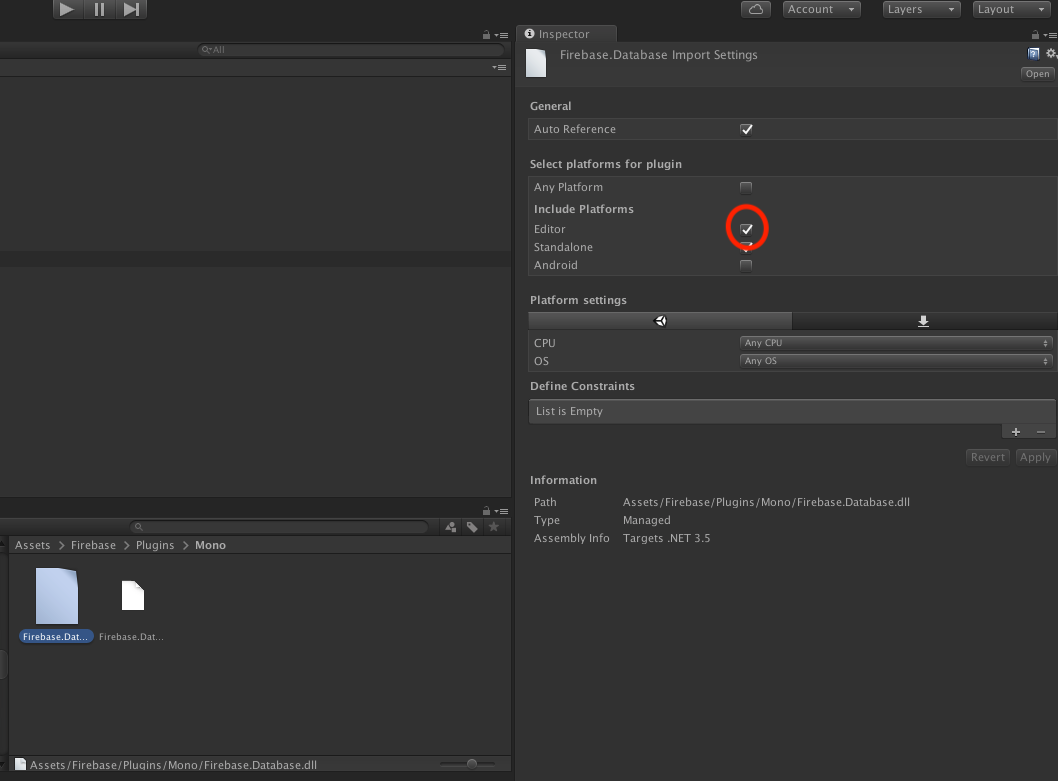
But after i tried, it didn't work for me. There's no error anymore but the API call never get any response and never get completed.
 inxidious
on 26 Jan 2019
inxidious
on 26 Jan 2019
Can someone please provide the details on how to go about implementing the suggested fix by @paulomuggler earlier in this post? To disable one firebase.database.dll and enable another. How do you actually do this?
Thanks!
BobI think it should be this one
But after i tried, it didn't work for me. There's no error anymore but the API call never get any response and never get completed.
Thanks, that worked for me.
robertlair
on 30 Jan 2019
Well, apparently it didn't work only on ".info/serverTimeOffset" and ".info/connected", i tried pulling other data and it worked!, but the weird thing is that when i go offline and tried to pull a database data, the unity editor crashed 🤣
inxidious
on 31 Jan 2019
Using:
Unity Editor 2018.3.0f2 on OSX Sierra 10.13.6
scripting Runtime 4.x
scripting backend IL2CPP
API Level 4.x
Firebase plugin version 5.4.4
All the solutions here are of no use to me.
One percent of my customers are unable to use the service because of the phenomenon.
Isn't there a better way?
 berabue
on 4 Feb 2019
berabue
on 4 Feb 2019
@paulomuggler 's workaround doesn't work for me. When I use the Plugin DLL, run my game in the Unity Editor, and call a Realtime Database GetValueAsync(), it works ok but seems to leak a thread. The second time I run my game in the Unity Editor, the Unity Editor completely crashes. I was able to repeat this behavior in a test project pulled from here: https://github.com/firebase/quickstart-unity
Putting my computer on my mobile hotspot didn't solve the Web Socket problem either. Nor did turning off every Firewall knob I could find on my AT&T U-Verse Router.
My stats:
Mac OS 10.14.2
Unity 2018.3.4f1
Scripting Runtime Version: .NET 4.x Equivalent
Scripting backend: IL2CPP
API Compatibility level: .NET Standard 2.0
Firebase version: 5.4.4
I installed the "dotnet4" assets, although the Unity Inspector shows all my dll files say "Assembly Info Targets .NET 3.5". Not sure if that matters.
Eagerly waiting an update to the Editor Database DLL.
 KWarp
on 4 Feb 2019
KWarp
on 4 Feb 2019
I get the same results as @KWarp, using the same setup (except I think I'm using Firebase 5.4.3).
It doesn't seem like the database plugin is ready for general use. I'll be switching to just using the web API and sacrificing the realtime capability.
 JustinSchneider
on 4 Feb 2019
JustinSchneider
on 4 Feb 2019
I've been having the same issue. Can't get it to work right through the editor even with switching the fixes mentioned above. It works to some extent with a hotspot but doesn't work via my router.
What's strange is that if I run on Android only connected to my WiFi it still works fine. This makes it seem like it must be the DLLs that are faulty
 Jolurawa
on 6 Feb 2019
Jolurawa
on 6 Feb 2019
This continues to be an issue for us as well, and am seeing same crashing issues in Editor that @KWarp mentions.
Workaround for us was to change our Scripting Runtime to .NET 3.5 and use the .NET 3.5 version of the Firebase 5.4.4 library under Unity 2018.3.4f1. Not ideal since that runtime has been deprecated, but at least resolves the crashes and Firebase Database connection issues mentioned in this thread.
 MiketoString
on 7 Feb 2019
MiketoString
on 7 Feb 2019
Eagerly waiting an update to the Editor Database DLL.
Same problem here and seems there is no solution until DLL updates... Any estimations?
 novavision
on 9 Feb 2019
novavision
on 9 Feb 2019
Unfortunately @MiketoString 's workaround does not work for me. I am blocked on this until there is a DLL update.
KWarp
on 16 Feb 2019
No solution still? Unfortunately now it got to me too :( I can't use Firebase because of it. Disabling DLL didn't work- it may disabled the errors but any call to the database in my script failed (caught)... I never had this issue before! (I use the latest SDK, and must use .net 4)
 shlighter
on 7 Mar 2019
shlighter
on 7 Mar 2019
No solution still? Unfortunately now it got to me too :( I can't use Firebase because of it. Disabling DLL didn't work- it may disabled the errors but any call to the database in my script failed (caught)... I never had this issue before! (I use the latest SDK, and must use .net 4)
The same. I wonder if running on my phone would be fine, but I still need to test in Unity Editor. Have you found any solution?
 AurielXue
on 12 Mar 2019
AurielXue
on 12 Mar 2019
Any news on fixing this bug? I spend a lot of time on testing not through Unity Editor, It is very uncomfortable(
 MatthewPattell
on 13 Mar 2019
MatthewPattell
on 13 Mar 2019
Ok, so the whole disable / enable dll instruction is a bit confusing. What I believe the op meant, and what worked for me just now (Unity 2018.3.10f21, Firebase Analytics Unity 5.6.0) was:
1: Rename the Firebase.Database.dll in /Assets/Firebase/Plugins/Mono/ to Firebase.Database.DISABLEDDLL (just to keep it around)
2: Copy Firebase.Database.dll in /Assets/Firebase/Plugins to /Assets/Firebase/Plugins/Mono/
Note: after this, Unity Complained about duplicate dlls when building to Android. To fix this:
- Rename Assets/Plugins/Firebase.Database.dll to Firebase.Database.DISABLEDDLL
After this, both Editor and Android (Gradle) builds work fine with the Firebase Database
Important to note: You have to do all of this in the finder/explorer. The files with file ending ".dll" in the unity project explorer ARE NOT THE REAL .dll files, but have the file ending .dll.mdb if you look in finder/explorer
Hope this can help anyone else stuck with this problem!
 Squirenetic
on 27 Mar 2019
Squirenetic
on 27 Mar 2019
Followed squirenetic's directions, but unfortunately it doesn't work for me.
KWarp
on 1 Apr 2019
we cannot read/save data to firebase database in case if system time is wrong. Even if it is in seconds. So try to change system time -> choose internet time -> and select time.windows.com.
 aslamca
on 1 Apr 2019
aslamca
on 1 Apr 2019
Ok, so the whole disable / enable dll instruction is a bit confusing. What I believe the op meant, and what worked for me just now (Unity 2018.3.10f21, Firebase Analytics Unity 5.6.0) was:
1: Rename the Firebase.Database.dll in /Assets/Firebase/Plugins/Mono/ to Firebase.Database.DISABLEDDLL (just to keep it around)
2: Copy Firebase.Database.dll in /Assets/Firebase/Plugins to /Assets/Firebase/Plugins/Mono/
Note: after this, Unity Complained about duplicate dlls when building to Android. To fix this:
- Rename Assets/Plugins/Firebase.Database.dll to Firebase.Database.DISABLEDDLL
After this, both Editor and Android (Gradle) builds work fine with the Firebase Database
Important to note: You have to do all of this in the finder/explorer. The files with file ending ".dll" in the unity project explorer ARE NOT THE REAL .dll files, but have the file ending .dll.mdb if you look in finder/explorer
Hope this can help anyone else stuck with this problem!
It works for me. Thank you!
MatthewPattell
on 6 Apr 2019
I think the key here, is that either way this is still a work around. I think everyone here is quite anxious for an actual fix from Google that will make Firebase work (the latest firebase DLL) with Unity 2018 (and now 2019). I am also quite anxious for Firestore support. This must not be that high of a priority for Google based on how long it has taken thusfar.
robertlair
on 6 Apr 2019
Ok, so the whole disable / enable dll instruction is a bit confusing. What I believe the op meant, and what worked for me just now (Unity 2018.3.10f21, Firebase Analytics Unity 5.6.0) was:
1: Rename the Firebase.Database.dll in /Assets/Firebase/Plugins/Mono/ to Firebase.Database.DISABLEDDLL (just to keep it around)
2: Copy Firebase.Database.dll in /Assets/Firebase/Plugins to /Assets/Firebase/Plugins/Mono/
Note: after this, Unity Complained about duplicate dlls when building to Android. To fix this:
- Rename Assets/Plugins/Firebase.Database.dll to Firebase.Database.DISABLEDDLL
After this, both Editor and Android (Gradle) builds work fine with the Firebase Database
Important to note: You have to do all of this in the finder/explorer. The files with file ending ".dll" in the unity project explorer ARE NOT THE REAL .dll files, but have the file ending .dll.mdb if you look in finder/explorer
Hope this can help anyone else stuck with this problem!
Found that the editor still has problems. For example:
This problem is only in the editor.
MatthewPattell
on 8 Apr 2019
I tried the quickstart example again today and I'm quite disappointed to see that this hasn't been resolved.
I think the honest thing to do is to _clearly write in the desktop workflow page that realtime database is not supported on the desktop Unity Editor until this is resolved._
We were under the impression this was going to be resolved last year but eventually switched to REST access to better support us during development.
I'd much rather be given an answer that clearly states, it's not a priority / it's not going to be resolved than to keep checking and getting disappointed again and again :(
eladleb
on 1 Jun 2019
Yes it's very disappointing. Worth noting that I only get the error on my
MBP on my home wifi, tethered to 4G it's fine, and on all Windows machines
I've used it on, it works correctly. Perhaps tweaking your network config
might help in the meantime?
On Sat, 1 Jun 2019 at 12:25, Elad Lebovitch notifications@github.com
wrote:
I tried the quickstart example again today and I'm quite disappointed to
see that this hasn't been resolved.I think the honest thing to do is to clearly write in the desktop
workflow page that realtime database is not supported on the desktop Unity
Editor until this is resolved.
We were under the impression this was going to be resolved last year but
eventually switched to REST access to better support us during development.I'd much rather be given an answer that clearly states, it's not a
priority / it's not going to be resolved than to keep checking and getting
disappointed again and again :(—
You are receiving this because you commented.
Reply to this email directly, view it on GitHub
https://github.com/firebase/quickstart-unity/issues/106?email_source=notifications&email_token=AKYSF5FQ2TOM3EZEVU5ZXGDPYJMDJA5CNFSM4DYJJB22YY3PNVWWK3TUL52HS4DFVREXG43VMVBW63LNMVXHJKTDN5WW2ZLOORPWSZGODWW6REY#issuecomment-497936531,
or mute the thread
https://github.com/notifications/unsubscribe-auth/AKYSF5HEHJ76PVP7MB2AM5LPYJMDJANCNFSM4DYJJB2Q
.>
Iestyn Lloyd
CTO
Check out our VR & AR collaboration tool, VISIONxR
http://www.futurevisual.com/visionxr™
[email protected]
www.futurevisual.com
+44 (0)7595 499100
yezzerfv
on 1 Jun 2019
@stewartmiles are there any updates on this issue? Or is it not on the roadmap anymore?
eladleb
on 20 Jun 2019
I comfirm is a error over network... please chek your router or firewell
CristianSerranoMartinez
on 20 Jun 2019
@eladleb we're working on it, at the moment we think we have one more issue to solve before we can switch to the C++ implementation.
stewartmiles
on 27 Jun 2019
SDK 6.2.0 release notes say moved to C++ SDK in editor, implying fixed. Such excitement. Downloading...
 ferretnt
on 3 Jul 2019
ferretnt
on 3 Jul 2019
With the update to the C++ implementation on the the desktop version of the SDK we expect that this should be fixed. If you still see issues please open a new bug so we can track and resolve the issue.
 alexames
on 4 Jul 2019
alexames
on 4 Jul 2019
Status is the same. Very sad. No way to get Firebase to function using .net 4 and Unity 2019 and macbook. Now the door is closing for using the famous .net 3.5 workaround, since 3.5 is no longer supported in Unity 2019.
 fingerfunkerNick
on 10 Jul 2019
fingerfunkerNick
on 10 Jul 2019
Hi @fingerfunkerNick
That's unfortunate to hear. What version of Unity are you still getting these problems on?
Can you enable verbose logging, and provide any logs concerning this, particularly around WebSockets? To enable verbose logging, you can use:
Firebase.FirebaseApp.LogLevel = Firebase.LogLevel.Verbose;
Thanks!
a-maurice
on 11 Jul 2019
The Unity version is 2019.1.9f1,
And I havre previously used some variant of 2018, with the .net version set
to 3.5. this worked. But setting project to .net 4 gave similar websocket
error message flood like now.
That is no no longer possible. I will try to get you some logs later. The
workaround hack of disabling the editor version of dll and using the
android one works for one "run" and crashes reliably on the next one.
Needless to say this is extremely annoying, particularly considering the
maturity and general impressi on of quality of your product.
TIA
Niklas
Den tors 11 juli 2019 kl 00:18 skrev a-maurice notifications@github.com:
Hi @fingerfunkerNick https://github.com/fingerfunkerNick
That's unfortunate to hear. What version of Unity are you still getting
these problems on?Can you enable verbose logging, and provide any logs concerning this,
particularly around WebSockets? To enable verbose logging, you can use:Firebase.FirebaseApp.LogLevel = Firebase.LogLevel.Verbose;
Thanks!
—
You are receiving this because you were mentioned.
Reply to this email directly, view it on GitHub
https://github.com/firebase/quickstart-unity/issues/106?email_source=notifications&email_token=AAD2OENBIOEA22XKJ4MLO5TP6ZN4PA5CNFSM4DYJJB22YY3PNVWWK3TUL52HS4DFVREXG43VMVBW63LNMVXHJKTDN5WW2ZLOORPWSZGODZU5I7A#issuecomment-510252156,
or mute the thread
https://github.com/notifications/unsubscribe-auth/AAD2OELOP4VHNRPBSHX2V4TP6ZN4PANCNFSM4DYJJB2Q
.
--
niklas wörmann
fingerfunk ab
valborgsmässovägen 11
126 37 Hägersten Sweden
+46 70 0720292
http://www.fingerfunk.se/
fingerfunkerNick
on 11 Jul 2019
For the record, the C++ implementation has been working great for me.
Unity 2018.3.f1
Mac OS High Sierra
.Net 4 SDK
KWarp
on 11 Jul 2019
Well, I have tried connecting thru my Office Wifi, and now on my tethered
Android phone, same thing.
the logs are basically:
7/16/2019 1:08:30 PM [Error] WebSocket: ws_19 - WebSocketException during
handshake
Firebase.Database.Internal.TubeSock.WebSocketException: unknown host:
bisevogamificationbeta.firebaseio.com --->
System.Net.Sockets.SocketException: No route to host
at System.Net.Sockets.Socket.Connect (System.Net.EndPoint remoteEP)
[0x000b6] in <0079a30f96a047348857e1cecc6c638a>:0
at System.Net.Sockets.TcpClient.Connect (System.Net.IPEndPoint remoteEP)
[0x00033] in <0079a30f96a047348857e1cecc6c638a>:0
at Firebase.Database.Internal.TubeSock.WebSocket.CreateSocket ()
[0x000ea] in
Z:\tmp\tmp.CfMemjIYQK\firebasedatabase\client\mono\Database\Internal\TubeSock\WebSocket.cs:323
--- End of inner exception stack trace ---
at Firebase.Database.Internal.TubeSock.WebSocket.CreateSocket ()
[0x0010c] in
Z:\tmp\tmp.CfMemjIYQK\firebasedatabase\client\mono\Database\Internal\TubeSock\WebSocket.cs:327
at Firebase.Database.Internal.TubeSock.WebSocket.RunReader () [0x0001b]
in
Z:\tmp\tmp.CfMemjIYQK\firebasedatabase\client\mono\Database\Internal\TubeSock\WebSocket.cs:386
UnityEngine.DebugLogHandler:Internal_Log(LogType, LogOption, String, Object)
UnityEngine.DebugLogHandler:LogFormat(LogType, Object, String, Object[])
UnityEngine.Logger:Log(LogType, Object)
UnityEngine.Debug:LogError(Object)
Firebase.Platform.FirebaseLogger:LogMessage(PlatformLogLevel, String) (at
Z:\tmp\tmp.4oHf4jn9P6\firebase\app\client\unity\src\Unity\FirebaseLogger.cs:19)
Firebase.Unity.UnityLoggingService:LogMessage(PlatformLogLevel, String) (at
Z:\tmp\tmp.4oHf4jn9P6\firebase\app\client\unity\src\Unity\UnityLoggingService.cs:13)
Firebase.Database.Internal.Logging.DefaultLogger:Error(String, String) (at
Z:\tmp\tmp.CfMemjIYQK\firebasedatabase\client\mono\Database\Internal\Logging\DefaultLogger.cs:68)
Firebase.Database.Internal.Logging.DefaultLogger:OnLogMessage(Level,
String, String, Int64) (at
Z:\tmp\tmp.CfMemjIYQK\firebasedatabase\client\mono\Database\Internal\Logging\DefaultLogger.cs:32)
Firebase.Database.Internal.Logging.LogWrapper:Error(String, Exception) (at
Z:\tmp\tmp.CfMemjIYQK\firebasedatabase\client\mono\Database\Internal\Logging\LogWrapper.cs:36)
Firebase.Database.Internal.TubeSock.WebSocket:LogError(String, Exception)
(at
Z:\tmp\tmp.CfMemjIYQK\firebasedatabase\client\mono\Database\Internal\TubeSock\WebSocket.cs:143)
Firebase.Database.Internal.TubeSock.WebSocket:RunReader() (at
Z:\tmp\tmp.CfMemjIYQK\firebasedatabase\client\mono\Database\Internal\TubeSock\WebSocket.cs:468)
Firebase.Database.Internal.TubeSock.Runnable101:Run() (at
Z:\tmp\tmp.CfMemjIYQK\firebasedatabase\client\mono\Database\Internal\TubeSock\WebSocket.cs:516)
Google.Sharpen.Thread:InternalRun() (at
Z:\tmp\tmp.E3dmJ1Obf7\third_party\dotnet_src\sharpen\Sharpen\Thread.cs:80)
System.Threading.ThreadHelper:ThreadStart_Context(Object)
System.Threading.ExecutionContext:RunInternal(ExecutionContext,
ContextCallback, Object, Boolean)
System.Threading.ExecutionContext:Run(ExecutionContext, ContextCallback,
Object, Boolean)
System.Threading.ExecutionContext:Run(ExecutionContext, ContextCallback,
Object)
System.Threading.ThreadHelper:ThreadStart()
repeat ad nauseam ;(
Sorry about the very unspecific bug report
Dont really know what else to do here. The project is huge, and I honestly
dont have time to create a barebones testing project. Maybe in a couple of
weeks....
Thanks anyway
//niklas
Den tors 11 juli 2019 kl 21:12 skrev greglieb notifications@github.com:
For the record, the C++ implementation has been working great for me.
Unity 2018.3.f1
Mac OS High Sierra
.Net 4 SDK—
You are receiving this because you were mentioned.
Reply to this email directly, view it on GitHub
https://github.com/firebase/quickstart-unity/issues/106?email_source=notifications&email_token=AAD2OEPJX47QFZBGD3LYT2DP66A2RA5CNFSM4DYJJB22YY3PNVWWK3TUL52HS4DFVREXG43VMVBW63LNMVXHJKTDN5WW2ZLOORPWSZGODZXWJNY#issuecomment-510616759,
or mute the thread
https://github.com/notifications/unsubscribe-auth/AAD2OEMY5BWOT5MEMDRG5BTP66A2RANCNFSM4DYJJB2Q
.
--
niklas wörmann
fingerfunk ab
valborgsmässovägen 11
126 37 Hägersten Sweden
+46 70 0720292
http://www.fingerfunk.se/
fingerfunkerNick
on 16 Jul 2019

Solution is to tick and untick two Firebase.Database file setting file as picture
 warren30815
on 20 Jul 2019
warren30815
on 20 Jul 2019
This work on Unity Editor and Android device well
I haven't tested on iOS, but I think it will also make sense
Environment:
.Net 4 SDK
Unity 2018.2f1
Mac
warren30815
on 20 Jul 2019
Appears to be working for me as well! Removed the previous REST code At last!
Thanks a lot @stewartmiles 👍
eladleb
on 21 Jul 2019
Related issues
 GeorgeFedoseev
·
3Comments
GeorgeFedoseev
·
3Comments
 SeanLangre
·
3Comments
SeanLangre
·
3Comments
 Vah94
·
6Comments
Vah94
·
6Comments
 andr-construction
·
4Comments
andr-construction
·
4Comments
 Ankit-Jegames
·
3Comments
Ankit-Jegames
·
3Comments
Most helpful comment
Using:
Unity Editor 2018.2.5f1 on OSX Sierra 10.12.6
scripting Runtime 4.x
scripting backend IL2CPP
API Level 4.x
Firebase plugin version 5.2.1
I was having the exact same problem.
Managed to workaround this issue by disabling the FirebaseDatabase.dll under Firebase/Plugins/Mono for the editor platform, and enabling the one FirebaseDatabase.dll under Firebase/Plugins/ instead.