Quickstart-ios: Stack overflow in fira_viewDidAppear:
Hi guys!
Something went wrong while I'm trying to attach Firebase framework to my project.
Thanks

 ostapkuzyk
All 46 comments
This is a stack overflow in one of our private class extensions.
Can you describe what steps you took that led to this issue?
@baolocdo FYI
 morganchen12
on 6 Mar 2017
morganchen12
on 6 Mar 2017
Hi!
Well actually nothing special. We just installed your pod and at app startup it stuck on viewDidAppear method.
Maybe the root of this cause is that we're swipe/change our rootViewController few times at the very beginning?
ostapkuzyk
on 6 Mar 2017
Thanks for reporting. Would you mind sharing the SDK version, stack trace and some debug log when you turn on debug mode using the argument -FIRAnalyticsDebugEnabled?
 baolocdo
on 6 Mar 2017
baolocdo
on 6 Mar 2017
We're using the following frameworks
Firebase (3.14.0)
FirebaseAnalytics (3.7.0)
FirebaseCore (3.5.1)
FirebaseInstanceID (1.0.9)
GoogleToolboxForMac (2.1.1)
And here is the crashlog:
And more details:
ostapkuzyk
on 6 Mar 2017
Can you provide symbolicated crash logs?
morganchen12
on 7 Mar 2017
hi
please see attached. If that not what you're expecting just let me know.
ostapkuzyk
on 7 Mar 2017
Thanks for the info. In the mean time, can you try setting this flag FirebaseScreenReportingEnabled to NO in the Info.plist to turn off auto screen reporting? Please let us know if the problem still persists.
Firebase automatic screen reporting is enabled. Call +[FIRAnalytics setScreenName:setScreenClass:] to set the screen name or override the default screen class name. To disable automatic screen reporting, set the flag FirebaseAutomaticScreenReportingEnabled to NO in the Info.plist
baolocdo
on 7 Mar 2017
ostapkuzyk@: Would you mind providing a sample app which has this bug? It will greatly help the engineers to debug the issue. Thank you in advance!
baolocdo
on 7 Mar 2017
hi @baolocdo !
FirebaseScreenReportingEnabled = NO did the trick. And I'm still trying to do some test case which can reproduce the issue.
Thanks
ostapkuzyk
on 9 Mar 2017
Hi guys!
Seems the option to set FirebaseScreenReportingEnabled = NO not working, it still crashing.
Please see below the stack trace:
Crashed: com.apple.main-thread
0 XXXX 0x1004dddb8 -[UIViewController(FIRAScreenClassName) fira_viewDidAppear:] + 885252
1 XXXX 0x1004ddde8 -[UIViewController(FIRAScreenClassName) fira_viewDidAppear:] + 885300
2 XXXX 0x1004ddde8 -[UIViewController(FIRAScreenClassName) fira_viewDidAppear:] + 885300
3 XXXX 0x1004ddde8 -[UIViewController(FIRAScreenClassName) fira_viewDidAppear:] + 885300
4 XXXX 0x1004ddde8 -[UIViewController(FIRAScreenClassName) fira_viewDidAppear:] + 885300
5 XXXX 0x1004ddde8 -[UIViewController(FIRAScreenClassName) fira_viewDidAppear:] + 885300
6 XXXX 0x1004ddde8 -[UIViewController(FIRAScreenClassName) fira_viewDidAppear:] + 885300
7 XXXX 0x1004ddde8 -[UIViewController(FIRAScreenClassName) fira_viewDidAppear:] + 885300
8 XXXX 0x1004ddde8 -[UIViewController(FIRAScreenClassName) fira_viewDidAppear:] + 885300
9 XXXX 0x1004ddde8 -[UIViewController(FIRAScreenClassName) fira_viewDidAppear:] + 885300
10 XXXX 0x1004ddde8 -[UIViewController(FIRAScreenClassName) fira_viewDidAppear:] + 885300
11 XX 0x1041343a4 _TFC7XX26LaunchScreenViewController13viewDidAppearfSbT_ + 100
12 XX 0x10413467c _TToFC7XX26LaunchScreenViewController13viewDidAppearfSbT_ + 44
13 UIKit 0x191d22834 -[UIViewController _setViewAppearState:isAnimating:] + 848
14 UIKit 0x191d90070 __64-[UIViewController viewDidMoveToWindow:shouldAppearOrDisappear:]_block_invoke + 44
15 UIKit 0x191d9000c -[UIViewController _executeAfterAppearanceBlock] + 92
16 UIKit 0x191f9c0e4 _runAfterCACommitDeferredBlocks + 556
17 UIKit 0x191f8dd50 _cleanUpAfterCAFlushAndRunDeferredBlocks + 560
18 UIKit 0x191fa709c __84-[UIApplication _handleApplicationActivationWithScene:transitionContext:completion:]_block_invoke_2 + 188
19 CoreFoundation 0x18be02a44 __CFRUNLOOP_IS_CALLING_OUT_TO_A_BLOCK__ + 20
20 CoreFoundation 0x18be02240 __CFRunLoopDoBlocks + 288
21 CoreFoundation 0x18be00094 __CFRunLoopRun + 788
22 CoreFoundation 0x18bd2e2b8 CFRunLoopRunSpecific + 444
23 GraphicsServices 0x18d7e2198 GSEventRunModal + 180
24 UIKit 0x191d757fc -[UIApplication _run] + 684
25 UIKit 0x191d70534 UIApplicationMain + 208
26 XXXX 0x100174390 main (AppDelegate.swift:31)
27 libdispatch.dylib 0x18ad115b8 (Missing)
Thanks
ostapkuzyk
on 16 Mar 2017
Hello all,
Gents, are there any plans for updates to be released soon?
Unfortunately I can't reproduce this issue on my test app.
Thanks
ostapkuzyk
on 20 Mar 2017
We are looking into this. I'm not sure how long it will take since we can't reproduce this scenario and it will be hard to know what is really the issue. Sometimes developers reported that the bugs were caused by some other SDKs or some categories of the NSObjects, UIView, etc.
baolocdo
on 1 Apr 2017
Same issue for me, i am inhering from default appdelegate, and then initialize firebase. FirebaseScreenReportingEnabled Fixed issue for me.
 m1entus
on 4 Apr 2017
m1entus
on 4 Apr 2017
m1entus@: is it consistent in your app? Is it reproducible in this sample app at all? Also, it would be great to know the SDK versions and XCode versions that you have the problem with. Thanks!
baolocdo
on 4 Apr 2017
I thought that this is newest version, but i pulled quite old version 3.7.4? And had the same issue. In my app is all the time without Info.plist flag.
m1entus
on 4 Apr 2017
Do you know what UIViewController that you have the problem with? How complex is the view (multiple views, keyboard view)? Thanks!
baolocdo
on 5 Apr 2017
My root view controller have a uiview, which works as a container for child view controller.
rootViewController (UIViewController) -> UIView -> childViewController (UINavigationController) -> topViewController .
And if this help, my rootViewController is in Framework, because i see some calls from you for NSBundle mainBundle, but i suppose there is infinity loop in fira_topViewController, are you checking childViewControllers there ?
m1entus
on 6 Apr 2017
Thanks for the info, @m1entus . I'll check with the engineer.
baolocdo
on 6 Apr 2017
@baolocdo any movement on this issue?
 MikeDeasyBB
on 25 Apr 2017
MikeDeasyBB
on 25 Apr 2017
@baolocdo I'm also running into this issue. Here are my version specs
- Firebase/Core (3.9.0):
- FirebaseAnalytics (= 3.5.1)
- FirebaseCore (= 3.4.4)
- FirebaseAnalytics (3.5.1):
- FirebaseCore (~> 3.4)
- FirebaseInstanceID (~> 1.0)
- GoogleInterchangeUtilities (~> 1.2)
- GoogleSymbolUtilities (~> 1.1)
- GoogleToolboxForMac/NSData+zlib (~> 2.1)
- FirebaseCore (3.4.4):
- GoogleInterchangeUtilities (~> 1.2)
- GoogleToolboxForMac/NSData+zlib (~> 2.1)
- FirebaseInstanceID (1.0.8)
MikeDeasyBB
on 25 Apr 2017
@MikeDeasyBB : Can you try updating to the latest pod (FirebaseAnalytics 3.9.0) and let us know if you still have the same issue?
baolocdo
on 25 Apr 2017
@baolocdo just tried updating, still have the issue
Current lockfile
- Firebase/Core (3.17.0):
- FirebaseAnalytics (= 3.9.0)
- FirebaseCore (= 3.6.0)
- FirebaseAnalytics (3.9.0):
- FirebaseCore (~> 3.6)
- FirebaseInstanceID (~> 1.0)
- GoogleToolboxForMac/NSData+zlib (~> 2.1)
- FirebaseCore (3.6.0):
- GoogleToolboxForMac/NSData+zlib (~> 2.1)
- FirebaseInstanceID (1.0.10):
- FirebaseCore (~> 3.6)
MikeDeasyBB
on 25 Apr 2017
@baolocdo I am able to reproduce this issue on every launch. Please find the sample project which crashes after going to an infinite loop on launch.
I am just using Google Login. Firebase is not used anywhere.
Please let me know if you need further information.
 VinayakKkini
on 26 Apr 2017
VinayakKkini
on 26 Apr 2017
@VinayakKkini : awesome! That will be really helpful the engineers. Thanks for the sample project.
baolocdo
on 26 Apr 2017
From the engineer: "The provided sample project has a lot of warnings (e.g. "Class ... is implemented in both"), which indicates that Firebase is being linked in twice (from GoogleLoginTest and CloudAccess). Deleting all entries related to Firebase from 'Other Linker Flags' of GoogleLoginTest, which may include $(inherited), should fix the issue."
baolocdo
on 27 Apr 2017
@baolocdo Please then make real framework of Firebase and not static library, because we have dependencies from cocoapods and not able to fix it easly ...
m1entus
on 30 Apr 2017
@baolocdo The cause for this problem is, firebase is not a dynamic framework but a static library. So when we add this pod to more than one target it gets copied multiple times rather than getting referenced from a single copy. Also, as suggested by the developer, its not easy remove “ entries in 'Other Linker Flags' and $(inherited)” as lot of these flags get set by the cocoa pods and may have dependencies to other frameworks.
The only way you can solve this is by using dynamic frameworks.
VinayakKkini
on 1 May 2017
You should be able to avoid duplicate Firebase symbols pretty easily if you're just using Firebase as a top-level dependency through CocoaPods. Avoid nesting Firebase in a dynamic library dependency.
What do your dependency graphs look like?
morganchen12
on 1 May 2017
@morganchen12 This is mine:
abstract_target 'ClubAppCommon' do
    pod 'Alamofire', '~> 4.0.1  '
    pod 'SDWebImage', '~> 4.0.0-beta2'
    pod 'FormatterKit', '~> 1.8.1'
    pod 'XCDYouTubeKit', '~> 2.5.3'

    target "ClubAppCoreProduct" do
        pod 'Fabric'
        pod 'Crashlytics'
        pod 'TwitterKit'
        pod 'Firebase'
        pod 'Firebase/Messaging'
    end

    target "ClubAppDemo" do
    end

    target "GornikLeczna" do
    end

    target "MKS Puszcza" do
    end
end
target like GornikLeczna links ClubAppCoreProduct which is framework
m1entus
on 1 May 2017
Either move Firebase to the top level of your dependency graph or make ClubAppCoreProduct a static library.
I'm going to close this issue, but feel free to keep posting situations in which you'd like to use Firebase as a dependency of a dependency--moving towards dynamic frameworks is something we're constantly evaluating and would like to support, and knowing how many people it'd affect will help us prioritize that.
morganchen12
on 1 May 2017
i also have this issue in my project. my firebse sdk version is 4.0.2, xcode version is 8.3.3. and i use cocoapod to install firebase sdk. here is the screenshot from fabric.
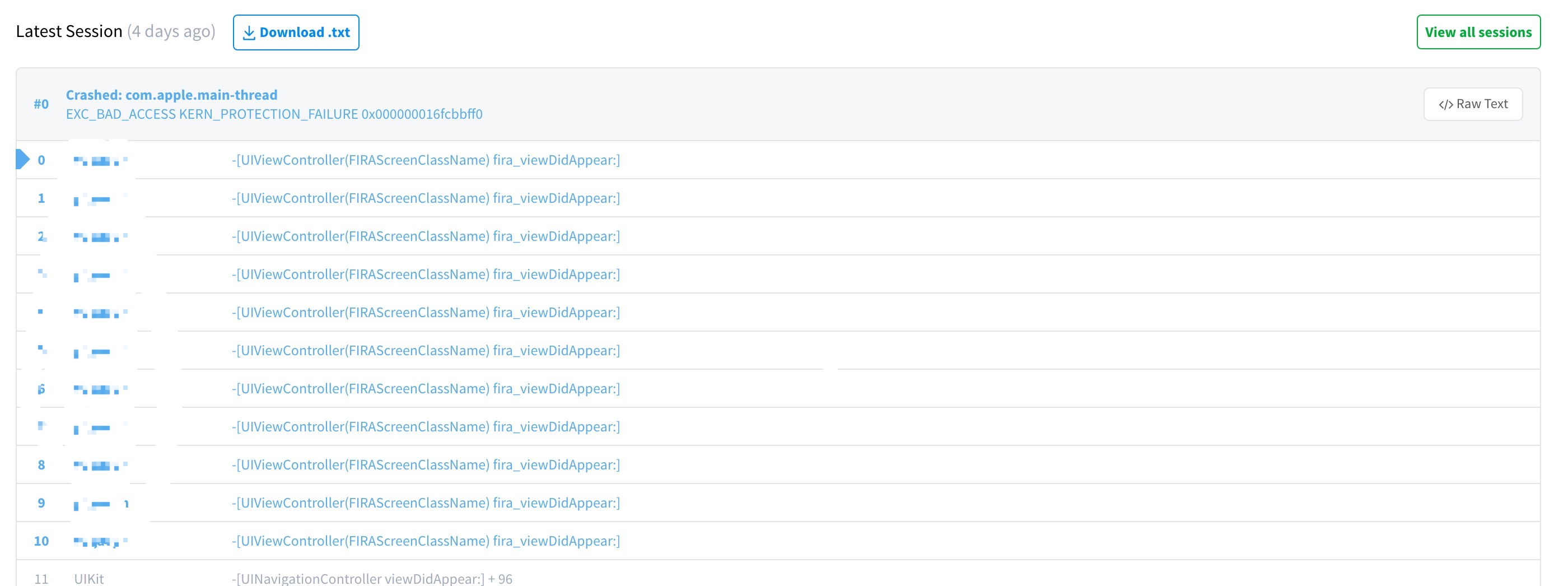
 WiiliamChik
on 30 Jun 2017
WiiliamChik
on 30 Jun 2017
@WiiliamChik 請確認您 console 裡沒有上面提過的警示。
Class [...] is implemented in both [...] and [...]. One of the two will be used. Which one is undefined.
如果 console 沒有這種警示,卻 app 還会崩溃,請分享您 Podfile 的內容。
morganchen12
on 30 Jun 2017
@morganchen12 please move firebase to a dynamic library, the amount of bugs/workarounds just to keep it working properly as a static library make the continued use of Firebase less and less attractive
 jlaws
on 16 Jul 2017
jlaws
on 16 Jul 2017
@salqadri FYI
morganchen12
on 17 Jul 2017
@morganchen12 our main issue with Firebase as a static library is that all of our extensions and main app need to include the code. With 8 extensions this significantly increases our binary size. We minimized our code that touches Firebase so only a few of our classes are duplicated across each extension and the main App. Firebase is not a small target, especially when including the same code 9 times. Moving it to a dynamic framework would allow us to restructure our shared code, and significantly decrease our bundle size which is nearly at 100MB.
jlaws
on 17 Jul 2017
Getting the same error while using cocoapods, a dynamic library would be really helpful.
 tbaranes
on 22 Nov 2017
tbaranes
on 22 Nov 2017
What I noticed is if the pod is added to a framework project/target then the crash happens.
 qalandarov
on 6 Dec 2017
qalandarov
on 6 Dec 2017
@qalandarov I'm having the same problem. Any way to get around this? The app I'm working on is split into several layers using Frameworks. Firebase is needed for our remote layer.
 ascendedco
on 3 Jan 2018
ascendedco
on 3 Jan 2018
Setting FirebaseScreenReportingEnabled stopped the app from crashing but now, events are not being sent and still getting all those warnings for classes defined in two places
 jesus-rod
on 23 Jan 2018
jesus-rod
on 23 Jan 2018
If you're using CocoaPods, CocoaPods 1.4.0 and higher now specifies a static_framework rule, meaning you can avoid duplicating Firebase symbols in your project by making your dependency tree static.
morganchen12
on 23 Jan 2018
@morganchen12
I am developing a Swift framework (dynamic). The company distributes it as a binary (no source). Our framework needs to use Firebase and the integrating app may use it as well.
I guess none of the solutions suggested above can work. Right ?
 davibe
on 28 Mar 2018
davibe
on 28 Mar 2018
@davibe you'll have to wait for a dynamic Firebase release.
Alternatively, if you're depending on one of the open source components, you can take the source and package it yourself in a way that doesn't cause collisions, but this is a ton of work and has its own downsides.
morganchen12
on 28 Mar 2018
Having the same issue as everyone above. We need Firebase to be included in both the app and in a Swift Framework utilized by the app. If we can't find a way around this we'll have to wipe Firebase completely from our platform. 😢
 c0rnonthec0bb
on 22 Jun 2018
c0rnonthec0bb
on 22 Jun 2018
In addition to the static_framework option mentioned above, CocoaPods 1.5.0 added Swift static libraries.. Both of these can be helpful for adding Firebase to multiple targets.
 paulb777
on 22 Jun 2018
paulb777
on 22 Jun 2018
Setting FirebaseScreenReportingEnabled to false, basically disables ALL screen tracking, and not only the automatic. So this means, if you try to call setScreenName(_ screenName: String?, screenClass screenClassOverride: String?) it will return in not being sent - so all manual screen opens will fail too.. This is not sustainable - we need to be able to turn off automatic screen tracking ONLY. Any news on this?? :-)
 nharbo
on 13 May 2020
nharbo
on 13 May 2020
I have integrated Firebase into a highly modular project build with dynamic frameworks.
Here is what you have to do:
1) In your Podfile add Firebase to the dynamic framework.
2) Link dynamic libraries that Firebase depends on to the framework and to your app target so that those dylibs get copied into the target.
e.g In my case I added GoogleToolbox, Protobuf and nanopb to the framework where firebase was and to the AppTarget. I took the exact library versions out of the Podfile.lock when I had only the Firebase linked.
3) Expose Firebase static library via Umbrella file of your dynamic framework so that you can link the firebase on every level you link your dynamic framework to.
e.g in MyFramework.h I added on the bottom this line:
import "FirebaseRemoteConfig/FirebaseRemoteConfig.h"
That allowed me to import Firebase everywhere I linked MyFramework
e.g
import MyFramework
import Firebase
No need to say, that the framework must be compiled before the import will start working.
With this approach, I am able to use Firebase from a dynamic library that is on the 2nd level of our hierarchy. I hope it helps someone.
 CyrilCermak
on 30 Sep 2020
CyrilCermak
on 30 Sep 2020
Related issues
 mrithula-quintet
·
7Comments
mrithula-quintet
·
7Comments
 davecoffin
·
3Comments
davecoffin
·
3Comments
 kamrankhan07
·
7Comments
kamrankhan07
·
7Comments
 Kangqj
·
3Comments
Kangqj
·
3Comments
 abdulKarim002
·
6Comments
abdulKarim002
·
6Comments
Most helpful comment
@morganchen12 please move firebase to a dynamic library, the amount of bugs/workarounds just to keep it working properly as a static library make the continued use of Firebase less and less attractive