Quickstart-android: Crash not working for kotlin version
I just clone and run the sample app. Tested the crash:app in the emulator.
When the UI for crash sample is running, there is 2 options: Java and Kotlin. Using Java, when i click the button, i can see in firebase console that crash is detected.
However, when i attempted to do on Kotlin, it is not. I try with different firebase project (different json) to verify again. The result is the same. Java works, Kotlin doesn't.
Any suggestions? Thanks.
 4tee
4tee
All 6 comments
This issue does not seem to follow the issue template. Make sure you provide all the required information.
 google-oss-bot
on 30 Oct 2020
google-oss-bot
on 30 Oct 2020
@4tee Can you tell us whether you checked the "Catch Crash" CheckBox or not? Just so we can we can reproduce your issue accurately.
 rosariopfernandes
on 30 Oct 2020
rosariopfernandes
on 30 Oct 2020
@rosariopfernandes ... I unchecked it to make them crashed.
4tee
on 31 Oct 2020
@4tee I tried to reproduce your issue with no success. Both the Java and Kotlin apps are working for me.
Here's what it looks like in the Crashlytics Console:

Notice that it says "4 events". Some of them are from the Java app, others from the Kotlin app. They've been grouped together because it's the same type of crash being thrown from the same class (View.OnClickListener).
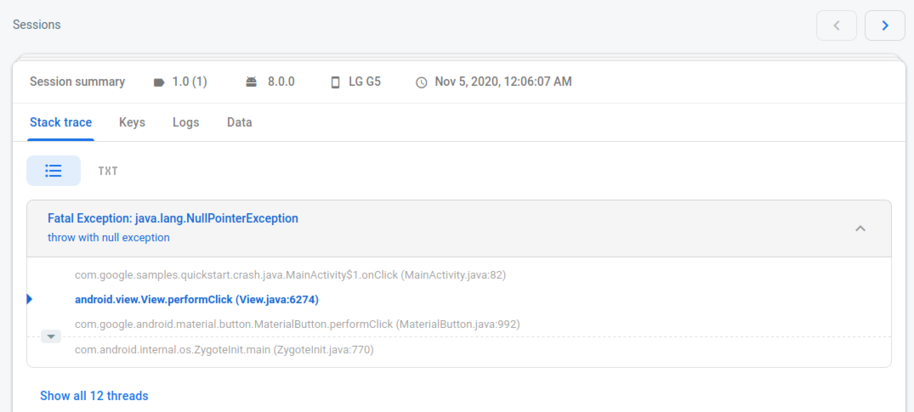
If you'd like to go through each of the 4 grouped events, click on the issue and then you'll see the page bellow. Navigate through the events by clicking on the > button shown on the top right corner of this image:
rosariopfernandes
on 4 Nov 2020
@rosariopfernandes ... thanks a lot for following up. Yes, today, i try to run again and it works in both Java and Kotlin now. 😕
Anyway, I will close this thread. Thanks a lot once again.
4tee
on 5 Nov 2020
@rosariopfernandes thanks for looking into this!
 samtstern
on 5 Nov 2020
samtstern
on 5 Nov 2020
Related issues
 UttamPanchasara
·
4Comments
UttamPanchasara
·
4Comments
 naveenkumarn27
·
4Comments
naveenkumarn27
·
4Comments
 the-dagger
·
4Comments
the-dagger
·
4Comments
 rahuldevanavar91
·
5Comments
rahuldevanavar91
·
5Comments
 wellbranding
·
3Comments
wellbranding
·
3Comments