Quasar: "quasar dev -m capacitor -T android" not launching Android Studio
Describe the bug
When I attempt to run the command "quasar dev -m capacitor -T android" on windows, it opens the windows explorer folder for the path to the gradle file instead of launching Android Studio.
Codepen/jsFiddle/Codesandbox (required)
Idk how to fork a codepen for this?
To Reproduce
1) Fresh install Android Studio.
2) Add Android Studio SDK /tools and /platform-tools to PATH.
3) Restart to make sure PATH is refreshed.
4) Open terminal and go to project directory.
5) Run the command "quasar dev -m capacitor -T android"
Expected behavior
I expected it to open Android Studio so I could build an APK. Instead, it just opens the src-capacitor\android folder in Windows Explorer.
Screenshots
If applicable, add screenshots to help explain your problem.
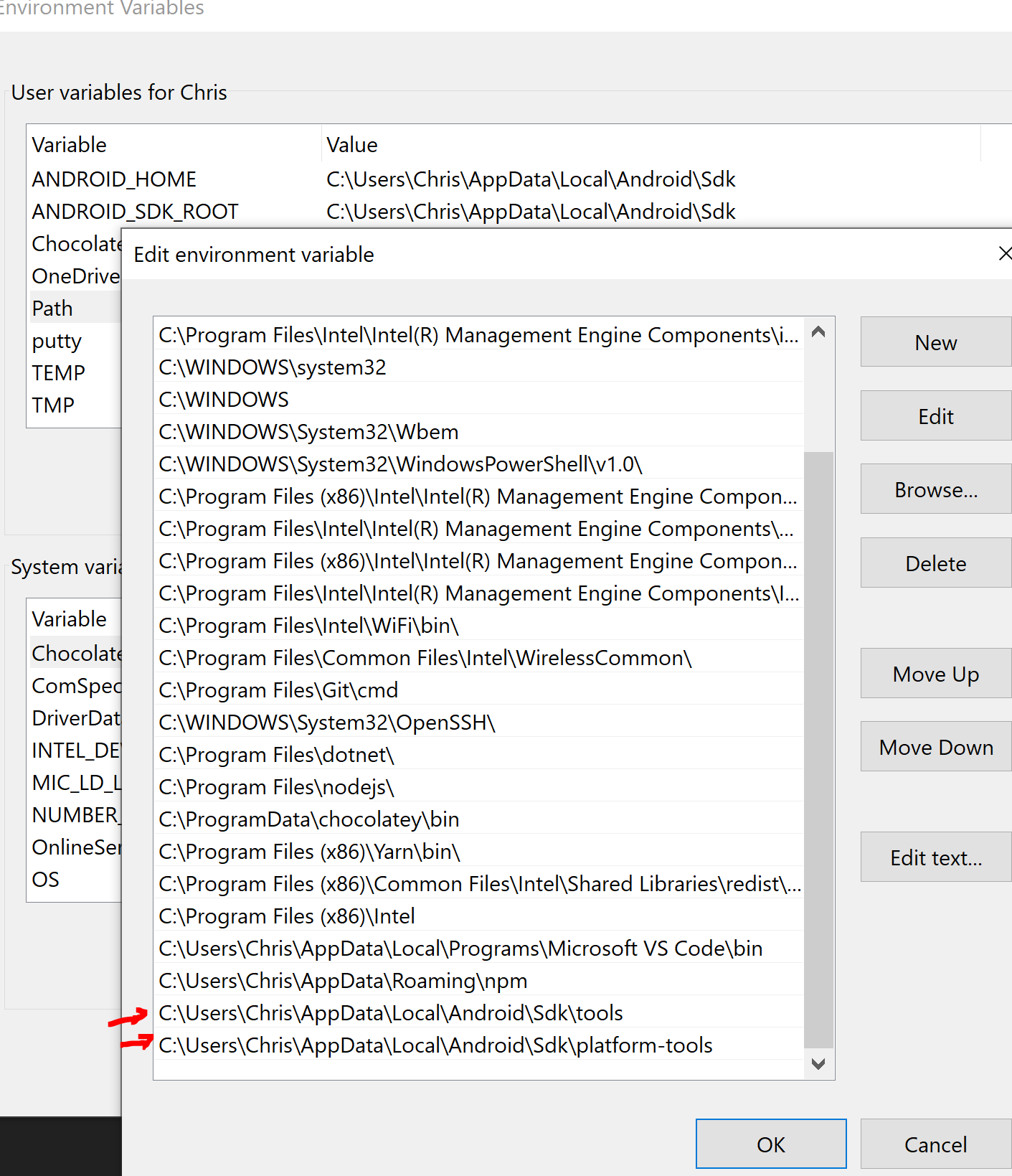
Platform (please complete the following information):
OS: Windows 10
Node: 12.18.3
NPM: 6.14.6
Yarn: 1.22.0
Here's the output in the terminal:
Dev mode.......... capacitor
Pkg quasar........ v1.12.8
Pkg @quasar/app... v2.0.8
Debugging......... enabled
Running mode...... IDE (manual)
Configured browser support (at least 86.16% of global marketshare):
· Chrome for Android >= 84
· Firefox for Android >= 68
· Android >= 81
· Chrome >= 75
· Edge >= 80
· Firefox >= 71
· iOS >= 10.0-10.2
· Opera >= 65
· Safari >= 10.1
App · Reading quasar.conf.js
App · ⚠️ Detected external IP 192.168.1.74 and using it
App · Checking listening address availability (192.168.1.74:8080)...
App · Transpiling JS (Babel active)
App · Extending Capacitor Webpack config
App · Generating Webpack entry point
App · Booting up...
• Compiling:
└── Capacitor ████████████████████ 100% done in 10078 ms
DONE Compiled successfully in 10085ms 7:54:28 AM
i 「wds」: Project is running at http://192.168.1.74:8080/
i 「wds」: webpack output is served from
App · Updated src-capacitor/package.json
App · Updated capacitor.config.json
App · Running "C:\code\fleet-service\src-capacitor\node_modules\@capacitor\cli\bin\capacitor sync android"
√ Copying web assets from www to android\app\src\main\assets\public in 10.11ms
√ Copying native bridge in 1.95ms
√ Copying capacitor.config.json in 3.46ms
√ copy in 36.70ms
√ Updating Android plugins in 1.43ms
Found 0 Capacitor plugins for android:
[warn] Your @capacitor/core version doesn't match your @capacitor/android version
Consider updating to matching version npm install @capacitor/[email protected]
√ update android in 27.76ms
Sync finished in 0.088s
App · Updated capacitor.config.json
App · ⚠️ IMPORTANT! Could not find MainActivity.java file and therefore cannot enable devServer: https support.
⚠️
⚠️ Opening Android Studio IDE...
⚠️ From there, use the IDE to run the app.
⚠️
⚠️ DO NOT close the terminal as this will kill the devserver.
⚠️
⚠️ DO NOT upgrade Gradle or any other deps as Android Studio will suggest.
⚠️ If you encounter any IDE errors then click on File > Invalidate caches and restart.
⚠️
 FascistDonut
All 12 comments
Someone else is having the same problem on a linux box:
FascistDonut
on 28 Aug 2020
Just to add, tried on my old app quasar1.12.2 @quasar/app - 1.9.3 and it opens the IDE just fine, on quasar v1.13.1 @quasar/app v2.0.8, it opens the src-capacitor\android folder instead in an explorer.
 metalsadman
on 28 Aug 2020
metalsadman
on 28 Aug 2020
Same happening here. MacOS
 thugic
on 29 Aug 2020
thugic
on 29 Aug 2020
Having same problem, opens android folder not android studio. MacOS
 seanaye
on 30 Aug 2020
seanaye
on 30 Aug 2020
Traced this down to open. v7.1.0 works fine, 7.2.0 fails. Add this to your package.json to fix (requires yarn):
"resolutions": {
     "open": "7.1.0"
}
@rstoenescu probably want to lock to version 7.1.0 in @quasar/app. Also, someone should open an issue on the open repo.
 nklayman
on 30 Aug 2020
nklayman
on 30 Aug 2020
Traced this down to open. v7.1.0 works fine, 7.2.0 fails. Add this to your
package.jsonto fix (requires yarn):"resolutions": { "open": "7.1.0" }@rstoenescu probably want to lock to version 7.1.0 in @quasar/app. Also, someone should open an issue on the
openrepo.
Having same problem here on Windows and this solution works for me. Thanks! 😄
 SignorMercurio
on 1 Sep 2020
SignorMercurio
on 1 Sep 2020
Pushed a commit to revert to the "open" v7.1.0 --- will be available in "@quasar/app" v2.0.9.
Thanks for investigating @nklayman !
 rstoenescu
on 1 Sep 2020
rstoenescu
on 1 Sep 2020
Just dropped in to say that this solved my issue, thanks!
 ryanhollander
on 3 Sep 2020
ryanhollander
on 3 Sep 2020
Updating did make it so that the Android IDE opens now... however, when it opens there is an error message that says "Project Sync: The project 'android' is not a Gradle-based project".
I have tried invalidating cache and restarting per the documentation, but that doesn't seem to change anything.
FascistDonut
on 8 Sep 2020
@FascistDonut can you try on a new project and see if you get the same error?
nklayman
on 9 Sep 2020
Good idea!
It does seem to work with a new test project, so there must just be something wrong with that specific project.
FascistDonut
on 9 Sep 2020
I deleted the gradle files and android folder from the project with the problem and then re-ran the build command and everything appears to be working normally now. Thanks for your help.
FascistDonut
on 10 Sep 2020
Related issues
 mesqueeb
·
3Comments
mesqueeb
·
3Comments
 tombarfoot
·
3Comments
tombarfoot
·
3Comments
 jippy89
·
3Comments
jippy89
·
3Comments
 jean-moldovan
·
3Comments
jean-moldovan
·
3Comments
 sskwrl
·
3Comments
sskwrl
·
3Comments
Most helpful comment
Traced this down to open. v7.1.0 works fine, 7.2.0 fails. Add this to your
package.jsonto fix (requires yarn):@rstoenescu probably want to lock to version 7.1.0 in @quasar/app. Also, someone should open an issue on the
openrepo.