Quasar: QVirtualScroll breaks td rendering when using table-layout fixed
Describe the bug
When setting table-layout: fixed on the table (QMarkupTable or even a plain <table>) in QVirtualScroll, the rendering of the column is broken. See the following jsFiddles
Codepen/jsFiddle/Codesandbox (required)
Broken: https://jsfiddle.net/f1ewgn4y/2/
Working: https://jsfiddle.net/f1ewgn4y/3/
To Reproduce
Steps to reproduce the behavior:
- Set
table-layout: fixedin the QVirtualScroll table. - See error
Expected behavior
table-layout: fixed shouldn't break rendering.
Screenshots
Working

Broken
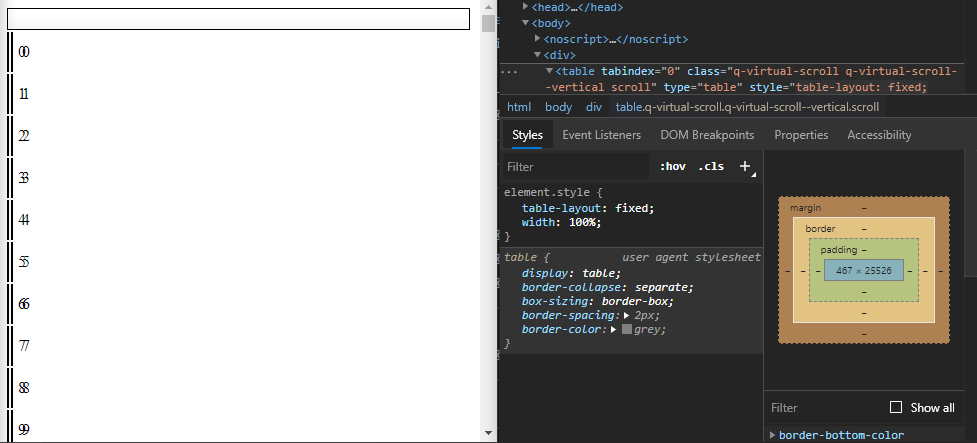
Platform (please complete the following information):
OS: Ubuntu 2004
Node: v10.19.0
Yarn: 1.22.4
Browsers: Chromium
Additional context
table-layout: fixed worked in an earlier version of QVirtualScroll. I think back then it wasn't its own component but included in QTable.
Edit
The culprits are the <td>s within the before and after tbodies. Removing them or setting their colspan equal to the actual amount of columns fixes this issue.
I.e. passing the column count to the QVirtualScroll component and referencing them in the mixin here: https://github.com/quasarframework/quasar/blob/dev/ui/src/mixins/virtual-scroll.js#L437
Changing this line to attrs: { colspan: this.columnCount } works.
Please also see this StackOverflow answer: https://stackoverflow.com/a/5028091/2680408
 johannes-z
All 4 comments
Can you make a PR for this? Looks like it's a good solution.
 pdanpdan
on 27 Jul 2020
pdanpdan
on 27 Jul 2020
@pdanpdan I created a PR where I added the columnCount prop.
Are the <td> elements needed in the before and after bodies? Removing them altogether seems to work as well...
johannes-z
on 27 Jul 2020
you'll lose the background when scrolling and there is no place to put the height
pdanpdan
on 27 Jul 2020
New prop ("table-colspan") will be available in Quasar v1.13.0
 rstoenescu
on 29 Jul 2020
rstoenescu
on 29 Jul 2020
Related issues
 mesqueeb
·
3Comments
mesqueeb
·
3Comments
 florensiuslaylim
·
3Comments
florensiuslaylim
·
3Comments
 Bangood
·
3Comments
Bangood
·
3Comments
 nueko
·
3Comments
nueko
·
3Comments
 xereda
·
3Comments
xereda
·
3Comments